An XML sitemap is a file that lists the URLs you want search engines to find, optionally with the date each page last changed. It usually sits at the root of your domain (/sitemap.xml), and you announce it in robots.txt and in Google Search Console. It is a hint, not a command: Google says a sitemap helps it discover URLs but doesn't guarantee they will be crawled or indexed. Below: the format, shown on the real sitemap of our four-language site, what Google ignores, where WordPress and Yoast put theirs, and the mistakes to avoid.
What an XML sitemap is, and what it isn't
A sitemap tells search engines which pages you consider important and adds a few facts about each one: when it last changed and, if you like, which language versions exist. Search engines still decide for themselves what to crawl and index. Google calls submitting a sitemap "merely a hint."
Our own numbers show the gap. We submitted our sitemap index in Search Console on October 13, 2026. On October 25, Search Console counted 194 of the 227 URLs then in our sitemaps as indexed. English lagged at 35 of 56, mostly because many English guides changed address on October 14 (more on that below). This is a new site with less than two weeks of data, so read it only as a reminder that a listed URL is not an indexed one.
Do you need one? Google says you probably don't if your site has about 500 pages or fewer, all reachable through links, and few videos, images or news articles you want found. New sites with few external links and large sites benefit most. A sitemap costs little, though, and most systems create one for you.
Don't confuse it with an HTML sitemap, a page of links written for visitors, or with a visual sitemap, the diagram of pages a designer draws before building a site. Google also accepts an RSS or Atom feed, or a plain text file with one URL per line, but XML is the most versatile format: it can also carry language versions, images and videos.
A real example: the sitemap of polytested.com
Our site runs in English, German, French and Spanish. It has one sitemap per language, tied together by a sitemap index, plus one temporary file. This is what we found when we fetched the files on October 28, 2026, and counted the URLs:
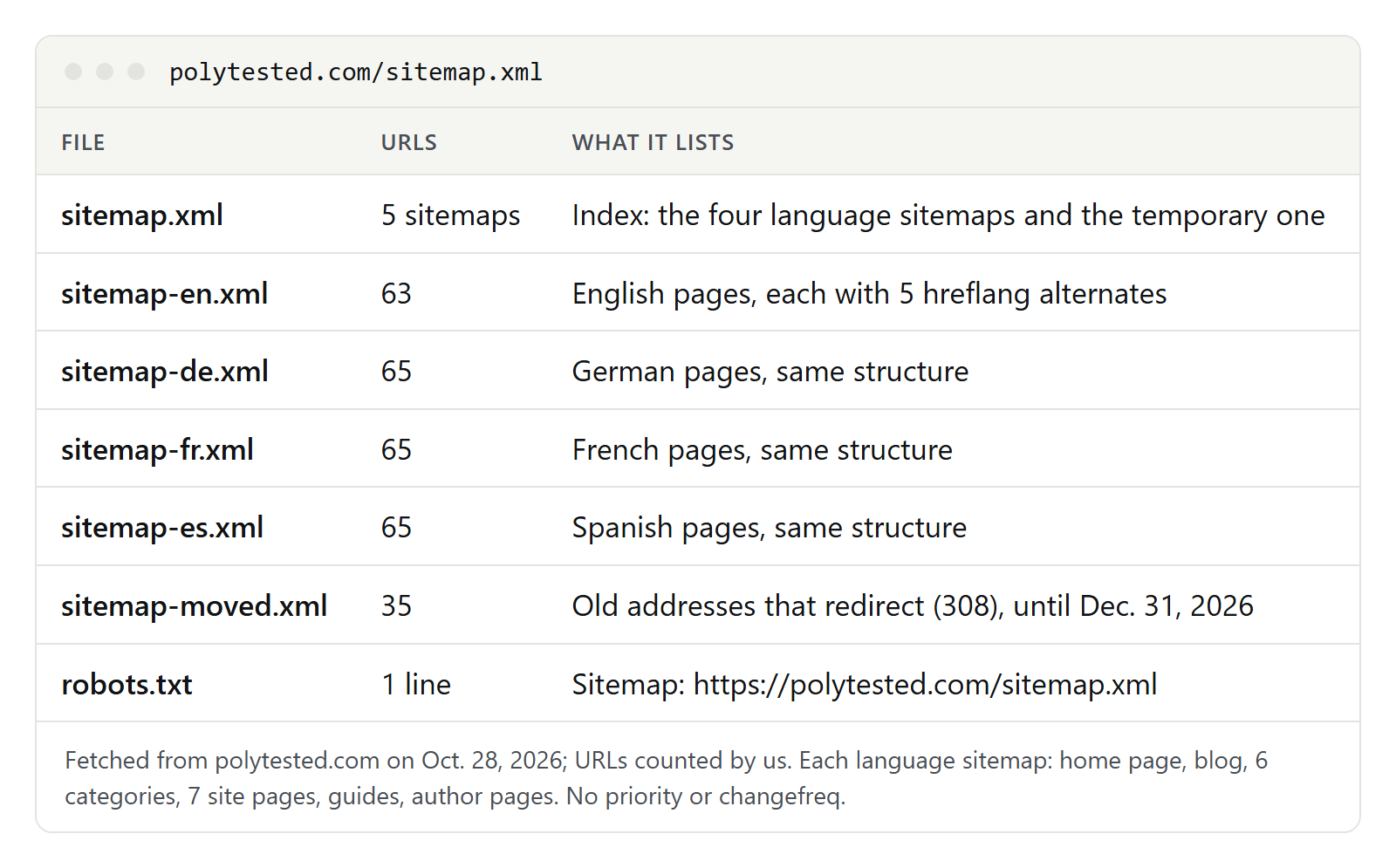
The index is the file we submit. Here it is in full as it stood on October 28, 2026, with line breaks added:
<?xml version="1.0" encoding="UTF-8"?>
<sitemapindex xmlns="http://www.sitemaps.org/schemas/sitemap/0.9">
  <sitemap><loc>https://polytested.com/sitemap-en.xml</loc><lastmod>2026-10-25</lastmod></sitemap>
  <sitemap><loc>https://polytested.com/sitemap-de.xml</loc><lastmod>2026-10-25</lastmod></sitemap>
  <sitemap><loc>https://polytested.com/sitemap-fr.xml</loc><lastmod>2026-10-25</lastmod></sitemap>
  <sitemap><loc>https://polytested.com/sitemap-es.xml</loc><lastmod>2026-10-25</lastmod></sitemap>
  <sitemap><loc>https://polytested.com/sitemap-moved.xml</loc><lastmod>2026-10-14</lastmod></sitemap>
</sitemapindex>
On October 28, before that day's new guides went live, each language sitemap held the home page, the blog, six category pages, seven site pages such as About and Privacy, the guides and the author pages: 63 URLs in English and 65 each in German, French and Spanish. This is a shortened excerpt of the English file:
<?xml version="1.0" encoding="UTF-8"?>
<urlset xmlns="http://www.sitemaps.org/schemas/sitemap/0.9"
        xmlns:xhtml="http://www.w3.org/1999/xhtml">
  <url>
    <loc>https://polytested.com/blog/what-is-an-srt-file-create-edit-translate</loc>
    <lastmod>2026-10-17</lastmod>
    <xhtml:link rel="alternate" hreflang="en" href="https://polytested.com/blog/what-is-an-srt-file-create-edit-translate"/>
    <xhtml:link rel="alternate" hreflang="de" href="https://polytested.com/de/blog/srt-datei-oeffnen-erstellen-uebersetzen"/>
    <!-- fr, es and x-default follow the same pattern -->
  </url>
  <url>
    <loc>https://polytested.com/voice</loc>
    <!-- category page: no lastmod; alternates as above -->
  </url>
  <!-- 61 more url entries -->
</urlset>urlsetwraps the file and names the sitemaps.org namespace; the second namespace,xhtml, is there for the language versions.- Each page gets a
urlelement, with the full address inlocand, here, alastmodwith the date only, which the protocol allows. - The
xhtml:linklines list every language version, the page itself included, plus x-default.
Only urlset, url and loc are required. The file must be UTF-8, and characters such as the ampersand must be escaped (&).
The four tags, and which ones Google uses
| Tag | Required? | What Google does with it |
|---|---|---|
loc | yes | Crawls the URL exactly as listed; use a full, absolute URL |
lastmod | no | Uses it to schedule crawls, but only if the dates prove reliable |
changefreq | no | Ignores it |
priority | no | Ignores it |
Google wrote in June 2023 that it still doesn't use changefreq or priority at all. Bing said the same year that it largely disregards both, because most sites set them to the same values everywhere. Leave them out. Yoast SEO dropped priority from its sitemaps back in version 3.5, and our files carry neither.
lastmod is the tag that matters, and it has rules:
- It is the date of the last significant change: the main text, structured data or links. A new copyright year in the footer doesn't count.
- It is not the date the sitemap was generated. Bing reported in February 2023 that the most common lastmod mistake was the same date on every URL.
- Wrong dates cost trust. Google says that if your lastmod values don't match reality, it eventually stops believing them.
- You may leave it out where you can't tell, for example on a home page or category page that only lists other pages.
Our own setup: a guide's lastmod is the day it was last saved in our CMS, in any of its four languages. That is close to Google's rule but not identical: a save that only fixes a typo in the German text moves the date in all four sitemaps. Category and author pages carry no lastmod. The home page and the blog list carry the date of the newest change to anything published in that language.
Size limits and sitemap index files
One sitemap may hold at most 50,000 URLs and 50 MB uncompressed. You may compress it with gzip, but the limit applies to the unpacked file. Above that, split it and list the parts in a sitemap index:
- The format is the same idea with other names:
sitemapindexandsitemapinstead ofurlsetandurl. - One index may list up to 50,000 sitemaps, and its
lastmodsays when each sitemap file last changed. - Location: the listed sitemaps must be on the same site as the index, and Google adds that they must sit in the same folder as the index or below it.
- Search Console accepts up to 500 sitemap index files per site.
Our language sitemaps are about 44 kilobytes each, far below the limit. We split them for another reason: Search Console's Page indexing report can be filtered by sitemap, so separate files show indexing language by language.
Language versions, images and videos
A sitemap can carry more than addresses:
- Language versions (hreflang). Declare the xhtml namespace and give every
urlentry onexhtml:linkper language version, including the page itself. These lines don't count toward the URL limit. On October 28, in each of our language files, 63 entries listed five alternates: four languages plus x-default. The German, French and Spanish files also contained a guide that doesn't exist in English, which listed three alternates and no x-default, and the page of that language's editor, which listed only itself. Codes, x-default and return links are covered in our guide to hreflang and canonical tags. - Images. The image extension adds an
image:imageelement with animage:locfor each picture on the page, up to 1,000 per URL. Google has dropped the caption, title, geo location and license tags. - Videos. A video entry needs a thumbnail, a title, a description, and either the video file (
video:content_loc) or the player address (video:player_loc).
When WordPress introduced its built-in sitemaps, they didn't cover images, videos or news; that was left to plugins.
Where to put it and how to tell search engines
Put the sitemap at the root of your domain. Its location limits what it may list: a file at /blog/sitemap.xml may only contain URLs under /blog/, unless you submit it in Search Console. All URLs must also use the same protocol and host as the sitemap, so https and www matter. Before our launch, our language sitemaps sat in a /sitemaps/ folder while listing pages from all over the site, so we moved them to the root.
Then announce it in two places. First, robots.txt: add one line with the full URL, as ours does.
Sitemap: https://polytested.com/sitemap.xmlThe line can go anywhere in the file, isn't tied to a user agent and may appear several times. Google, Bing and other major search engines read it. Ours names only the index, which leads to all five sitemaps.
Second, Google Search Console: open the Sitemaps report, paste the address into "Add a new sitemap" and click Submit. The status should read "Success," and "Discovered pages" shows how many URLs Google read from the file. You need owner permission; without it, rely on robots.txt. The report lists only sitemaps submitted there or through the API. Our guide to Google Search Console walks through the report.
The old "ping" address is gone: Google announced in June 2023 that it would stop accepting sitemap pings six months later. You also don't need to resubmit after every new page. Once Google has read a sitemap, it fetches it again on its own schedule; resubmit after big changes.
How WordPress, Yoast, Rank Math and Shopify create sitemaps
Most systems write the sitemap for you. Its address depends on the software:
| System | Address | Notes |
|---|---|---|
| WordPress, built in (since 5.5) | /wp-sitemap.xml | Index of posts, pages, categories, tags and author pages; up to 2,000 URLs per file; lastmod for posts and the home page since 6.5 |
| Yoast SEO | /sitemap_index.xml | /sitemap.xml redirects there; parts named like post-sitemap.xml; 1,000 URLs per file by default |
| Rank Math | /sitemap_index.xml | "Links Per Sitemap" set to 200 by default |
| Shopify | /sitemap.xml | Separate sitemaps for products, collections, blogs and pages; store languages are added automatically |
So sitemap_index.xml, a file name many people look up, is simply the index of Yoast SEO or Rank Math. A few details from the vendors' help pages:
- WordPress lists its sitemap in the robots.txt it generates. If you check "Discourage search engines from indexing this site" under Search Engine Visibility in the Reading settings, the built-in sitemap is switched off.
- Use one generator. Yoast asks you to turn off other sitemap plugins and delete any physical sitemap file before you turn on its own.
- Noindex content stays out: Yoast leaves out content types set to noindex.
- Shopify stores in private mode can't be read, sitemap included.
If you build your own site, generate the sitemap from the same data as your pages. Google calls that the best way, and it is how ours works: the sitemap, the page head and the hreflang links come from the same list of published pages.
Common mistakes
Google's rule is short: list the canonical URLs you want to see in search results. Most mistakes break it:
- Noindex pages. The sitemap invites indexing, the noindex rule forbids it. Remove one of them.
- Redirects. Search Console's help suggests replacing redirecting URLs with the URLs that should be crawled. List the target, not the old address.
- Duplicates. Parameter versions, http next to https, with and without www, or a URL whose canonical tag points elsewhere. If Google picks a different canonical than the one you listed, see our guide to canonical issues.
- Errors and locked pages. URLs that return 404 or 500 errors, need a login or are blocked in robots.txt.
- A wrong lastmod. The generation date on every URL, or a date that changes on every request.
- Relative URLs such as /pricing instead of https://example.com/pricing.
- The test site's sitemap. At launch, check that the live sitemap lists live addresses, not staging ones. Our website migration checklist covers the launch steps.
- Two generators, for example the WordPress sitemap plus a plugin's, or a plugin plus a forgotten sitemap.xml file.
On October 28 we checked our own language sitemaps against this list. We requested each of the 258 URLs once, without following redirects. All 258 answered with status 200, every page's canonical tag named exactly the listed URL, and none carried a noindex rule.
The exception: 35 redirects we list on purpose
On October 25 we added a fifth file that breaks the rule above, on purpose. sitemap-moved.xml lists 35 old addresses: an author page renamed on October 13, and 34 guides (25 English, nine German) that got longer, more descriptive slugs on October 14. Each old address answers with a permanent 308 redirect to its new one. In the index we first dated this file with its newest move, October 14; since October 28 it carries October 25, the day the file appeared, because the protocol defines a lastmod in the index as the date the sitemap file changed.
The reason: by October 25, Google had not recrawled most of the old English addresses since October 13 to 15, and Search Console still counted most impressions of our English guides on the old URLs. A redirect only counts once Googlebot fetches the old URL again. In the temporary file, each old address carries a lastmod equal to the moment it moved, which is accurate: that is when its response changed. The aim is that crawlers fetch the old URLs once more, see the redirect and pass the old page's signals to the new address.
Google's own site-move guide describes the same idea: submit a sitemap of the old URLs next to the new one, watch its indexed count fall, and ignore the warnings about redirects. We limited the side effects:
- A separate file. The four language sitemaps still list only canonical URLs, so their indexing reports stay clean.
- An end date. The file is served until December 31, 2026. The redirects themselves stay.
- No false alarm. In the Page indexing report, a redirecting URL appears as "Page with redirect," which by definition is not indexed. For this file that is the expected status.
We can't say yet whether it speeds anything up; the file is only days old.
Checklist
- One sitemap or sitemap index at the root of your domain, saved as UTF-8, with absolute https URLs.
- Only canonical, indexable URLs that answer with status 200.
- A lastmod only where it is true; no priority or changefreq.
- At most 50,000 URLs and 50 MB per file, split with an index above that, or by language or content type if that helps your reports.
- For language versions, every entry lists all versions, itself included.
- A Sitemap line in robots.txt and a submission in Search Console.
- One generator only; know the address your CMS uses.
- After a launch or URL change, check that the sitemap lists the new addresses. For a site in several languages, our international SEO guide shows how sitemaps, hreflang and URL structure fit together.