A canonical tag is a line in a page's HTML head, such as <link rel="canonical" href="https://polytested.com/blog">, that tells search engines which URL is the main version of a page when the same content can be reached at several addresses. Google treats it as a strong hint, not an order: it usually follows the tag, but it can pick another URL. Most pages should carry one that names the page itself, and most content management systems add it automatically. Below, we show how our own site answers 11 versions of its own URLs, and when a canonical tag is the right tool and when a redirect or hreflang is.
The short answer
- What it is: a
linkelement withrel="canonical"in the page's<head>, naming the preferred URL. - Why it exists: the same page often lives at many URLs. Search engines pick one to index and show in results, and they combine signals such as links on it. The tag tells them which one you prefer.
- A hint, not a rule: Google's documentation says that indicating a canonical preference is "a hint, not a rule".
- On every page? Google recommends a canonical on the canonical page itself, pointing to itself, but doesn't require it. WordPress adds one to posts and pages, and Yoast, Wix and Shopify add one to every page, according to their documentation.
- Not for: retiring a URL (use a permanent redirect), translations (use hreflang, with each language naming itself), or page 2 of a list (it names itself).
What a canonical tag looks like
The tag goes in the <head> of the page, with the full address including https://:
<link rel="canonical" href="https://polytested.com/blog">
One tag per page. For PDFs and other files that aren't HTML, the same information can go in an HTTP header instead: Link: <https://example.com/guide.pdf>; rel="canonical". Google supports both. The idea goes back to 2009, when Google, Yahoo, Microsoft and Ask announced support for the tag together, and was written up as RFC 6596 in 2012.
Why one page ends up at many URLs
- Tracking parameters:
?utm_source=newsletterfrom a newsletter or an ad. - Sorting and filters:
?sort=priceor?category=seoon the same list. - Protocol and host:
http://andhttps://, with and withoutwww. - Small spelling differences: a trailing slash, or capital letters. Google treats
/Blogand/blogas two different URLs. - Other versions of the same page: print or mobile pages, and copies on other sites.
Real examples from our own site
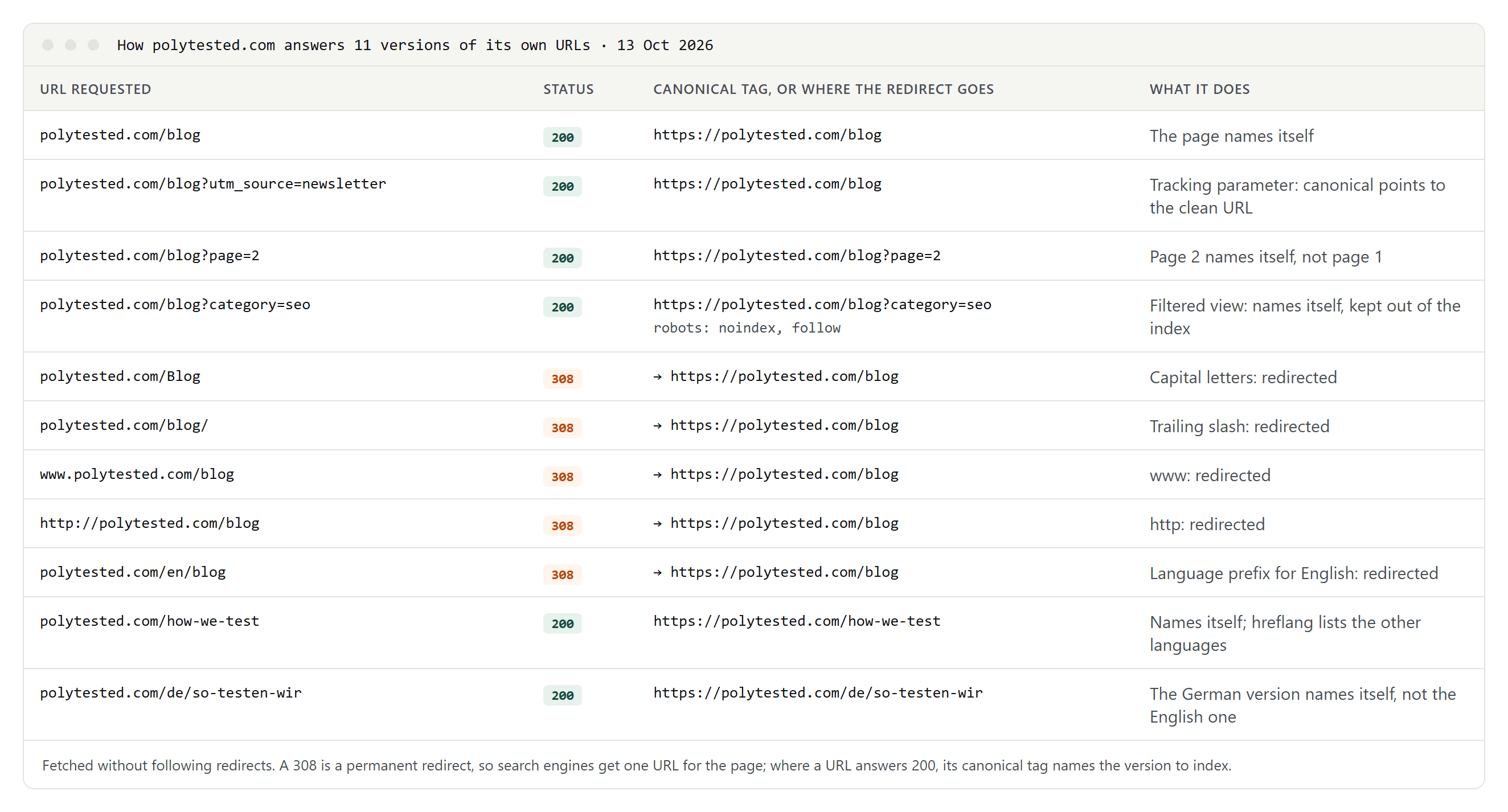
We requested 11 versions of our own addresses on 13 October 2026, without following redirects:
- A tracking parameter such as
?utm_source=newsletterstill shows the page, and its canonical tag names the clean URL. A newsletter link doesn't create a second page in Google. - Page 2 of the blog names itself, not page 1. Google asks for this: every page of a list gets its own canonical.
- A filtered view of the blog names itself and carries
noindex, follow, so filter combinations stay out of the index while search engines can still follow the links on them. - Capital letters, a trailing slash,
www,httpand the/enprefix don't show the page at all. They answer with a 308 permanent redirect to the one real address, so there's nothing for a canonical tag to choose between. - Translations name themselves: our German page's canonical is the German page, and hreflang links connect the four languages. Our guide to hreflang and canonical tags explains the combination in detail.
How Google chooses the canonical
Google groups pages whose main content is the same or very similar and picks the one it considers most complete and useful. It crawls that one most often, judges the content by it, and usually links to it in results. Google lists its signals by strength:
- Redirects: a strong signal.
rel="canonical", as a tag or an HTTP header: a strong signal.- Listing the URL in your sitemap: a weak signal.
It also prefers HTTPS pages, pages inside a working hreflang cluster, and the URL your internal links point to. If the pages aren't really duplicates, Google may ignore your tag and choose for itself.
Canonical tag, redirect, noindex or hreflang?
- The old URL should disappear (a moved or merged page): use a permanent redirect. Google says to use redirects when you retire a duplicate.
- Both URLs have to keep working (tracking parameters, sort orders, print versions): add a canonical tag that points to the main URL.
- Filtered or sorted lists you don't want in search at all:
noindex, or a canonical to the unfiltered list. Google notes that a canonical is less effective here in the long run. - The same content in another language: hreflang, with each language version naming itself as canonical. A translated page isn't a duplicate.
- Page 2, page 3 and so on: each page names itself.
- Your article republished on another site: Google now recommends that the partner block indexing of its copy rather than rely on a canonical tag pointing to yours. Bing still suggests a canonical to the original where your agreement allows it.
Mistakes that make search engines ignore it
- The tag isn't in the
<head>. Google only accepts it there. An invalid element in the head, such as an image, makes Google treat the head as ended, and a canonical after it is lost. - Several canonical tags with different URLs on one page.
- The target redirects, returns an error or carries
noindex. Point to the final, indexable URL. - Relative or incomplete addresses. Google supports relative URLs but recommends full ones.
example.com/pagewithouthttps://is read as a path on your own site. - Every page pointing to the home page. In our Lovable SEO check, one site sent the home page's canonical tag from every address, including pages that didn't exist.
- Translations pointing to the English page. Each language should name itself.
- Changing the canonical with JavaScript. Google prefers it in the HTML source, untouched by scripts.
- Using robots.txt or noindex to choose a canonical. A blocked page can still be indexed without its content, and noindex removes the page instead of consolidating it.
How to check which canonical Google chose
- In the page source: search for
rel="canonical". Only one tag should appear. - In Google Search Console: the URL Inspection tool shows the user-declared canonical, the one your page names, and the Google-selected canonical, the one Google indexes.
- In the Page indexing report:
- "Alternate page with proper canonical tag" means the page correctly points to another URL. Nothing to fix.
- "Duplicate without user-selected canonical" means Google found duplicates and chose one itself. Declare a canonical if its choice is wrong.
- "Duplicate, Google chose different canonical than user" means Google disagrees with your tag. Compare the two URLs, and make your redirects, internal links and sitemap point the same way.
- Not with a
site:search. It can show URLs that aren't the canonical.
After a fix, Google may keep the old grouping for up to two weeks, according to its troubleshooting guide.
Does Bing treat it the same way?
Mostly. Bing's guidelines ask for canonical URLs, consistent URL structures and sitemaps that list only canonical URLs. For pages that have moved, Bing asks for a permanent redirect rather than a canonical tag. Like Google, it reminds site owners that robots.txt controls crawling, not indexing.
