To migrate a website without losing rankings, send every old URL straight to its new equivalent with a permanent server-side redirect (301 or 308), keep the content, remove the staging locks at launch, and switch canonicals, hreflang, internal links and the sitemap to the new addresses. Keep the redirects for at least a year and watch Search Console for weeks. We show each step on our own site: in October 2026 we changed 35 of our URLs and recorded how the server and Google responded.
What a site migration means for Google
A migration can mean a new design, a new content management system (CMS), a new domain, a switch to https, new URLs or rewritten content. For search, what counts is what changes in addresses, content and linking: a new design on the same URLs is a small change, a new URL structure is a move.
Google's guide to site moves with URL changes explains what happens then: Googlebot has to visit every old and every new URL at least once, and the move is processed one URL at a time. Signals such as links pass through the redirects, and Google states that 301 and other permanent redirects don't cause a loss in PageRank. The guide's three ground rules: change one thing at a time (the domain first, the layout later), move during a quiet traffic period, and expect rankings to fluctuate while Google recrawls.
Our own case: 35 changed URLs in two days
Polytested became indexable on October 13, 2026, and a few hours later we renamed the author page. On October 14 our nine German guides got longer, descriptive slugs on the day they went live; later that day, about a day after launch, our 25 English guides followed.
| Old URL | New URL | Changed |
|---|---|---|
/authors/sukru | /authors/sukru-celik | Oct 13 |
/de/blog/hreflang | /de/blog/hreflang-x-default-canonical-dach | Oct 14 |
/blog/srt-file | /blog/what-is-an-srt-file-create-edit-translate | Oct 14 |
/blog/meeting-minutes | /blog/how-to-write-meeting-minutes-template-example | Oct 14 |
On October 17 we requested all 35 old URLs again. Every one answered with a 308 to the correct new URL, and every new URL answered with 200.
The limits: the old URLs were hours to a day old, with almost no links. We can show the mechanics and the first days in Search Console, not a long-term ranking effect. We changed them this early on purpose: the later a URL changes, the more links and signals depend on it.
Step 1: Collect every old URL
You can only redirect an address you know about, and no single source is complete. Google suggests combining:
- the XML sitemaps of the old site;
- server logs, over a period that covers seasonal pages;
- analytics for the pages with the most traffic;
- the Links report in Search Console (its tables stop at 1,000 rows);
- your CMS, which knows every published page;
- a crawl of the old site. The free version of Screaming Frog SEO Spider crawls up to 500 URLs.
Don't stop at HTML pages: Google names images, videos, JavaScript and CSS files, and PDFs and other downloads can bring traffic of their own. Then save a baseline: clicks, impressions and position per page from the Performance report, plus titles, meta descriptions and the crawl. Without it, you can't tell later which page lost traffic.
Step 2: Build the redirect map
The redirect map has two columns, old and new, and a few rules:
- One to one: each old page points to the new page with the same content; merged pages all point to the merged page.
- Removed: with no successor, the old URL answers 404 or 410. Google treats all 4xx errors except 429 the same way.
- Not everything to the home page: Google advises against redirecting many old URLs to one irrelevant target. It confuses users and can be treated as a soft 404.
- Straight to the target: every rule points to the final URL, never to an address that redirects again.
Our map lives in the site's code, one pair of old and new slug per line:
// The English guides got longer, more descriptive slugs on 2026-10-14
...[
  ['srt-file', 'what-is-an-srt-file-create-edit-translate'],
  ['meeting-minutes', 'how-to-write-meeting-minutes-template-example'],
  // ...23 more pairs
].map(([from, to]) => ({ source: `/blog/${from}`, destination: `/blog/${to}`, permanent: true })),
The rules are dated and under version control, but they only go live with a deploy: a slug changed only in the CMS would have returned 404 until then. Find out whether your CMS creates redirects itself.
301, 308, 302 or 307: which redirect to use
For a permanent redirect, Google shows the new target in search results; for a temporary one, the source page.
| Redirect | Type | What Google does | For a migration? |
|---|---|---|---|
| 301 Moved Permanently | permanent | strong signal to process the target | yes |
| 308 Permanent Redirect | permanent | equivalent to 301 | yes |
| 302 Found | temporary | weak signal to process the target | no |
| 307 Temporary Redirect | temporary | equivalent to 302 | no |
meta refresh without delay | permanent | read as permanent | only if nothing server-side works |
meta refresh with delay | temporary | read as temporary | no |
So you pick 301 or 308. The difference lies outside search: under the HTTP standard RFC 9110, a client may turn a POST request into a GET after a 301 or 302, but not after a 307 or 308. That's why Next.js, which runs our site, uses 308 for permanent redirects. JavaScript redirects are a last resort; server-side redirects are the ones Google is most likely to interpret correctly.
Watch for defaults that create temporary redirects: on Apache, a Redirect directive without a status becomes a 302; in Next.js, permanent: false gives a 307; and many hosts let you pick the status of a domain redirect in their dashboard. Bing recommends 301 for permanent moves and 302 only for changes of less than two days.
Lock the staging site, and plan the unlock
A new site is usually built on a staging copy that must stay out of search. Of three common locks, two work reliably:
- robots.txt is not enough. Google says it is not a way to keep a page out of its results; a blocked URL can still be indexed if other pages link to it.
- noindex works only if Google may crawl the page, as a meta tag or an X-Robots-Tag HTTP header. Behind a robots.txt block, the crawler never sees it.
- A password is the safest lock: nobody gets in without access, crawlers included.
The bigger risk is the unlock. A noindex rule or a Disallow: / that survives the launch takes the new site out of search, and Google lists such leftovers first in its troubleshooting table for site moves. Plan the launch robots.txt in advance and keep a list of every noindex rule to remove.
We used a single switch. Until launch, every response carried X-Robots-Tag: noindex, nofollow, and robots.txt allowed crawling but didn't list the sitemap, so Google could see the noindex rule. On launch day one environment variable and a rebuild removed the header and added the sitemap. Nothing had to be removed by hand.
Switch canonicals, hreflang, internal links and the sitemap
Everything Google reads on the new site must point to the new addresses:
- Canonical: each new page points to itself with rel="canonical", not to its old address. See our guide to the canonical tag.
- hreflang: all language versions point to the new URLs, in both directions; Google names this explicitly in its site-move guide. When our English URLs changed, the German, French and Spanish versions had to point to the new English URLs too. More in our guide to hreflang, x-default and canonical tags.
- Internal links go straight to the new URLs; each one through a redirect costs load time and crawling.
- The sitemap lists only the new, canonical URLs.
On our site all four switched automatically, because they're generated from the CMS. Internal links are stored as references to an article key and get the current slug when the page renders, so none pointed to an old URL. On October 17 neither our English nor our German sitemap listed a single old URL. For multilingual URL structures, see our international SEO guide.
As for the old sitemap: Google describes submitting it next to the new one for a while, to watch its indexed count fall to zero, while Bing wants redirected URLs out of sitemaps promptly. Our suggestion: the public sitemap lists only new URLs, and an old-URL sitemap goes into Search Console only temporarily, as a measuring tool.
How to test redirects: curl, browser and crawler
The most reliable view is the raw server response. The command-line tool curl comes preinstalled on Windows 11 and macOS, and on most Linux systems:
# Status code and Location header of the first response
curl -sI https://example.com/old-page

# Follow the whole chain and print the headers of every hop
curl -sIL https://example.com/old-page

# One line per URL: status code and target, handy for lists
curl -s -o /dev/null -w "%{http_code} %{redirect_url}\n" https://example.com/old-page
On Windows, write NUL instead of /dev/null, and in Windows PowerShell 5.1 type curl.exe: there, plain curl is a name for the Invoke-WebRequest cmdlet, which takes different options.
Also test the variants visitors and crawlers arrive through, http and www. That's where extra hops hide:
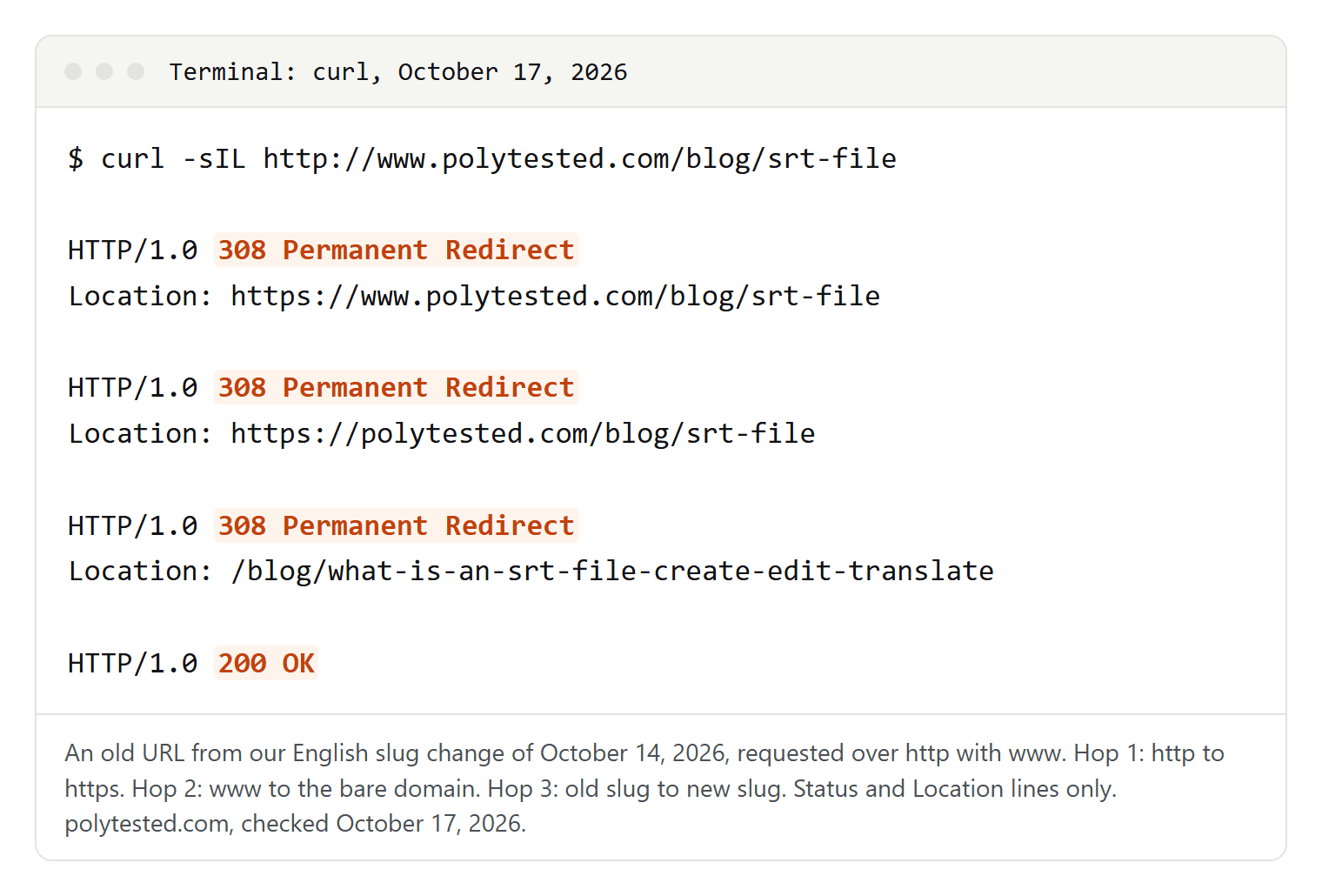
| Entry point | Hops | What happens |
|---|---|---|
https://polytested.com/blog/srt-file | 1 | old slug to new slug |
http://polytested.com/blog/srt-file | 2 | http to https, then the slug |
https://www.polytested.com/blog/srt-file | 2 | www to bare domain, then the slug |
http://www.polytested.com/blog/srt-file | 3 | http to https, www to bare domain, then the slug |
Googlebot follows up to 10 hops, but Google recommends redirecting straight to the final URL, or ideally no more than 3 hops and fewer than 5. Stack a migration's redirects on old protocol and domain redirects, and you pass that quickly. Rules can also combine in your favor: our site lowercases URLs with capital letters, yet /Blog/SRT-File reached the new slug in one hop, because the old-slug rule matched it first. Only testing shows how your rules combine.
A browser is a poor test tool. A 308 tells clients to cache the redirect forever, according to the Next.js documentation, so a wrong permanent redirect can stick; our redirects send Cache-Control: public, max-age=0, must-revalidate, but test with curl anyway. And once Chrome knows a site uses HSTS, as ours does, it upgrades http links itself: in our check on October 14, 2026, its network log showed "307 Internal Redirect" for HSTS, although our server never sent a 307.
For many URLs, loop curl over a text file of old URLs or use a crawler's list mode, and look for any 302 or 307 that should be permanent, any 404 that should redirect, and any chain over https. Don't rely on the URL Inspection tool here: its help page says the live test follows redirects silently, while another Google page says the inspection tools don't follow them at all.
After launch: Search Console and realistic timelines
Three reports show whether the move is working:
- Page indexing: "Page with redirect" is expected for old URLs. Look closer at "Not found (404)" for pages that only moved, "Soft 404" (often a redirect to the home page), "Redirect error" (a chain too long, a loop or an invalid URL), and "URL blocked by robots.txt" or "URL marked 'noindex'" on new pages.
- Crawl stats (in the property settings): 308 is counted under "Moved permanently (301)" and 307 under "Moved temporarily (302)"; each hop counts as a separate request. A rising share of temporary redirects means a wrong setting somewhere.
- Sitemaps: how many submitted URLs are indexed, per sitemap.
Our own data shows how gradual the move is:
| URL Inspection result | German guides | English guides |
|---|---|---|
| Old URLs known to Google on October 15 | 1 of 9 | 15 of 25 |
| New URLs indexed on October 16 | 9 of 9 | 12 of 25 |
| New URLs where Google still chose the old URL as canonical | 0 | 4 |
Google had barely seen the old German URLs, and all nine new ones were indexed two days later. Many English URLs had been indexed under their old addresses, and two days after the change four new pages, our SRT guide among them, showed "Duplicate, Google chose different canonical than user", with the old URL still chosen. That is the URL-by-URL move Google describes, not an error, and a good reason to change URLs early.
How long does it take? Google says a small to medium-sized site can take a few weeks for most pages to move, larger sites longer, depending mainly on the number of URLs and server speed. In a 2022 video reported by Search Engine Land, Google's John Mueller said fully processing a URL change can take several months. Plan with weeks for most pages and months for the rest, and measure it.
How long to keep redirects, and when to use Change of Address
Google's guide is clear: "Keep the redirects for as long as possible, generally at least 1 year." For users, it suggests keeping them indefinitely, and our 35 redirects have no end date. Two moments put redirects at risk: the next migration, when nobody remembers why old rules exist (document each with a date and a reason), and chain cleanup. If a second move creates a chain from A through B to C, point A straight to C; never delete A.
Search Console's Change of Address tool is only for moving from one domain or subdomain to another, not for http to https, paths within a site or www to non-www, so our case doesn't need it. For a domain move, file it for every verified variant of the old domain, www included. Search Console shows a notice for 180 days; keep the redirects at least that long, longer while search traffic still arrives through them, and keep paying for the old domain for at least a year so nobody can misuse it.
Website migration SEO checklist
Before launch
- Decide what changes; avoid changing domain, URLs, CMS, design and content at once.
- Collect all old URLs, including images and PDFs, and save a per-page baseline.
- Build the redirect map: one to one, 404 or 410 for removed pages, nothing in bulk to the home page.
- Use 301 or 308, server-side, straight to the final URL; check your defaults.
- Lock staging with a password or noindex, and plan the unlock.
- On staging, check canonicals, hreflang, internal links and the new sitemap.
- Verify every site variant in Search Console, and make sure the server can take the extra crawling Google says follows a move.
Launch day
- Turn on the redirects and remove the locks in the same step.
- Check robots.txt: if it returns a server error, Google stops crawling the site for the first 12 hours.
- Test every old URL, including http and www variants.
- Submit the new sitemap in Search Console and Bing Webmaster Tools.
- Domain move only: file a change of address.
- Update your own links in profiles, ads and signatures, and ask the sites that send you the most visits to update theirs.
After launch
- Check Page indexing, Crawl stats and Sitemaps weekly; fix 404 and soft 404 errors on moved pages.
- Resolve chains by pointing old rules straight to the final URL.
- Keep the redirects for at least a year, ideally for good, and document them.
