On a multilingual site, three tags work together. The canonical tag names the main URL of a page in its own language. Hreflang tells search engines which URLs are the same page in other languages. And x-default names the page for readers whose language isn't in the set. Below is how we set all three up on polytested.com, which runs in English, German, French and Spanish, followed by the rules Google checks and the mistakes that make it ignore your tags.
The short answer, in real HTML
This is the head of our About page:
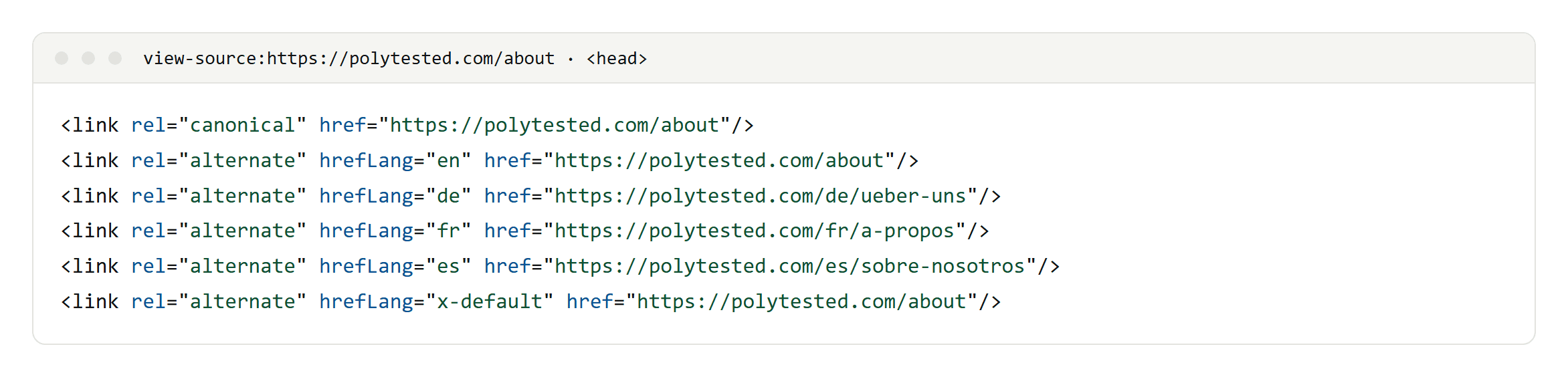
Four things make it work:
- The canonical points to the page itself. The German page's canonical is the German URL, never the English one.
- Every published language gets an hreflang link, including the page itself. The English page lists
enas well asde,frandes. - x-default points to the English version, our default for readers whose language we don't cover.
- All URLs are absolute. The slugs differ by language (/about, /de/ueber-uns, /fr/a-propos, /es/sobre-nosotros). Hreflang connects pages, not matching URLs.
Next.js writes the attribute as hrefLang. That is fine: HTML attribute names are case-insensitive, and Google treats hreflang values as case-insensitive too.
What each tag answers
- Canonical: which URL is the main one among duplicates in the same language? Our guide to canonical tags covers the basics.
- Hreflang: which URL is this page in another language or region?
- x-default: which URL fits a reader whose language matches none of them?
All three are hints. Google can still choose a different canonical, and it reads each page's language from the content itself, not from hreflang or the lang attribute.
Should the German page's canonical point to the English page?
No. Google asks you to specify a canonical page in the same language, or the best possible substitute language only when no same-language canonical exists. Translations are not duplicates: Google treats language versions as duplicates only if their main content is in the same language. If you point a German page's canonical at the English one, you are asking Google to drop the German page, and the hreflang link to it has nothing left to join.
The opposite advice still circulates. It goes back to a 2010 recommendation for sites that translated only their template, and Google withdrew it in 2011.
There is one real exception: regional versions in the same language. If your en-GB and en-US pages are nearly identical, Google may fold them into one canonical. Hreflang doesn't guarantee that each version is indexed, and Search Console reports on the canonical URL. The same logic applies if you translate only the menus and leave the main content in English; those pages are duplicates. Translate the content or don't publish the version.
The rules Google checks
- Return links. Each language version must list itself and all other versions. If two pages don't point to each other, Google ignores that pair, but it still uses the pairs that do.
- Fully qualified URLs. Write
https://polytested.com/de/ueber-uns, not/de/ueber-uns. - One method is enough. Link tags in the head, HTTP
Linkheaders and sitemap entries are equivalent for Google, and using all three brings no extra benefit. - Only indexable, canonical URLs. A noindex page can't join the cluster. Link to final URLs, not to redirects or missing pages; site crawlers report those as errors.
- A clean head. Google stops reading the head when it finds an element that doesn't belong there, such as an iframe or an image. Put your link tags before anything like that.
Language and region codes
The code is an ISO 639-1 language, optionally followed by an ISO 3166-1 Alpha-2 region:
defor German speakers anywhere,de-ATfor Austria.en-GBfor the United Kingdom.en-UKis wrong: UK is not the country code.- A region alone, such as
at, is not valid.
Spanish in HTML
For one Spanish page, use hreflang="es". For separate country versions, add es-ES and es-MX, and keep a plain es version as the catch-all. Google doesn't support es-419, the code for Latin American Spanish, so don't rely on it. Declare the page's own language with <html lang="es">; the hreflang links describe the other pages. We checked which Spanish codes big multilingual sites actually use in hreflang for Spanish.
x-default: where it should point
x-default is the URL Google shows when no listed language matches the searcher. Google introduced it for language selectors and home pages that redirect by location, but it can also be simply the version you consider the default. Google's own example points it at the English page.
That is what we do: the English page doubles as x-default. Our code adds x-default only when an English version exists, so a page published in German alone has no x-default. Hreflang doesn't have to cover the whole site either; Google says annotating only part of a site is fine.
Pages that aren't translated yet
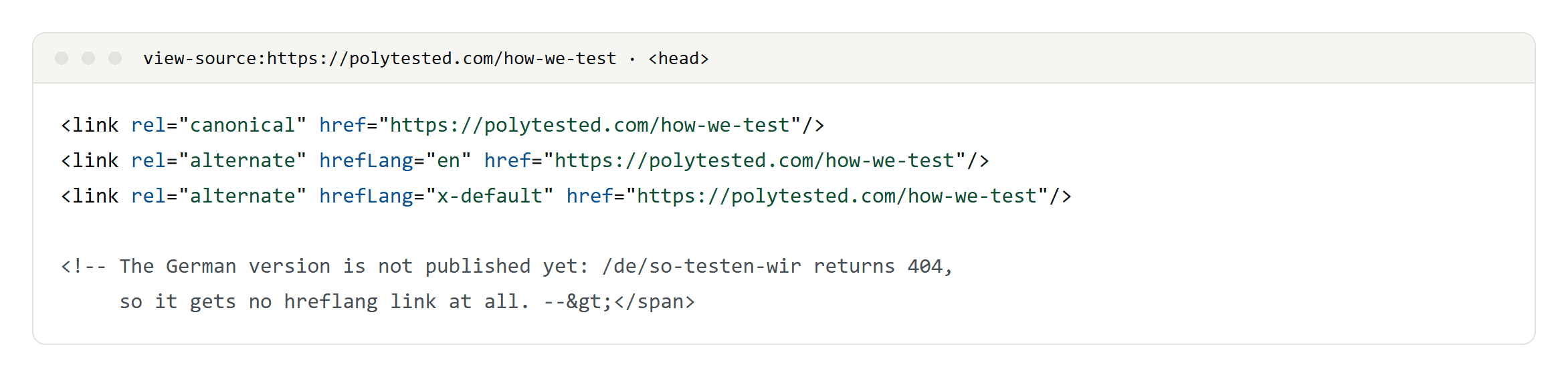
When a translation isn't published, its hreflang link doesn't appear and its URL returns a 404. We don't fall back to showing English text under a German address: that page would be a duplicate of the English one, and an hreflang link to it would point at the wrong language. The link appears as soon as the translation is approved. Until then, visitors can use their browser's translation, which doesn't create a language version in Google's eyes; we show what that looks like in how to translate a web page.
Hreflang in the sitemap
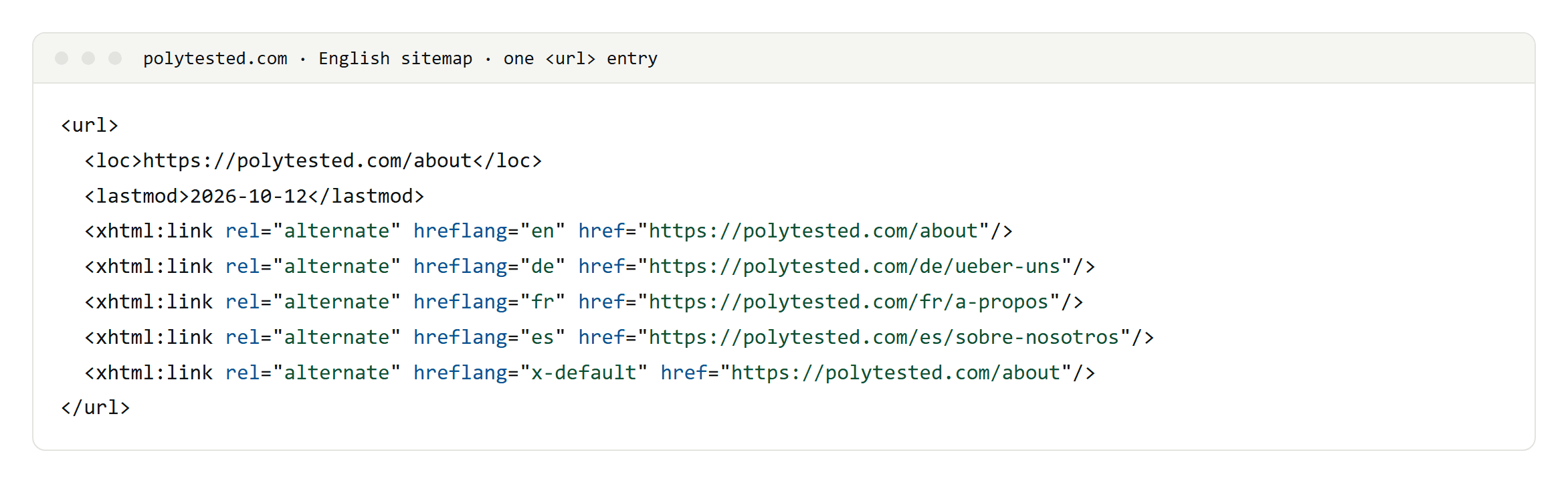
Each language has its own sitemap, and every entry repeats the alternates from the page head. Both come from the same function and the same list of published translations, so the sitemap and the HTML can't disagree. If you use both methods, that is the rule to follow: generate them from one source.
Pagination and filtered pages
Page two of a list is not the same page as page two in another language; the lists hold different posts. So our paginated pages get a canonical to themselves and no hreflang. Filtered views of a list are marked noindex, follow: they don't add new pages to the index, and links on them are still followed.
If you build with Next.js
- The Next.js examples for sitemaps and
generateMetadatashow alternates without the page itself and without x-default. Add both. - Metadata merges shallowly: if a page sets
alternates, it replaces the layout's entirely. Set them on every page that needs them. - Build the head tags and the sitemap from one function, as described above.
How to check your setup
Search Console's International Targeting report is gone, but Google still uses hreflang. To check your setup:
- URL Inspection in Search Console shows the canonical you declared and the one Google selected. If they differ for a translated page, look at its canonical tag first.
- A site crawler checks return links, codes and targets that redirect, return 404 or are noindex. Semrush's Site Audit has an International SEO report for hreflang, and Screaming Frog flags hreflang links to URLs that don't answer 200.
- Hreflang generators are fine for a handful of static pages. Google lists Aleyda Solis's generator and Merkle's tester, with the note that it doesn't maintain or check them. On a site with a CMS, generate the tags from your content data instead.
- View the source of every language version, not only the one you started from. Most broken clusters are missing a return link on the page nobody checked.
What about Bing?
Bing has called hreflang a much weaker signal than content-language, and its current guidance still recommends hreflang for language targeting. Declare each page's language with the lang attribute on <html> and, if you can, a Content-Language HTTP header. W3C advises against using a meta http-equiv tag to declare the language.
Checklist: the mistakes that break hreflang
- Translations whose canonical points to the English page.
- A missing self-reference or a missing return link.
- Relative URLs.
- Invalid codes:
en-UK,es-419or a region on its own. - Canonical and hreflang combined in one
<link>tag; Google doesn't use that for canonicalization. - Hreflang links to noindex pages, redirects or missing pages.
- Link tags after an iframe or image in the head.
- Redirecting visitors by the language you guess they speak; Google advises against it.
- Framework examples copied without the self-entry or x-default.
- Looking for hreflang errors in the retired Search Console report.
Hreflang only connects the versions. Each version still has to answer what people in its market search for; we describe how we found those queries in international keyword research.
