Canonical issues are cases where Google indexes a different URL than the one you want, or groups pages that you consider different. Search Console's Page indexing report and URL Inspection tool show them, and several of these statuses are normal. When one does, the fix is nearly always the same: make your redirect, canonical tag, internal links, sitemap and hreflang name the same URL, then give Google time to crawl again. Below: each status, the usual causes, the checks, and what our own site showed 11 days after we changed 25 URLs.
The Search Console statuses, and which ones need work
The Page indexing report lists canonical cases under "Why pages aren't indexed". That heading sounds alarming, but Google's help says that a page marked as duplicate or alternate is "usually a good thing": it means Google found the canonical version and indexed that one. Google also says not to expect every URL of a site to be indexed, only the canonical pages.
| Status | What it means | What to do |
|---|---|---|
| Alternate page with proper canonical tag | This URL names another URL as canonical, and Google indexed that one | Nothing |
| Duplicate without user-selected canonical | Google found duplicates, none declares a canonical, so Google picked one | Only if Google picked the wrong URL: declare a canonical or redirect |
| Duplicate, Google chose different canonical than user | Your page names a canonical, but Google indexed another URL | Compare both URLs in URL Inspection |
| Page with redirect | The URL redirects, so only the target can be indexed | Nothing for old URLs; fix it if the URL is in your sitemap or links |
| Crawled - currently not indexed | Google fetched the page and decided not to index it for now | Not a canonical problem: improve the page or leave it |
Two details are easy to miss. Search Console does not detect alternate language pages, so a translation never shows up as "Alternate page with proper canonical tag". And "Crawled - currently not indexed" is not a canonical status, even though it sits in the same table: Google fetched the page and chose not to index it for now. New to the report? Start with our guide to Google Search Console; for the tag itself, see what a canonical tag is.
How to read a URL Inspection result
Open URL Inspection, paste the URL and look at the indexed result, not the live test. Under "Page indexing" you find three lines that matter here: "Last crawl", "User-declared canonical" (what your page says) and "Google-selected canonical" (what Google indexed). Most cases fall into one of four patterns:
- Both canonicals are the same URL. No canonical issue. If the page isn't indexed, the reason is elsewhere.
- Google picked another spelling of the same address, such as the http, www or trailing-slash version. Your site answers under several addresses; one of your redirects or tags is inconsistent.
- Google picked a URL that now redirects, typically the old address after a move. Compare the last crawl date with the date of your change: if Google hasn't been back since, it doesn't know about the redirect yet.
- Google picked a different page with similar content. Either the two pages are too alike, or your canonical points to a page that isn't really a duplicate. Google's help is blunt here: if the declared canonical isn't similar to the page, Google will never choose it.
Three limits: the live test ("Test live URL") does not check canonical selection; the Google-selected canonical can be a few hours behind Google's index; and inspections and "Request indexing" have a daily limit per property.
One more effect: the Performance report attributes clicks, impressions and positions to the canonical URL. As long as Google treats an old URL as canonical, its traffic is reported under the old URL, although every visitor lands on the new one.
Common causes and how to fix them
| Cause | What you see | Fix |
|---|---|---|
| http and https both answer | Google-selected canonical starts with http | One permanent redirect to https; canonical, sitemap and hreflang use https |
| www and non-www both answer | The same page under two hosts | Choose one host and redirect the other |
| Trailing slash or capital letters | /page and /page/ or /Page counted as separate URLs | Redirect to one spelling and link only to that one |
| Tracking, sort and filter parameters | Many "Alternate page" or "Duplicate without user-selected canonical" entries | Canonical to the clean URL; noindex for filter pages you never want in search |
| Temporary redirect (302 or 307) or a chain | The old URL stays canonical longer | One permanent hop (301 or 308) straight to the final URL |
| Canonical points to a redirect, a 404 or a noindex page | Google may ignore your canonical | Point to the final URL that answers 200 and may be indexed |
| Signals disagree | Sitemap lists one URL, the tag names another, links go to a third | Use the same URL everywhere |
| Translations point their canonical to English | Translated pages missing from the index | Each language names itself; hreflang connects them |
| Slug or domain change | The old URL is still the Google-selected canonical | Keep the redirect, update every signal, wait for a recrawl |
| Two pages that are almost the same | Google groups pages you see as different | Make the content clearly different, or merge them |
| CMS or plugin error, hacked site | Canonical or redirect to an unexpected, sometimes foreign, URL | Check the HTML and the server response; report CMS bugs to the vendor |
Google's documentation adds a few rules. Redirects and canonical tags are strong signals, a sitemap is a weak one, and they add up when they agree. Don't name one URL in the sitemap and another in the tag. Don't use robots.txt or noindex to choose a canonical: a URL blocked in robots.txt can still be indexed without its content, and noindex blocks the page from Search completely. Google prefers https pages as canonical, unless the certificate is invalid, the https page redirects to http, or its canonical tag names the http version.
Check one URL with curl
URL Inspection tells you what Google decided; curl tells you what your server sends, without browser caches. Check the status code, the canonical tag, a possible noindex and the hreflang links. Here are the first two checks on one of our old addresses, with our server's answers on October 25, 2026:
# 1. Where does the old address go, and with which status?
curl -sI https://polytested.com/blog/meeting-minutes
HTTP/1.1 308 Permanent Redirect
Location: /blog/how-to-write-meeting-minutes-template-example

# 2. Which canonical does the new page declare?
curl -s https://polytested.com/blog/how-to-write-meeting-minutes-template-example | grep -o '<link rel="canonical"[^>]*>'
<link rel="canonical" href="https://polytested.com/blog/how-to-write-meeting-minutes-template-example"/>

# 3. Does the page carry noindex, in the HTML or in a header?
curl -s https://example.com/page | grep -io '<meta name="robots"[^>]*>'
curl -sI https://example.com/page | grep -i x-robots-tag
Then repeat the first check with http, www, a trailing slash, capital letters and a tracking parameter. On our site, the old address with http, www or a trailing slash took two permanent hops to the new URL, with capital letters one hop, and the new URL with ?utm_source=newsletter answered 200 with the clean URL as canonical. Google's crawlers follow up to 10 redirect hops, so two hops work, but one is cleaner. Our guide to website migration SEO shows how to test whole redirect chains and lists of URLs.
Check the whole site with a crawler
curl checks one URL at a time. A crawler follows every internal link and shows patterns. Look for:
- indexable pages whose canonical names another URL;
- canonical targets that redirect, return an error or carry noindex;
- internal links that lead to redirects instead of the final URL;
- sitemap URLs that redirect or aren't canonical;
- hreflang links that point to a different URL than the target page's canonical.
Semrush's Site Audit, for example, reports broken canonical links, pages with several canonical URLs, redirect chains and loops, temporary redirects, conflicting hreflang and canonical URLs, and sitemaps that contain redirected or non-canonical URLs, according to its knowledge base (checked October 25, 2026). It counts two pages as duplicates when their content is 85 percent identical.
When we crawled our own site on October 25, 2026, all 277 URLs reached answered 200, no internal link led to a redirect, and each of the 227 indexable pages named itself as canonical. Yet three of our URLs had a canonical issue in Search Console that day: a crawler checks what you send, not what Google decided.
Our own case: Google kept the old URLs
On October 14, 2026, one day after the site opened to search engines, our 25 English guides moved from short slugs such as /blog/meeting-minutes to longer, descriptive ones, each with a 308 redirect. Our nine German guides got new slugs the same day. On October 25 we inspected every URL in our sitemaps and compared the results with the Performance report for October 12 to 25.
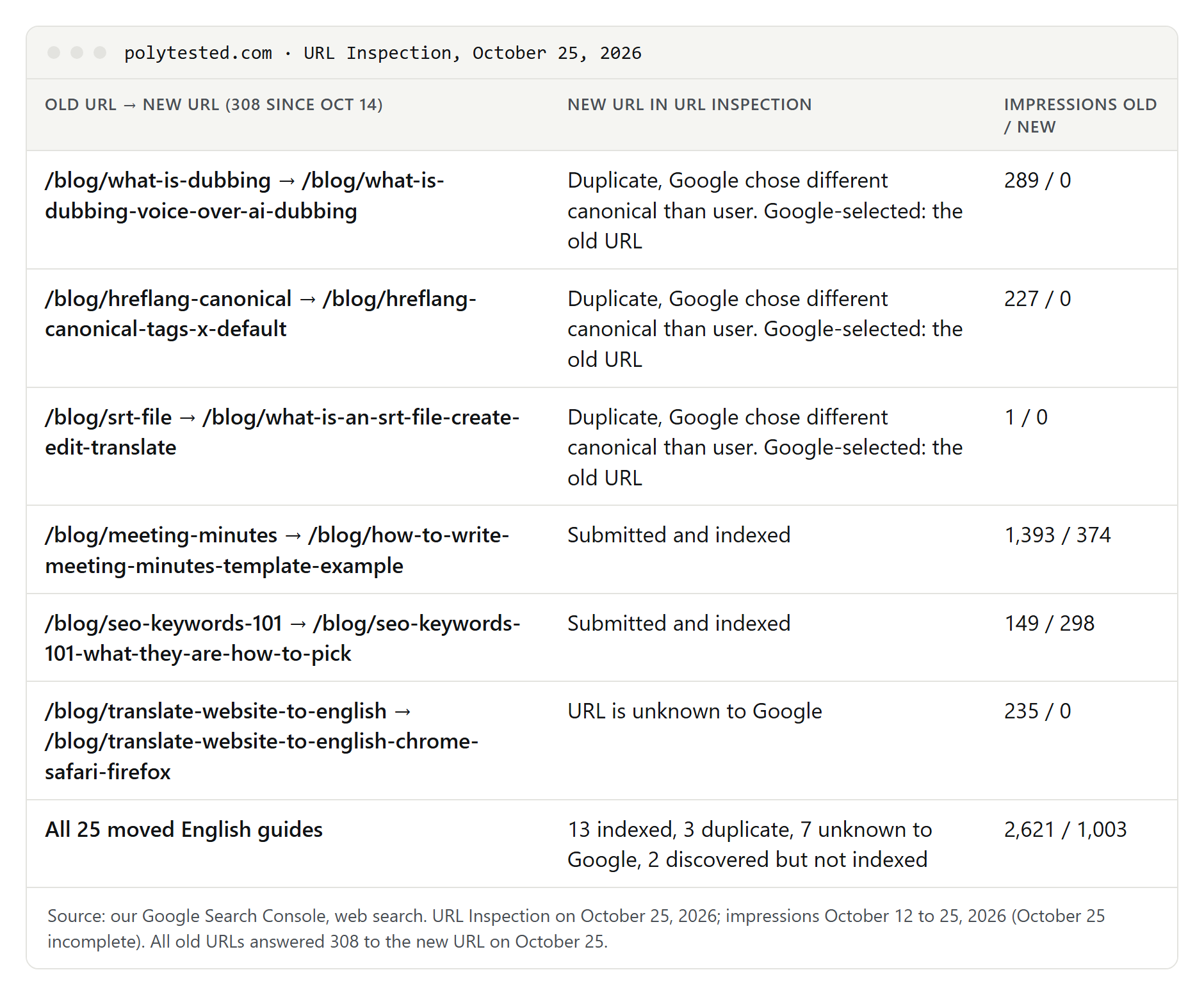
- Three new URLs had the status "Duplicate, Google chose different canonical than user". For all three, the Google-selected canonical was the old address, which had redirected for 11 days. Google had last crawled the new URLs on October 15 and 16, and most old URLs on October 13 to 15, before or just after the change.
- Of the 25 new English URLs, 13 were indexed, 7 were still unknown to Google, 2 were discovered but not crawled, and 3 were the duplicates above.
- Impressions stayed with the old URLs. Of 4,075 impressions on English pages, 2,621 (64 percent) were counted on the old short URLs. That fits Google's rule that data goes to the canonical URL.
- The German guides moved cleanly. Their old URLs were barely known to Google: all nine new URLs were indexed, and the old URLs had no impressions at all.
- Everything we send points to the new URLs. On October 25, all 35 old addresses answered 308 to the right page, every new page named itself as canonical, and the hreflang links in all four languages led to pages that answered 200.
So the duplicate status here is not a misconfiguration but the delay Google describes for moved pages: each old URL is processed when it is crawled again. One more page in our sitemaps, /fr/cookies, was "Crawled - currently not indexed", with itself as Google-selected canonical, while the cookie pages in the three other languages were indexed. No canonical issue, and a cookie policy doesn't need to rank.
The limits of this data: the site is new, the period is short, and positions are averages. Many of these impressions came from far down the results; the old meeting-minutes URL, for example, averaged position 81, where few people scroll.
What to do after a URL change
- Keep the permanent redirects. Removing them, or pointing the canonical back to the old URL, would send mixed signals.
- Update every signal at once: canonical tags, internal links, the sitemap, and the hreflang links in every other language.
- Help Google revisit the old URLs. Google's site-move guide suggests submitting a sitemap with the old URLs next to the new one, so you can watch the old one's indexed count fall; warnings about redirects in that sitemap are normal. On October 25, 2026 we added a temporary sitemap with our 35 redirected addresses to our sitemap index. We can't say yet whether it speeds things up. Our guide to the XML sitemap covers the format.
- Request indexing for a handful of important new URLs, not for all of them; the feature has a daily limit.
- Validate the fix only if you want progress emails. Google updates the counts whenever it crawls the pages anyway; a validation typically takes up to about two weeks.
- Plan for weeks. Google says most pages of a small or medium site take a few weeks to move, and that pages can stay in a duplicate group for up to two weeks after you fix the content.
Canonical issues on multilingual sites
A translation is not a duplicate. Each language version names itself as canonical, and hreflang links connect the versions; Google asks for a canonical in the same language. If only the menu and footer are translated and the main text stays in English, though, Google does treat the pages as duplicates.
Two common mistakes: translations whose canonical points to the English page, so Google may index only the English version, and hreflang links that still point to old URLs after a slug change in one language. When our English slugs changed, the German, French and Spanish pages had to link to the new English URLs too. Google also prefers URLs that are part of an hreflang group when it picks a canonical. More in our guides to hreflang and canonical tags and international SEO.
A fix order that works
- Find the URLs: in the Page indexing report, open the row of each canonical status.
- Inspect a few examples and sort them into the four patterns above.
- Check what your server sends with curl: status, canonical, noindex, hreflang.
- Crawl the site for canonicals, internal links and sitemap entries that point to redirects or errors.
- Make every signal name the same final URL; redirect what should disappear.
- Request indexing for the most important URLs, then wait a few weeks before you judge the result.
- Leave "Alternate page with proper canonical tag" and expected "Page with redirect" entries alone.