M4A transcription doesn't need a converter in between. An M4A file is ordinary MP4 audio, and the common tools take it as it is: free online converters such as TurboScribe or Jumpshare for a short file, Apple's built-in transcripts for iPhone Voice Memos, Word's Transcribe with Microsoft 365, and OpenAI's free Whisper on your computer, which got 1.45 percent of the words wrong in our English test. Convert to MP3 or WAV only when a tool rejects the codec inside. Below: each route, the free limits from vendor pages, and how to check that codec.
Which way to turn M4A into text
| Way | Cost | Where the audio goes | Good for |
|---|---|---|---|
| Free online converters | Free files or minutes, then paid | Their servers | One short file with nothing private in it |
| Voice Memos or Notes | Included with iPhone 12 or later and Macs | Apple's pages don't say | Recordings made in those apps |
| Shortcuts, Transcribe Audio action | Included with iOS 17 and macOS 14 or later | Apple's notes don't say | An existing file on an Apple device |
| Word's Transcribe | Microsoft 365 subscription | Sent to Microsoft, copy kept in OneDrive | Speaker labels and timestamps in Word |
| Whisper on your computer | Free, open source | Stays on your computer | Long, private or many files |
| Fireflies, Descript | Free plans with limits | Their cloud | Meetings and editing |
| ChatGPT | Paid plans only | OpenAI | Asking questions about the recording |
| Gemini app | Up to 10 minutes of audio, longer with paid plans | Very short clips |
- The recording was made in Voice Memos on an iPhone 12 or later? Open it there first. The transcript may already exist.
- One short file and nothing confidential in it? A free online converter is the quickest route; the table in the next section shows what each one allows without paying.
- The file is long, confidential or one of many? Use Whisper. It is free, works offline once the model is downloaded, and was the most accurate free engine in our test.
- You need speaker names and clickable timestamps, and you pay for Microsoft 365? Word's Transcribe takes .m4a directly.
- The file came from a Zoom meeting? Check whether you have one M4A per participant. That solves the "who said what" problem before you start.
Free M4A to text converters online
"Free" means something different on every site: a number of files per day, a number of minutes, or a trial. We read each service's own page on 4 November 2026 and uploaded nothing. Free limits change often, so check the page again before you rely on one.
| Service | Takes M4A | Account for free use | Free use | Limit per file | Also worth knowing |
|---|---|---|---|---|---|
| TurboScribe | Yes | Not needed, says its free tool page | 3 files a day, one at a time | 30 minutes | Built on Whisper; says uploads aren't used to train AI |
| Any2Text | Yes | Not needed to start | First 15 minutes | Length not limited, says the page | Exports DOCX, XLSX, SRT, TXT |
| Jumpshare | Yes | Not needed | 2 files a day, one at a time | 100 MB and 1 hour | File deleted after 24 hours without an account |
| Happy Scribe | Yes | Not stated | 10-minute trial | Not stated | Over 150 languages, dialects and accents |
| Go Transcribe | Yes | Needed to get the file | Free trial, terms not on the page | No fixed limit; under 4 GB recommended | Exports Word, PDF, SRT, VTT |
| Otter | Not listed on its pricing page | Needed | 3 file imports in total on the Basic plan | 30 minutes | Basic plan exports TXT only |
| Fireflies | Yes | Needed | Free plan, 400 minutes of storage | 500 MB of audio, 150 minutes | Downloading transcripts is listed as a paid feature |
| Descript | AAC, MP3 or PCM inside, not Opus or ALAC | Needed | Free plan | 1 GB | iPhone 16 Spatial Audio files treated as stereo |
| ChatGPT | Yes | Needed | Not on the Free plan | 512 MB | Speaker identification "may be unreliable" |
| Gemini app | Audio formats not listed | Not stated | Audio up to 10 minutes in total | 100 MB | Up to 3 hours with Google AI Pro or Ultra |
Which one fits:
- No account, one file under half an hour: TurboScribe or Jumpshare. Jumpshare's hour per file is longer, but you get two files a day instead of three.
- A file longer than an hour: split it, or use Whisper.
- Subtitles from the M4A: Any2Text, TurboScribe and Go Transcribe export SRT. Our guide to audio to SRT covers line length and reading speed.
Several of these pages promise 98 or 99 percent accuracy without saying how, on which recordings or in which language that was measured.
How to use an upload site with the least risk:
- Check the length first. Most free limits are in minutes or files, not megabytes; split long recordings with the ffmpeg command further down.
- Set the spoken language if the site lets you, instead of leaving it on automatic detection.
- Download the format you need before a free period ends: TXT for reading, DOCX for editing, SRT for subtitles.
- Delete the file and the transcript when you are done, if the site allows it.
- Skip upload sites for anything confidential: medical, legal, HR or a recording of other people who haven't agreed.
Google Docs is not on the list for a reason: its voice typing listens to your microphone, and Google documents no way to upload an audio file.
iPhone Voice Memos: Apple's built-in transcripts
Many M4A files come from Voice Memos, and on a recent iPhone the transcript is already built in. This section follows Apple's help pages for iOS 27.
Get the transcript on the iPhone
Voice Memos transcribes speech on an iPhone 12 or later in English (all variants), Spanish, Portuguese, Italian, French, German, Japanese, Korean, and Simplified and Traditional Chinese, though not in every country or region.
- Open the Voice Memos app (in the Utilities folder).
- Tap the recording, then tap the options button.
- Choose View Transcript to select and copy part of the text, or Copy Transcript for all of it.
The search in Voice Memos also finds words inside transcripts. When you open a recording made in iOS 17 or earlier, Voice Memos transcribes it automatically if it contains speech.
Older iPhones and the Mac
On a Mac, Voice Memos transcribes recordings made on a device that doesn't support transcription, and recordings made in macOS 14 or earlier. If Voice Memos is turned on in iCloud, recordings from your iPhone appear on the Mac signed in to the same Apple Account, so a Mac can produce the transcript an older iPhone can't. On the Mac, click the recording, then the Transcription button, and copy the text.
Export the M4A for another tool
Apple's help page says recordings are exported from Voice Memos "in .m4a format" by default: tap the recording, open the share options and choose Save to Files. Layered recordings are flattened into one track and Spatial Audio becomes stereo. If you tap Options and choose Editable instead, you get a QuickTime Audio file (.qta) that keeps layers and effects. For transcription, use the default .m4a. On a Mac, drag the recording to a Finder window.
Layered recordings are stored as QTA. Apple notes that only the first layer can be transcribed, and that separated layers become .m4a files again.
Apple's pages don't describe importing an M4A from elsewhere into Voice Memos.
Notes
Notes records and transcribes audio inside a note: Record Audio in a note, and afterward Add Transcript to Note or Copy Transcript. You can tap a word in the transcript to hear that moment. It needs an iPhone 12 or later, or a Mac with M1 or later. Calls you record in the Phone or FaceTime app (iOS 18.1 or later) are transcribed into Notes too. If you would rather speak than record, our guide to dictation on a Mac covers typing by voice.
Shortcuts: the Transcribe Audio action
This is the only Apple feature documented for files you already have. Apple's release notes for iOS 17 and macOS 14 say the Shortcuts action Transcribe Audio "generates text from an audio file", and the notes for version 26 say its performance improved. A small shortcut does it: pick the M4A, then Transcribe Audio, then save or copy the text. Apple's notes don't list languages, length limits or where the audio is processed.
Word's Transcribe
Microsoft's help page lists .m4a among the four formats Word's Transcribe accepts, next to .wav, .mp4 and .mp3, and says it works with more than 80 locales.
- In Word, go to Home, Dictate, Transcribe.
- In the Transcribe pane, select Upload audio and choose the M4A file.
- Keep the pane open. Microsoft says transcription can take up to about the length of the recording.
What you get: sections labeled "Speaker 1", "Speaker 2" and so on, which you can rename, and timestamps you can click to play that part.
What to know first:
- It needs a Microsoft 365 subscription, with up to 300 minutes of uploaded audio per month.
- On the desktop, it works only in Word for Microsoft 365 on Windows in what Microsoft calls commercial tenants; otherwise use Word for the web, in the new Microsoft Edge or in Chrome.
- It needs an internet connection. Microsoft says the audio is sent to Microsoft only to provide the service and isn't stored by the transcription service afterward, but the uploaded file stays in a Transcribed Files folder in your OneDrive until you delete it.
Dictation, voice commands and fixes for Word are in our guide to speech to text in Word.
Whisper: free, offline, takes M4A as it is
Whisper is OpenAI's open-source speech recognizer, released under the MIT License. It runs on your computer and never uploads the recording, and it has no daily or monthly limit.
- Install Python and ffmpeg. The Whisper README suggests
choco install ffmpegorscoop install ffmpegon Windows andbrew install ffmpegon a Mac. - Install Whisper with
pip install -U openai-whisper. - Transcribe the M4A directly:
whisper voice-memo.m4a --model turbo --language English --output_format txt
whisper interview-part-1.m4a interview-part-2.m4a --model turbo --language English --output_format srt
The first line writes plain text; the second handles two files in one go and writes SRT subtitle files with timestamps. Leave out --output_format and you get TXT, VTT, SRT, TSV, JSON and JSONL at once. turbo is also the model Whisper uses when you don't name one.
You don't need to convert anything. ffmpeg decodes AAC, Apple Lossless and Opus, and Whisper resamples every file to mono at 16,000 samples per second anyway, so a WAV copy adds nothing it can use.
On our laptop without a graphics card, the turbo model needed about 39 minutes of computer time per hour of audio, and about 8 minutes with the laptop's graphics card. If you prefer a window to a terminal, free apps such as Buzz, noScribe or aTrain put one around Whisper; our guide on how to transcribe an audio recording compares the models and the apps.
What an M4A file is
M4A is not a codec but a file extension. Behind it is the MP4 file format, defined in part 14 of the MPEG-4 standard (ISO/IEC 14496-14). According to the Library of Congress, M4A files contain only audio, and Apple started using the extension for audio files without copy protection, partly because the general .mp4 might confuse some media players. Protected files from the same family end in .m4p, and bookmarkable ones such as audiobooks in .m4b. The registry of MP4 file types (MP4RA) lists the brand M4A for iTunes MPEG-4 audio.
Inside the file sits audio coded in one of several ways:
- AAC, a lossy codec, is the usual one. Microsoft's Windows Media Player help says .m4a files are "often" AAC.
- Apple Lossless (ALAC) keeps every detail and makes much larger files. Apple published the codec as open source under the Apache 2.0 license.
- Opus and other codecs can also end up in an MP4 audio file, as our own test below shows.
Why this matters: no speech recognizer reads the M4A itself. Each one first decodes the audio into plain samples; Whisper, for example, calls the free ffmpeg program for that. So the useful question is never "does this tool accept M4A?" but "can it decode the codec inside my M4A?"
Inside an M4A file we made
We generated a three-second test tone in the Chrome browser (version 156 on Windows 11), let the browser's built-in recorder, which websites can use to record your voice, save it as MP4 audio, and read the result box by box.
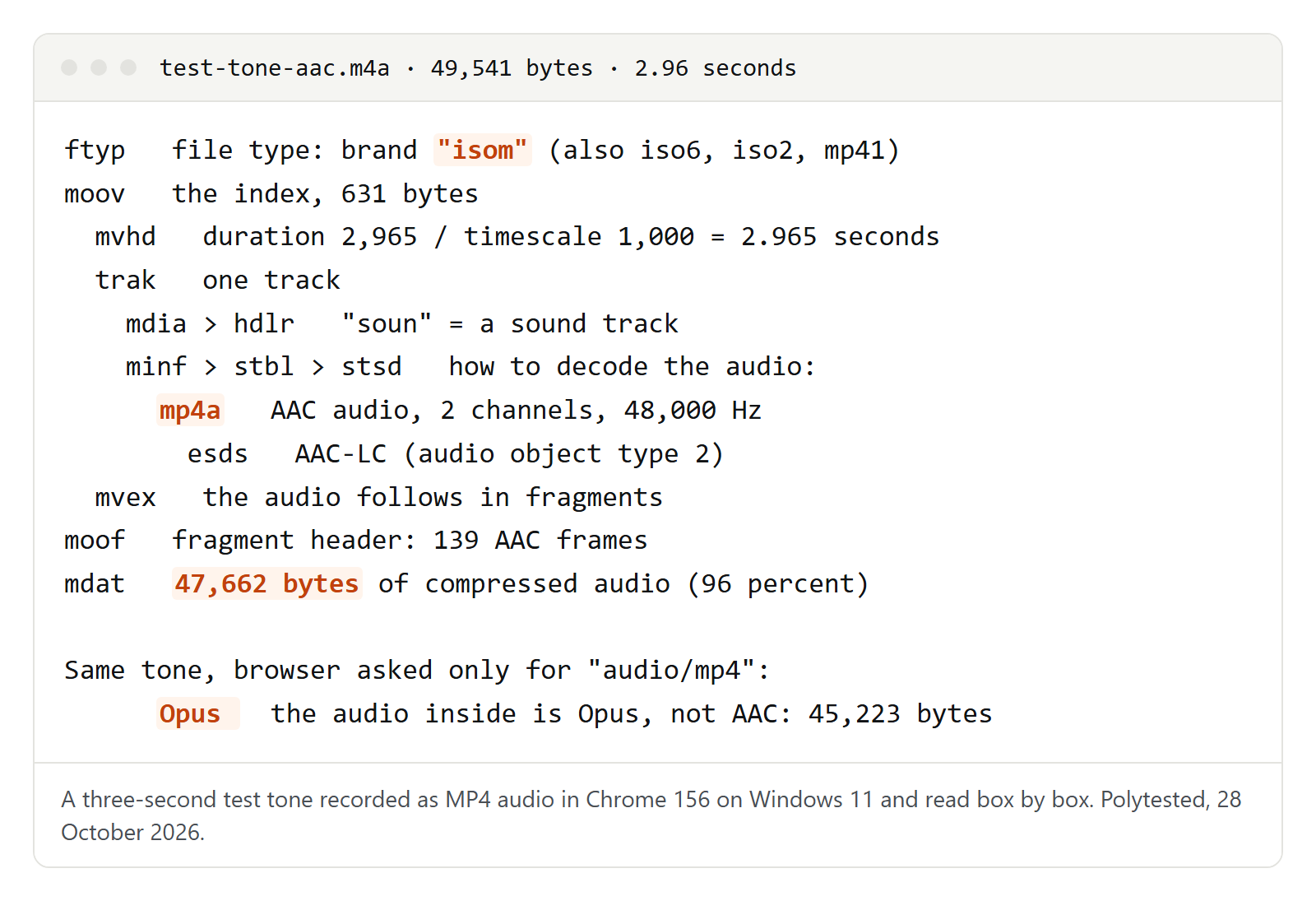
An MP4 file is a chain of "boxes", each with a four-letter name and a length. What ours contained:
- ftyp, the file type. Ours says "isom", the generic ISO media format, not M4A. The name test-tone-aac.m4a was our choice: the browser handed over the data without a file name. The extension alone tells you little; the boxes tell you what is really there.
- moov, the index, 631 bytes. It holds the duration (2.965 seconds), marks the track as sound ("soun") and, in the box called mp4a, says how to decode the audio: AAC-LC, two channels, 48,000 samples per second.
- moof and mdat, the audio itself, here in one fragment of 139 AAC frames. The audio data takes 47,662 of the 49,541 bytes, 96 percent of the file, at about 128 kilobits per second, the bit rate the browser chose.
Then the surprise. When we asked the browser for "audio/mp4" without naming a codec, it chose Opus, not AAC. The boxes looked the same, but the codec box was called "Opus" instead of "mp4a". Descript's help page says its app accepts M4A files with AAC, MP3 or PCM audio, not with Opus. So an M4A that a website recorded for you is not always the M4A a transcription tool expects.
To check your own file, use ffprobe, which comes with ffmpeg (Whisper needs ffmpeg anyway):
ffprobe -v error -show_entries stream=codec_name,channels,sample_rate:format=duration recording.m4acodec_name=aac means AAC, alac Apple Lossless and opus Opus. The other lines give the channels, the sample rate and the duration in seconds.
Where else your M4A file came from
- Voice Memos on a Mac: Settings, Audio Quality offers Compressed (smaller files) or Lossless (larger files). Apple doesn't name the codec on that page. If a tool rejects a Lossless recording, check the codec with the ffprobe command above.
- Zoom: Zoom's help page lists an audio-only M4A file next to the video for both computer and cloud recordings, named audio followed by a number, for example audio98796876.m4a. Computer recordings can also include a separate audio file for each participant, named after the person. Those files are the easiest route to a transcript with correct speakers.
- Windows Sound Recorder: in 2022 Microsoft added a file format setting to the Windows 11 app, so check the extension. Whisper and Word's Transcribe take M4A, MP3 and WAV alike.
- Microsoft Teams: a Teams meeting recording is not an M4A file; Microsoft's help page calls it an .mp4 file. You don't need to extract the audio, because Word's Transcribe and Whisper both read MP4 video as well.
- Android phones: Google's Recorder app on Pixel phones transcribes its own recordings, in English (United States) and other languages, and can share the transcript as a .txt file or the audio as a file. Google's help pages don't name the audio format. Other Android recorders differ; check the file extension.
- Purchased music and audiobooks: copy-protected audio from the same family carries the .m4p extension. Descript's help page accepts files only if they are not encrypted or DRM-protected, and we found no free transcription route for such files. Use an unprotected copy of the recording instead.
When to convert M4A to MP3 or WAV first
Convert only in these cases:
- A tool rejects a file it should accept. Check the codec. Descript's app, for example, doesn't take Opus or Apple Lossless inside M4A.
- A tool doesn't list M4A at all. Some uploaders name only MP3 and WAV; an MP3 copy is the smallest safe choice.
- The file ends in .qta. Export it again from Voice Memos with the default options.
- The recording is longer than a tool's limit per file. Split it instead of converting.
The ffmpeg commands:
ffmpeg -i memo.m4a memo.mp3
ffmpeg -i memo.m4a -ac 1 -ar 16000 memo-16k.wav
ffmpeg -i meeting.m4a -t 00:30:00 -c copy meeting-part-1.m4a
ffmpeg -ss 00:30:00 -i meeting.m4a -c copy meeting-part-2.m4a
The first makes an MP3. The second makes a mono WAV at 16,000 samples per second, the form Whisper uses internally. The last two split a recording at the half-hour mark, which fits the strictest per-file limit in the table above; for longer pieces, change both times. -c copy copies the audio without decoding it again, so it keeps its quality.
Don't convert to WAV "for better quality". Decoding can't bring back what AAC left out, and WAV is much larger, which matters when a site limits the file size:
| Format | Bit rate | One hour | Length that fits in 100 MB |
|---|---|---|---|
| M4A with AAC | 64 kbit/s | about 29 MB | about 3 hours 28 minutes |
| M4A with AAC, like our test file | 128 kbit/s | about 58 MB | about 1 hour 44 minutes |
| WAV, mono, 16,000 samples per second | 256 kbit/s | about 115 MB | about 52 minutes |
| WAV, stereo, 44,100 samples per second | 1,411 kbit/s | about 635 MB | about 9 minutes |
| WAV, stereo, 48,000 samples per second | 1,536 kbit/s | about 691 MB | about 9 minutes |
With a compressed M4A, the length limit usually comes before the size limit: a one-hour file at 128 kbit/s stays well under the 100 MB of Jumpshare and the Gemini app, the strictest size limits in our table.
Timestamps and speakers
What you get depends on the route:
- Whisper writes timestamps in its SRT, VTT, TSV and JSON files, not in the TXT file. It doesn't label speakers.
- Word's Transcribe labels speakers and gives timestamps you can click.
- Apple's Voice Memos and Notes let you jump from a word to that moment in the audio. Apple's pages describe copying the text, not exporting timestamps or speakers.
For meetings, Zoom's separate audio files are the cleanest solution. Transcribe each participant's M4A with Whisper as SRT, and the speaker is known from the file name. Then merge the lines by their start times. Whisper can invent words in long silences, which these files have, so check those spots.
Once the speakers are known, our guide to the speaker label format shows how to write them, and the time-coded transcript guide how to lay out timestamps. Whether to keep every "um" and false start is a style choice; full verbatim transcription explains the options. If you already have plain text and need subtitles, see how to convert TXT to SRT.
How accurate to expect
We measured free speech engines on six public-domain LibriVox audiobook clips, three in English and three in German, on 16 and 17 October 2026. On the English clips, Whisper's default turbo model got 18 of 1,238 words wrong, 1.45 percent. small reached 3.5 percent, tiny 8.2 percent, and Vosk's big English model 8.4 percent. On recordings published in 2025, turbo got 1.0 percent wrong.
Audiobooks are a best case: one clear voice, a good microphone, no interruptions. When we mixed steady background noise into the same clips, turbo went from 1.4 to 2.3 percent and small from 3.6 to 5.2 percent. Cutting the audio to telephone bandwidth cost less: turbo rose from 1.4 to 1.6 percent.
What does the M4A format change? We didn't compare the same speech as AAC and as WAV. What we can say: Whisper reduces every file to mono at 16,000 samples per second, so stereo, a high sample rate or a lossless codec give it nothing extra. A close microphone and a quiet room matter more than the file format. What this page says about Word, Apple and the upload sites comes from their own pages.
Privacy before you upload
- Stays on your device: Whisper and the apps built on it.
- Not documented: Apple's Voice Memos, Notes and Shortcuts pages don't say where transcription runs.
- Word: audio is sent to Microsoft; a copy stays in your OneDrive.
- Fireflies: stored and processed in the US by default; Fireflies says it doesn't use customer data for AI training.
- TurboScribe: says files are stored encrypted, that only you have access, that uploads aren't used to train AI models and that you can delete them at any time.
- Jumpshare: deletes a file after 24 hours if you have no account, and keeps it as long as your account is active if you do.
- Other upload sites: several of the pages above don't say how long they keep a file; read each privacy policy.
- Pixel Recorder: Google says its Re-transcribe feature may process audio on Google servers.
The other question is whether you may transcribe the recording at all, especially a call or meeting recorded with other people. Our guide on how to transcribe an interview explains how to ask for consent. This is not legal advice.
When an M4A won't transcribe
| What happens | Likely reason | What to try |
|---|---|---|
| "File not supported", although the tool lists M4A | Opus or Apple Lossless inside | Check with ffprobe; convert to MP3 or WAV |
| The file ends in .qta | Voice Memos "Editable" export or a layered recording | Export again with default options, or separate the layers |
| Upload refused or cut off | Limit per file, in minutes or MB | Split the recording with ffmpeg |
| No transcript in Voice Memos | Older iPhone, unsupported language or region | Open the recording on a Mac via iCloud, or use Whisper |
| Transcript in the wrong language | Automatic language detection guessed wrong | Set the language yourself |
| Transcript far shorter than the recording | A repetition loop or a skipped part | Compare length with the recording; run Whisper with its command defaults |
| Nothing works with a .m4p file | Copy protection | Use an unprotected copy of the recording |
That repetition loop is real: in our test, Whisper's base model, called from Python with the library's plain defaults, returned one chapter heading 47 times for a 14.5-minute story. The whisper command with its default settings didn't loop.
Before you use the text:
- Listen once while reading along.
- Check names, numbers and technical terms, where errors clustered in our test.
- Read the last lines and delete anything nobody said.
- Compare the transcript's length with the recording.
- Decide what you need. If it's decisions rather than every word, write meeting minutes from the transcript; if you need a clean version for readers, our transcript examples show the common styles side by side.