A good transcript example shows the same words in more than one style, because the style decides what you can do with the text. Below is one invented 40-second conversation, a bike shop owner talking about online bookings, written six ways: verbatim, clean verbatim, edited, time-coded, as a research interview and as a video transcript that describes what is on screen. Each version is plain text you can copy, followed by what it keeps, what it drops and when to use it.
The conversation behind every example
We wrote the conversation ourselves; it is not a real recording. It packs into 40 seconds most of what makes transcription hard: hesitation sounds, filler words, a false start, a stutter, a listener's "mm-hmm", a laugh, a pause, a word nobody can make out and two people talking at once. We wrote the verbatim version first and made every other version from it by deleting or replacing the marked items, so the differences you see come from the style alone.
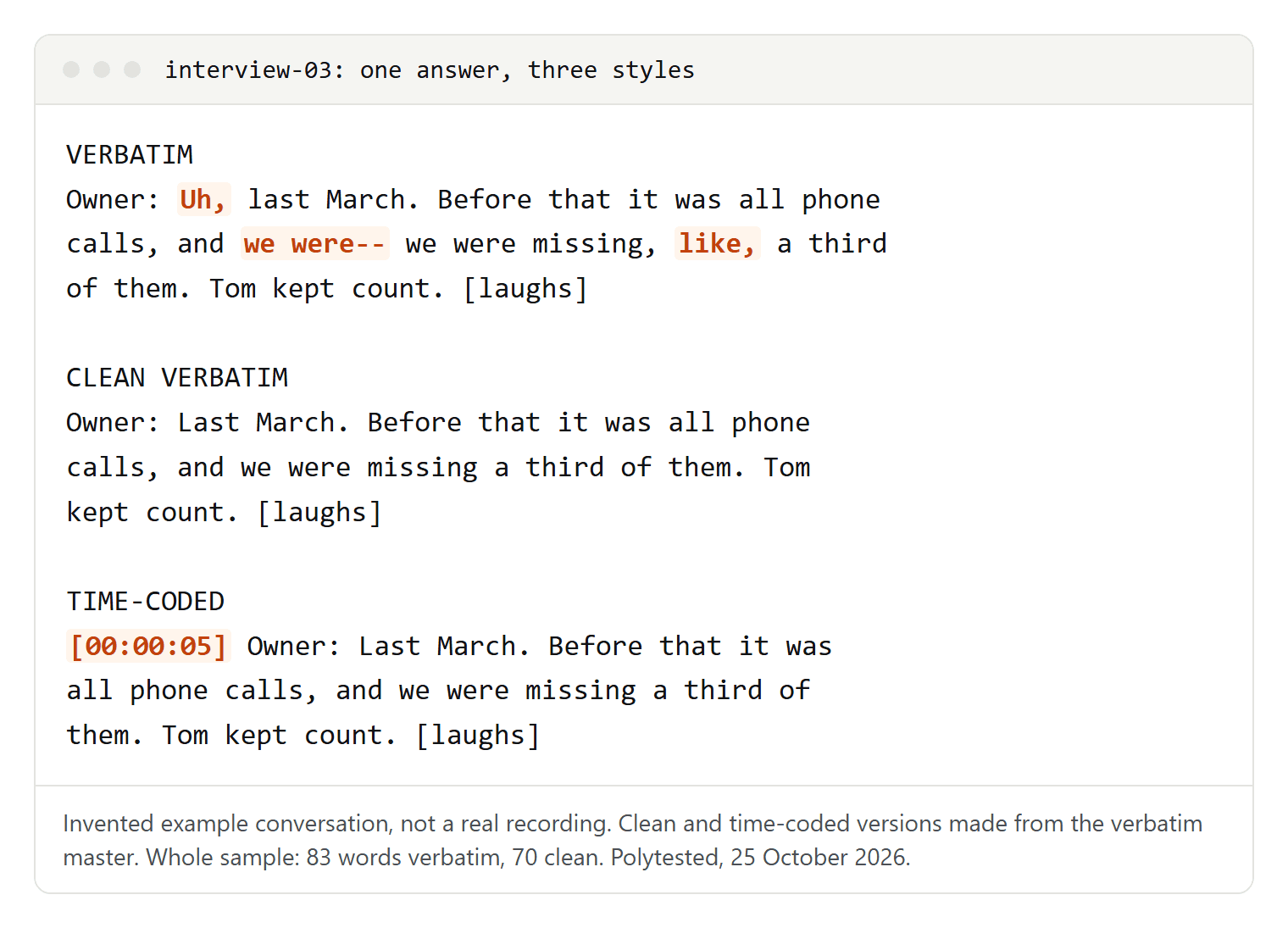
The verbatim version has 83 words. The clean version has 70, so 13 words, about one in six, are hesitations, fillers and false starts. The edited version, rewritten for reading, has 57.
Example 1: verbatim transcript
Also called true verbatim or full verbatim: every sound a speaker makes goes in, exactly as it was said.
Interviewer: So, um, when did you start taking bookings online?
Owner: Uh, last March. Before that it was all phone calls, and we were-- we were missing, like, a third of them. Tom kept count. [laughs]
Interviewer: Mm-hmm.
Owner: And, you know, the phone always rings when you've got grease [silence] up to your elbows. So we tried a booking page.
Interviewer: And did it work?
Owner: Mostly. People still call, but the no-shows went down, I mean, a lot. The reminder texts [inaudible 00:00:31] help.
Interviewer: [crosstalk] Would you do it again?
Owner: [crosstalk] Def-- Definitely.
It keeps "um" and "uh", filler words such as "like" and "you know", the false start "we were-- we were", the stutter "Def-- Definitely", the listener's "Mm-hmm", the pause, the laugh, the inaudible word with its time and the moment both people talk at once. The double dash for a broken-off phrase and the tags in square brackets follow the transcription guidelines that GoTranscript publishes for its transcribers. Those guidelines also separate two tags: [inaudible] when a word can't be heard, [unintelligible] when it can be heard but not understood.
Use verbatim when how something was said matters as much as what was said. W3C's accessibility guidance names legal depositions as content to transcribe verbatim, including "um", "ah" and repeated phrases, and research on speech needs it too. Keep it as your master copy even if nobody else reads it: every other version below can be made from it, but not the other way round.
Example 2: clean verbatim transcript
Interviewer: When did you start taking bookings online?
Owner: Last March. Before that it was all phone calls, and we were missing a third of them. Tom kept count. [laughs] The phone always rings when you've got grease up to your elbows. So we tried a booking page.
Interviewer: And did it work?
Owner: Mostly. People still call, but the no-shows went down a lot. The reminder texts [inaudible 00:00:31] help.
Interviewer: [crosstalk] Would you do it again?
Owner: [crosstalk] Definitely.
Clean verbatim keeps every word that carries meaning and removes what only gets in the way of reading: hesitation sounds, filler words, false starts, stutters and the listener's "mm-hmm", which didn't answer a question. With the "mm-hmm" gone, the owner's two turns join into one. Three things stay on purpose:
- The grammar as spoken. W3C's guidance says it is usually not appropriate to correct grammar, and GoTranscript's rules say the same. "It was all phone calls" stays as it is.
- The laugh. It tells the reader that the count was half a joke.
- The inaudible marker with its time. Deleting it would hide a gap, and the time lets someone listen again.
Rules differ in the details. GoTranscript's clean verbatim, for example, writes "gonna" as "going to" and "yeah" as "yes", and keeps a filler word when removing it would change the meaning. Whatever rules you choose, write them down so that every transcript follows them. Clean verbatim suits interviews you will quote, podcasts and most business recordings.
Example 3: edited transcript
Interviewer: When did you start taking bookings online?
Owner: Last March. Before that, all bookings came in by phone, and we missed about a third of the calls, because the phone rang while we were working on bikes. With the booking page, far fewer people fail to show up. The reminder texts [one word inaudible] help.
Interviewer: Would you do it again?
Owner: Definitely.
An edited transcript turns speech into written sentences. Some services call a version like this intelligent verbatim, but they don't agree on what the term means, so ask for the definition before you order one. Phrases are merged and reworded: "it was all phone calls" becomes "all bookings came in by phone". It reads well as a Q&A article, in show notes or in a newsletter.
Two rules keep it honest:
- Don't quote from it. The owner never said "far fewer people fail to show up".
- Keep the gap marked. The missing word in "the reminder texts [inaudible] help" could have been "don't". An edited version that quietly smooths that over may say the opposite of what was said.
Example 4: time-coded conversation transcript
[00:00:02] Interviewer: When did you start taking bookings online?
[00:00:05] Owner: Last March. Before that it was all phone calls, and we were missing a third of them. Tom kept count. [laughs] The phone always rings when you've got grease up to your elbows. So we tried a booking page.
[00:00:24] Interviewer: And did it work?
[00:00:25] Owner: Mostly. People still call, but the no-shows went down a lot. The reminder texts [inaudible 00:00:31] help.
[00:00:33] Interviewer: [crosstalk] Would you do it again?
[00:00:34] Owner: [crosstalk] Definitely.
This is the clean version with a timestamp at every change of speaker, written as hours, minutes and seconds with leading zeros so that the stamps sort and search cleanly. It is a common layout for meetings, podcasts and long conversations, where readers need to find a passage in the recording. The owner's answer starts at 00:00:05 and runs on past the "mm-hmm" at 00:00:14; because the clean version merges those turns, the first stamp is the one that counts.
Fireflies lets you switch timestamps and speaker labels on or off when you download a transcript as PDF, DOCX, SRT, CSV, JSON or Markdown; downloads need a Pro plan or higher. Other notations, how often to stamp and how to add timestamps by hand are in our guide to time-coded transcripts.
Example 5: interview transcript for research
Project: Small-business interviews, interview 03
Recording: interview-03.mp4, 40 seconds
Speakers: I = interviewer, P1 = shop owner
Style: clean verbatim, names replaced, [inaudible] with time
Transcribed by: [initials], checked by: [initials]

[00:00:02] I: When did you start taking bookings online?
[00:00:05] P1: Last March. Before that it was all phone calls, and we were missing a third of them. [her brother] kept count. [laughs] The phone always rings when you've got grease up to your elbows. So we tried a booking page.
[00:00:24] I: And did it work?
[00:00:25] P1: Mostly. People still call, but the no-shows went down a lot. The reminder texts [inaudible 00:00:31] help.
[00:00:33] I: [crosstalk] Would you do it again?
[00:00:34] P1: [crosstalk] Definitely.
A research transcript opens with a header that says what the file is and how it was made. It uses short codes instead of names (I for the interviewer, P1 for the first participant) and replaces names that could identify someone: "Tom" became "[her brother]". The style line matters most, because anyone who reads or codes the transcript later needs to know whether the "um"s were left out on purpose. If your university, supervisor or client prescribes rules, theirs come first. Consent, a notation key to copy and how long transcribing takes are in how to transcribe an interview.
Example 6: video transcript with timestamps
[00:00] [On screen: a small bike repair shop. Text: "Interview, October 2026"]
[00:02] Interviewer: When did you start taking bookings online?
[00:05] Owner: Last March. Before that it was all phone calls, and we were missing a third of them. Tom kept count. [laughs]
[00:15] The phone always rings when you've got grease up to your elbows. So we tried a booking page.
[00:20] [Close-up: the owner wipes her hands on a cloth]
[00:24] Interviewer: And did it work?
[00:25] Owner: Mostly. People still call, but the no-shows went down a lot. The reminder texts [inaudible 00:00:31] help.
[00:28] [On screen: a phone shows a booking confirmation]
[00:33] Interviewer: [crosstalk] Would you do it again?
[00:34] Owner: [crosstalk] Definitely.
A video transcript adds what a viewer sees and a listener misses: text on screen, who is speaking and actions that matter. W3C calls this a descriptive transcript. People who are Deafblind need it, since they get the content from neither the sound nor the picture, and it helps anyone who would rather read. Under WCAG, prerecorded audio-only content needs a transcript at Level A, and video-only content needs a descriptive transcript or an audio description; for a video with sound, captions are Level A and a transcript is Level AAA.
Three tips from W3C's guidance:
- Timestamps only where they help, and without end times. In a short clip, minutes and seconds are enough.
- Starting from captions? Add the text shown on screen and the speakers' names, which caption files often leave out.
- A two-column table with the audio on the left and the visual information on the right lets readers skip the descriptions.
For someone else's YouTube video, start from the transcript panel described in how to get a YouTube transcript. For your own video, take its caption file, convert the SRT to text and add the visual lines.
What each style keeps and drops
| Item | Verbatim | Clean | Edited | Time-coded | Research | Video |
|---|---|---|---|---|---|---|
| Um, uh | yes | no | no | no | no | no |
| Like, you know, I mean | yes | no | no | no | no | no |
| False starts, stutters | yes | no | no | no | no | no |
| Listener's mm-hmm | yes | no | no | no | no | no |
| Grammar as spoken | yes | yes | no | yes | yes | yes |
| Laughs | yes | yes | no | yes | yes | yes |
| Inaudible marks | yes | yes | yes | yes | yes | yes |
| Timestamps | optional | optional | no | speaker changes | speaker changes | every line |
| Real names | yes | yes | yes | yes | replaced | yes |
| What's on screen | no | no | no | no | no | yes |
| Best for | legal records, speech research, master copy | quotes, interviews, podcasts | articles, show notes | meetings, long recordings | theses, user research | video pages, accessibility |
Make every version from one verbatim master
The order matters. Deleting fillers from a verbatim transcript takes minutes, but you can't put back fillers you never typed.
- Transcribe or correct the verbatim version first and save it as the master. Don't edit it again.
- Copy it and make the clean version. Delete hesitation sounds, filler words, false starts and stutters, drop listener sounds that don't answer a question, and join the turns that now stand next to each other. Check every "like" and "so" before you delete it: in "I like it", "like" isn't a filler.
- Copy the clean version for the other formats: timestamps at speaker changes, a header with codes, or the visual lines.
- Write the edited version last, from the clean one, and never quote from it.
In our sample, step 2 removed eight items, 13 of 83 words, and turned eight turns into six.
Software can do part of step 2. Descript detects filler words such as "um" and "uh" and lists them in the AI Tools panel under Remove filler words, where you can delete each one with its audio or remove it from the transcript only. Its help center says detection works for English transcripts only. Neither Descript nor Fireflies decides whether a "like" carries meaning, and neither writes the visual descriptions of a video transcript. Free ways to get the first draft are compared in our guide to transcribing audio to text. If you need decisions and action items rather than words, write meeting minutes instead.
