The most accurate free way to transcribe an audio recording in our test was OpenAI's Whisper running on your own computer, either from the command line or inside a free desktop app. Its default model, turbo, got 1.45 percent of the words wrong on clean English audiobook speech, fewer than 2 in 100, and the audio never left the laptop. If you already pay for Microsoft 365, Word's Transcribe feature takes an uploaded file; an iPhone transcribes what you record in Voice Memos or Notes; upload sites are quick when privacy doesn't matter. Below: our test of eight free speech engines, then each way step by step.
Which free way fits your recording
- A file on your computer that should stay there: Whisper in a free app (Way 1) or from the command line (Way 2). Free, offline once the model is downloaded, and the most accurate option we measured.
- A file, and you already pay for Microsoft 365: Word's Transcribe (Way 3), with speaker labels and clickable timestamps. Your audio is sent to Microsoft.
- A recording you are about to make on an iPhone: record it in Voice Memos or Notes (Way 4), and the transcript comes with it.
- One short file with nothing private in it: an upload website (Way 5), within its free limits.
- An old or slow computer: Whisper's small or base model. Vosk's small English model was the fastest engine in our English test, at about 3 minutes of computer time per hour of audio, but it got 15 in 100 words wrong.
- Live speech rather than a file: that's dictation. Google Docs voice typing, Windows voice typing and Mac Dictation listen to a microphone; none of them opens a file.
- A YouTube video: you may not need to transcribe anything. See how to get a YouTube transcript, or download the subtitles as an SRT file.
How we tested: six audiobook readers, eight free engines
We took six public-domain audiobook recordings from LibriVox, three in English and three in German, each read by a different volunteer, transcribed them with eight free speech engines on an ordinary laptop, and counted the word errors against the printed book text. The reference text comes from Project Gutenberg; capital letters, punctuation and the way numbers are written don't count, old spellings such as "to-night" were set to today's spelling, and a word written together or apart is not an error.
- The recordings. In English, the openings of three O. Henry stories from "The Four Million" (1906), 7 minutes 53 seconds and 1,238 words in all. In German, three complete short stories by Franz Kafka, 9 minutes 46 seconds and 1,374 words.
- The engines. OpenAI's Whisper in six sizes (tiny, base, small, medium, turbo and large-v3), with the same decoding settings as the
whispercommand and the language set for each clip. And Vosk, another free offline recognizer, with its official small and big model for each language. - The score. Word error rate: out of 100 words of the book, how many came out wrong, missing or extra.
- The laptop. An AMD Ryzen 7 7840HS processor with 8 cores, 32 GB of memory and Windows 11. Most runs used the processor alone; some used its NVIDIA RTX 4050 laptop graphics card with 6 GB of memory.
- A control set. Older audiobooks could have ended up in the models' training data, so we repeated the test on five recordings LibriVox published in autumn 2025, which are less likely to have been part of it: three chapters of a 1920 novel by Grace Livingston Hill and two German Christmas stories by Hermann Löns.
Audiobook narration is a best case: one clear voice, a good microphone, no interruptions. Interviews, meetings, strong accents and people talking over each other will produce more errors. We did not test those.
How accurate the free models were
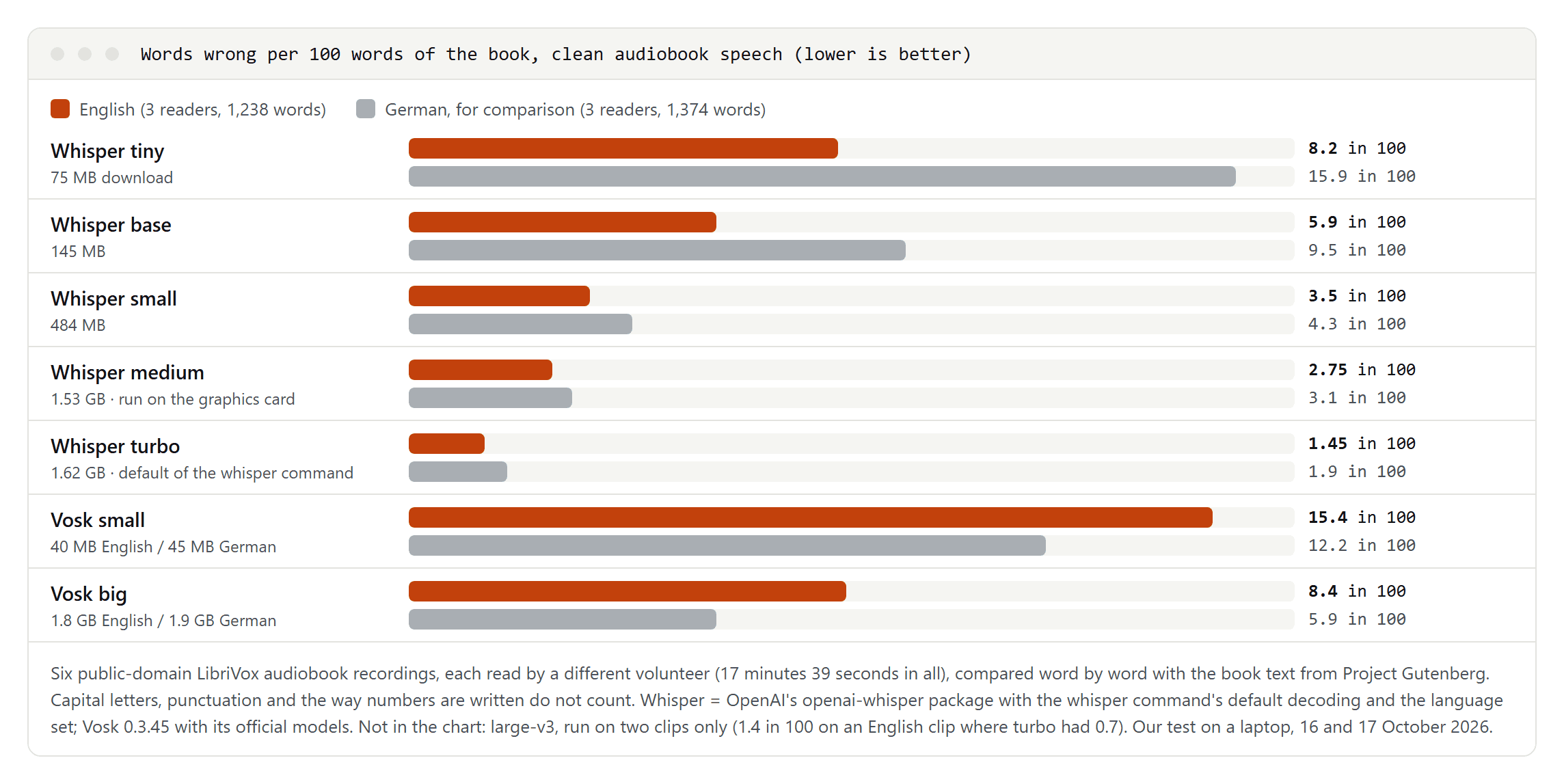
On the three English clips:
- turbo, the model the
whispercommand uses by default, got 18 of 1,238 words wrong: 1.45 percent. - medium followed with 2.75 percent, then small with 3.5, base with 5.9 and tiny with 8.2 percent, about one word in twelve.
- Vosk reached 8.4 percent with its big English model and 15.4 percent with the small one. It also writes everything in lower case without punctuation.
- large-v3, the biggest Whisper model, ran on two clips only because it is so slow on a laptop. On the English clip it made 1.4 percent errors where turbo made 0.7. OpenAI calls turbo an optimized version of large-v3 with minimal loss of accuracy, and in our check the bigger download didn't pay off.
The control set confirmed the order: on the 2025 recordings turbo got 1.0 percent of the words wrong, small 1.6 and tiny 5.9 percent. So the results aren't an artifact of old audiobooks the models might have heard, although the book texts themselves are on the web and may be known to them.
German, for comparison: turbo 1.9 percent, small 4.3, base 9.5 and tiny 15.9 percent. The small models lose much more in German than in English; from small upward the gap was under one point. That fits a comparison of 11 transcription services by the CISPA Helmholtz Center, published in 2023: most services did better in English than in German, and Whisper was the best AI service in it. The researchers note that their results reflect the state of December 2022.
Transcription tools often advertise 95, 98 or even 99.9 percent accuracy. None of the pages we read said how that was measured, on which recordings or in which language.
How long it takes on an ordinary laptop
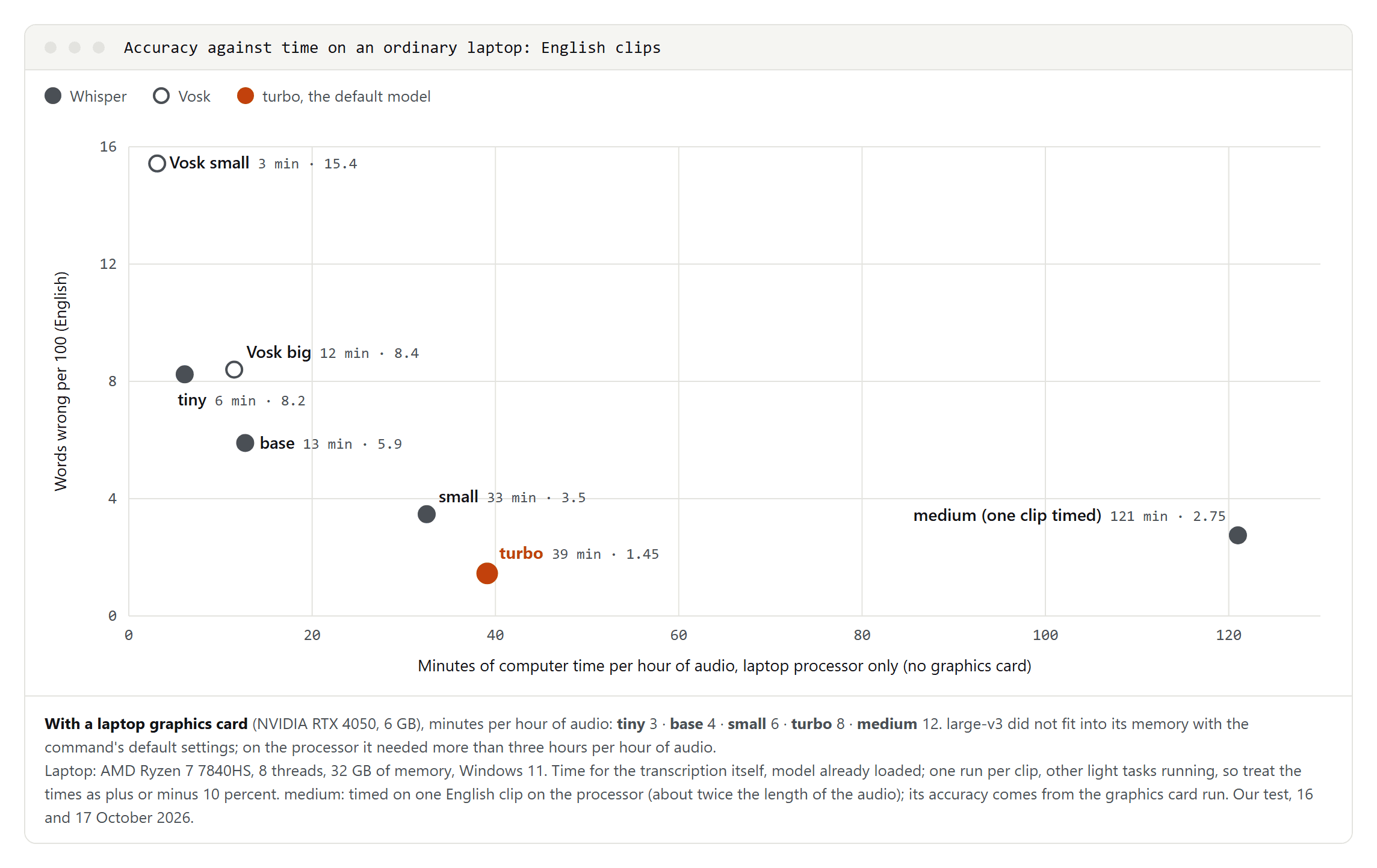
Without a graphics card, our laptop needed about 6 minutes of computer time per hour of English audio with tiny, 13 with base, 33 with small and 39 with turbo. medium took about two hours and large-v3 more than three, each timed on one clip. Vosk needed about 3 minutes with its small model and 12 with the big one.
turbo is barely slower than small on the processor and makes less than half as many errors, which is why it is a sensible default. With the laptop's graphics card, turbo needed about 8 minutes per hour of audio, small 6, base 4, tiny 3 and medium 12. large-v3 didn't fit into the card's 6 GB with the command's default settings; OpenAI lists about 6 GB of video memory for turbo and about 10 GB for the large models. The aTrain project says transcription can take about 20 percent of the audio's length on entry-level gaming laptops with an NVIDIA card, and our turbo runs on the graphics card took 13 to 15 percent.
The first run downloads the model: 75 MB for tiny, 484 MB for small, 1.62 GB for turbo and 3.09 GB for large-v3. Our times cover the transcription itself, one run per clip with other light tasks running, so treat them as plus or minus 10 percent.
What the mistakes look like
- Names. "Dillingham" (five times) and "Chandler" (six times) were right in every Whisper size, but "Brady" became "Bready" in tiny and turbo, both times. In German, no system got Kafka's invented name "Odradek" right in every place, and Vosk wrote "Deck" each time: it can only produce words from its vocabulary.
- Rare and old words. "Tulle" came out as "tull" (turbo), "doll" (small) and "tall" (base); "commensurate" became "common" in turbo; "renascent" became "renaissance" in small and "innocent" in base.
- Numbers. "The Gift of the Magi" prints its amounts as figures with a dollar sign, and the reader says "one dollar and eighty-seven cents". small and turbo wrote the amounts out in words, tiny wrote figures. Our score treats both as correct, but if your document needs one style, plan a find-and-replace pass.
Some "errors" are not the software's fault. In six places in the English clips, turbo, medium and Vosk's big model all wrote the same thing, and it differed from the book, for example "possessors were" where the book has "possessor was". Most likely the reader said it that way; we didn't verify each place by ear. Counting those six as correct, turbo's English error rate drops to about 1.0 percent (12 of 1,238 words).
Background noise and phone-quality audio
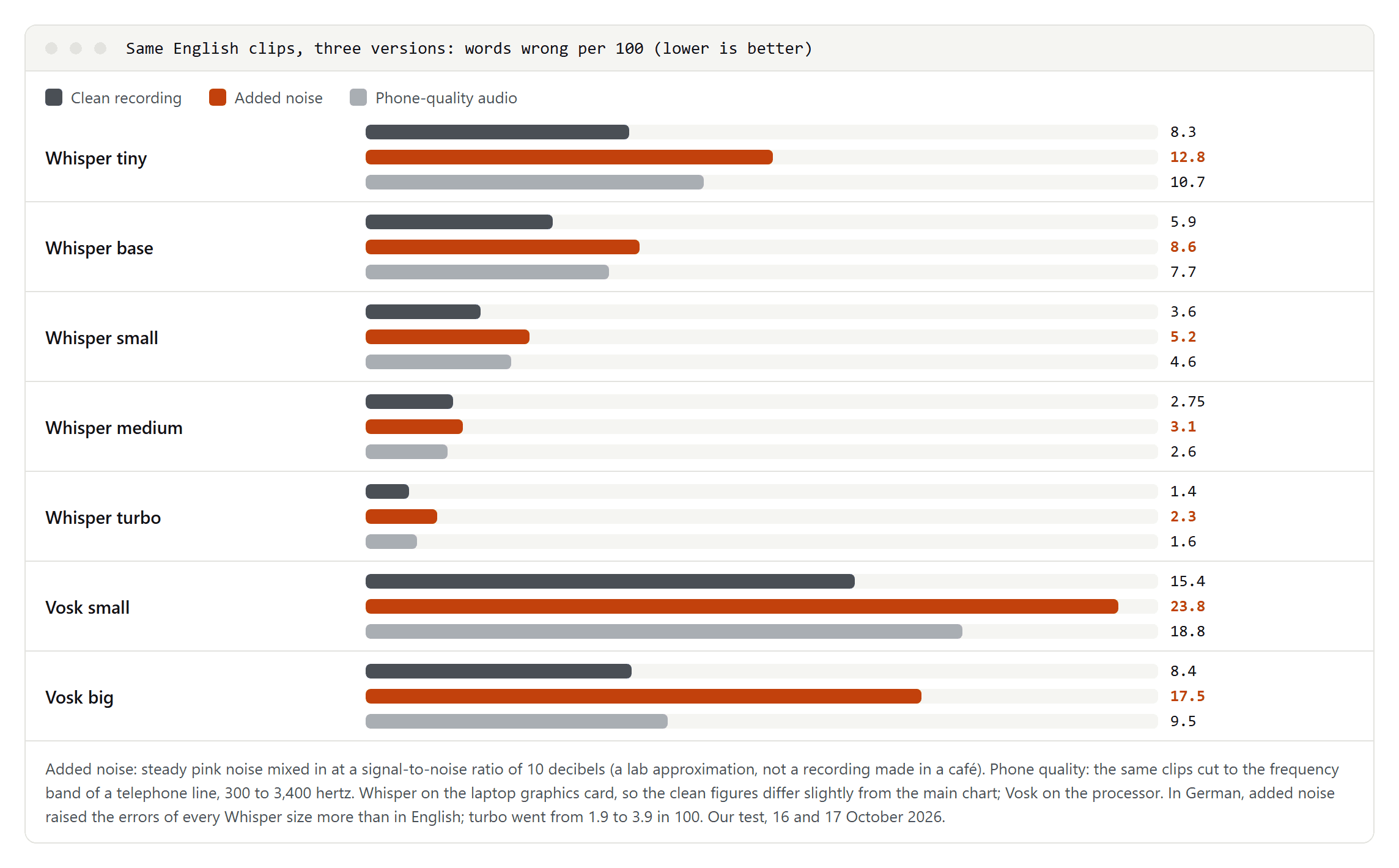
We made two more versions of every clip: one with steady background noise mixed in at a signal-to-noise ratio of 10 decibels, and one cut to the frequency band of a telephone line (300 to 3,400 hertz). These Whisper runs used the graphics card, so the clean figures differ slightly from the first chart.
- Added noise hurt every engine. turbo went from 1.4 to 2.3 percent, small from 3.6 to 5.2, tiny from 8.3 to 12.8. Vosk's big model more than doubled, from 8.4 to 17.5 percent.
- German suffered more. Added noise raised the German errors of every Whisper size more than the English ones; turbo's doubled, from 1.9 to 3.9 percent.
- Phone bandwidth cost little: turbo rose from 1.4 to 1.6 percent, small from 3.6 to 4.6.
- Bigger models lost less. medium only went from 2.75 to 3.1 percent with noise.
Our noise is a lab approximation, not a recording made in a busy café, so take the direction rather than the exact numbers. The lesson holds anyway: record close to the speaker's mouth in a quiet room, and use a larger model when the audio is poor.
Three ways Whisper went wrong in our runs, and the fixes
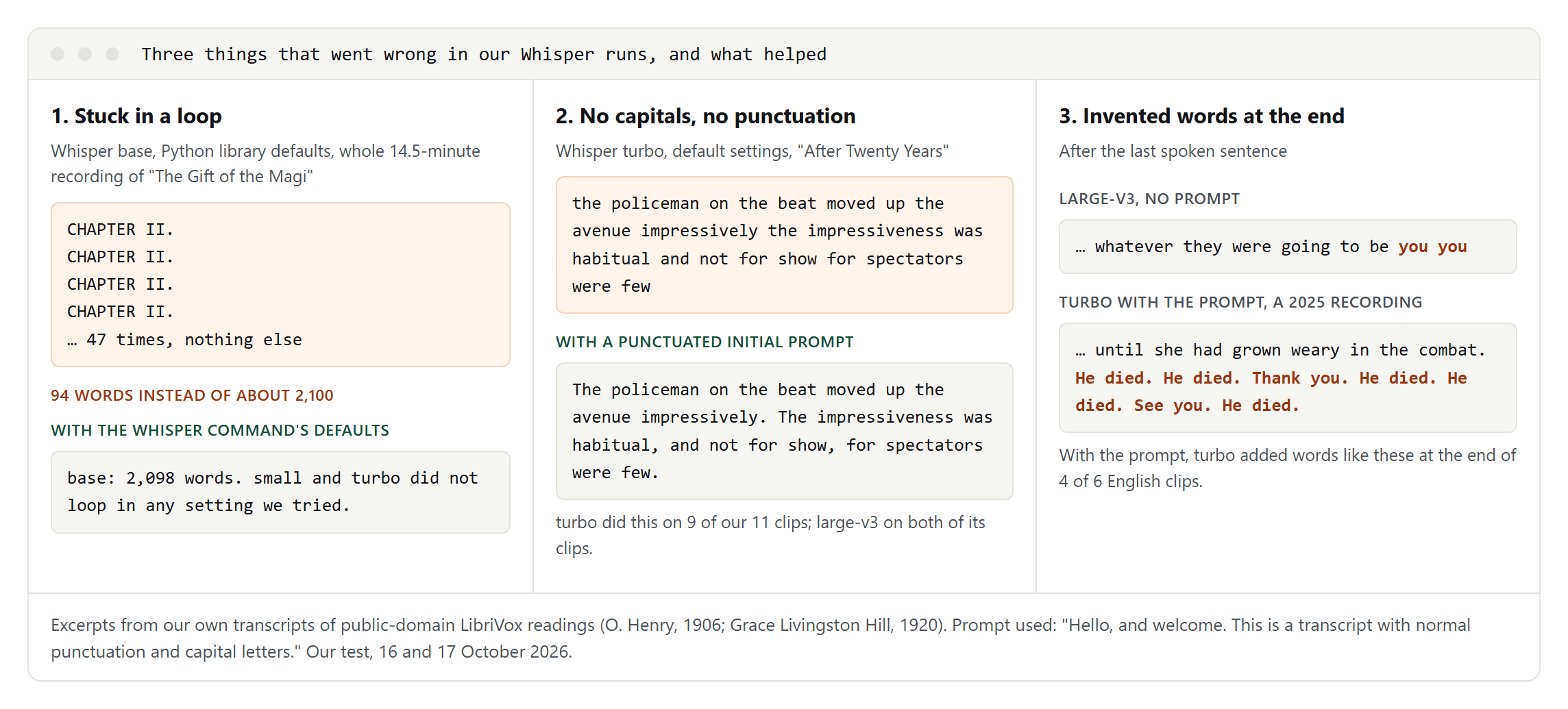
1. A repetition loop. We gave Whisper's base model the whole 14.5-minute recording of "The Gift of the Magi", called from Python with the library's plain defaults and word timestamps switched on. It returned the line "CHAPTER II." 47 times and nothing else: 94 words instead of about 2,100. The same model with the whisper command's default settings returned 2,098 words, and with --condition_on_previous_text False 2,086. small and turbo didn't loop in any setting we tried. Whisper's model card says the model is prone to repetitive text, which beam search reduces but doesn't remove, and the command's help says switching off --condition_on_previous_text makes such loops less likely.
2. No capitals, no punctuation. turbo returned only lower-case words without a single punctuation mark for 9 of our 11 clips, in both languages, and large-v3 did the same on both of its clips; tiny to medium wrote normal sentences. We tested one fix: --initial_prompt "Hello, and welcome. This is a transcript with normal punctuation and capital letters." It brought back capitals and punctuation in all 11 clips. The side effect: in 4 of the 6 English clips, turbo then added invented words at the end, which raised its English error rate from 1.4 to 4.0 percent on the main set and from 1.0 to 3.7 percent on the 2025 set. German stayed under 2 percent, although one German clip also got four invented words at the end. Whether turbo drops punctuation on ordinary recordings such as interviews, we couldn't test.
3. Invented words in silence. Without any prompt, large-v3 added "you you" after the last sentence of an English clip and "die die die die" after the last sentence of a German one, with timestamps beyond the end of the audio. Whisper's model card warns that its output may include text that was not actually spoken.
What helped:
- Use the
whispercommand or an app with its default settings rather than bare library defaults. - Set the language. Without it, tiny guessed Afrikaans for one of our English clips from 2025.
- Trim long silence at the start and end of the recording.
- Read the last lines of every transcript, especially after using a prompt.
- Compare the length with the recording: a 14-minute story doesn't come back as 94 words.
Way 1: Whisper in a free desktop app
If you'd rather not use a terminal, several free apps put a window around Whisper and run it offline. We tested Whisper itself, not these apps; the details below come from their project pages, and apps with other settings or another Whisper implementation won't necessarily match our numbers.
- Buzz transcribes files and live microphone input, can identify speakers and exports TXT, SRT and VTT. Its Windows installer isn't signed, so Windows shows a warning during installation. On a Mac it now requires Apple silicon; the last version for Intel Macs is 1.4.5.
- Vibe runs on Windows, macOS and Linux, transcribes files in batches, separates speakers and exports SRT, VTT, TXT, HTML, PDF, JSON and DOCX. Its optional summaries can use an external AI service or a local model through Ollama; only the local route keeps the text on your computer.
- noScribe is free and open source (GPL-3.0) for Windows, macOS and Linux, runs completely locally, distinguishes speakers, handles around 60 languages and has an editor for checking the transcript. Its author warns that a site at noscribe(dot)ai is an unrelated paid service.
- aTrain, from the University of Graz, works offline with speaker detection and writes files that MAXQDA, ATLAS.ti and NVivo can import. On Windows it is available from the Microsoft Store; versions for Apple silicon Macs and Debian are in beta.
In any of them, choose the model (turbo on a recent computer, small or base if it struggles), set the language explicitly, and pick the output format: plain text for reading, SRT or VTT for subtitles, as explained in our guide to what an SRT file is.
Way 2: Whisper from the command line
This is the package we used for our test.
- Install Python and ffmpeg. Whisper's README says ffmpeg is available from most package managers, for example
choco install ffmpegorscoop install ffmpegon Windows andbrew install ffmpegon a Mac. - Install Whisper with
pip install -U openai-whisper. - Transcribe:
whisper recording.mp3 --model turbo --language English --output_format txt. The first run downloads the model.
Worth knowing:
- The default model is turbo, so
--model turboonly makes it explicit. - The default output is every format at once: TXT, VTT, SRT, TSV and JSON. To turn subtitle files into clean text later, see how to convert SRT to TXT.
- Without
--language, Whisper detects the language itself. It was right for all our main clips, but tiny's Afrikaans guess shows why setting it is safer. --initial_promptgives the model text for the start of the recording, such as names spelled correctly. If you use it, read the end of the transcript.- English-only models exist for tiny, base, small and medium (
tiny.enand so on). OpenAI says they tend to do better, especially the two smallest; we didn't test them. - turbo is not trained for translation. For English text from speech in another language, OpenAI recommends medium or large.
You may have read that OpenAI is retiring Whisper. That concerns its paid API: on 26 August 2026, OpenAI told developers that whisper-1 and its other transcription models will be removed from the API on 26 February 2027, with gpt-live-transcribe or gpt-transcribe as replacements. The open-source model you download and run yourself is released under the MIT License and isn't affected, and neither are the apps built on it.
Way 3: Microsoft Word's Transcribe
We didn't test Word's Transcribe; this is from Microsoft's help page. In Word, go to Home, Dictate, Transcribe, then Upload audio, and choose a .wav, .mp4, .m4a or .mp3 file. The transcript appears in a side pane.
- It needs a Microsoft 365 subscription, which includes up to 300 minutes of uploaded audio per month; a Microsoft Copilot license raises that to 30,000 minutes.
- Where it works: Word for the web in the new Microsoft Edge or Chrome, and in the desktop app currently only Word for Microsoft 365 on Windows in what Microsoft calls commercial tenants. It needs an internet connection.
- Output: speakers labeled "Speaker 1", "Speaker 2" and so on, which you can rename, and clickable timestamps. You can add sections or the whole transcript to your document. Each document holds one transcript; starting a new one deletes the old one.
- Storage: the audio is saved in a "Transcribed Files" folder in your OneDrive and stays there until you delete it.
- Languages: more than 80 locales, with English (United States) among 13 English variants.
On data, Microsoft says: "Your audio files are sent to Microsoft and used only to provide you with this service." It adds that the service doesn't store the audio or the results once the transcription is done; the OneDrive copy is separate.
Way 4: iPhone Voice Memos and Notes
This comes from Apple's help pages; we didn't test it. An iPhone 12 or later transcribes speech in recordings you make in Voice Memos or Notes. Apple lists English (all variants), Spanish, Portuguese, Italian, French, German, Japanese, Korean, and Simplified and Traditional Chinese, and says the feature isn't available in all countries or regions.
- Voice Memos (in the Utilities folder) shows the transcript live while you record or afterwards. Tap the recording, open its options and choose View Transcript to copy part of it, or Copy Transcript for the whole text.
- Notes records audio inside a note via Record Audio and shows a live transcript. Afterwards you can tap a word to hear that moment, and choose Add Transcript to Note or Copy Transcript. Calls you record in the Phone or FaceTime app are transcribed into Notes too (iOS 18.1 or later).
What neither page documents: importing an existing audio file, such as an MP3 from your computer, for transcription. For a recording made elsewhere, use Whisper on a computer.
Way 5: Free upload websites, and what "free" means
Upload sites are the quickest route for a single file. We read their pages but did not upload our clips to any of them. Their free tiers have limits that differ from site to site:
- Length and size per file. Limits we saw include 500 MB and 60 minutes per file on one site and 30 minutes per file on another.
- Minutes per month, on some sites on top of the limit per file.
- An account. Some ask you to sign in, either before you start or before you can download the full result.
Before you upload, find out where the file is processed and stored, when it is deleted, whether it is used to train the provider's models, and which export formats you get. Not every tool page we read named a data location, and none of the accuracy figures came with a method.
ChatGPT, Descript and Fireflies
These need an account, and we didn't test any of them. Everything here is from their own help pages.
- ChatGPT accepts audio uploads only on paid subscriptions and workspaces, not on the Free plan. Common formats such as MP3, M4A and WAV are supported, up to 512 MB per file. OpenAI says long recordings are processed on a best-effort basis and may time out, transcripts may contain errors, speaker identification may be unreliable, and performance varies by language. Some pages still claim ChatGPT can't transcribe files at all; OpenAI's own page says paid plans can. Its Record mode, in the macOS desktop app for Plus, Pro, Business, Enterprise and Edu, records up to 4 hours per session and deletes the audio after transcription; with "Improve the model for everyone" switched on, Free, Plus and Pro transcripts may be used for training.
- Descript transcribes 26 languages written in the Latin alphabet, English and German among them, but only one language per file. Filler-word detection and the transcription glossary work only in English. Descript is based in the United States and processes and stores information there, and its privacy policy allows using data for research and development, including training its AI models.
- Fireflies takes uploaded MP3, M4A and WAV audio and MP4 and WEBM video, with audio files up to 500 MB and any file up to 150 minutes long. You choose the spoken language when you upload. By default, Fireflies stores and processes data in the United States; with Enterprise private storage, data can be stored in the EU but is still processed in the US. Fireflies says it doesn't use customer data for AI training.
Dictation tools can't transcribe a file
Several free tools turn speech into text, but only live, from a microphone:
- Google Docs voice typing (Tools, then Voice typing) works in current Chrome, Edge and Safari. Google says the browser controls the speech-to-text service and sends the text to Docs. It documents no way to upload an audio file.
- Windows voice typing (Windows logo key + H) needs an internet connection, a working microphone and the cursor in a text box; Microsoft says it uses online speech recognition powered by Azure Speech services. One vendor guide we read lists this shortcut as a way to transcribe audio; Microsoft describes it as typing by speaking.
- Mac Dictation types into any text field and stops when it hears no speech for 30 seconds. Keyboard settings show whether your voice input is processed on the Mac itself.
Playing a recording through your speakers into the microphone isn't a feature any of these documents, and we didn't try it.
Privacy and consent before you upload
Whisper, Vosk and the offline apps above keep the recording on your computer. The cloud routes send it to a provider: Word to Microsoft, Descript and Fireflies to the United States by default, and with ChatGPT, data use depends on your plan and settings; OpenAI says its business offerings aren't used for training. Apple's Voice Memos and Notes pages don't say where the transcription runs, and for upload sites you have to check each one.
The second question is whether you may transcribe the recording at all. Whisper's own model card cautions against transcribing recordings of people taken without their consent. In the US, the rules on recording conversations differ by state; our guide to transcribing an interview summarizes them and explains how to ask for consent. In the EU, a voice recording of a person counts as personal data, and a cloud service that transcribes it for you processes that data on your behalf, which requires a contract with the provider. This is not legal advice.
From raw transcript to usable text: a checklist
Even 1.45 percent means about one wrong word in every 70. Before you use a transcript:
- Listen once while reading along, and fix what you hear.
- Search for names, numbers and technical terms, where errors clustered in our test.
- Read the last lines and delete anything after the final sentence that nobody said.
- Scan for repeated lines and compare the length with the recording.
- Pick one style for numbers, figures or words, and fix the rest with find and replace.
- Add speakers and timestamps if you need them. Plain Whisper doesn't label speakers; Word, noScribe, aTrain, Buzz and Vibe can. Our guide to the time-coded transcript shows the formats.
- Decide what you actually need. If the goal is a record of decisions rather than every word, write meeting minutes from the transcript instead.
