To transcribe an interview properly, decide before you start how much detail you need (every "um", only the words that carry meaning, or a condensed version), use the same speaker labels and notation throughout, and check the result against the recording. Software can produce the first draft in minutes; the checking is still yours. Below: getting consent and good audio, choosing a style, one passage in three styles, a notation key to copy, how long it takes, interviews in other languages, and the final check.
Before you record: consent and audio
- Ask before you record, and record the yes. Research ethics bodies such as the Oral History Association ask for informed consent before the interview, with a clear explanation of how the recording will be stored and used.
- Know the law where you are. In the US, federal law requires the consent of at least one party to a conversation, but about 11 states require everyone's consent. In Germany, recording someone's non-public words without permission is a crime. When in doubt, ask everyone.
- Get clean audio. Record in a quiet room, keep each speaker close to a microphone, and make a backup copy straight after the interview. Every noisy minute costs you time later.
- Personal data. In the EU, a recording of a person's voice is personal data. Uploading it to a transcription service means that service processes it on your behalf, which requires a contract with it. Removing names afterwards (pseudonymizing) doesn't make the data anonymous if people can still be identified.
Choose a style
- Full verbatim: every word as spoken, with fillers ("um", "uh"), false starts, repetitions, laughter and pauses. Use it when the way something is said matters, in legal work or in research on speech.
- Clean verbatim: every word that carries meaning, without fillers, stutters and false starts. This is what most people need for quotes and analysis.
- Edited: a condensed version of clean verbatim, with sentences that don't change the meaning left out.
The guides disagree on one point. Scribbr allows fixing grammar and broken sentences in clean verbatim; James Madison University's guidelines and GoTranscript's transcription rules say never to correct a speaker's grammar. If you quote people, don't correct them, and write your rule down so everyone transcribing follows the same one.
One passage, three styles
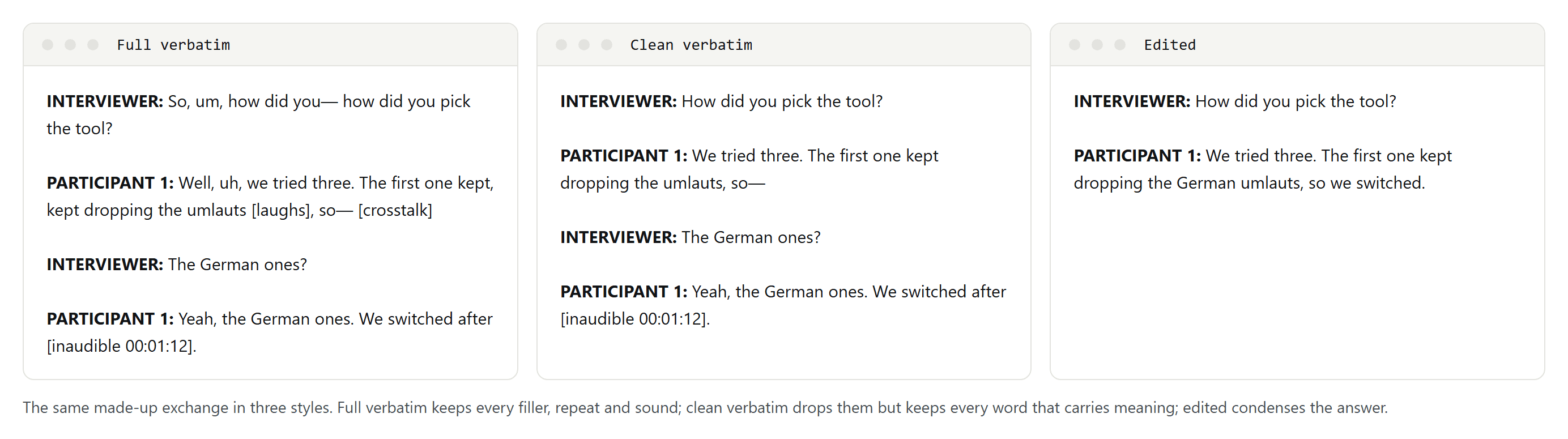
Notice what clean verbatim keeps: the inaudible passage is still marked, because removing it would hide a gap in the record. Only the edited version rewrites the answer, which is why it is not suitable for quotes.
Set up the format
- A header: the project or interview name, the date and place, who interviewed whom, and who transcribed it.
- Speaker labels: a role or a name in bold, followed by a colon, the same way in the whole file. Use roles such as Interviewer and Participant 1 if the transcript has to be anonymous.
- Timestamps: at least at each speaker change or every few minutes, so anyone can find a passage in the recording. Our guide to time-coded transcripts explains the formats.
A notation key to copy
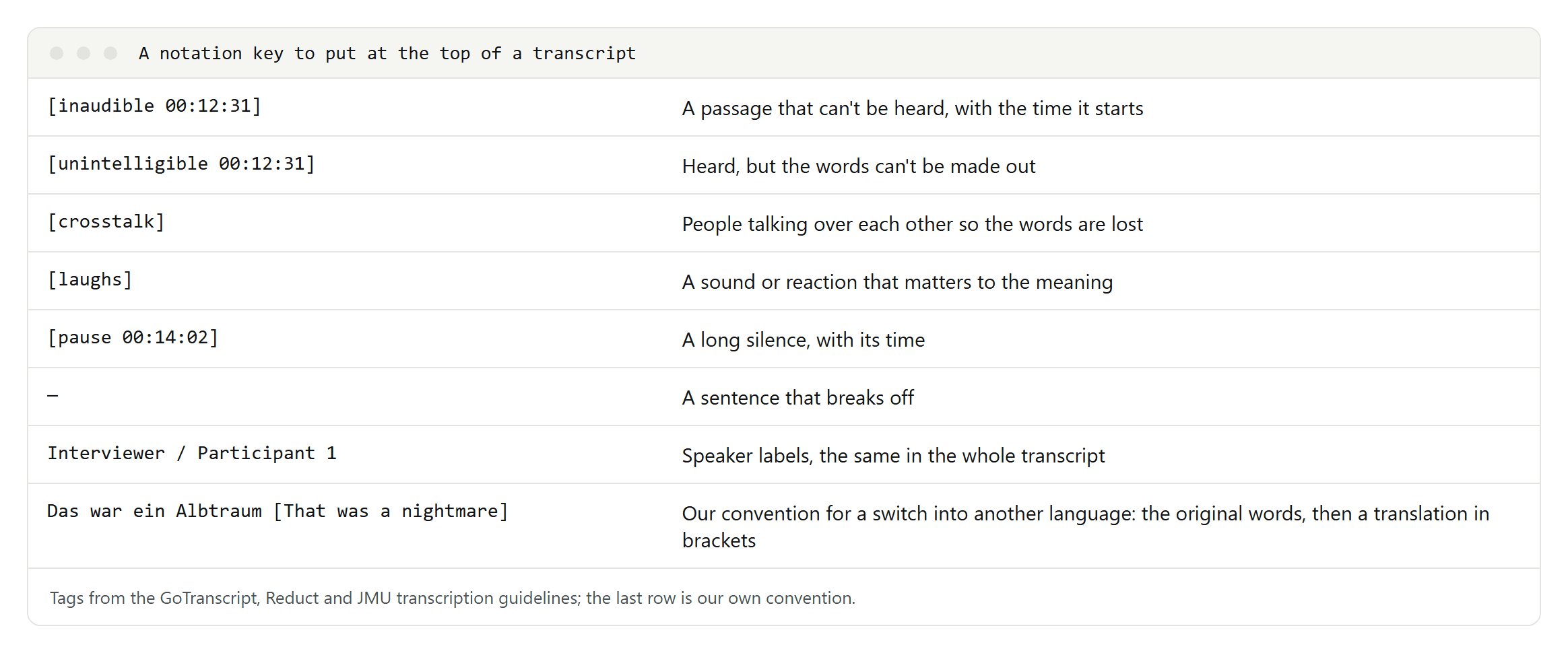
Two tags are easy to mix up: inaudible means a passage can't be heard, unintelligible means it can be heard but the words can't be made out. Add the time to both, so someone can listen again later. Reduct's guidelines suggest crosstalk rather than inaudible when people talk over each other.
By hand or with software
Typing a transcript by hand is slow: Cornell University's guide tells students to expect four to six hours of work for every hour of recorded interview, and poor audio or full verbatim takes longer.
Software gives you a first draft fast. Microsoft Word's Transcribe feature, in Word for Microsoft 365, transcribes uploaded recordings with speaker labels and clickable timestamps. OpenAI's open-source Whisper model runs on your own computer and writes text or subtitle files; it doesn't label speakers. Descript and Otter transcribe uploads with speaker labels and export to text or subtitle formats. We haven't tested their accuracy yet; that test is on our list. How accurate Whisper and other free engines were in our own test, and how long they took on a laptop, is in our guide to transcribing audio to text.
Whatever produces the draft, a person has to check it: names, numbers, technical terms and anything said by two people at once are where automatic transcripts fail most often. Uploading the recording to a cloud service is also processing personal data, as explained above.
Interviews in other languages, or in two
- Transcribe in the original language. Research guidance, such as van Nes and colleagues on qualitative research across languages, recommends staying in the original language for as long as possible, because meaning gets lost in translation.
- Translate the quotes you use, carefully, ideally with a professional or a native speaker, and say how you translated them.
- Keep switches between languages. When a speaker moves into another language, the switch can carry meaning. Write the original words and add a translation in brackets, as in our notation key, rather than silently translating.
- One language per file for software. Some tools, Descript among them, expect one spoken language per file and handle mixed-language recordings poorly.
Check and finish
- Listen to the whole recording once more while reading along, and fix what you hear.
- Search for every [inaudible] and [unintelligible] tag and try once more.
- Check names, numbers and terms against your notes.
- Remove or replace names and identifying details if the transcript must be anonymous.
- Store the recording and the transcript as you promised when you asked for consent.
If what you need is a record of decisions rather than every word, write meeting minutes instead.
