Text to speech without AI means a voice that is computed from rules or stitched together from recorded fragments, not generated by a neural network. If you want text to speech with no AI, the short answer is: use a Windows legacy voice (David, Mark or Zira for US English), the free eSpeak NG engine, or Festival on Linux. All of them run on your own computer, work offline and sound like a classic computer voice. The catch is that "built in" no longer means "not AI." On our Windows test PC, 19 of Chrome's 20 voices were remote Google voices. Here is how to tell what you are using and how to get each classic voice.
The short answer by situation
| You want to | Use | Runs on |
|---|---|---|
| Hear text read aloud on Windows | Windows legacy voices, added in Narrator settings | Your PC |
| Use a screen reader with a fast, clear voice | NVDA with its built-in eSpeak NG | Your PC |
| Save an audio file on Windows without installing anything | Windows PowerShell and the System.Speech voices | Your PC |
| A classic voice in 100+ languages, from the command line | eSpeak NG | Windows, Linux, Mac, Android |
| A classic voice on Linux | eSpeak NG, Festival or Flite | Your computer |
| An audio file on a Mac | The say command | Your Mac |
| A non-neural voice through an API | Amazon Polly standard voices | Amazon's cloud |
| The sound of a retro robot | eSpeak NG robot variants | Your computer |
The sections below explain each route from its own documentation. If your real concern is only privacy, read the section on local neural voices too: they keep your text on your device but are AI.
What "text to speech without AI" can mean
People who ask for TTS without AI usually want one of three things:
- A different method: the voice is not produced by a neural network.
- No cloud: the text never leaves the device.
- No real person behind it: no cloned voice, nothing built from someone's recordings.
These don't always come together. Piper is a local engine, but it is neural. Amazon Polly's standard voices are not neural, but they run in Amazon's cloud. Decide which of the three matters to you before you pick a tool.
| Method | How it works | Examples | Where it runs |
|---|---|---|---|
| Formant synthesis | Computes the sound from acoustic rules, without recordings | eSpeak NG | Your device |
| Concatenative (diphone, unit selection) | Joins short pieces of recorded speech | MBROLA voices, Festival, Amazon Polly standard voices | Your device; Polly in the cloud |
| Statistical parametric | A model trained on recordings predicts the sound | Festival's HTS and Clustergen engines, many Google Cloud standard voices | Your device; Google in the cloud |
| Neural | Neural networks generate the audio | Edge "Online (Natural)" voices, Azure voices, Piper, ElevenLabs, Murf | Mostly cloud; Piper on your device |
The line is blurrier than it looks. Statistical parametric voices are machine learning too, just an older kind. When DeepMind introduced its neural WaveNet in 2016, it described the main alternatives: concatenative systems built from a very large database of fragments recorded by one speaker, hard to change without recording a new database, and parametric systems that tended to sound less natural. For a plain introduction to all of this, see our guide to what TTS is.
Why people want text to speech without AI
- Privacy: a cloud voice receives your text. Microsoft says Edge voices with "Online" in their name are produced by its Azure service: the text goes to Microsoft, encrypted, with a random token, and is deleted right after conversion. When Edge uses a voice on your device, Microsoft says no information is sent to its servers. In our network check on 14 October 2026, Chrome reading a test sentence with its Google Deutsch voice sent the whole sentence to Google inside the address of a request. A local Windows voice sent nothing.
- No retention, no training on your text: each cloud service sets its own rules for what it keeps. Microsoft, for example, says that for its prebuilt neural voices neither the input text nor the output audio is stored in its logs. Other services have other terms, so read the privacy terms of any online tool before you paste a contract or a medical letter into it. A local engine never receives your text in the first place.
- Offline use and no waiting: MDN, the web developer reference, notes that remote voices can add latency, bandwidth or cost. A local voice keeps working on a plane or behind a strict company firewall.
- Speed and predictability: the eSpeak NG project says its speech is clear and can be used at high speeds. The free NVDA screen reader for Windows ships with eSpeak NG built in.
- No borrowed voice: a formant voice is not built from anyone's recordings. The eSpeak NG documentation contrasts it with larger synthesizers "based on human speech recordings."
- The classic sound: some people simply want the voice of an old computer, for a game, a video or a joke. Our guide to the robot voice generator shows how to push eSpeak NG and Windows voices further in that direction.
Our check: which voices on our PC run locally
On 28 October 2026 we listed the voices on the same Windows 11 test PC we used for our guide to what TTS is. Chrome reports for each voice whether it is local or remote.
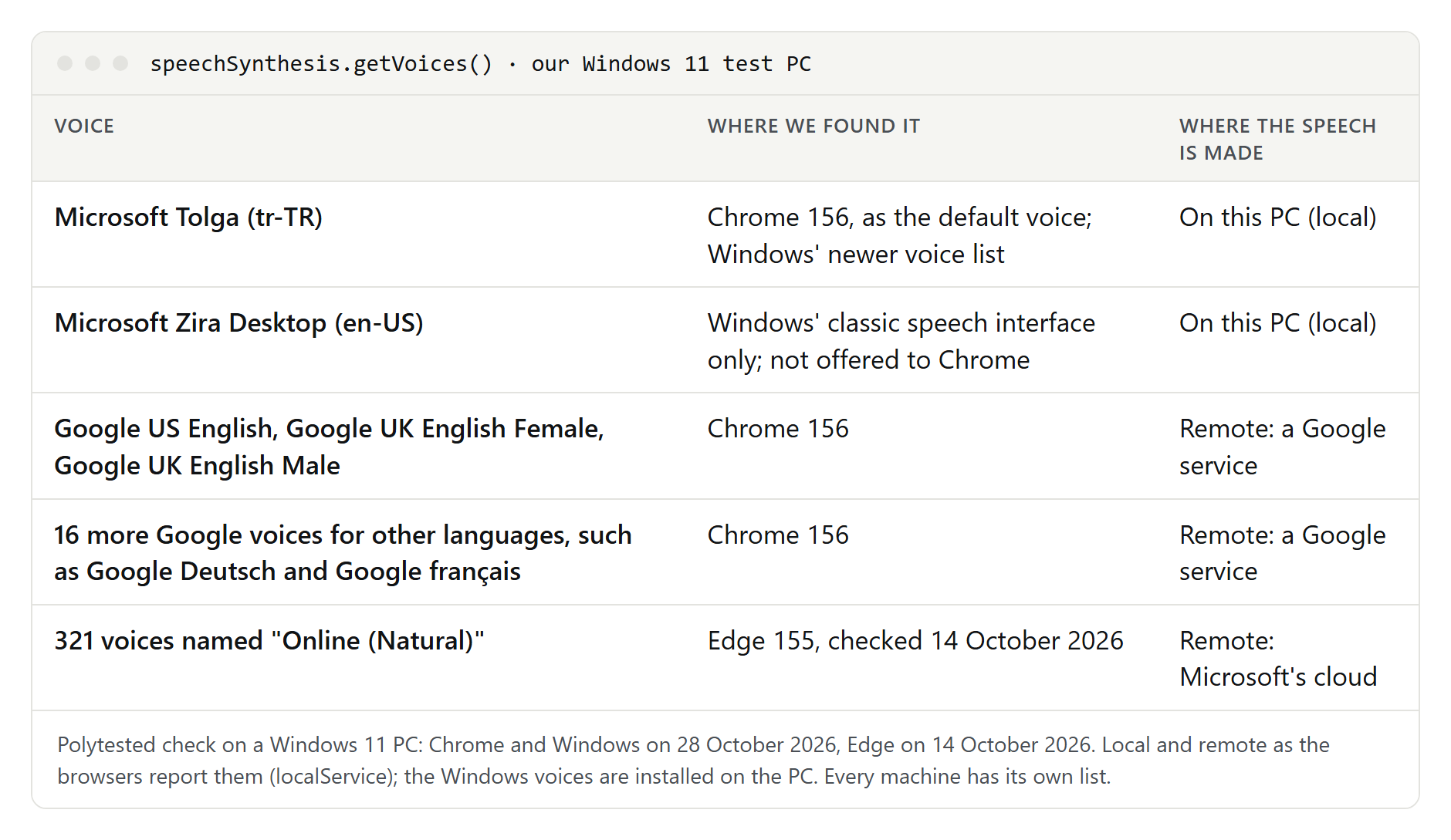
- Chrome 156 offered 20 voices: 19 Google voices, all remote, and Microsoft Tolga (Turkish), the only local voice and the default. The first request returned no voices; the list then filled in two steps, 19 voices and then 20.
- Windows had two lists: Microsoft Zira Desktop (US English) in its classic speech interface and Tolga in its newer one. Chrome reads only the newer list, so Zira never shows up in the browser.
- Edge offered 322 voices when we checked on 14 October: 321 "Online (Natural)" voices from Microsoft's cloud, plus Tolga.
The Chrome result matches our checks of 15 and 17 October with Chrome 155. On this computer, the only voices that ran locally were Windows' own. Microsoft lists Zira with David and Mark as its US English voices and files them under legacy voices, separate from its newer natural voices. The Microsoft pages we read don't say how the legacy voices are made, so "legacy" is the closest thing to a "no AI" label that Windows offers.
How to tell which kind of voice you are using
- Read the name. In Edge, "Online" means Microsoft's cloud, and Microsoft says its cloud text to speech uses deep neural networks. In Chrome, the voices whose names start with "Google" were all remote on our PC. Windows Narrator settings keep Add natural voices and Add legacy voices apart.
- Ask the browser. Open the browser's developer console on any page and run the lines below. Run them twice: the list can arrive a moment after the first request.
- Go offline. If a voice keeps speaking with Wi-Fi turned off, it runs on your device.
- Check the engine on Android. Under Settings, Accessibility, Text-to-speech output, Android shows the engine in use: Google's, the phone maker's or one you installed from Google Play.
speechSynthesis.getVoices().forEach((voice) => {
  console.log(voice.name, voice.lang, voice.localService ? "local" : "remote")
})
Keep in mind that "local" does not prove "not AI." It only proves the text stays on your device.
Watch out for the word "standard"
Cloud services use the same word for different things:
- Amazon Polly says its standard engine uses concatenative synthesis, joining recorded speech. Not neural.
- Google Cloud Text-to-Speech says many of its standard voices use a variation of parametric text to speech. An older kind of machine learning, not neural like its WaveNet voices.
- Microsoft Azure now calls its out-of-the-box neural voices "standard voices." Neural.
So a "standard voice" can be classic or neural, depending on who sells it. Look for the method in the vendor's documentation, not the label.
Windows: legacy voices, NVDA and audio files
Add a legacy voice
Microsoft lists David, Mark and Zira for US English and similar legacy voices for many other languages, for example Paul, Hortence and Julie for French, Stefan, Hedda and Katja for German, Pablo, Helena and Laura for Spain, Raul and Sabina for Mexico, and Ichiro, Ayumi and Haruka for Japanese.
- Open Narrator settings with the Windows logo key + Ctrl + N.
- Under Narrator's voice, select Add legacy voices. This opens the Speech settings page.
- Under Manage voices, select Add voices.
- Choose the language and select Add. Microsoft says the voices download in a few minutes, depending on your connection.
- Back in Narrator settings, pick the voice under Choose a voice.
You need the internet once, for the download. After that, the voice speaks on your PC. If you need these voices in another language, our guides to French text to speech, Spanish text to speech and Japanese text to speech explain which voices to add and what each language gets wrong.
NVDA and eSpeak NG
NVDA is a free, open-source screen reader for Windows. Its 2026.3 user guide says eSpeak NG is built in and needs no other drivers. NVDA also supports Microsoft's classic SAPI 5 voices, 32-bit and 64-bit, and the newer OneCore voices, which it uses by default and calls more responsive than SAPI 5. NVDA tells you to add OneCore voices in Windows Speech settings, the same page Narrator opens for legacy voices.
Save an audio file with Windows PowerShell
Windows can save speech as a WAV file without any extra program. Microsoft's SpeechSynthesizer class, part of .NET Framework since version 3.0, gives access to the voices installed on your PC. Open Windows PowerShell from the Start menu and paste these lines. They follow Microsoft's documentation for the class: GetInstalledVoices lists the voices, SelectVoice picks one, Rate runs from -10 to 10, and SetOutputToWaveFile writes a WAV file instead of playing the sound.
Add-Type -AssemblyName System.Speech
$voice = New-Object System.Speech.Synthesis.SpeechSynthesizer
$voice.GetInstalledVoices() | ForEach-Object { $_.VoiceInfo.Name }
$voice.SelectVoice("Microsoft Zira Desktop")
$voice.Rate = 0
$voice.SetOutputToWaveFile("$env:USERPROFILE\Desktop\narration.wav")
$voice.Speak((Get-Content "$env:USERPROFILE\Desktop\script.txt" -Raw))
$voice.Dispose()
Replace the voice name with one from the list the third line prints, and put your text in script.txt on your Desktop. That list can differ from the one Narrator shows, so always pick a name from it.
Balabolka
If you prefer a window to a command line, Balabolka is a freeware TTS program for Windows. Its site says every computer voice installed on your system is available to it, that it uses Microsoft's Speech API and lets you change rate and pitch, and that it can save the text as an audio file. A portable version runs from a USB drive without installation, and a separate command-line utility reads text aloud or saves it as audio.
Word has its own Read Aloud and Speak commands; our guide to Word's speech tools covers them next to dictation.
eSpeak NG: the classic formant voice
eSpeak NG is a free, open-source formant synthesizer, released under the GPL version 3 or later. Its README lists more than 100 languages and accents, Linux, Windows (Windows 8 and later), Android 4.0 and later and BSD, and says it has been ported to the Mac. On Windows it also comes as a SAPI 5 version, so screen readers and other programs can use it. The program and its data take only a few megabytes.
Install it. The eSpeak NG user guide says to use your Linux package manager, for example sudo apt-get install espeak-ng on Debian, Ubuntu or Mint. On Windows, open the project's Releases page on GitHub, pick the latest release and run the .msi installer.
Make an audio file. eSpeak NG can save speech as a WAV file instead of playing it. These commands come from its manual; we haven't installed it for this guide:
espeak-ng --voices=en
espeak-ng -v en-us "This is a test"
espeak-ng -v en-us -s 150 -w narration.wav -f script.txt
espeak-ng -v en-us -p 40 -a 120 "Lower pitch, a little louder"
The first line lists the English voices, the second speaks a sentence, and the third reads script.txt at 150 words per minute (the default is 175) and writes narration.wav. In the fourth, -p sets the pitch from 0 to 99 (default 50) and -a the volume from 0 to 200 (default 100). You add a variant to a voice with a plus sign, as in en-us+m3.
MBROLA: classic voices from recorded speech
MBROLA is a collection of diphone voices, a concatenative method built from recorded speech. The eSpeak NG project says its own formant speech is less natural than synthesizers based on human recordings, so MBROLA is the step up that stays classic. MBROLA doesn't turn spelling into sounds itself, so eSpeak NG serves as its front end for pronunciation and intonation. In eSpeak NG the voices are named mb- plus the MBROLA name, such as mb-en1 for the English voice en1. On Debian or Ubuntu, the eSpeak NG documentation installs it with sudo apt-get install mbrola mbrola-en1; on Windows, you select mb-en1 during the eSpeak NG installation and then install MbrolaTools35. The project notes that the voices are free for non-commercial use but not open source.
Linux: Festival and Flite
Festival is the speech synthesis system from the University of Edinburgh's Centre for Speech Technology Research. It is free software under an X11-type licence that allows commercial and non-commercial use. Version 2.4 speaks British and American English, Spanish and Welsh, and offers unit selection and diphone voices next to its HTS and Clustergen parametric engines. You can run it from the shell, a Scheme interpreter, C++, Java or Emacs.
Flite (festival-lite) comes from Carnegie Mellon University. Its homepage calls it a small, fast run-time open-source engine for small embedded machines and large servers, built as an alternative to Festival for voices made with the FestVox tools. Version 2.1.0 has loadable voices, 13 of them for US English in various accents, and Android support.
eSpeak NG is in most Linux distributions as well, which makes it the quickest classic voice to try on Linux.
Mac and Android
Mac. The say command speaks text from Terminal using the Mac's Speech Synthesis manager. Its manual page documents say -v '?' to list voices, -r for the rate in words per minute, -f to read a file and -o to save an audio file, AIFF by default, with caff, m4af and WAVE as other formats:
say -v '?'
say -r 160 -o narration.aiff -f script.txt
Apple's help page on voices doesn't say which of them are neural. It does say that added voices download from Apple, so you need the internet once, and that voices aren't available in every language. Our guide to text to speech on Mac covers Speak selection, voice downloads and more say options.
Android. Under Settings, Accessibility, Text-to-speech output, you choose the engine, language, rate and pitch, and Install voice data adds another language. Android lists Google's engine, the device maker's engine and third-party engines from Google Play. eSpeak NG lists Android 4.0 and later among its platforms.
Classic voices in the cloud: Amazon Polly
Amazon says its standard engine uses concatenative synthesis, with 40 female and 20 male voices in 29 languages and variants. For US English, its standard voices include Ivy, Joanna, Kendra, Kimberly, Salli, Joey and Kevin. They are not neural, but they are a cloud service: your text goes to Amazon. This route suits developers who want a predictable, non-neural voice through an API. Google Cloud's standard voices are parametric, as described above, and also run in the cloud.
Side by side
| Route | Method | Where it runs | Saves audio | Licence or cost |
|---|---|---|---|---|
| Windows legacy voices | Not stated by Microsoft | Your PC | With PowerShell or Balabolka | Part of Windows |
| NVDA + eSpeak NG | Formant | Your PC | No (screen reader) | Free, open source |
| eSpeak NG | Formant | Windows, Linux, Mac, Android | WAV | Free, GPL |
| MBROLA via eSpeak NG | Diphone (concatenative) | Your computer | WAV | Free for non-commercial use |
| Festival | Unit selection, diphone, parametric | Linux and Unix | Yes | Free, commercial use allowed |
| Flite | FestVox voices, small engine | Embedded devices, servers, Android | Yes | Open source |
Mac say | Not stated by Apple | Your Mac | AIFF, WAVE and more | Part of macOS |
| Amazon Polly standard | Concatenative | Amazon's cloud | Yes | Amazon Web Services |
Local but still AI: Piper and Windows natural voices
If your real concern is privacy, a local neural voice may be the better fit:
- Piper describes itself as "a fast and local neural text-to-speech engine." It uses eSpeak NG to work out pronunciation and a neural model to produce the sound.
- Windows natural voices for Narrator, such as Jenny, Aria and Guy for US English, use what Microsoft calls modern, on-device text to speech. Once downloaded, they work without an internet connection.
Both keep your text on your computer. Neither is "no AI." Our list of free AI voice generators has more options that run on your own computer.
What you give up
- Natural sound: the eSpeak NG project says its formant speech is not as natural or smooth as synthesizers based on human recordings.
- Languages on your machine: our test PC had no German, French or Spanish voice at all. Legacy voices are added one language at a time.
- "Free" websites may not be what they seem: some online readers speak with your browser's own voices. TTSReader gives all Web Speech API voices away for free, and voicegenerator.io says it uses your browser's built-in voices, although its audio download comes from an external text-to-speech server. In Edge or Chrome, those browser voices are often cloud voices.
- Polish for published content: AI voice services such as ElevenLabs and Murf advertise realistic AI voices; if a voice-over has to sound human, that is the trade-off. Our guide to what dubbing is explains where voice-overs and AI voices are used, and our free AI voice generators list shows what each free plan allows.
For reading articles and documents aloud with the voices you already have, see our guide to reading text aloud. The same local-or-cloud question exists in the other direction, and our guide to transcribing audio covers tools that run on your own computer.
Troubleshooting
- The Windows voice doesn't show up in Chrome. Chrome reads only Windows' newer voice list. On our test PC, Zira from the classic list never appeared in the browser. Add the voice through Narrator's Add legacy voices, or use a program that works with Windows' classic SAPI voices, such as Balabolka.
- The browser's voice list is empty. Run the console lines again after a moment. On our PC the first request returned nothing and the list filled in afterwards.
- There is no voice for your language. Add one per language in Windows, or use eSpeak NG, which covers more than 100 languages and accents.
- eSpeak NG is too fast or too robotic. Lower the speed with
-s, try another variant, or switch to an MBROLA voice such asmb-en1, which is built from recorded speech. - A "no AI" website downloads a different voice than it plays. Some sites play your browser's voice but build the download on an external server. voicegenerator.io suggests recording your device's own sound instead; a local tool such as eSpeak NG,
sayor PowerShell saves the file directly. - You aren't sure whether a voice is local. Turn off Wi-Fi and try again. A voice that still speaks runs on your device.