For free Spanish text to speech, start with the voices your device already has. Windows adds Spanish voices for Spain and Mexico; Macs and iPhones speak Spanish for Spain, Mexico, Argentina, Chile and Colombia under Read & Speak; Android installs Spanish voice data in its text-to-speech settings; Chrome and Edge read Spanish web pages aloud. For one sentence, Google Translate's Listen button is enough. For an MP3 you can keep, use an online tool such as ElevenLabs or Narakeet. Then pick the accent your listeners expect and write accents, numbers and abbreviations the way they should sound.
Which option to use: the short answer
Everything below comes from the vendors' own help pages and documentation, checked on November 4, 2026.
| Your situation | Use | Why |
|---|---|---|
| You want Spanish read aloud on your PC | Windows Spanish voices | Free voices for Spain and Mexico |
| You use a Mac, iPhone or iPad | Read & Speak | Built in, with five Spanish variants |
| You use an Android phone | Text-to-speech output | Install Spanish voice data once, then apps can use it |
| You want a Spanish web page read to you | Chrome reading mode or Edge Read aloud | No extension needed |
| You want to hear one phrase, or practice it slowly | Google Translate | Listen at normal, slow or slower speed |
| You need an audio file for a video, class or podcast | ElevenLabs or Narakeet | Downloadable Spanish audio; commercial use needs a paid plan |
| You build an app or a phone menu for US callers | Microsoft, Google Cloud or Amazon Polly | Spanish (US) voices through an API, with SSML |
New to the technology? Our explainer what is TTS covers how it works, and how to have text read aloud for free covers any language on any device. Working with French as well? Our French text to speech guide follows the same plan.
Windows: Spanish voices for Spain and Mexico
Microsoft lists these Spanish voices for current Windows versions:
- Spanish (Spain): Pablo (male), Helena and Laura (female)
- Spanish (Mexico): Raul (male), Sabina (female)
- Natural voices for Narrator, Spain: Alvaro (male), Elvira (female)
- Natural voices for Narrator, Mexico: Jorge (male), Dalia (female)
There is no US, Argentine or Colombian Spanish voice in Microsoft's list, so for a Latin American audience the Mexican voices are the closest built-in choice. The first two groups are classic voices; our guide to text to speech without AI explains how they differ from natural voices.
How to add a Spanish voice in Windows 11, step by step
- Press Windows logo key + Ctrl + N to open Narrator settings.
- Under Narrator's voice, select Add legacy voices (in Windows 10: Add more voices). The Speech settings page opens.
- Under Manage voices, select Add voices.
- Select Spanish (Spain) or Spanish (Mexico), then Add. Microsoft says the voices are ready in a few minutes, depending on your connection.
- In Start > Settings > Time & language > Speech, choose the Spanish voice as the default, set its speed and preview it.
For the natural voices, select Add next to Add natural voices in Narrator settings, then Choose a language, pick Spanish and install Alvaro, Elvira, Jorge or Dalia. Microsoft notes that each voice is installed separately.
If Add voices doesn't offer Spanish, add it as a language: Settings > Time & language > Language & region > Add a language, pick Spanish, tick Text-to-speech and select Install. Microsoft notes that not every language has speech features.
Mac, iPhone and iPad: Read & Speak in Spanish
Apple lists Read & Speak for Spanish (Spain), Spanish (Mexico), Spanish (Argentina), Spanish (Chile) and Spanish (Colombia) on both macOS and iOS. The same list includes Catalan, Basque, Galician and Valencian, useful for schools and businesses in Spain. There is no separate US Spanish entry.
On a Mac
- Choose Apple menu > System Settings > Accessibility > Read & Speak. (Older macOS versions call it Spoken Content.)
- Click the info button next to System voice, click Spanish in the sidebar and click a voice to download it.
- Click Done and choose the Spanish voice in the System voice pop-up menu.
- Turn on Speak selection, select Spanish text in any app and press Option-Esc, the default shortcut. Press it again to stop.
On an iPhone or iPad
- Go to Settings > Accessibility > Read & Speak.
- Turn on Speak Selection (select text, then tap Speak) or Speak Screen (swipe down with two fingers from the top).
- Under Voices, choose Spanish, then the voice and dialect.
- Set Default Language, or turn on Detect Languages so the iPhone switches to Spanish when the text is Spanish.
Apple says enhanced-quality voices can be 100 MB or larger, so download them on Wi-Fi. Pronunciations, on both Mac and iPhone, lets you dictate or spell out how a word should be spoken: the easiest fix for names on Apple devices.
Android: Google's text-to-speech in Spanish
- Open Settings > Accessibility > Text-to-speech output.
- Choose your preferred engine and set the language to Spanish. Google notes that engines differ by device: Google's own, the manufacturer's or one from the Play Store.
- Select Install voice data and choose Spanish. If your device offers more than one Spanish variant, pick the one for your listeners.
- Press Play for a sample, and adjust speech rate and pitch.
Web pages and single sentences: Chrome, Edge and Google Translate
This is the "Spanish text reader" most people need: a Spanish article or homework page read aloud.
Chrome: right-click the page and select Open in reading mode, or press Alt + Shift + R (⌘ + Option + R on a Mac). Select Play; Playback speed slows it down. For Spanish voices, go to Settings > Voice selection > Languages..., turn on Spanish and pick a voice. Google says reading mode downloads its natural voices for your current language and falls back to the system voice if that fails. It doesn't work on every website. Our roundup of read aloud Chrome extensions covers the alternatives.
Edge: right-click the page and choose Read aloud, or press Ctrl + Shift + U (Command + Shift + U on a Mac). Voice options in the toolbar change the voice and the speed, so choose a Spanish voice there.
Google Translate is the quickest route for a phrase:
- Open Google Translate in your browser and choose Spanish as the language to translate to.
- Type or paste your text; Google's limit is 5,000 characters at a time.
- Click Listen under the Spanish translation.
- To practice, click Settings at the top right and choose Slow or Slower.
In the Android app, Menu > Settings has Region, which changes the accent, and Speed. Translate has no download button, and what it reads is a machine translation, so check the Spanish before you learn it by heart.
Online tools and AI voice generators with Spanish voices
These tools make Spanish audio files. Their free plans don't allow commercial use.
ElevenLabs
- Free use: the Free plan includes 10,000 credits a month, which the pricing page puts at about 10 minutes of text to speech.
- Spanish: its Spanish page describes voices from Spain and Latin America, with labels such as Castilian, Mexican, Latin American and Argentine. ElevenLabs lists Spanish for Eleven v3, Multilingual v2 and Flash v2.5; the language list for Eleven v4, its newest model, names Spanish (LatAm).
- Download: MP3 (128 kbps on the Free plan); WAV, M4A and FLAC from your history.
- Commercial use: not on the Free plan, and free-plan audio you publish needs "elevenlabs.io" or "11.ai" in the title. Starter is the first plan with a commercial license.
ElevenLabs says the language comes from your text and the accent from the voice. Its pre-made voices are English, so for a Mexican or Castilian accent it recommends a voice trained on Spanish with that accent.
Narakeet
- Free use: try it online without registering. A free account allows 20 conversions, with audio scripts up to 1 KB of text.
- Spanish voices: 124 for Castilian Spanish, 45 for American Spanish and 19 for Mexican Spanish, by the counts on Narakeet's language pages, plus Puerto Rican accent voices. It also has Catalan, Basque and Galician voices.
- Download: M4A, MP3 or WAV.
- Commercial use: only with a paid account; free-account audio is for personal and evaluation use. SSML scripting is for paid accounts too.
NaturalReader
- Free use: unlimited listening with Free Voices (your device's own voices), 20,000 characters a day with Lite voices and 4,000 a day shared across Plus and cloned voices.
- Spanish voices: Lite, Plus and Pro voices for Spain, Mexico and the US; Plus voices also cover Catalan, Basque and Galician. NaturalReader advises picking from the specific accent list, not the multilingual list, when the accent matters.
- Download: no MP3 on the Free plan; MP3 files made with Lite, Plus or Pro voices are for personal use only.
Cloud services for developers
- Microsoft Azure AI Speech covers 22 Spanish locales, from Argentina to Venezuela, including the United States, Puerto Rico and Equatorial Guinea. Spain and Mexico each have more than 20 voice entries, counting HD and multilingual versions; the other locales have two each (for the US: Alonso and Paloma).
- Google Cloud Text-to-Speech lists voices for Spanish (Spain) and Spanish (US), with no separate Mexico entry.
- Amazon Polly lists six voices for Spain (Conchita, Lucia, Alba, Enrique, Sergio, Raúl), two for Mexico (Mia, Andrés) and five for the US (Lupe, Penélope, Miguel, Pedro, Carlos).
All three accept SSML (see below); free allowances are on their pricing pages. To compare more voice tools, see our roundup of free AI voice generators.
How to make a Spanish MP3 with ElevenLabs, step by step
- Sign up for a free account and select Text to Speech in the sidebar.
- Paste your Spanish text. The website detects the language from the text and you can't set it by hand, so keep English and Spanish in separate generations, even in a bilingual lesson.
- Choose a voice. In the Voice Library, filter by language (Spanish) first; the accent filter becomes available after that. Pick Castilian for Spain, Mexican or Latin American for most of the Americas.
- Check the model. Flash v2 and Turbo v2 are English-only and can give Spanish an English accent; use one of the multilingual models.
- Generate and listen. Where a word sounds wrong, fix the text (see below) and generate that part again.
- Download the MP3. For WAV, M4A or FLAC, open the history tab in the right-hand panel and click the download icon; FLAC and M4A are under Advanced.
Side by side
| Option | Spanish variants listed | Free use | Audio file | Commercial use |
|---|---|---|---|---|
| Windows voices | Spain, Mexico | Free, built in | No, listening only | Windows license terms |
| Apple Read & Speak | Spain, Mexico, Argentina, Chile, Colombia | Free, built in | No, listening only | Apple license terms |
| Android | Depends on the engine | Free, built in | No, listening only | Engine's terms |
| Chrome, Edge | Spanish voices in the voice settings | Free | No | Not applicable |
| Google Translate | Region setting in the Android app | 5,000 characters at a time | No | Not applicable |
| ElevenLabs | Castilian, Mexican, Latin American, Argentine labels | 10,000 credits a month | MP3, WAV, M4A, FLAC | Paid plans; free needs attribution |
| Narakeet | Castilian, American, Mexican, Puerto Rican | 20 conversions, free account | M4A, MP3, WAV | Paid accounts only |
| NaturalReader | Spain, Mexico, US | Daily character limits | MP3 on paid plans | Personal use only |
| Azure, Google Cloud, Polly | 22 locales (Azure), Spain and US (Google), Spain, Mexico, US (Polly) | See pricing pages | Through the API | Each service's terms |
The built-in voices need no account; the online tools need one for regular use. If you narrate someone else's text, the rights to that text apply too, as Narakeet points out. We can't give legal advice: check the terms of the tool and of the text before you publish.
Spain, Mexico, the US or elsewhere: choosing the voice
Some differences come from the voice, others from your text. Get both right for your listeners.
What the voice decides:
- Seseo or distinción. Most speakers in Spain pronounce z and c before e or i with a "th" sound, so casa (house) and caza (hunt) sound different. In Latin America, the Canary Islands and parts of Andalusia, both sound like s (seseo), and some Andalusian speakers use a "th" for both (ceceo). Text can't change this; the voice's region does.
- Ll and y. Most speakers say calle and cayó the same way; voices from Argentina and Uruguay give them a "sh" or "zh" sound. For learners in the US, a Mexican or US Spanish voice is closest to what they hear around them.
What your text decides:
- Vosotros, ustedes or vos. Spain uses vosotros for "you all" among friends; Latin America uses ustedes for everyone. Argentina, Uruguay and parts of Central America use vos (vos tenés). A Mexican voice reading vosotros tenéis sounds odd to Mexican ears. Write the forms your audience uses.
- Vocabulary. Coche, carro or auto; ordenador or computadora; móvil or celular; zumo or jugo. The voice reads what you write; it doesn't localize.
- US Spanish. Spanish speakers in the US often keep English terms such as high school. A Spanish voice reads them with Spanish sounds, and ElevenLabs advises against mixing languages in one generation, so use the Spanish term (el Seguro Social) where your audience knows it.
What text to speech gets wrong in Spanish, and how to fix it
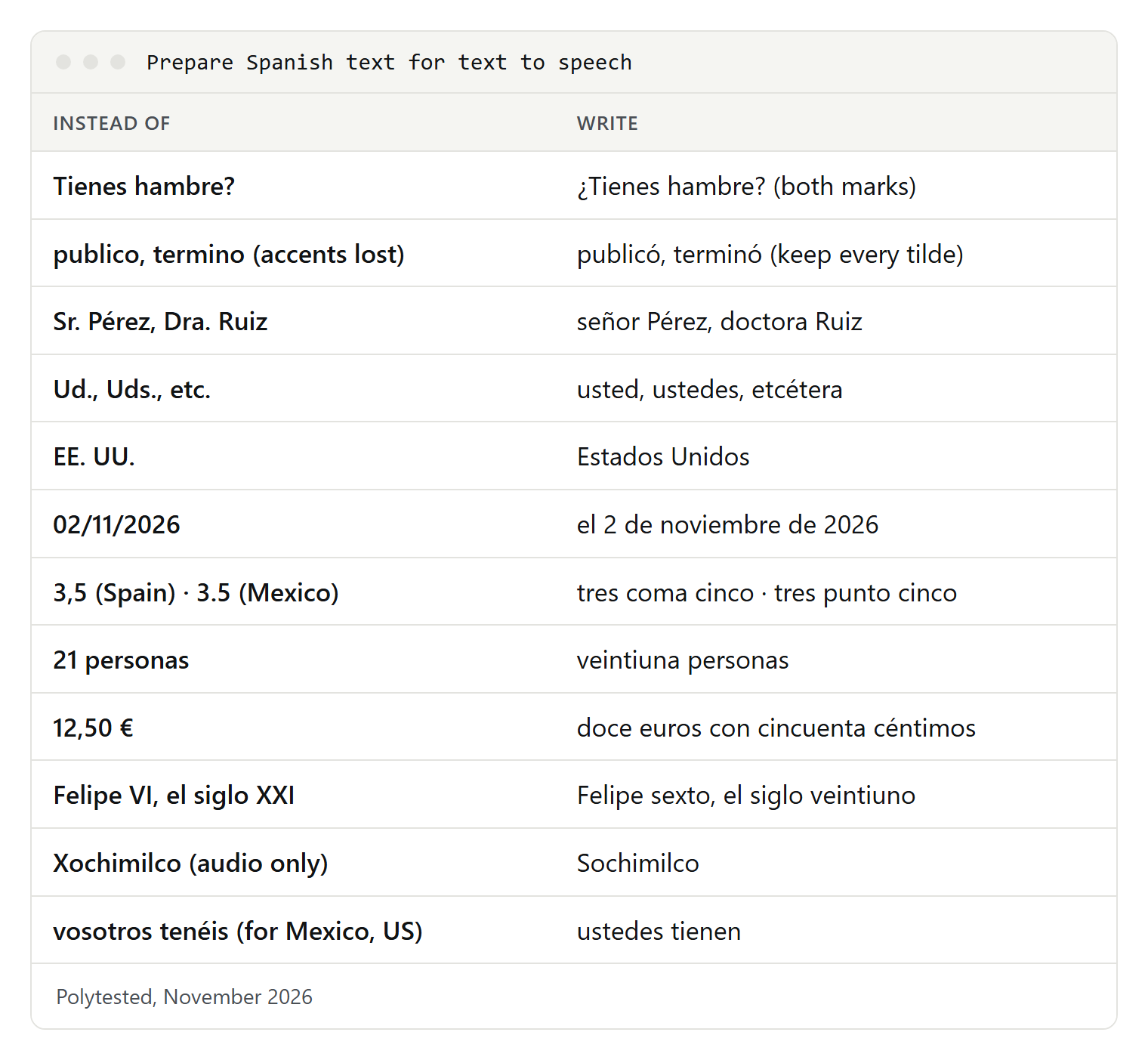
Spanish spelling is close to its sound, so most problems come from what isn't a plain word: punctuation, missing accents, numbers and abbreviations. ElevenLabs' own advice is to write numbers, dates, symbols and acronyms in words, the way you want them spoken.
¿ and ¡: the opening marks matter
In Spanish, a yes/no question often has the same word order as a statement. Tienes hambre means "you're hungry"; ¿Tienes hambre? means "are you hungry?". The punctuation is the only clue, and the opening mark shows where the question or exclamation starts. Keep both marks, and put them around the part that is actually asked:
Before: Tienes hambre?
After:  ¿Tienes hambre?

Before: Si quieres, vienes mañana?
After:  Si quieres, ¿vienes mañana?

Before: Qué sorpresa! Llegaste temprano.
After:  ¡Qué sorpresa! Llegaste temprano.
Text typed on an English keyboard often loses these marks. On Windows, a Spanish keyboard layout has keys for them; on most phone keyboards, a long press on ? or ! offers them.
Keep every accent mark and every ñ
A tilde moves the stress and can change the meaning, so a voice reads text without accents as different words:
publico "I publish"   público "public"   publicó "he published"
termino "I finish"    término "term"     terminó "he finished"
esta "this"           está "is"
papa "potato"         papá "dad"
si "if"               sí "yes"
Accents and the ñ go missing in text copied from old systems, spreadsheets saved without UTF-8 and messages typed in a hurry. The voice can't guess which word you meant.
Numbers: comma or point, and gender
Spain uses a decimal comma and a point (or space) for thousands; Mexico and the US use a decimal point and a comma for thousands. The same digits can mean different numbers, so write them in words:
3,5 (Spain)         → tres coma cinco
3.5 (Mexico, US)    → tres punto cinco
1.250 (Spain)       → mil doscientos cincuenta
1,250 (Mexico, US)  → mil doscientos cincuenta
21 personas         → veintiuna personas
1 hora              → una hora
200 páginas         → doscientas páginas
1.º, 2.ª            → primero, segunda
Felipe VI           → Felipe sexto
el siglo XXI        → el siglo veintiuno
Spanish numbers agree with the noun: veintiún libros but veintiuna personas, doscientos euros but doscientas páginas. For numbers ending in one, or in the hundreds, the word is safer than the digit. Roman numerals are a trap too: kings take ordinals up to ten (Alfonso X is Alfonso décimo), centuries take cardinals.
Dates, times and money
02/11/2026   → el 2 de noviembre de 2026
1/5          → el primero de mayo, or el uno de mayo
14:30        → las dos y media de la tarde
12,50 €      → doce euros con cincuenta céntimos
$12.50       → doce dólares con cincuenta centavos
$250 MXN     → doscientos cincuenta pesos
Spanish puts the day before the month, but Spanish speakers in the US also see US documents with the month first; the month as a word removes the doubt. Mexico uses the dollar sign for pesos, so name the currency.
Abbreviations, titles and acronyms
Spanish abbreviations are common in letters and forms, and a voice may spell them out or skip them:
Sr., Sra., Srta.     → señor, señora, señorita
Dr., Dra.            → doctor, doctora
Lic., Ing.           → licenciado, ingeniero (Mexico)
Ud., Uds., Vd.       → usted, ustedes, usted
etc., p. ej.         → etcétera, por ejemplo
n.º, pág., tel.      → número, página, teléfono
EE. UU.              → Estados Unidos
Spanish reads some acronyms as words (ONU, OTAN, IVA) and spells out others (DNI in Spain, RFC in Mexico). If a voice gets one wrong, write it the way it's said, or use the full name.
Names, places and English words
Spanish voices usually read Spanish names well; the trouble starts with names from other languages. Mexican place names from Nahuatl use x for different sounds: México and Oaxaca have a "j" sound, Xochimilco starts with an "s". For audio only, respell the word (Sochimilco); for text you also display, use your tool's pronunciation feature. English brand names (YouTube, Wi-Fi) are read with Spanish sounds, so listen and respell if needed.
Punctuation and pauses
Voices take their pauses from punctuation. Spanish writing allows long sentences with many commas; for audio, split them. End headings and list items with a period. In dialogue, the Spanish dash (raya) marks who speaks, but a voice may not pause at it, so rewrite dialogue for audio:
Before: —¿Vienes? —preguntó Ana—. Te espero.
After:  Ana preguntó: «¿Vienes? Te espero».
SSML and pronunciation tools
SSML, the Speech Synthesis Markup Language, tells a voice how to read a word. Three elements matter most for Spanish: phoneme (a phonetic spelling), sub (say this instead of the written text) and say-as (read as a date, number or letters).
- Microsoft Azure supports
phonemewith IPA and other alphabets, plussubandsay-as; it notes that reading durations withsay-asworks only in English and Spanish. - Google Cloud accepts IPA and X-SAMPA in
phoneme, one word per tag. - Amazon Polly supports
phonemewith IPA or X-SAMPA for standard, neural and long-form voices. - ElevenLabs doesn't support SSML in Eleven v4, which reads IPA written between slashes instead. Its SSML phoneme tags work only with the English-only Flash v2 and Turbo v2.
- Built-in readers don't take SSML; on Apple devices, use Pronunciations.
<speak version="1.0" xmlns="http://www.w3.org/2001/10/synthesis" xml:lang="es-MX">
  La <sub alias="doctora">Dra.</sub> Ruiz te espera en
  <phoneme alphabet="ipa" ph="sotʃiˈmilko">Xochimilco</phoneme>.
  <break time="500ms"/>
  Tu cita es el <say-as interpret-as="date" format="dmy">02/11/2026</say-as>.
</speak>
Microsoft's examples also wrap the text in a voice element. For Eleven v4, the IPA goes straight into the text, in double quotes as in ElevenLabs' examples:
La excursión a "/sotʃiˈmilko/" sale a las nueve.Listen to every word you mark, whichever service you use.
If it doesn't sound right
An English voice reads your Spanish. The default voice is probably English. On Windows, add a Spanish voice and select it; in Chrome, add Spanish under Voice selection > Languages...; on an iPhone, turn on Detect Languages or set Spanish as Default Language. In ElevenLabs, use a voice trained on Spanish, keep languages in separate generations and avoid Flash v2 and Turbo v2.
The accent is wrong for your audience. Pick the voice by country, then check your text for vosotros, vos and regional words.
Questions sound like statements. Add the opening ¿ and make sure the closing mark is there too.
Words are stressed in the wrong place. Look for missing accent marks or broken characters; save text files as UTF-8.
The Spanish voice doesn't appear. Wait for the download to finish, then restart the app. On Windows, try the language-pack route if Add voices doesn't work.
It's too fast for learning. Use Translate's Slow or Slower, Chrome's Playback speed, Edge's Voice options or the speaking rate on Apple and Android devices.