For free Japanese text to speech, start with the voices your device already has. Windows offers Haruka, Ayumi and Ichiro plus the natural voices Nanami and Keita; Macs and iPhones speak Japanese under Read & Speak; Android installs Japanese voice data in its text-to-speech settings; Chrome and Edge read Japanese web pages aloud. For one sentence, Google Translate's Listen button is enough. For an audio file, use ElevenLabs, Narakeet or the free VOICEVOX character voices, and follow their credit rules. Then write tricky kanji, names and numbers in kana so the voice reads them the way you mean.
Which option to use: the short answer
Everything below comes from the vendors' own help pages, documentation and terms, checked on November 4, 2026.
| Your situation | Use | Why |
|---|---|---|
| You want Japanese read aloud on your PC | Windows Japanese voices | Free, with natural voices for Narrator |
| You use a Mac, iPhone or iPad | Read & Speak | Built in, with downloadable Japanese voices |
| You use an Android phone | Text-to-speech output | Install Japanese voice data once, then apps can use it |
| You want a Japanese web page read to you | Chrome reading mode or Edge Read aloud | No extension needed |
| You want to hear a phrase slowly while you study | Google Translate | Listen at normal, slow or slower speed |
| You need narration for a video, course or podcast | ElevenLabs or Narakeet | Downloadable Japanese audio; commercial use needs a paid plan |
| You want an anime-style character voice | VOICEVOX | Free desktop app; every clip needs a credit such as "VOICEVOX:ずんだもん" |
| You build an app, game or phone menu | Microsoft, Google Cloud or Amazon Polly | Japanese voices through an API, with kana-based pronunciation control |
How classic system voices differ from AI voices is explained in our guide to text to speech without AI; for other languages on each device, see how to have text read aloud for free.
Windows: add Japanese voices and use them
Microsoft lists three classic Japanese voices for current Windows versions, Ichiro (male), Haruka and Ayumi (female), and two natural voices for Narrator, Keita (male) and Nanami (female).
- Press Windows logo key + Ctrl + N to open Narrator settings.
- Under Narrator's voice, select Add legacy voices (in Windows 10: Add more voices). The Speech settings page opens.
- Under Manage voices, select Add voices, select Japanese, then Add. Microsoft says the voices are ready in a few minutes, depending on your connection.
- Go to Start > Settings > Time & language > Speech, pick the Japanese voice under Voices, set its speed and preview it.
For the natural voices, select Add next to Add natural voices in Narrator settings, then Choose a language, Japanese and Next, and install Nanami or Keita.
If Add voices doesn't offer Japanese, add the language instead: Settings > Time & language > Language & region > Add a language, type Japanese, select Next, tick text-to-speech under Optional language features and select Install. Leave Set as my Windows display language unticked unless you want Japanese menus.
Mac, iPhone and iPad: Read & Speak in Japanese
Apple lists Read & Speak for Japanese (Japan) on macOS and iOS.
On a Mac: choose Apple menu > System Settings > Accessibility > Read & Speak. Click the info button next to System voice, click Japanese in the sidebar and click a voice to download it, then click Done and choose it in the System voice menu. Turn on Speak selection, select Japanese text in any app and press Option-Esc, the default shortcut. A voice isn't available until its download is complete.
On an iPhone or iPad: go to Settings > Accessibility > Read & Speak and turn on Speak Selection (select text, then tap Speak) or Speak Screen (swipe down with two fingers from the top). Under Voices, choose a Japanese voice, and set Default Language or turn on Detect Languages so the iPhone switches voices when the text changes language. Apple says enhanced-quality voices can be 100 MB or larger, so use Wi-Fi.
On both, Pronunciations lets you dictate or spell out how a word should sound: the simplest fix for a name the voice keeps misreading.
Android, Chrome, Edge and Google Translate
Android: open Settings > Accessibility > Text-to-speech output, choose your preferred engine, set the language to Japanese, then select Install voice data and choose Japanese. Press Play for a sample. Google notes that the engines on offer vary by device.
Chrome: right-click the page and select Open in reading mode, or press Alt + Shift + R (⌘ + Option + R on a Mac), then Play. For a Japanese voice, go to Settings > Voice selection > Languages... and turn on Japanese. Google says reading mode downloads natural voices for your current language and falls back to the system voice; it doesn't work on every website.
Edge: right-click the page and choose Read aloud, or press Ctrl + Shift + U (Command + Shift + U on a Mac). Voice options in the toolbar change the voice and speed.
Google Translate: choose Japanese as the language to translate to, paste up to 5,000 characters and click Listen. For practice, click Settings at the top right and choose Slow or Slower; the Android app has the same choices under Menu > Settings > Speed. There's no download button, and a machine translation can pick an odd word or politeness level, so check it before you learn it by heart.
AI voice generators and online tools with Japanese voices
These tools make Japanese audio files you can keep. Their free plans don't allow commercial use.
ElevenLabs
- Free use: the Free plan includes 10,000 credits a month, about 10 minutes of text to speech by the pricing page's estimate.
- Japanese: supported by Eleven v4, Eleven v3, Multilingual v2 and Flash v2.5. Its Japanese page names anime, gaming and media as uses.
- Download: MP3 (128 kbps on the Free plan); WAV, M4A and FLAC from your history.
- Commercial use: not on the Free plan, and free-plan audio you publish must credit "elevenlabs.io" or "11.ai" in the title. Starter is the first plan with a commercial license.
The accent comes from the voice, and ElevenLabs' pre-made voices are English, so pick a Voice Library voice recorded in Japanese.
Narakeet
- Free use: try it online without registering. A free account allows 20 conversions, with audio scripts up to 1 KB of text.
- Japanese voices: 118 male and female voices by Narakeet's count, including multilingual "polyglot" voices.
- Download: M4A, MP3 or WAV.
- Commercial use: paid accounts only; free-account audio is for personal and evaluation use. SSML is also for paid accounts.
Cloud services for developers
- Microsoft Azure AI Speech lists seven standard neural Japanese voices (Nanami, Keita, Aoi, Daichi, Mayu, Naoki, Shiori), plus HD and multilingual versions.
- Google Cloud Text-to-Speech lists more than 40 Japanese voices, 30 of them Chirp 3: HD voices.
- Amazon Polly lists four: Mizuki, Takumi, Kazuha and Tomoko.
All three let you set readings in kana (see the SSML section). To compare voice tools in general, see our guides to free AI voice generators and ElevenLabs alternatives.
VOICEVOX: free Japanese character voices, with credit rules
VOICEVOX is a free Japanese text-to-speech and singing app for Windows, Mac and Linux, built on open-source code. Its official site lists 44 characters, such as Zundamon (ずんだもん) and Shikoku Metan (四国めたん), plus VOICEVOX Nemo, voices without characters. It exports WAV files, works offline and lets you correct readings and intonation word by word. Its website and help pages are in Japanese.
The rules come in two layers, and both apply:
- VOICEVOX's software terms: commercial and non-commercial use are allowed, with a credit showing that you used VOICEVOX.
- Each character's terms: VOICEVOX's standard wording allows commercial and non-commercial use with the credit "VOICEVOX:" plus the character's name, but some characters set stricter rules.
| Character | Credit to show | Use allowed |
|---|---|---|
| Zundamon, Shikoku Metan, Kyushu Sora, Tohoku Zunko and others from the same rights holder | VOICEVOX:ずんだもん (with the character's name) | Commercial and non-commercial; no political or religious use, no fake or misleading content |
| No.7, Yurei-chan | VOICEVOX:No.7, VOICEVOX:ユーレイちゃん(CV:神崎零) | Non-commercial, with income from fan works and streaming allowed; other commercial use needs approval first |
| Mochiko-san | VOICEVOX:もち子(cv 明日葉よもぎ) | Commercial and non-commercial, except voice works, voice materials and games; companies ask first |
| Aoyama Ryusei, Goki | VOICEVOX:青山龍星, VOICEVOX:後鬼 | Individuals: commercial and non-commercial; companies ask first |
| Voidoll, Zonko | VOICEVOX:Voidoll(CV:丹下桜), VOICEVOX:ぞん子 | Voidoll: companies contact the rights holder first; Zonko: commercial use only after contacting the rights holder |
The VOICEVOX Q&A says to put the credit in a video's description or in the video; for audio only, such as a phone message, at the start or end, unless the character's terms say otherwise. If you blend a voice that allows commercial use with one that doesn't, the stricter terms apply. Character terms are in Japanese and can change, so open the 利用規約 (terms of use) link on the character's page before you publish. This isn't legal advice.
How to make a Japanese MP3 with ElevenLabs, step by step
- Sign up for a free account and select Text to Speech in the sidebar.
- Paste your Japanese text. The website detects the language from your text and you can't set it by hand, so keep English and Japanese in separate generations.
- Choose a voice. In the Voice Library, filter by language (Japanese) first; the accent filter appears after that.
- Check the model: Eleven v4, Eleven v3, Multilingual v2 or Flash v2.5. Flash v2 and Turbo v2 are English-only and can give Japanese an English accent.
- Generate and listen. Where a word sounds wrong, rewrite it in kana (see below) and generate that part again.
- Download the MP3. For WAV, M4A or FLAC, open the history tab in the right-hand panel and click the download icon; FLAC and M4A are under Advanced.
Side by side
| Option | Japanese voices listed | Free use | Audio file | Commercial use |
|---|---|---|---|---|
| Windows voices | Haruka, Ayumi, Ichiro; natural Nanami, Keita | Free, built in | No, listening only | Windows license terms |
| Apple Read & Speak | Japanese voices to download | Free, built in | No, listening only | Apple license terms |
| Android, Chrome, Edge | Depends on the engine or browser | Free | No | Not applicable |
| Google Translate | Japanese, at three speeds | 5,000 characters at a time | No | Not applicable |
| ElevenLabs | Voice Library, filter by Japanese | 10,000 credits a month | MP3, WAV, M4A, FLAC | Paid plans; free needs attribution |
| Narakeet | 118 voices | 20 conversions, free account | M4A, MP3, WAV | Paid accounts only |
| VOICEVOX | 44 characters plus Nemo | Free desktop app | WAV | Per character, always with credit |
| Azure, Google Cloud, Polly | From four (Polly) to more than 40 (Google) | See pricing pages | Through the API | Each service's terms |
If you narrate someone else's text, the rights to that text apply too.
What text to speech gets wrong in Japanese, and how to fix it
A Japanese voice has to turn kanji into sounds before it can speak, and many kanji have several readings. The rule of thumb if you don't read Japanese well: kana (hiragana and katakana) are read as written; kanji, numbers and Latin letters are where the voice has to guess.
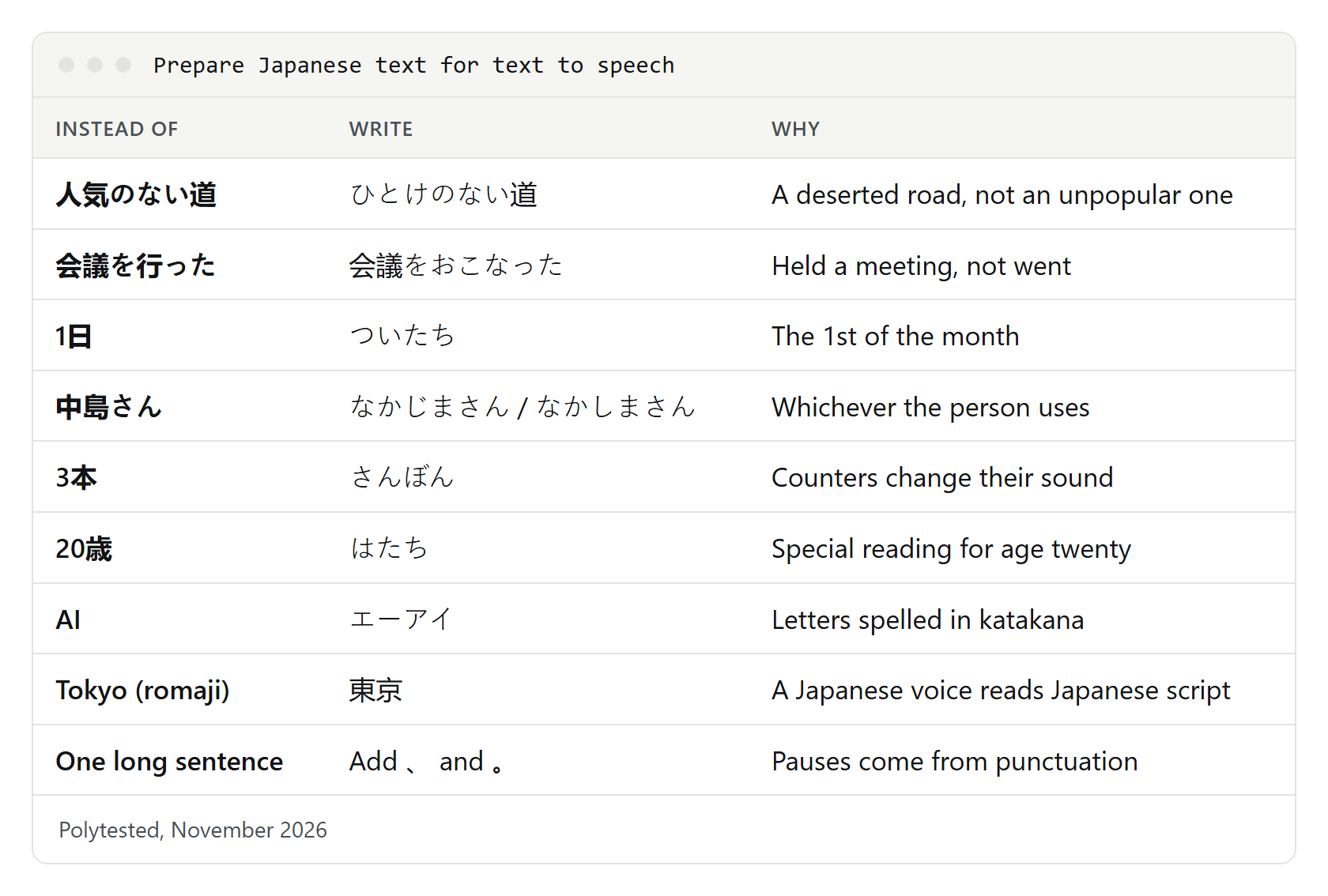
Kanji with more than one reading
Context usually tells the voice which reading to use, but short sentences can trip it up:
人気のない店   にんきのないみせ    a shop that isn't popular
人気のない道   ひとけのないみち    a road with nobody around
東京に行った   とうきょうにいった   I went to Tokyo
会議を行った   かいぎをおこなった   We held a meeting
このカレーは辛い からい          This curry is spicy
別れは辛い    つらい           Saying goodbye is hard
If the audio picks the wrong one, write that word in kana: 人気のない道 becomes ひとけのない道. Keep kanji everywhere else, because it helps the voice choose the right meaning and accent.
Names of people and places
The same kanji can be read many ways, and only the person knows which is right: 中島 can be Nakajima or Nakashima, and 日本橋 is Nihonbashi in Tokyo but Nipponbashi in Osaka. Check, then write the name in kana for the audio:
中島さん      → なかじまさん  (or なかしまさん)
日本橋(大阪) → にっぽんばし
健さん       → けんさん  (or たけしさん, まさるさん …)
Counters, numbers and dates
Numbers and counters change their sounds when they meet, and dates have special readings a voice can miss:
1本 いっぽん  3本 さんぼん   (long objects)
1匹 いっぴき  3匹 さんびき   (small animals)
1人 ひとり   3人 さんにん   (people)
1日 ついたち  the 1st (いちにち = one day)
20日 はつか   the 20th
4月 しがつ   April
20歳 はたち   twenty years old
2026年11月4日  にせんにじゅうろくねん じゅういちがつ よっか
Write dates the Japanese way, 2026年11月4日, not 11/4/2026, which a voice may read as plain numbers. Write money with 円 after the number (1,500円). Phone numbers are read digit by digit, and many speakers say の for the hyphens; if the voice doesn't, write the reading in kana. ElevenLabs' advice holds for every tool: write numbers, dates and symbols the way you want them spoken.
Particles は, へ and を
Three particles aren't read the way their kana usually are: は as wa, へ as e, を as o.
私は学生です   わたしはがくせいです  (は = wa)  I'm a student
東京へ行きます  とうきょうへいきます  (へ = e)   I'm going to Tokyo
水を飲む     みずをのむ       (を = o)   to drink water
Voices handle this well in normal text with kanji. Long runs of hiragana are the problem, because the voice can't tell where words end: ははははじめて is 母は初めて (mother, for the first time). Write normal mixed kanji and kana, or add commas, instead of all-hiragana text.
Long vowels and the small っ
Vowel length and the small っ change meaning, so a typo becomes a different word:
おばさん  aunt       おばあさん  grandmother
ビル    building    ビール    beer
きて    come        きって    postage stamp
Long o and long e are often written with う and い: 東京 is とうきょう but sounds like tōkyō. Voices know this; you don't need to fix it.
English words, acronyms and romaji
A Japanese voice reads Latin letters in its own way, and results vary by engine. For predictable audio, write loanwords and acronyms in katakana, and never write Japanese in romaji: an English voice reads "arigatou" with English sounds, and a Japanese voice may not treat it as Japanese.
Excel → エクセル
AI    → エーアイ
USB   → ユーエスビー
Tokyo → 東京
arigatou gozaimasu → ありがとうございます
Punctuation and pauses
Pauses come from 、 and 。, the Japanese comma and full stop, so split long sentences. The VOICEVOX Q&A notes that a very short phrase between commas is sometimes skipped and suggests lengthening the silence around it.
Before: 資料を確認してから会議室に来てください明日は九時からです
After:  資料を確認してから、会議室に来てください。明日は、九時からです。
Pitch accent: why 箸 and 橋 sound different
Japanese words have a pitch pattern instead of English-style stress. In standard Tokyo Japanese, はし is chopsticks (箸), bridge (橋) or edge (端) depending on where the pitch drops. A voice takes the pattern from the word it recognizes, one more reason to keep kanji: in hiragana alone, はし gives it nothing to go on.
箸  はし  high-low              chopsticks
橋  はし  low-high, drops after  bridge
端  はし  low-high, stays high   edge
雨  あめ  high-low              rain
飴  あめ  low-high              candy
Most tools don't let you change pitch directly. VOICEVOX does, in its accent and intonation panels, and Google Cloud's yomigana readings can mark where the pitch drops.
Forcing a reading: kana, furigana and dictionaries
Furigana, the small kana printed above kanji, help human readers but not most voices, which read the main text. When you copy text with furigana from a web page, the reading can also end up inline (東京とうきょう), and the voice reads both, so clean it up first.
To force a reading, from simplest to most powerful:
- Write the word in kana. Works everywhere; use it for names and ambiguous words.
- Apple Pronunciations on Mac and iPhone: dictate or spell out the sound.
- VOICEVOX: click the reading in the accent panel to correct it, or add the word under 設定 (Settings) > 読み方&アクセント辞書 (reading and accent dictionary) with its reading in hiragana or katakana.
- ElevenLabs: pronunciation dictionaries with alias rules work in Studio, Dubbing Studio and the API; an alias from 中島 to なかじま does the job.
- Cloud services: SSML phoneme tags with kana, below.
Our guides to French text to speech and Spanish text to speech cover the same kind of fixes for those languages.
SSML for Japanese: yomigana and kana phonemes
SSML, the Speech Synthesis Markup Language, tells a voice how to read a word. For Japanese, the cloud services take readings in kana instead of IPA:
- Google Cloud requires the
yomiganaalphabet for Japanese, in hiragana or katakana;^marks the start of a pitch phrase and!the drop. Chirp 3: HD voices don't accept SSML, so use a Neural2, WaveNet or Standard voice. - Amazon Polly offers
x-amazon-yomigana(hiragana, katakana or romaji) andx-amazon-pron-kana, which adds an accent mark, for standard, neural and long-form voices. - Microsoft Azure bases its
sapiphone set for ja-JP on kana, and custom lexicons and thesubelement can swap a word for its reading. - ElevenLabs doesn't support SSML in Eleven v4; use kana in the text or a pronunciation dictionary.
<speak>
  <phoneme alphabet="yomigana" ph="なかじま">中島</phoneme>さんは
  <phoneme alphabet="yomigana" ph="^は!し">箸</phoneme>を使います。
</speak><speak>
<phoneme alphabet="x-amazon-yomigana" ph="ひとけ">人気</phoneme>のない道です。
</speak>Listen to every word you mark: a wrong reading is spoken just as confidently as a right one.
If it doesn't sound right
A Chinese voice reads your Japanese. Kanji are shared with Chinese, so with a Chinese voice selected, a device reads them in Chinese and stumbles over kana. Pick a Japanese voice: on Windows, set it as the default; in Chrome, add Japanese under Voice selection > Languages...; on an iPhone, turn on Detect Languages or set Japanese as Default Language; in ElevenLabs, choose a voice recorded in Japanese.
An English voice reads romaji or skips the Japanese. Select a Japanese voice and write the text in Japanese script.
A kanji, name or date is read wrong. Write that word in kana, add it to the tool's dictionary or use an SSML phoneme tag.
Characters come out as gibberish. The text file may use an older Japanese encoding. Save it as UTF-8 and paste again.
The Japanese voice doesn't appear. Wait for the download to finish and restart the app; on Windows, try the language-pack route.
It's too fast for learning. Use Translate's Slow or Slower, Chrome's Playback speed, Edge's Voice options or the speaking rate on Apple and Android devices.