For free French text to speech, start with the voices your device already has. Windows can add French voices for France, Canada and Switzerland; Macs and iPhones speak French for France, Canada and Belgium under Read & Speak; Android installs French voice data in its text-to-speech settings; Chrome and Edge read French web pages aloud. For a single sentence, Google Translate's Listen button is enough. For an MP3 you can keep, use an online tool such as ElevenLabs or Narakeet. Whatever you choose, pick a French voice, then write numbers, dates and abbreviations the way they should sound.
Which option to use: the short answer
Everything below comes from the vendors' own help pages and documentation, checked on November 2, 2026.
| Your situation | Use | Why |
|---|---|---|
| You want French read aloud on your PC | Windows French voices | Free voices for France, Canada and Switzerland |
| You use a Mac, iPhone or iPad | Read & Speak | Built in, with voices for France, Canada and Belgium |
| You use an Android phone | Text-to-speech output | Install French voice data once, then apps can use it |
| You want a French web page read to you | Chrome reading mode or Edge Read aloud | No extension needed |
| You want to hear one phrase, or practice it slowly | Google Translate | Listen at normal, slow or slower speed |
| You need an audio file for a video, course or podcast | ElevenLabs or Narakeet | Downloadable French audio; commercial use needs a paid plan |
| You build an app or a phone menu | Microsoft, Google Cloud or Amazon Polly | French voices through an API, with SSML for pronunciation |
For how speech synthesis works in general, see our explainer what is TTS. For reading any language aloud on each device, see how to have text read aloud for free.
Windows: add French voices and use them
Microsoft lists these French voices for current Windows versions:
- French (France): Paul (male), Julie and Hortense (female)
- French (Canada): Claude (male), Caroline (female)
- French (Switzerland): Guillaume (male)
- Natural voices for Narrator: Henri (male) and Denise (female), listed as French without a region
There is no Belgian French voice in Microsoft's list. You install the first three groups with Narrator's Add legacy voices button; our guide to text to speech without AI explains how these classic voices differ from natural voices.
How to add a French voice in Windows 11, step by step
- Press Windows logo key + Ctrl + N to open Narrator settings.
- Under Narrator's voice, select Add legacy voices (in Windows 10: Add more voices). The Speech settings page opens.
- Under Manage voices, select Add voices.
- Select the French variant you need, then Add. Microsoft says the voices are ready in a few minutes, depending on your connection.
- In Start > Settings > Time & language > Speech, choose the French voice as the default, set its speed and preview it.
For Narrator's natural voices, select Add next to Add natural voices in Narrator settings, then Choose a language, French, Next, and install Denise or Henri. Each voice is installed separately.
If Add voices doesn't offer French, add French as a language instead: Settings > Time & language > Language & region > Add a language, pick French, tick Text-to-speech and select Install. Microsoft notes that not every language pack includes text to speech.
Mac, iPhone and iPad: Read & Speak in French
Apple lists Read & Speak for French (France), French (Canada) and French (Belgium) on macOS and iOS. There is no Swiss French entry.
On a Mac
- Choose Apple menu > System Settings > Accessibility > Read & Speak. (Older macOS versions call it Spoken Content.)
- Click the info button next to System voice, click French in the sidebar and click a voice to download it. Scroll down for voices from another region, such as Canada.
- Click Done and choose the French voice in the System voice pop-up menu.
- Turn on Speak selection, select French text in any app and press Option-Esc, the default shortcut. Press it again to stop.
Apple notes that a voice isn't available until its download is complete.
On an iPhone or iPad
- Go to Settings > Accessibility > Read & Speak.
- Turn on Speak Selection (select text, then tap Speak) or Speak Screen (swipe down with two fingers from the top).
- Under Voices, choose a French voice and dialect.
- Set Default Language, or turn on Detect Languages so the iPhone switches to French when the text is French.
Apple says enhanced-quality voices can be 100 MB or larger, so use Wi-Fi to download them. On both Mac and iPhone, Pronunciations lets you dictate or spell out how a word should be spoken: the easiest fix for French names on Apple devices.
Android: Google's text-to-speech in French
- Open Settings > Accessibility > Text-to-speech output.
- Choose your preferred engine and set the language to French. Google notes that the engines differ by device: Google's own, the manufacturer's or one from the Play Store.
- Select Install voice data and choose French. If your device offers more than one French variant, pick the one for your listeners.
- Press Play for a sample, and adjust speech rate and pitch.
Web pages: Chrome reading mode and Edge Read aloud
Chrome: right-click the page and select Open in reading mode, or press Alt + Shift + R (⌘ + Option + R on a Mac). Select Play; Playback speed slows it down. To get French voices, go to Settings > Voice selection > Languages..., turn on French and pick a voice. Google says reading mode downloads Google's natural voices for your current language and uses the system voice if that download fails. It doesn't work on every website. Our roundup of read aloud Chrome extensions covers the alternatives.
Edge: right-click the page and choose Read aloud, or press Ctrl + Shift + U (Command + Shift + U on a Mac). Voice options in the toolbar change the voice and speed, so pick a French voice there.
Google Translate: hear a sentence in French
- Open Google Translate in your browser and choose French as the language to translate to.
- Type or paste your text; Google's limit is 5,000 characters at a time.
- Click Listen under the French translation.
- To practice, click Settings at the top right and choose Slow or Slower.
In the Android app, Menu > Settings has Region, which changes the accent, and Speed. Translate has no download button, and what it reads is a machine translation, so check the French before you learn it by heart.
Online tools and AI voice generators with French voices
These tools make French audio files. Their free plans don't allow commercial use.
ElevenLabs
- Free use: the Free plan includes 10,000 credits a month, which the pricing page puts at about 10 minutes of text to speech.
- French: supported by its current models, including Eleven v4. Its French page mentions voices "from Parisian elegance to Québécois flair".
- Download: MP3 (128 kbps on the Free plan); WAV, M4A and FLAC from your history.
- Commercial use: not on the Free plan, and free-plan audio you publish needs "elevenlabs.io" or "11.ai" in the title. Starter is the first plan with a commercial license.
ElevenLabs says the language comes from your text and the accent from the voice. Its pre-made voices are English and, with older models, can carry an English accent into French; for Eleven v4, it says a voice now speaks another language fluently instead of keeping its original accent. For a specific accent, such as Québec, it recommends a voice trained on French with that accent.
Narakeet
- Free use: try it online without registering. A free account allows 20 conversions, with audio scripts up to 1 KB of text.
- French voices: 124 for Metropolitan French, 42 for Canadian French, 3 for Belgian French and 2 for Swiss French, by Narakeet's count.
- Download: M4A, MP3 or WAV.
- Commercial use: only with a paid account; free-account audio is for personal and evaluation use. SSML scripting is also for paid accounts.
NaturalReader
- Free use: unlimited listening with its Free Voices (your device's own voices), 20,000 characters a day with Lite voices and 4,000 a day shared across Plus and cloned voices.
- French voices: Plus voices for Belgium, Canada, France and Switzerland. NaturalReader advises picking from the French list, not the multilingual list, when the accent matters.
- Download: no MP3 on the Free plan; MP3 files made with Lite, Plus or Pro voices are for personal use only.
Cloud services for developers
- Microsoft Azure AI Speech lists more than 20 voice entries for French (France), counting HD and multilingual versions, six for Canada, two for Belgium (Charline, Gerard) and two for Switzerland (Ariane, Fabrice).
- Google Cloud Text-to-Speech lists voices for French (France) and French (Canada).
- Amazon Polly lists six voices for France (Ambre, Céline, Florian, Léa, Mathieu, Rémi), three for Canada (Chantal, Gabrielle, Liam) and one for Belgium (Isabelle).
All three accept SSML (see below); free allowances are on their pricing pages.
How to make a French MP3 with ElevenLabs, step by step
- Sign up for a free account and select Text to Speech in the sidebar.
- Paste your French text. The website detects the language from the text and you can't set it by hand, so keep English and French in separate generations.
- Choose a voice. In the Voice Library, filter by language (French) first; the accent filter becomes available after that.
- Check the model. ElevenLabs lists French for Eleven v4, Eleven v3, Multilingual v2 and Flash v2.5. Flash v2 and Turbo v2 are English-only and can give French an English accent.
- Generate and listen. Where a word sounds wrong, fix the text (see below) and generate that part again.
- Download the MP3. For WAV, M4A or FLAC, open the history tab in the right-hand panel and click the download icon; FLAC and M4A are under Advanced.
To compare voice tools first, see our sister guides on free AI voice generators and ElevenLabs alternatives.
Side by side
| Option | French variants listed | Free use | Audio file | Commercial use |
|---|---|---|---|---|
| Windows voices | France, Canada, Switzerland | Free, built in | No, listening only | Windows license terms |
| Apple Read & Speak | France, Canada, Belgium | Free, built in | No, listening only | Apple license terms |
| Android | Depends on the engine | Free, built in | No, listening only | Engine's terms |
| Chrome, Edge | French voices in the voice settings | Free | No | Not applicable |
| Google Translate | Region setting in the Android app | 5,000 characters at a time | No | Not applicable |
| ElevenLabs | Filters by language and accent | 10,000 credits a month | MP3, WAV, M4A, FLAC | Paid plans; free needs attribution |
| Narakeet | France, Canada, Belgium, Switzerland | 20 conversions, free account | M4A, MP3, WAV | Paid accounts only |
| NaturalReader | Belgium, Canada, France, Switzerland | Daily character limits | MP3 on paid plans | Personal use only |
| Azure, Google Cloud, Polly | Two to four variants | See pricing pages | Through the API | Each service's terms |
The built-in voices need no account; the online tools need one for regular use. If you narrate someone else's text, the rights to that text apply too, as Narakeet points out. We can't give legal advice: check the terms of the tool and of the text before you publish.
France, Québec, Belgium or Switzerland?
The voice gives you the accent and the melody. The words, including how numbers are said, come from your text, so match both to your listeners.
- Accent: choose a voice made for the variant your audience speaks.
- Numbers: Belgium and Switzerland say septante (70) and nonante (90), and some Swiss cantons say huitante (80). France and Québec say soixante-dix, quatre-vingts and quatre-vingt-dix. If your listeners expect septante, write the word.
- Vocabulary: in Québec, e-mail is courriel and the weekend is la fin de semaine; in Québec, Belgium and Switzerland, déjeuner, dîner, souper are breakfast, lunch and dinner. A voice reads what you write; it doesn't localize.
- Dates: dates written as 2026-11-02 are common in Canada. Write le 2 novembre 2026 to be sure it's read as a date.
What text to speech gets wrong in French, and how to fix it
Many French mistakes can be fixed in the text before you press play. Engines must guess how to expand abbreviations, numbers and symbols; ElevenLabs' own advice is to write them in words, the way you want them spoken.
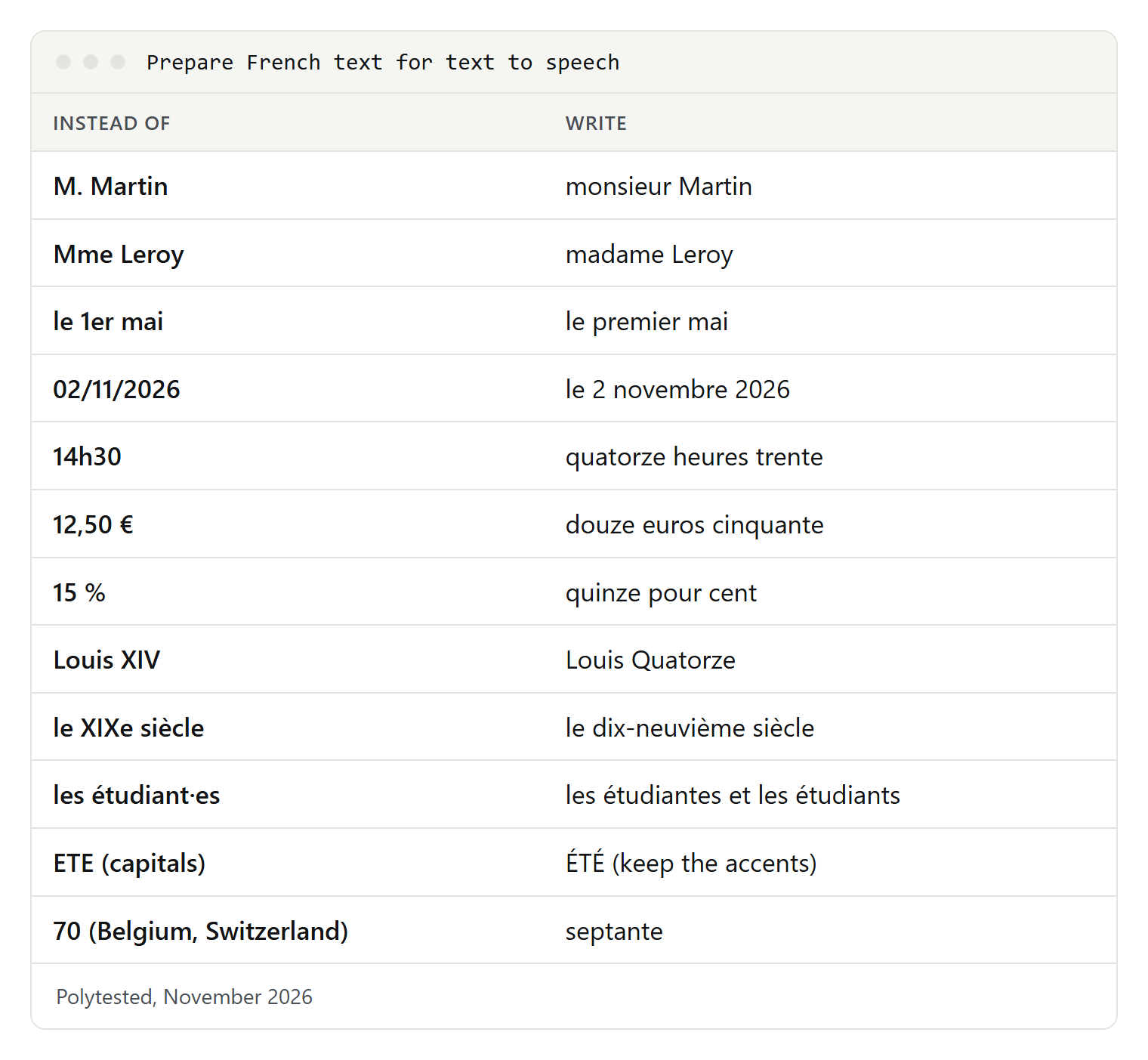
Abbreviations and acronyms
French abbreviations drop letters, so a voice may read them as letters or skip them:
M. Dupont, Mme Leroy  → monsieur Dupont, madame Leroy
Dr, Pr, St-Malo       → docteur, professeur, Saint-Malo
n° 12                 → numéro douze
p. ex., c.-à-d., etc. → par exemple, c'est-à-dire, et cetera
French spells some acronyms letter by letter (SNCF, TVA) and reads others as words (ONU, Unesco). If a voice gets one wrong, write it as it should sound: S N C F, or the full name.
Numbers, dates, times and money
French puts the day before the month, uses a comma for decimals and a space between thousands. Write the spoken form:
02/11/2026      → le 2 novembre 2026
le 1er mars     → le premier mars
14h30           → quatorze heures trente
12,50 €         → douze euros cinquante
3,5 %           → trois virgule cinq pour cent
1 250 personnes → mille deux cent cinquante personnes
06 12 34 56 78  → zéro six, douze, trente-quatre, cinquante-six, soixante-dix-huit
Louis XIV       → Louis Quatorze
le XIXe siècle  → le dix-neuvième siècle
French phone numbers are read in pairs. Roman numerals are a classic trap: Louis XIV is Louis Quatorze, but le XIVe siècle is le quatorzième siècle.
Liaisons and the h aspiré
A liaison links a silent final consonant to the next vowel. Some are required, some are forbidden, and a wrong one can change the meaning:
les amis      → lé-z-amis (liaison)
ils ont       → il-z-ont, "they have" (not ils sont, "they are")
les héros     → lé-héros, no liaison (with one, it sounds like "les zéros")
les haricots  → lé-haricots, no liaison
Paul et Anne  → never a liaison after "et"
Words with an h aspiré, such as héros, haricot and hibou, block the liaison. You can't mark a liaison in plain text, so if a voice gets one wrong, rephrase the sentence or use a pronunciation tool (next section).
Same spelling, two pronunciations
Les poules du couvent couvent.        (convent, then "they brood")
Nous portions les portions.           (verb, then noun)
Les présidents président la séance.   (noun, then verb)
Ils sont tous venus.                  (tous with a final "s" sound)
If the audio is wrong, change the wording (Tout le monde est venu) or fix the word with a phoneme tag.
Names, places and English words
Many French place names don't follow the spelling rules: Reims sounds like rince, Metz like messe, and Bruxelles has an "s" sound in the middle. For audio only, respell the word (Rince for Reims); for text you also display, use your tool's pronunciation feature. English words inside French (le week-end, le marketing) are read with French sounds by a French voice, which is what French listeners usually expect.
Accents, capitals and inclusive writing
- Keep every accent. Côte and cote, été and ete sound different, and French keeps accents on capitals: ÉTÉ, not ETE. Text copied from PDFs sometimes loses them.
- Write both forms instead of a middle dot, which a voice may spell out or drop:
Before: Chers étudiant·es, les inscrit·es recevront un courriel.
After:  Chères étudiantes, chers étudiants, les personnes inscrites recevront un courriel.
Punctuation and pauses
Voices take their pauses from punctuation; a line break alone may not create one. End headings and list items with a period, use commas where a speaker would breathe, and split long sentences. ElevenLabs notes that an ellipsis (…) adds a pause and weight in Eleven v4. French quotation marks « » can stay; they are punctuation, not words.
Before: Ouvrez le fichier puis cliquez sur Enregistrer
After:  Ouvrez le fichier. Ensuite, cliquez sur « Enregistrer ».
SSML and pronunciation tools
SSML, the Speech Synthesis Markup Language, tells a voice how to read a word. Three elements matter for French: phoneme (a phonetic spelling), sub (say this instead of the written text) and say-as (read as a date, number or letters).
- Microsoft Azure supports
phonemewith IPA and other alphabets, with its own phone set for French in France, Canada, Belgium and Switzerland, plussubandsay-as. - Google Cloud accepts IPA and X-SAMPA in
phoneme, one word per tag. - Amazon Polly supports
phonemewith IPA or X-SAMPA for standard, neural and long-form voices. - ElevenLabs doesn't support SSML in Eleven v4, which reads IPA written between slashes instead. Its SSML phoneme tags work only with an English-only model. Pronunciation dictionaries with alias rules work in Studio and the API.
- Built-in readers don't take SSML; on Apple devices, use Pronunciations.
<speak version="1.0" xmlns="http://www.w3.org/2001/10/synthesis" xml:lang="fr-FR">
  <sub alias="Monsieur">M.</sub> Martin vous attend à
  <phoneme alphabet="ipa" ph="ʁɛ̃s">Reims</phoneme>.
  <break time="500ms"/>
  Rendez-vous le <say-as interpret-as="date" format="dmy">02/11/2026</say-as>.
</speak>
Microsoft's own examples also put a voice element with the voice name inside speak. For Eleven v4, the IPA goes straight into the text, in double quotes as in ElevenLabs' own examples:
Le train pour "/ʁɛ̃s/" part à huit heures.ElevenLabs notes that IPA results can still vary by voice and phrase, so listen to every word you mark, whichever service you use.
If it doesn't sound right
An English voice reads your French. The default voice is probably English. On Windows, add a French voice and select it; in Chrome, add French under Voice selection > Languages...; on an iPhone, turn on Detect Languages or set French as Default Language. In ElevenLabs, use a voice trained on French, keep languages in separate generations and avoid Flash v2 and Turbo v2.
Accents are missing or words sound clipped. Check the text: missing accents, broken characters from a PDF or a file in the wrong encoding change what the voice reads. Save text files as UTF-8.
The French voice doesn't appear. Wait for the download to finish, then restart the app. On Windows, try the language-pack route if Add voices doesn't work.
The voice sounds mechanical. Microsoft calls its newer voices natural voices; try Denise or Henri in Narrator, a Google natural voice in Chrome, or an AI voice for audio you publish. Shorter sentences and clear punctuation help every voice.
It's too fast for learning. Use Translate's Slow or Slower, Chrome's Playback speed, Edge's Voice options or the speaking rate on Apple and Android devices.