SEO, short for search engine optimization, is the work of making your pages easy for search engines like Google and Bing to find, understand and show in their free results, and worth clicking once they appear there. It has three parts: technical (can the search engine fetch and read the page?), content (does the page answer the searcher's question?) and links from other sites. Paid ads are not SEO. Below we explain each part in plain English, using our own site as the example: we opened it to search engines on October 13, 2026, and watched what Google did next.
What SEO means
Google's own starter guide describes SEO as helping search engines understand your content, and helping people find your site and decide whether to visit it from a search engine. The same three letters also name the person who does this work: Google's page on hiring help is titled "Do you need an SEO?"
SEO is about the organic results, the ones nobody pays for. Google says it never accepts money to include or rank sites in those results, and that advertising with Google has no effect on a site's presence there. Paid search ads are a separate channel. You'll also meet SEM (search engine marketing): the term mostly means paid search advertising, but it's sometimes used for paid and organic search together, so ask which one is meant.
A few terms come up again and again:
| Term | What it means |
|---|---|
| Crawler | A program that fetches web pages. Google's is called Googlebot. |
| Index | The database where a search engine stores what it learned about pages. Only indexed pages can appear in results. |
| Title link | The clickable headline of a result, usually taken from the page's <title>. |
| Snippet | The description under the title link. |
| Canonical | The preferred URL when the same content is reachable at several URLs. |
| CTR | Click-through rate: clicks divided by impressions. |
| AEO, GEO | Answer engine and generative engine optimization: optimizing for AI answers. To Google, still SEO. |
Why SEO matters
In the United States, most search traffic still starts at Google. StatCounter, which counts visits that reach the more than one million sites using its tracking code, put Google at 85.19 percent of visits from search engines in September 2026 and Bing at 9.89 percent. On desktop computers alone, Bing had 18.8 percent; on phones, Google had 94.13 percent. If your readers work at desks, Bing is worth the few minutes it takes to set up Bing Webmaster Tools.
The clicks are free, and the work outlasts an ad: an ad stops when the budget runs out, while a useful page can keep bringing visitors for months. The catch is that nothing is guaranteed. Google states that it doesn't guarantee it will crawl, index or show a page, even when the page follows all of its basic rules.
How Google finds, indexes and ranks pages
Google describes Search in three stages, and not every page makes it through all three:
- Crawling. Googlebot downloads text, images and videos from pages. It finds new URLs through links on pages it already knows and through sitemaps you submit. While crawling, Google renders the page and runs its JavaScript with a recent version of Chrome.
- Indexing. Google analyzes the content, including the
<title>element and image alt text, and stores what it learns in the index. It also groups pages with similar content and picks the most representative one, the canonical. Indexing isn't guaranteed either. - Serving. For each search, Google looks for matching pages in the index and shows the ones it considers most relevant. According to Google, relevance depends on hundreds of factors, including the searcher's location, language and device.
Google adds that it doesn't accept payment to crawl a site more often or to rank it higher.
What a search engine reads on our page
A crawler doesn't see the design first. It reads the HTML. This is the top of one of our English guides, fetched the way a crawler fetches it:
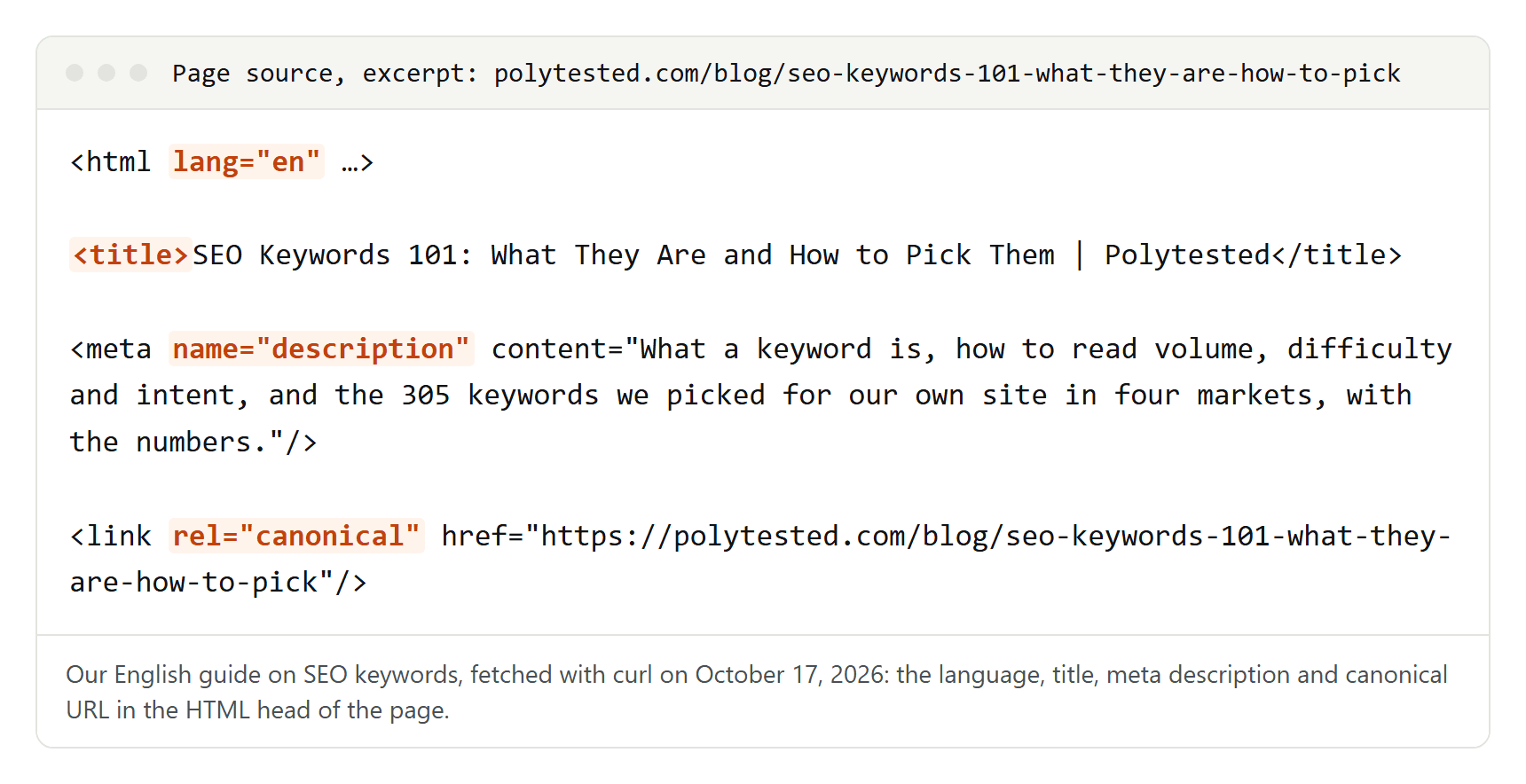
Line by line:
- The language:
lang="en"declares that the page is in English. - The title: it shows in the browser tab and is the main source for the title link in search results, although Google can also use headings and other text. Ours repeats the article's headline and adds the site name after a vertical bar. Google asks for titles that are unique to the page, clear, concise and accurate.
- The meta description: a one- or two-sentence summary. Google sometimes uses it for the snippet, but usually builds the snippet from the page's own text.
- The canonical: the page names its own URL as the preferred one. That matters as soon as the same content is reachable at more than one address; our guide on canonical tags shows when.
Further down, the same page lists its German, French and Spanish versions with hreflang tags, explained in our guide to hreflang and canonical tags. You can see all of this on any site: open a page and choose "View page source" in your browser.
The second file every crawler asks for is robots.txt. Ours, on the same day:
User-Agent: *
Allow: /
Disallow: /admin$
Disallow: /admin/
Disallow: /api/
Disallow: /go/

Sitemap: https://polytested.com/sitemap.xml
It lets crawlers fetch everything except our admin area, our API and our outgoing redirect links, and it points to the sitemap. Ours is an index with one sitemap per language; on October 17, 2026, they listed 46 English, 57 German, 27 French and 29 Spanish URLs.
What happened when we opened our site to Google
Until launch, no page was meant to enter the index. Every response from our server carried a noindex rule, and robots.txt allowed crawling but named no sitemap. Crawling had to stay allowed: Google can only obey a noindex rule on a page it is allowed to fetch. Our website migration checklist explains how to lock a test site safely. On launch day one switch and a rebuild removed the rule. This is what followed:
| Time | What happened |
|---|---|
| Oct 13, 17:14 | Lighthouse checks the home page with noindex still on: SEO score 69 out of 100. The only failed check: "Page is blocked from indexing." |
| Oct 13, 17:29 | We rebuild the site with indexing switched on. |
| Oct 13, 17:32 | Lighthouse again: SEO score 100. |
| Oct 13, 17:40 | We submit the sitemap index in Search Console. Google downloads it four seconds later. |
| Oct 13, 17:42 | Googlebot Smartphone crawls the home page and the blog page. Both end up indexed. |
| Oct 14, about 14:40 | We check all 86 URLs in our sitemaps with Search Console's URL Inspection. |
The result of that check, a day after launch:
| Language | URLs | Submitted and indexed | Discovered, not indexed | Unknown to Google |
|---|---|---|---|---|
| English | 41 | 13 | 12 | 16 |
| German | 27 | 7 | 0 | 20 |
| French | 9 | 6 | 2 | 1 |
| Spanish | 9 | 1 | 5 | 3 |
| Total | 86 | 27 | 19 | 40 |
Three lessons for any new site. Crawling can start within minutes, but indexing comes page by page: a day later, Google didn't know 40 of our URLs at all, including German guides published that same morning. Every one of the 27 indexed pages had been crawled by the smartphone crawler, which is what mobile-first indexing means in practice. And being indexed isn't the same as being seen: on October 14, Search Console showed no impressions yet. By October 16 the whole site had 437 impressions and 2 clicks, as we describe in our guide to low-volume keywords.
Technical SEO: being found and understood
Technical SEO makes sure search engines can reach and read your pages. The basics:
- Let crawlers in. Google names three common crawl problems: server errors, network issues and robots.txt rules that block Googlebot.
- Know noindex from robots.txt. A noindex rule keeps a page out of the index. A robots.txt rule only stops crawling, and a blocked URL can still appear in results if other pages link to it.
- Submit a sitemap. It helps Google discover your URLs but doesn't guarantee they'll be crawled. Google says new sites with few external links benefit most, while a small, well-linked site of about 500 pages or fewer may not need one.
- One URL per piece of content. If the same page answers at several addresses, Google picks one; a canonical tag states your preference.
- Redirect old URLs. When an address changes, a permanent redirect sends visitors and signals to the new one.
- Think mobile first. Google uses the mobile version of a page, crawled with its smartphone crawler, for indexing and ranking.
- Mind the Core Web Vitals. Google's targets: Largest Contentful Paint within the first 2.5 seconds, Interaction to Next Paint below 200 milliseconds and Cumulative Layout Shift below 0.1. Lighthouse measured our home page's LCP at 2.1 seconds with no layout shift in its lab test at launch.
Google says good Core Web Vitals match what its core ranking systems seek to reward, but speed doesn't replace an answer.
Content and on-page SEO: answer the question behind the search
Technology gets a page into the index; content decides where it lands. Google asks for helpful content made primarily for people, not to manipulate rankings. Its self-check questions include whether the content shows first-hand expertise and whether a reader will leave knowing enough to reach their goal.
In practice:
- Choose one main keyword per page and find out what people who type it want. Someone searching "meeting minutes template" wants a template first, not an essay. Our guide to SEO keywords covers volume, difficulty and intent.
- Show your own work. Measurements, screenshots and examples you made yourself set a page apart from a hundred similar ones.
- Give each page its own title and meta description. We put the main keyword near the start of the title.
- Structure the text with headings. Google says their order doesn't matter for Search, but a clean order helps screen reader users.
- Use readable URLs, alt text for images and descriptive link text for links between your own pages.
Where the keyword belongs in each of these spots, and which popular rules don't come from Google, is the subject of our guide to keyword placement.
Links from other sites
Google uses links as a signal of relevance and as a way to find new pages. PageRank, the algorithm that evaluates links, is one of Google's fundamental algorithms, but Google calls it only one of many ranking signals.
Buying links to influence rankings is link spam under Google's policies. Paid links are allowed when the site that publishes them marks them with rel="sponsored" or rel="nofollow". Google's advice for a new site is to get other sites to link to you, but not to pay them for it. Good links usually come because a page offers something others want to cite: original data, a useful template, a tool.
Old rules Google says you can ignore
Google's starter guide lists popular beliefs it says you needn't worry about:
- The meta keywords tag: Google Search doesn't use it.
- Keywords in the domain name or URL path: on their own, they have hardly any effect on ranking.
- The domain ending: it only matters if you target users in one country, and even then it's usually a weak signal.
- Word count: there is no minimum or maximum length.
- Subdomain or subfolder: a business decision.
- A duplicate content "penalty": the same content at several URLs of your own site is inefficient but doesn't cause a manual action. Copying other people's content is a different story.
- The number and order of headings: there's no ideal number.
- E-E-A-T as a ranking factor: experience, expertise, authoritativeness and trustworthiness come from Google's guidelines for human quality raters. Are they a ranking factor? Google's answer is no. Its systems use a mix of factors that can identify content with good E-E-A-T, and give it extra weight on topics that affect health, finances or safety.
What does hurt: keyword stuffing, repeating the same words over and over, which breaks Google's spam policies.
SEO and AI search
Google began rolling out AI Overviews to everyone in the US on May 14, 2024, and since then many site owners have asked whether SEO still matters. Google's documentation answers yes: its AI features are rooted in the same ranking and quality systems as regular Search. There are no extra requirements to appear in AI Overviews or AI Mode; a page must be indexed and eligible to be shown with a snippet. Google adds that AEO and GEO, from its point of view, are still SEO.
Google also lists things you can skip for Google Search:
- llms.txt and other special files: Google Search doesn't use them, so they neither help nor harm there.
- Chunking content into tiny pieces: not required; Google's systems understand pages with several topics.
- Rewriting content just for AI: AI systems understand synonyms and meaning.
- Inauthentic mentions: not as helpful as they might seem.
- Overfocusing on structured data: not required for AI features, though still useful for rich results.
New since August 31, 2026: every site can choose in Search Console, under Settings, whether its content may appear in AI Overviews, AI Mode and the generative AI features of Discover. Inclusion is the default. Google says an exclusion usually takes effect within one to two days, sometimes longer, and that the setting isn't used as a ranking signal for the rest of Search. A separate report shows how your pages perform in these features.
How long SEO takes
There is no fixed timeline. In its starter guide, Google says some changes take effect within hours and others take months, and that you should generally wait a few weeks before judging whether your work helped. Not every change has a visible effect at all.
Many guides quote "four months to a year." That figure did appear on Google's own "Do you need an SEO?" page, but it's gone from the version Google revised in June 2026, an update Google says removed outdated examples.
For a new site, Google warns that it can take a few weeks before Google notices it. Ours was crawled two minutes after we submitted the sitemap, yet a day later Google still didn't know almost half of our URLs. Being found and ranking well are two different steps, and Google is clear that no one can guarantee a top ranking.
Doing SEO yourself: tools, help and a checklist
Google is frank about this: if you run a small local business, you can probably do much of the work yourself, starting with its SEO Starter Guide. Google says the best time to bring in a professional is when you plan a redesign or a new site.
If you hire an SEO, Google suggests asking for examples of past work, whether they follow Google Search Essentials, and what results they expect in what timeframe. Grant only read access to Search Console for an audit, walk away from guaranteed rankings, and remember that no third-party SEO tool has access to Google's internal ranking data. In the US, Google points people who feel deceived by an SEO to the Federal Trade Commission.
Free tools are enough to start:
- Google Search Console: the Performance report shows clicks, impressions, CTR and average position by query, page, country and device; Page indexing shows which pages are in the index; URL Inspection checks one page.
- Bing Webmaster Tools: the same idea for Bing.
- Lighthouse, in Chrome's developer tools: a lab test of one page, including basic SEO checks.
A first checklist:
- Set up Search Console and Bing Webmaster Tools.
- Make sure no noindex rule or
Disallow: /from development is left. - Submit an XML sitemap.
- Pick a main keyword and the intent behind it for each important page.
- Give every page its own title and meta description.
- Write content that answers the question better than the current results, with your own experience.
- Link related pages to each other.
- Redirect every URL you change.
- Check Search Console every month: which searches bring visitors, and which pages are missing.
