Put the words people search for in the title, the main heading, the body text, image alt text and the text of links. That is the one placement list Google publishes, in its Search Essentials: use those words "in prominent locations on the page, such as the title and main heading of a page, and other descriptive locations such as alt text and link text." Rules such as "use the keyword in the first 100 words" or "aim for 1–2 percent density" appear in no Google or Bing document. Below we go through each place on a page with what Google and Bing actually say, then show where the target keyword sits in our own 21 guides.
The short answer
- Title element: the search, or a natural variant of it, near what the page is about. Google uses it for the title shown in results most of the time.
- Main heading (H1): the same topic as the title, so Google and readers see one clear main title.
- Body text and subheadings: the keyword and its variations where they fit naturally, especially where you answer the search.
- Image alt text and file names: a description of the image, with keywords only where they describe it.
- Link text: describe the page you link to, for internal links too.
- URL: readable words, but don't expect a ranking effect.
- Meta description: a summary that matches the search. It can become the snippet, but Google doesn't use it for ranking.
- Meta keywords tag: nowhere. Google doesn't use it.
What Google and Bing actually document
- Google's list: the Search Essentials sentence quoted above, plus "Use words that people would use to look for your content". It names the title, the main heading, alt text and link text, nothing more specific.
- Google's explanation: its How Search Works pages call matching keywords "the most basic signal that information is relevant", and add that "if those keywords appear in the headings or body text of a webpage, the information might be more relevant."
- Bing's list: Bing's Webmaster Guidelines ask you to "Align titles, heading, and content intent", to "Place essential information near the top" and to "Avoid long introductions before addressing the main topic."
- The limit both set: Google's spam policies define keyword stuffing as "filling a web page with keywords or numbers in an attempt to manipulate rankings", and Bing warns that "excessive repetition, unnatural phrasing, or loading pages with irrelevant keywords can reduce visibility or lead to removal."
Title element
The title element (<title> in the page's HTML head) is the strongest single place for your keyword, because Google most often uses it as the clickable title in results.
- How often Google uses it: in September 2021 Google said it used title elements around 87 percent of the time, up from around 80 percent before a change it made that year. We found no newer figure from Google.
- Where else the title can come from: Google builds the title link from several sources: the title element, the main visible title on the page, headings such as H1, the
og:titletag, other large and prominent text, other text on the page, anchor text on the page, the text of links that point to the page, andWebSitestructured data. - No repetition: Google's title documentation says "there's no reason to have the same words or phrases appear multiple times" and treats that as keyword stuffing.
- No fixed length: "there's no limit on how long a
<title>element can be", but Google cuts the title link "as needed, typically to fit the device width." - Language matters: Google "tries to show a title link that matches the primary language and writing system of a page." On a multilingual site, write each language's title in that language.
- Bing: "Missing, duplicate, or overly short title tags and meta descriptions may reduce indexing reliability, ranking, and eligibility for grounding results and citations."
Main heading and subheadings
- One clear main title. When a page has several large, prominent headings, Google "may use the first heading" for the title link, and it suggests "putting the title text in the first visible
<h1>element on the page." - Heading order isn't a ranking issue. Google's SEO Starter Guide says semantic order helps screen readers, but "from Google Search perspective, it doesn't matter if you're using them out of order."
- Keywords in headings help relevance. That is the How Search Works sentence above: keywords in headings or body text make a page more likely to be relevant.
- Bing lists a logical H1 to H6 heading hierarchy among its HTML best practices.
In practice: make the H1 say the same thing as the title, and let subheadings use the natural variations a reader would look for.
URL
- Hardly a ranking factor. The SEO Starter Guide: "From a ranking perspective, the keywords in the name of the domain (or URL path) alone have hardly any effect beyond appearing in breadcrumbs."
- Readable is still better. Google's URL guidance: "When possible, use readable words rather than long ID numbers in your URLs."
A short, readable URL that names the topic is enough. Changing a live URL just to add a keyword means setting up a redirect for, in Google's words, hardly any effect.
Meta description
- Not used for ranking. Google wrote in 2009 that it doesn't use the keywords meta tag in its web search ranking and that it "still don't use the description meta tag in our ranking." We found no later Google statement that says otherwise.
- Sometimes used as the snippet. "Google primarily uses the content on the page to automatically determine the appropriate snippet." It uses the meta description when it "might give users a more accurate description".
- Not a keyword list. "Meta descriptions comprised of long strings of keywords don't give users a clear idea of the page's content."
- No length rule. "There's no limit on how long a meta description can be."
Write it as a one- or two-sentence summary of the page that someone who typed the search would recognize as their answer.
Body text and the opening
- Vary your wording. The SEO Starter Guide says that if you are "varying the words (writing naturally to not be repetitive), you have more chances to show up in Search."
- Don't repeat. "Excessively repeating the same words over and over (even in variations) is tiring for users, and keyword stuffing is against Google's spam policies."
- No density number. Google's documentation gives no target percentage or count.
- Answer early. No Google or Bing document gives a word position for keywords. Bing's guidance to place essential information near the top and avoid long introductions is about answering the question early, which usually puts the topic's words there anyway.
Images: alt text, file names and captions
- Alt text counts, with context. "Google uses alt text along with computer vision algorithms and the contents of the page" to understand an image. Google asks for useful text "that uses keywords appropriately".
- Stuffing backfires. Filling alt attributes with keywords "results in a negative user experience and may cause your site to be seen as spam."
- Describe the image. Google's own example ranks
alt="puppy"above a missing or stuffed alt text, andalt="Dalmatian puppy playing fetch"as best. - File names give light hints. "The filename can give Google very light clues about the subject matter of the image", so
my-new-black-kitten.jpgbeatsIMG00023.JPG. - Captions help. Google takes information about an image from the page, "including captions and image titles."
Link text
- Describe the target page. "Good anchor text is descriptive, reasonably concise, and relevant to the page that it's on and to the page it links to." Google names "Click here" and "Read more" as too generic.
- Don't force it. "If it feels like you're forcing keywords into the anchor text, then it's probably too much."
- The sentence counts. "The words before and after links matter, so pay attention to the sentence as a whole."
- Your links shape other pages' titles. The text of links pointing to a page is one of the sources Google uses for that page's title link. For internal links, you write that text yourself.
Where keywords do nothing
- Meta keywords tag: "The meta-keyword tag is not used by Google Search, and it has no effect on indexing and ranking at all."
- Keyword density formulas: Google's documentation never gives one.
Rules without an official source
These appear on many SEO checklists, but we found no Google or Bing document behind them:
- "Put the keyword in the first 100 words." No word position is documented; only the advice to answer early.
- "Keep keyword density at 1–2 percent." No number is documented.
- "Start the title with the keyword." Google's title documentation says nothing about word order.
- "Titles must be under 60 characters." Google says there's no limit; long titles are cut to fit the screen.
- "Use exactly one H1." Google suggests the title text in the first visible H1 and says heading order doesn't matter for Search. There is no one-H1 rule in its documentation.
- "Keywords in the URL boost rankings." Google: hardly any effect beyond breadcrumbs.
What we found in our own 21 guides
We read our 21 live guides and checked where each one's target keyword appears: exactly, as a close variant with every main word of the keyword, or not at all.
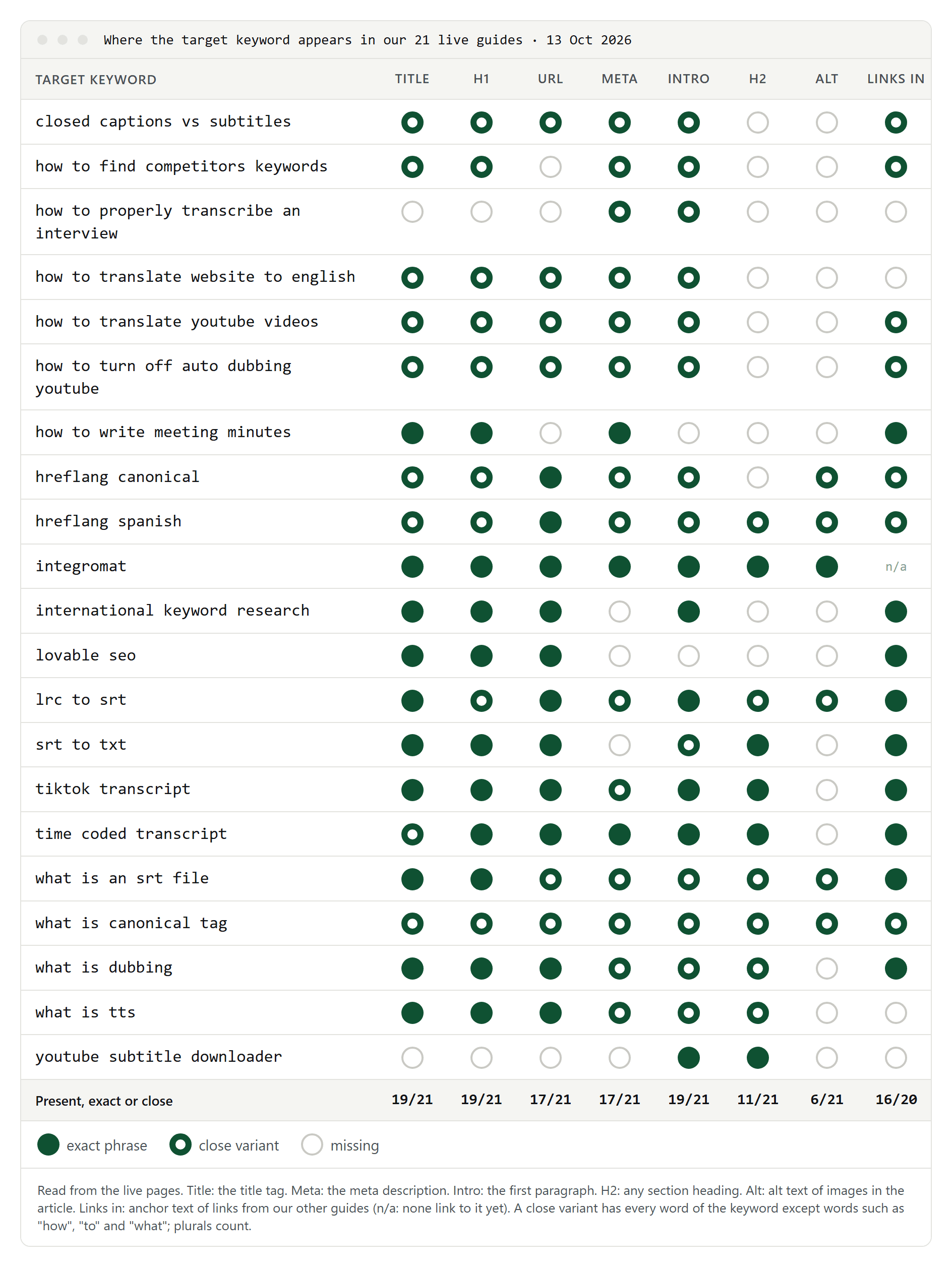
- The main places are covered. The keyword or a close variant is in the title of 19 guides, the H1 of 19, the first paragraph of 19, the URL of 17 and the meta description of 17.
- Exact matches are the minority. Only 10 titles contain the exact phrase; 9 more contain a close variant, such as "What Is a Canonical Tag?" for the search "what is canonical tag". We write for grammar, not for the string.
- Two misses are deliberate. For "youtube subtitle downloader" our title says how to download YouTube subtitles, because the guide explains methods rather than offering a downloader. For "how to properly transcribe an interview" the title drops "properly"; the first paragraph opens with "To transcribe an interview properly".
- Weakest: subheadings and alt text. Only 11 guides have the keyword in a subheading and 6 in an image's alt text. Our alt texts describe what the image shows, which is what Google's image guidance asks for, so we'll leave them.
- Links from our other guides carry the keyword or a variant for 16 of the 20 guides that have any.
The site went live on 13 October 2026, so we can't yet say which placements made a difference. We'll compare these guides with their Search Console data once there is some.
A short checklist
- The title and H1 both name the search, in natural words, without repeating them.
- The first paragraph answers the search.
- Subheadings use the variations a reader would look for.
- Images have alt text that describes them and readable file names.
- Internal links to the page use descriptive text.
- The URL is short and readable.
- The meta description is a summary of the page, not a keyword list.
To choose the keyword in the first place, start with SEO keywords 101.
