Striking distance keywords are searches for which one of your pages already shows up just below the top results, usually at an average position of about 11 to 20 in Google Search Console. The range is a habit of SEO writers, not a Google term: some guides start at 5, others go up to 30. The idea is simple. Google already shows your page for that search, so improving the page is a smaller step than starting a new one. Below: how to find these searches in Search Console, which ones to pick, what to change and how long to wait, with our own data from October 2026.
What "striking distance" means
A striking distance keyword is a search where your page ranks close to, but not in, the positions that get most clicks. The guides we read agree on that idea, but not on the numbers:
| Guide | Range it uses | Date of the guide |
|---|---|---|
| Clearscope blog | 11 to 20 | August 2024 |
| SEOTesting blog | 11 to 30 | updated March 2026 |
| RicketyRoo blog | 6 to 25 in its example; 5 to 20 or 11 to 30, depending on competition | February 2024 |
| SEO Gets feature page | 5 to 20 as the default | no date |
| WTF is SEO? newsletter | 11 to 30 | November 2022 |
Google's Search Console help pages that we read for this guide don't use the term at all. They speak of average position and warn against reading too much into it, as the next section shows.
In this guide we use 8 to 20. Positions 8 to 10 are usually near the bottom of the first page, and Google counts an impression whenever a result is on the page of results the searcher opened, whether or not they scrolled down to it. So a page at position 9 can collect impressions that nobody actually saw. It belongs on the same list as page two.
Why position 11 isn't always page two
Search Console's position isn't a count of blue links. Google numbers the elements on a results page from top to bottom: a carousel or a knowledge panel takes one position, a featured snippet usually takes position 1, and ads take none. Google's own help page lists four things a position of 11 can mean:
- the top right of a knowledge panel in a desktop search;
- the first result on page two, if page one had 10 results and nothing on the side;
- the second or third row of desktop image results;
- the sixth row of mobile image results.
Its advice is not to make simple assumptions and to watch how the position changes over time.
The "average" matters too. For each search, Search Console records the highest position your site held, and only if the result got an impression. The figure in the table is the average over all impressions. An average of 14 can come from some searches at 8 and others at 20, and with only a few impressions, one more search can move it a lot. Use the range as a way to sort your list, not as an exact rank.
How to find striking distance keywords in Search Console
Everything below is free and uses the labels from Google's Search Console help.
- Open the Performance report for Search results. Its default view shows clicks and impressions for the past three months.
- Turn on Average position by clicking its heading above the chart. The table now has a position column.
- Choose the Queries tab to list searches. You can sort the table by position.
- Export the table with the export button: Google Sheets, Microsoft Excel or CSV. The export keeps your filters and is cut off at 1,000 rows.
- Filter the spreadsheet to positions from 8 to 20, then sort by impressions, highest first. Delete your brand name and anything that looks like a test rather than a reader.
- Look at one language or section at a time. Click + Add filter, choose Pages, then URLs containing, type a folder such as
/es/and click Apply. - Check which page ranks. Click a query in the table: the report filters to that query. Then open the Pages tab.
Search Console leaves out rare searches to protect privacy, so your list is never complete. Our guide to low-volume keywords explains these hidden queries. Keyword tools such as Semrush also report positions for your site; how that differs from Search Console is covered in how to check keyword rankings.
What our own Search Console shows
We pulled our Search Console data on October 25, 2026. Polytested opened to Google on October 13, so the data covers October 12 to 25, and the last day was incomplete. In that time the whole site had 6,614 impressions and 8 clicks.
- 1,349 rows. The query table listed that many combinations of a search and one of our pages.
- 120 of them had an average position from 8 to 20. We removed 11 rows that look like someone testing a keyword tool, such as "test keyword 13". That left 109 rows with 251 impressions and 1 click.
- The range changes the list. 58 of those rows (144 impressions) sat below 11, and 51 rows (107 impressions) between 11 and 20. With the common 11 to 20 window, we would have missed our biggest group of searches, the Spanish one described below.
- English pages had 36 of the rows, with 83 impressions and no clicks.
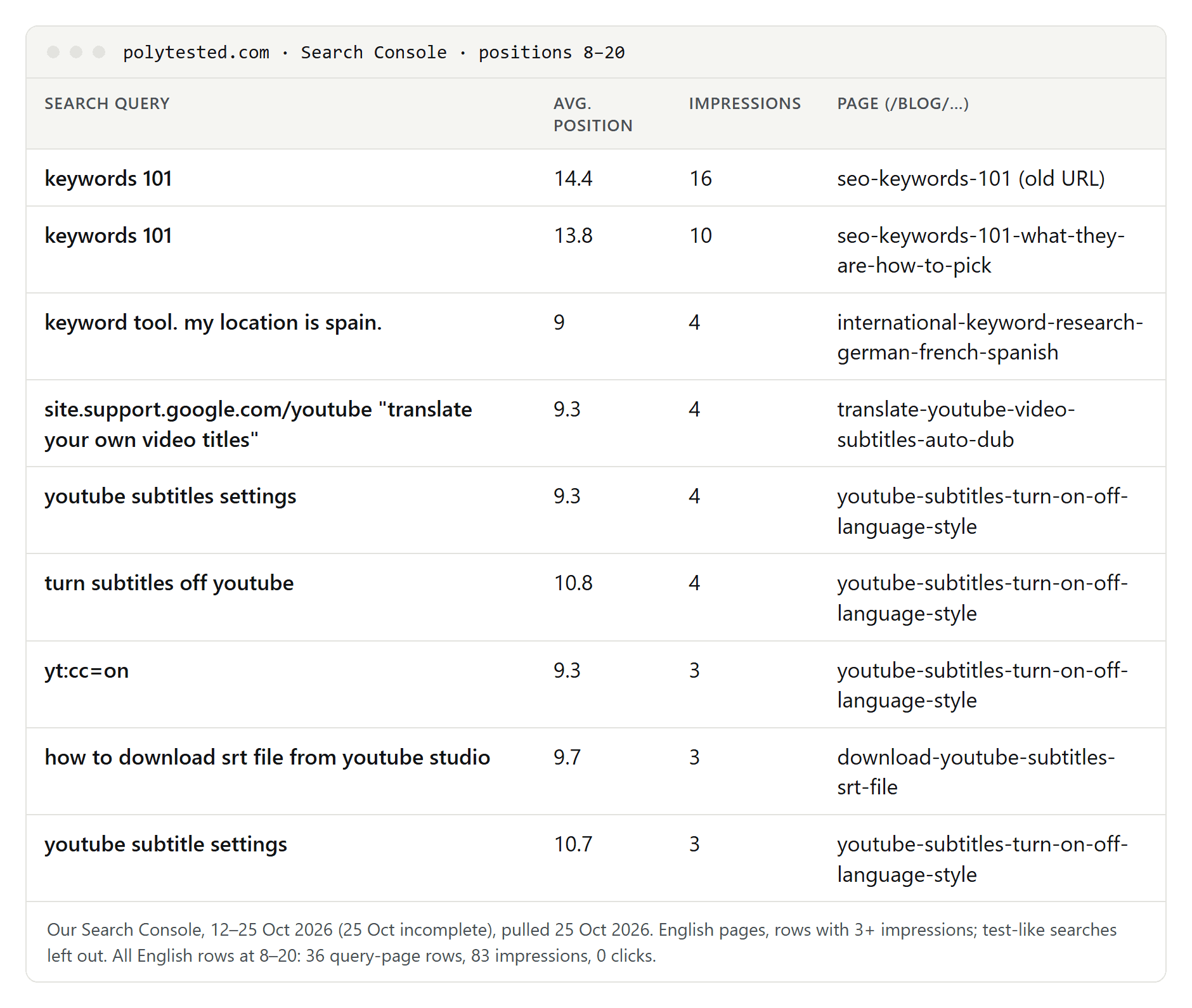
Read these numbers with care. The site is new, the period is two weeks, each row has only a few impressions, and the positions are averages. One click in 251 impressions also shows that impressions at these positions are not visits.
How to choose which ones to work on
A long list of searches is not a to-do list. We check four things for each row:
- Impressions. More is better, but on a small site the numbers are tiny. Add up the rows that ask the same question in different words: the 14 Spanish phrasings of one question described below had 81 impressions together, more than any single English row.
- Intent. Read the search and ask whether your page answers it. "keywords 101" is the planned keyword of our guide SEO keywords 101, so it fits. "keyword tool. my location is spain." is someone typing a sentence into a search box; we can't tell what they want, so we skip it.
- The page that ranks. Check it before you edit anything. Our "keywords 101" impressions were split between the old and the new address of the same guide: we changed our English addresses on October 14 and redirected the old ones, and 16 of the 26 impressions still went to the old address. That calls for patience and correct redirects, not new text.
- Value. A search that fits what you want readers to do next deserves more time than a curiosity.
When the page and the search fit, the next question is what is missing.
What to change on the page
Start from the words in the search and compare them with your page.
| What you see in Search Console | What to check first |
|---|---|
| The search names a term your title doesn't | Title and main heading |
| Many phrasings of one question | One section that answers it clearly |
| The search lands on an old or wrong address | Redirects, canonical tag and internal links |
| A search in another language | Whether your page in that language exists and is linked |
| A search outside your topic | Nothing; leave it |
- Title and main heading. If the search uses a term your page explains but your title doesn't mention, add it. Our guide to the SEO title covers length and structure.
- Headings and the first sentences. Put the searcher's wording where Google and readers look first. Our guide to keyword placement lists which places Google actually documents.
- A missing section. If the search asks a question your page only touches, add a heading in the searcher's words and answer it right below. Don't build a new page for every variant of the same question.
- Internal links. Link to the page from related pages, with link text that says what the page is about. Google says it uses links as a signal of relevance and to find pages, and that every page you care about should have a link from at least one other page on your site.
Change one page at a time and note the date. Otherwise you won't know what made the difference.
Our example: one title change in Spanish
Search Console showed our Spanish guide on subtitles for the deaf at average positions between 7 and 11 for 14 phrasings of one question: what "SD" means in subtitles. In Spanish, Netflix uses SD, for subtítulos descriptivos, as the label for subtitles that also describe sounds. Our page explained the label in its first section, but its title never said SD. Together, these searches had 81 of the page's 94 query impressions, at an average position of 8.6 when weighted by impressions, and no clicks.
On October 25, 2026, we changed the page's main heading to name SD, wrote SD into its meta title and meta description, and added "(SD)" to one sentence of the introduction. Nothing else changed. It is too early to say whether this helped, and we won't judge it on a few days of data.
How long to wait before judging
Google gives no fixed number. Its SEO Starter Guide says some changes take effect in a few hours and others take several months, and that in general you will want to wait a few weeks before assessing whether your work helped. It also notes that not every change has a noticeable effect.
Google first has to crawl the changed page again, which, according to Google, can take anywhere from a few days to a few weeks. You can ask for a recrawl in the URL Inspection tool, as our SEO title guide shows, but Google says this doesn't guarantee inclusion and repeated requests don't make it faster.
To judge the change, filter the Performance report to the page and use Compare in the date filter to set two periods of equal length, before and after. Google suggests weekly or monthly granularity for such comparisons, so that weekdays and weekends don't distort them. With only a handful of impressions, the average position jumps around anyway, so give it time and data.
A short checklist
- In Search Console, open the Performance report and turn on Average position.
- Export the queries and keep positions from 8 to 20.
- Remove brand and test-like searches; group phrasings of the same question.
- Check the intent and the page that ranks before you edit.
- Fix the title, a missing section or internal links, one page at a time.
- Write down the date of each change.
- Wait a few weeks, then compare equal periods for that page.
If your list is empty because the site is new, start with how to find keywords instead.
