An SEO title is the text in a page's title element. In most cases Google uses it as the clickable headline of a search result, which Google calls the title link; it shortens that link when needed and sometimes replaces it with other text from the page. Google sets no length limit. Character counts are only a rough guide, because letters differ in width: two of our own titles with 52 characters each differ by 59 pixels. Put the main keyword first, describe the page in concrete words and add your site name at the end.
What an SEO title is
Four things often get mixed up:
- The title element sits in the head of the page as
<title>. Browsers show it in the tab and in bookmarks, and it is Google's main source for the title link. "SEO title", "title tag" and "meta title" usually all mean this element. Strictly speaking it isn't a meta tag: the HTML standard definestitleas an element of its own. - The title link is the clickable headline of a search result. Google creates it automatically, usually from the title element, but not always.
- The H1 is the visible main heading on the page. It can be longer and more detailed than the title.
- og:title is a meta tag for link previews in social networks and messaging apps. Since 2024, Google has listed it as one of the sources for title links too.
The HTML standard explains why the title and the H1 often differ: the title should identify the page even out of context, in a browser history, a bookmark or a list of search results, while the first heading can rely on the page around it. This is how one of our guides looks in the source code:
<title>What Is TTS? Text-to-Speech Explained | Polytested</title>
<meta property="og:title" content="What Is TTS? Text-to-Speech Explained">

<h1>What Is TTS? Text-to-Speech Explained, with the Voices Already on Your Computer</h1>
All three start with the same words; only the title carries our site name.
How Google creates the title link
According to Google's documentation "Influencing your title links in search results", title links are generated completely automatically. Google lists nine sources:
- the content of the title element,
- the main visual title shown on the page,
- heading elements such as the H1,
- the content of og:title meta tags,
- other content that is large and prominent through styling,
- other text on the page,
- anchor text on the page,
- text in links that point to the page,
- WebSite structured data.
How often Google sticks with the first source: when it launched a new title system in August 2021, it wrote that the content of HTML title tags was used more than 80 percent of the time; after feedback and fixes, around 87 percent in September 2021. Google also said that titles generally no longer change with the search query. It hasn't published newer figures.
Two more points matter in practice. Google can't change title links by hand for individual sites, so if you want a different title link, you have to change the page. And Google has to recrawl and reprocess a page before it notices changes, which can take a few days to a few weeks.
Seven reasons Google replaces your title
In the same documentation, Google lists the most common issues that make it generate a title link from other text:
- Half-empty title elements, where part of the text is missing. Google's example is a title that consists only of a separator and the site name.
- Obsolete title elements, such as a year in the title that no longer matches the visible heading.
- Inaccurate title elements that don't reflect what the page is really about.
- Micro-boilerplate text: the same title on a group of pages that differ only in one detail, such as the season of a TV show.
- No clear main title, for example when a page has several headings with the same size and style.
- A mismatch of writing system or language between the title and the main content.
- Duplication of the site name. For domain-level site names, Google may leave the name out of the title link if it repeats the site name already shown in the result.
If none of these applies, Google suggests asking yourself whether the title link it shows fits the search better than your own title.
How long should an SEO title be?
Google answers this directly: there is no limit on how long a title element can be, but the title link is truncated in search results as needed, typically to fit the device width. Google doesn't publish a number of characters or pixels.
Rules of thumb come from elsewhere. The W3C style guide written by Tim Berners-Lee in 1992 recommended titles under 64 characters, because window titles had little room. Semrush's Site Audit flags titles longer than 70 characters and titles of 10 characters or fewer. Many preview tools measure in pixels instead of characters.
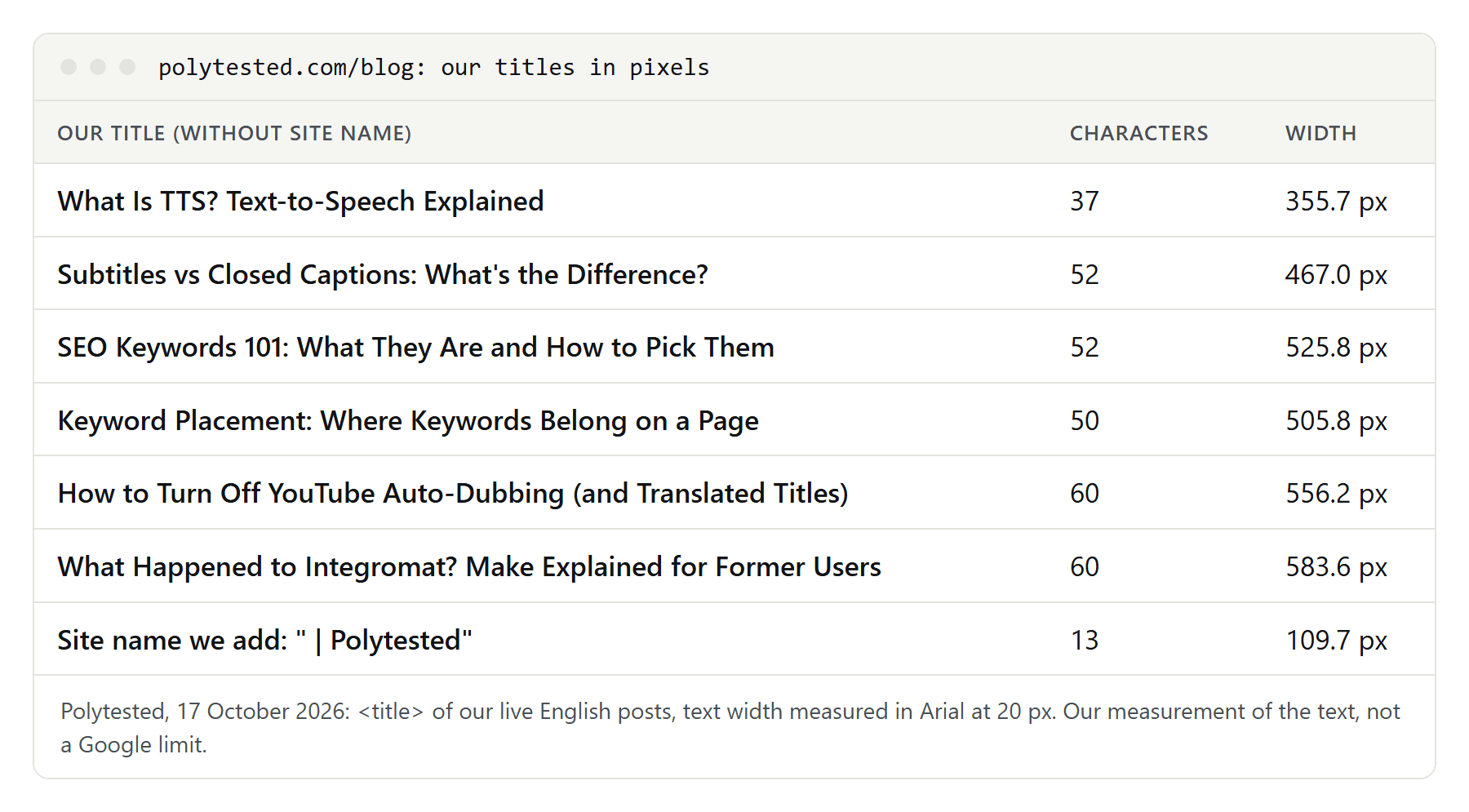
Pixels are the better yardstick, because letters have different widths. In Arial at 20 pixels, ten capital "M" take 166.6 pixels and ten lowercase "i" only 44.4. Two of our own English titles have 52 characters each: "Subtitles vs Closed Captions: What's the Difference?" is 467.0 pixels wide, "SEO Keywords 101: What They Are and How to Pick Them" 525.8 pixels.
We measure in Arial at 20 pixels because a fixed font makes titles comparable. It measures the text, not what Google displays: Google's own font, size and available width depend on the device and can change.
Our English titles, measured in pixels
On 17 October 2026 we measured the titles of all 30 English guides live on our site:
| Measure | Smallest | Median | Largest |
|---|---|---|---|
| Title without site name, characters | 37 | 52.5 | 60 |
| Title without site name, width | 355.7 px | 501.2 px | 583.6 px |
| Full title with site name, width | 465.4 px | 610.9 px | 693.3 px |
What we take from it:
- The site name is not free. " | Polytested" adds 13 characters and 109.7 pixels to every title. With it, our median title is about a fifth wider. That is one reason we put the site name last: if anything gets dropped, it should be the part a reader needs least.
- Character limits hide large differences. Our titles use between 9.0 and 10.1 pixels per character. A 60-character limit, which we use for the title without the site name, allowed widths from 556.2 to 583.6 pixels in our two longest titles.
- Title case costs space. We write English titles in title case, and capital letters are wider. Written in sentence case, six of our titles would be 10.8 to 28.9 pixels narrower; "SEO Keywords 101: What They Are and How to Pick Them" would drop from 525.8 to 496.9 pixels.
None of this tells you where Google cuts a title. It tells you which of your titles are long compared with the rest, and that a character count alone doesn't.
Structure: keyword first, then the benefit, site name last
A good title answers three questions in a few words: what is this about, what do I get, and who is it from. That gives a simple order:
- The main keyword at the start, where a reader looks first. Google's title documentation says nothing about word order, so this is a recommendation for readers, not a Google rule. "What Is an SRT File? Create, Edit and Translate One" starts with the question people search for. Our guide to keyword placement shows where else the keyword belongs on a page.
- The concrete benefit. What does the reader find: a template, a checklist, a comparison, measurements? "Template and Example" is more concrete than "Everything You Need to Know".
- The site name at the end, separated by a delimiter. Google suggests putting just the site name at the beginning or end, separated by a delimiter such as a hyphen, colon or pipe. We use a pipe.
Google adds two warnings. Don't repeat the same words; its example of keyword stuffing is a title like "Foobar, foo bar, foobars, foo bars". And don't use one long template for every page that changes in a single word. If you are unsure which keyword to choose, start with our SEO keywords 101.
Examples: weak titles and better ones
The better versions of examples 2, 3, 4 and 6 are real titles from our site; the others are made up.
- A phrase instead of a topic. Weak: "Welcome to Our Website". Better: "Tax Preparation for Freelancers in Austin | Example CPA". Searchers want to see in a second whether they are in the right place.
- A number instead of content. Weak: "Blog Post 17". Better: "What Is an SRT File? Create, Edit and Translate One". The keyword comes first, followed by the three questions the guide answers.
- A keyword list. Weak: "Transcribe Interview, Interview Transcription, Transcribing Interviews". Better: "How to Transcribe an Interview: Method, Format and Tools". The keyword once, then the benefit.
- Too long and too vague. Weak: "Everything You Need to Know About YouTube Subtitles: The Ultimate Guide for Beginners and Pros". Better: "How to Download YouTube Subtitles as an SRT File". A concrete task beats a big promise.
- Boilerplate. Weak: "Products | Shop | Category | Page 2 | Company Name". Better: "Waterproof Hiking Boots for Women | Company Name". Every page describes itself.
- The wrong language. Weak: our English title "How to Write Meeting Minutes: Template and Example" on the French version of the page. Better: "Compte rendu de réunion : modèle, exemple et méthode", the title of our French guide. The language of the title matches the content.
Two cases from Google's own list belong here too: a title that still says 2020 above a heading that says 2021, and a half-empty title such as "| Company Name", often left behind when a CMS field stays blank.
Title and H1: the same or different?
They may differ, but they should describe the same topic with the same core words. In its SEO Office Hours in December 2022, Google answered that the URL, the page title and the H1 don't need to be exactly the same and that some overlap in words is natural. In June 2024, asked whether the title should match the H1, Google said no: do whatever makes sense from a user's point of view.
Tools sometimes say otherwise. Semrush's Site Audit, for example, lists pages with identical H1 and title tags as an issue. Google says neither that they must match nor that they must differ. What Google does say: the H1 and the main visual title are sources for the title link, and a page without a clear main title is one of the seven reasons for a replacement. If title and H1 start with the same words, the beginning is right whichever text Google picks.
On our pages the H1 is usually the long version and the title the short one. Of our 30 live English guides, 7 have an H1 identical to the title without the site name, and 28 start both with the same word. Bing's Webmaster Guidelines also ask you to align titles, headings and the intent of the content, and warn that missing, duplicate or very short titles can hurt indexing and ranking.
Titles for different page types
- Home page: here the site name can come first, with a short description. Google's example is "ExampleSocialSite, a place for people to meet and mingle". Our home page is titled "Polytested: AI tools, tested in your language".
- Guides and blog posts: keyword plus subtopic or benefit, such as "How to Write Meeting Minutes: Template and Example".
- Categories: the category name plus what sets it apart, such as our "SEO tools, tested | Polytested".
- Local businesses: in its Office Hours in March 2023, Google suggested putting the location, the city and state names, into the titles of a local business site.
- Paginated lists: in December 2022 Google said a page number in the title is likely to have little effect; include it if it helps users understand the page.
- Legal pages: just the name, such as "Privacy policy | Polytested". Nobody is looking for creativity there.
Two details apply to every type. Use a year only if you really update the page every year, because an obsolete title is one of Google's seven reasons. And leave prices out of titles where they change often; Google specifically advises against flight prices in titles.
Titles on multilingual sites
Every language version needs its own title, written for that market's keyword. Google asks you to use the same language and writing system in the title as in the main content, and a mismatch is one of the reasons it replaces titles.
Our own pages show why translating a title and checking only its character count can mislead. Eleven of our guides are live in English, French and Spanish. The French titles have the most characters (median 56, against 52 in English and 54 in Spanish) but are not the widest: their median width is 495.2 pixels, against 502.5 in English and 490.2 in Spanish. French and Spanish titles use sentence case, so they have fewer wide capital letters.
| Guide | English | French | Spanish |
|---|---|---|---|
| What is n8n | 42 / 405.4 px | 55 / 485.2 px | 54 / 508.1 px |
| Hreflang and canonical | 55 / 502.5 px | 46 / 403.6 px | 46 / 408.0 px |
| Canonical tag | 57 / 566.2 px | 59 / 500.3 px | 54 / 496.9 px |
| Meeting minutes | 50 / 481.0 px | 52 / 501.4 px | 54 / 501.4 px |
The widest version is a different language from one guide to the next, because each title was written for its own keyword. How the language versions are connected technically is covered in our guide to hreflang and canonical tags.
When Google shows a different title
A shortened or replaced title link isn't automatically a problem. To find out whether you should change anything:
- Check what Google shows by searching for your page, on a computer and on a phone.
- Find the source. Compare the title link with your title element, your H1, your og:title and the text of links pointing to the page.
- Classify the case. A missing site name or a shortened end is normal as long as the beginning is right. If Google chose completely different text, one of the seven reasons above often applies.
- Fix the cause, not the symptom: update the year, give the page one clear H1, write a distinct title instead of a template.
- Ask for a recrawl. In Search Console's URL Inspection tool, click Request indexing for a changed page; there is a daily limit, and for many pages Google recommends submitting a sitemap. "View crawled page" shows the HTML Google fetched. Expect a few days to a few weeks.
- Accept good alternatives. If Google's text describes the page well, that isn't an error.
To see whether a new title works, use the Performance report in Search Console. Group by the Pages dimension, find your page and compare clicks, impressions and CTR, which is clicks divided by impressions, for equal periods before and after the change. Change one thing at a time, or you won't know what made the difference.
If you let AI tools draft titles, Google's guidance on AI-generated content applies: review generated content for accuracy before publishing, and Google says explicitly that this also covers metadata such as title elements. The same care matters when you change many titles at once during a website migration.
Checklist for your SEO title
- Every page has its own title element.
- The main keyword comes first.
- The title says concretely what the page offers, without repeating the keyword.
- You know its width in pixels, not just its character count, and you count the site name too.
- The site name comes last, separated by a hyphen, colon or pipe.
- The title and the H1 start with the same core words.
- No outdated year, no empty promises, and the title is in the language of the page.
- After publishing: check the title link on a computer and a phone, and watch clicks and CTR in Search Console.
