The free way to check where your site ranks for a keyword is Google Search Console: open the Performance report, turn on Average position, find the search in the Queries tab and narrow it down by page, country and device. The number you get is an average over every time Google showed your site, not a live rank. A rank tracker adds a daily snapshot for one location and one device, and a search in your own browser shows only your own view. Below we explain all three, with our own Search Console figures from October 2026.
Three ways to check a ranking
Each method answers a slightly different question, so their numbers rarely match.
| Method | What the number means | Cost | Main limit |
|---|---|---|---|
| Google Search Console | Your average position across the real searches in which Google showed your site | Free | Only sites you have verified; rare searches are hidden; data is a few days old |
| Rank tracker | Your position at one moment, for one location and one device, for keywords you chose | Mostly paid; free single checks exist | A sample, not what searchers saw; tools count positions differently |
| Search in your own browser | What one results page looked like for you | Free | Shaped by your location, language, device and history |
Start with Search Console. It's the only one of the three whose numbers come from Google and describe searches that real people made. Use the other two for what they do well, as described further down.
How to check a keyword's position in Search Console
Search Console only shows data for a site you've added as a property and proved you own, either a whole domain or a URL prefix such as one folder. Once that's done:
- Open the Performance report for Search results. By default it shows the past three months.
- Above the chart, turn on Average position next to Clicks and Impressions.
- Open the Queries tab. To find one keyword, click + Add filter, choose Queries, then Queries containing, type the word and click Apply. The match ignores capital letters but is otherwise exact, spaces included.
- Click the query in the table. The whole report now shows only that search, and the Pages tab lists which of your URLs Google showed for it.
- Open the Countries and Devices tabs to see the same search split by country and by desktop, mobile and tablet. To put two side by side, choose Compare in the filter, for example United States against Canada, or mobile against desktop. You can run one comparison at a time.
- To follow one page over time, add a page filter, show only Average position and choose a date range.
To catch several phrasings at once, Custom (regex) accepts a regular expression in RE2 syntax, not case-sensitive by default: rank (checker|tracker) finds both "rank checker" and "rank tracker".
Mind the timing. Google says collected data usually appears after two to three days, and the newest figures can be preliminary and still change. The report's days run on Pacific Time, which matters if you compare a single day with another tool.
What "average position" really measures
Google's definition: for each search in which your site appeared, Search Console takes the topmost position of a link to your site, and the report averages those values. Google's own example: if one search shows your site at positions 2, 4 and 6, it counts 2; if another shows it at 3, 5 and 9, it counts 3; the average is 2.5.
Four details change how you should read the number:
- No impression, no position. A position is only recorded when the result got an impression. If your page is on page 3 and the searcher only looks at page 1, that search doesn't count at all. An average of 45 therefore only describes the searchers who went that far.
- Elements, not links. Google counts from top to bottom of the main column, then the side column, and each element takes one position however many links it holds. An AI Overview is one position, and every link in it shares that position. A featured snippet usually takes position 1. Ads take no position.
- One number, several meanings. On a desktop, position 11 can be the top of a knowledge panel on the right or the first result on page 2, Google explains.
- Site or page. In the chart and in the Queries, Countries and Devices tabs, your site counts once per search, at its best position. In the Pages tab, each URL counts on its own. The same search can show a slightly different average in the two views.
Google's advice is to watch how position changes over time, especially sudden changes, and to pay more attention to trends in impressions and clicks than to position alone.
What our own Search Console shows
Polytested is a new site: Google has been allowed to index it since 13 October 2026, so the figures below cover only 12 to 25 October 2026, and the last day is incomplete. We read them in Search Console on 25 October.
Take our English guide to YouTube subtitles. In those two weeks it had 266 impressions, 1 click and an average position of 13.4. Split by search, the picture changes:
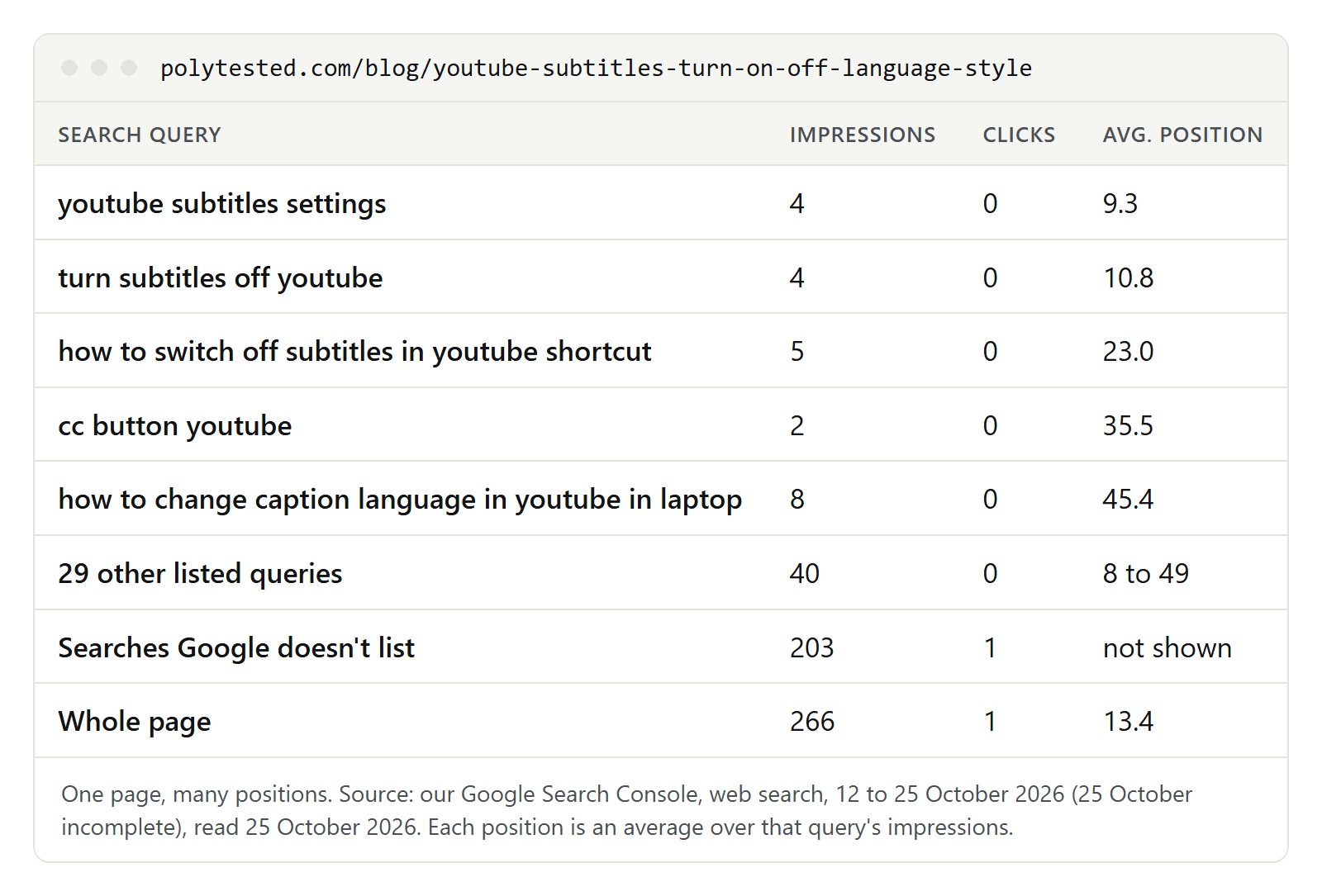
- The answer depends on the search. "youtube subtitles settings" averaged 9.3 and "turn subtitles off youtube" 10.8, both on page 1. "how to change caption language in youtube in laptop" averaged 45.4. Asking where this page ranks only makes sense for one search at a time.
- Most searches aren't listed. The 34 queries Search Console lists for this page account for 63 of its 266 impressions. The rest come from rare searches that Google leaves out of the table to protect privacy, and our only click came from one of them. The guide's main keyword, "youtube subtitles", isn't listed at all, so Search Console can't tell us where the page ranks for it.
- The page average isn't the average of the listed rows. Weighted by impressions, the 34 listed queries average 22.9 and the whole page 13.4, so the searches we can't see must have ranked higher on average.
- The average moves from day to day. It was 9.3 on 20 October and 19.5 on 23 October, partly because different searches came in on different days. A single check on either day would have told a different story.
Keep the limits in mind: two weeks of data, a new site, and listed rows with one to eight impressions each. An impression is counted when your link is on the results page someone loaded, whether or not they scrolled to it, so an impression far down a results page doesn't mean anyone saw the link. Our guide to low-volume keywords explains hidden searches and impressions in more detail.
The same site in other countries and on other devices
Search Console doesn't give you one ranking per keyword. It gives you an average for every slice you choose. Here is our whole site, all four languages together, by country and device:
| Searches from | Impressions | Clicks | Average position |
|---|---|---|---|
| United States | 2,428 | 1 | 72.2 |
| United Kingdom | 247 | 1 | 53.1 |
| Canada | 232 | 1 | 45.5 |
| India | 174 | 0 | 29.7 |
| Australia | 85 | 0 | 53.9 |
| Mobile, all countries | 2,095 | 6 | 47.8 |
| Desktop, all countries | 4,446 | 2 | 54.4 |
| Whole site | 6,614 | 8 | 52.1 |
The gaps are large, and they can come as much from different pages and searches showing up in each country as from one result moving. That's the point for rank checking: a tracker set to "United States, desktop" sees only part of this table, while Search Console averages all of it. To see one page by country, filter that page and open the Countries tab.
What rank trackers add
A rank tracker checks a list of keywords you choose on a schedule, stores each result and usually shows your competitors next to you. Semrush's Position Tracking is a typical example:
- One setting per campaign. Each campaign is set to one search engine (Google, Bing, Baidu, ChatGPT or Google AI Mode), one device (desktop, phone or tablet) and one location, from a country down to a ZIP code. More devices or locations need extra campaigns, which Semrush offers on its higher plans.
- Daily updates. Rankings are updated every day, and the tool's visibility score is based on Google's top 100.
- Keyword limits by plan. On 25 October 2026 Semrush listed 500 keywords tracked daily on its SEO and Starter plans, 1,500 on Pro+ and 5,000 on Advanced. The Free plan includes one demo project.
For a single check, free tools such as Semrush's Keyword Rank Checker and Ahrefs' Keyword Rank Checker take a keyword, a site and a location, and show the current position and the top 10. Not every free checker searches live: Keywords Everywhere says its Website Ranking Checker looks keywords up in its own index, which is refreshed regularly but not in real time.
Trackers are worth it when you need what Search Console can't give you: keywords you don't get impressions for yet, your competitors' positions, the same location and device every day, or rankings in one city.
Why rank trackers and Search Console disagree
When a tracker says 4 and Search Console says 9, both can be right. The usual reasons:
- One setting against all searchers. A tracker records one location, one device and one moment. Search Console averages every impression in your date range, from every country and device, personalized or not.
- Every check against seen results only. A tracker records your position on every check, even at 80. Search Console only records a position when someone was shown your result.
- Different counting. Google counts elements: an AI Overview is one position, ads none. Ahrefs says it counts search features as individual positions, while other tools may count only the classic blue links. The same result can get a different number in each tool.
- Your list against real searches. A tracker only checks the phrases you entered. Search Console lists the exact searches people typed, minus the rare ones it hides, so close variants get their own rows: our page has "youtube subtitles settings" at 9.3 and "youtube subtitle settings" at 10.7.
- Timing. Search Console data usually arrives two to three days later, and its days run on Pacific Time.
To compare fairly, filter Search Console to the tracker's country and device, and compare trends over weeks, not single numbers.
Why a search in your own browser misleads
Google's help page on why results differ between people names three causes:
- Time. New content is added soon after it's published, and changes to ranking systems take time to roll out to all of Google's data centers, so results can depend on which one answers.
- Context. Your location, language and device type, results related to one you just clicked, and your recent searches.
- Personalization. If you're signed in with Personalized Recommendations on, results can be reordered based on things like your search history. A note at the bottom of the results page may then say "Results are personalized", with a "Try without" link.
Even with personalization off, Google still uses context such as the area you search from, your language and your device, and shows the location it used at the bottom of the page. A private window leaves out your history at most, not your location. Google's developer guide gives an example: a search for bicycle repair shops shows different results in Paris than in Hong Kong. The Performance report's help adds that a query in your list may not show your site when you search for it yourself.
Use your own search for what it shows well: which kinds of results appear for a keyword, such as videos, forum threads or an AI Overview. Don't read a ranking into it.
Don't automate Google searches
If you follow many keywords, it's tempting to write a script that searches Google for each one. Don't. Google's spam policies describe machine-generated traffic as sending automated queries to Google, and they name scraping results for rank-checking purposes without express permission as an example; such activity violates both the spam policies and Google's Terms of Service. The Terms also forbid using automated means to access Google's services against the machine-readable instructions on its pages, such as robots.txt files. For your own site, the export button in the Performance report gives you the same table without any of that.
Which method to use when
- You want to know how a page is doing: Search Console, filtered to that page, over several weeks.
- You care about specific keywords, including ones you don't appear for yet: a rank tracker with a fixed country and device.
- You run a local business: a tracker set to your city, since results depend on location.
- You want to see the results page itself: your own browser, without reading a number into it.
Once you know your positions, our guide to striking distance keywords shows how to find the searches where you sit between positions 8 and 20. For new keyword ideas, see how to find keywords; to see where other sites rank, see how to find your competitors' keywords; and for where a keyword belongs on the page, see keyword placement.
