Local SEO is how a small business gets found by people nearby: in Google Maps, in the local results on Google Search and in the regular results below them. It rests on three things: a verified Google Business Profile (plus Bing Places and Apple Business), a website that shows your name, address, phone number and hours as plain text, and honest reviews collected within Google's rules and the FTC's. You can't pay Google for a better local ranking. To see where small business websites usually fall short, we checked the home pages of 63 local businesses on October 16, 2026.
What local SEO is and who it's for
When someone searches for a business near them, Google shows local results in Maps and Search; Google's example is "Italian restaurant" typed on a phone, with no city. Local SEO is everything you do to appear there and get calls, visits and bookings.
Google gives a Business Profile to businesses that customers visit or that travel to customers:
- Storefront businesses such as dental offices, restaurants and hair salons. Customers come to you.
- Service-area businesses such as plumbers, electricians and cleaning services. You go to your customers, and your address stays hidden.
A business that only sells online can't have a profile. For the basics of search, see what is SEO.
How Google ranks local results
Google's help says local results are "mainly based on relevance, distance, and popularity":
- Relevance: how well your profile matches the search. Complete, detailed information helps, and the categories you choose affect your local ranking.
- Distance: how far you are from the person searching. You can't change it.
- Prominence (the help page's heading for popularity): how well known your business is, based partly on how many websites link to you and how many reviews you have. More reviews and positive ratings can help.
You can't request or pay for a better local ranking, and Google keeps the algorithm's details confidential. It also fills profiles with public information, including content crawled from your official website, so your profile and your website should say the same thing.
Our survey: 63 local business websites
On October 16, 2026 we loaded the home pages of 63 public websites of local businesses once each in a browser, without clicking anything and respecting their robots.txt files. All 63 are in Germany (29), Austria (17) and Switzerland (17), in 21 cities: 18 trades (electricians, plumbers, painters, carpenters), 17 practices (dentists, physical therapists, veterinarians), 10 restaurants and bakeries, and 18 service businesses (hair salons, tax advisers, accountants). We found them with web searches for a trade and a city and removed all names. Three more candidates were unreachable or refused access.
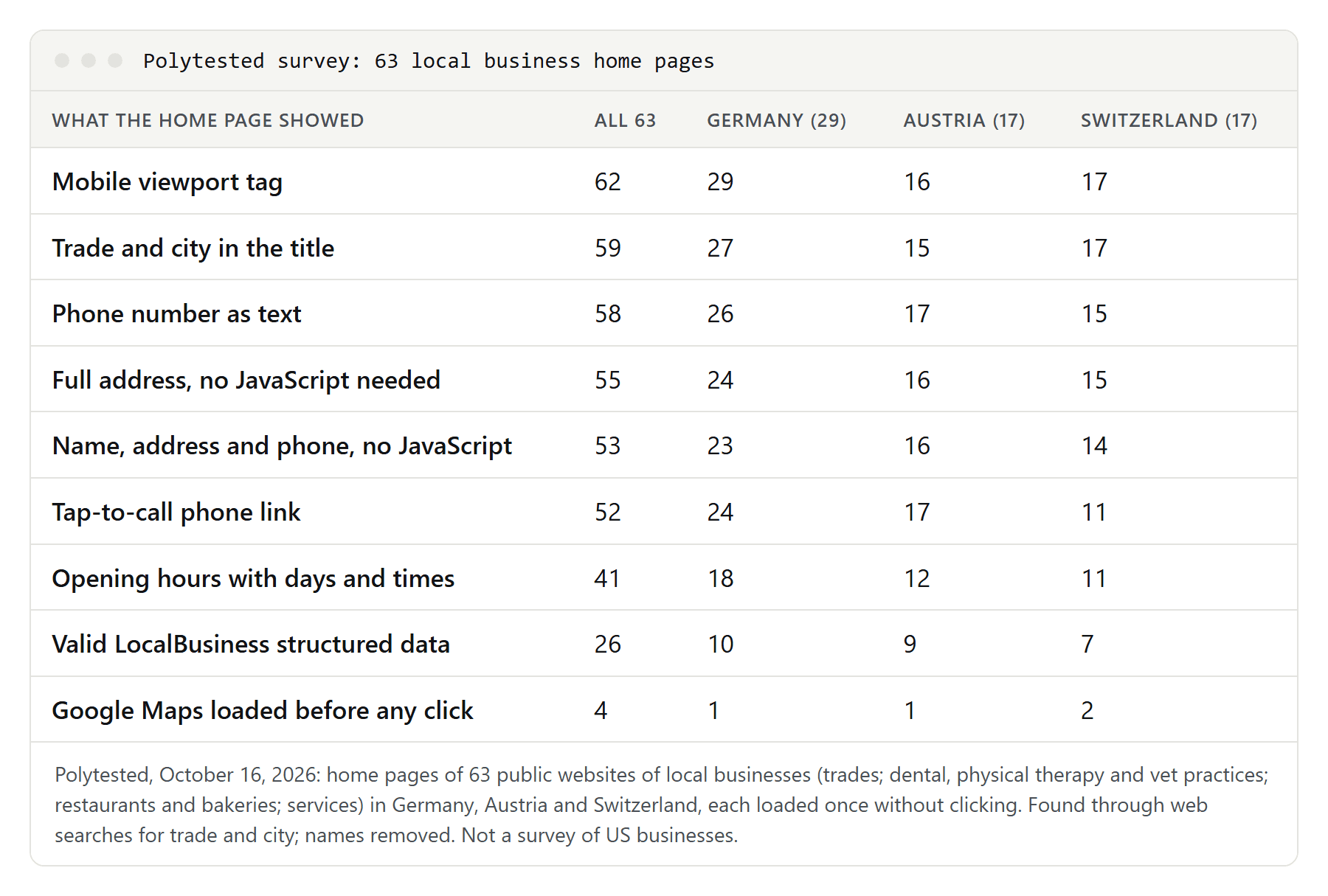
These are not US businesses, but the checks work the same for any website. Limits: sites that show up for "trade plus city" are probably better than average, so read the numbers as "even these"; we checked home pages only and every apparent gap by hand; and we didn't look at the businesses' Google profiles. The basics were mostly there, while opening hours (41 of 63) and structured data (26 of 63) were weak.
Create, claim and verify your Business Profile
A Google Business Profile is free. You need a Google Account, which works with any email address. First check whether a listing already exists:
- No profile yet: go to
business.google.com/addand click "Add your business to Google". - An unverified profile exists: open Google Maps on your computer, search for your business name and city, then select "Claim this business" and "Manage now".
- Someone else verified it, such as a former agency: request ownership from the current owner, or have them transfer it to you.
Keep one profile per business; duplicates cause display problems. If an agency helps you, verify the profile yourself and add the agency afterwards.
Google picks the verification methods automatically, based on business type, public information, region and hours, and sometimes asks for more than one:
- Phone or SMS: the code only reaches a person who answers, not an automated phone menu.
- Email.
- Video recording or live video call: live calls only during business hours. Show outside signs, branded equipment and proof that you run the place, such as the cash register.
- Postcard, not offered to everyone. The five-digit code expires after 30 days. While you wait, don't edit your name, address or category, and don't request a new code.
Google recommends video where offered. Review takes up to five business days, rarely longer, and is sometimes instant if your website is verified in Search Console. Never share the code, not even with your profile managers.
Name, address and service area: Google's rules
Name. Use your real-world name, as on your storefront, website and stationery. Extra words can get the profile suspended. Not allowed: taglines, store codes, trademark symbols, all-caps words, hours, phone numbers, web addresses, and service or location words. Google's example: "Midas Auto Service Experts" is not acceptable, "Midas" is. Legal terms such as LLC need real-world proof like signage or invoices. A place word that is part of the real name is fine; Google lists "University of California Berkeley" as acceptable.
Address. The exact address of your actual location. P.O. boxes don't count, and a "virtual office" (a rented mailing address you don't work from) can't have a profile. A coworking office only qualifies with clear signage, your own staff there and customers received during business hours.
Service area. If customers don't come to you, remove your address; Google's example is a plumber working from home. Under "Edit profile", "Location" and "Service area" you can add up to 20 cities, ZIP codes or other areas, but not a radius. The whole area shouldn't reach beyond about two hours' drive from your base.
Doctors, dentists, lawyers and agents can have their own profile, with titles such as Dr. or Esq., if they serve the public and can be reached there during stated hours. With several practitioners at one location, the practice gets its own profile too.
Categories, hours and the rest of your profile
Categories. Choose the most specific primary category, "Nail salon" rather than "Salon" in Google's example. Pick what your business IS, not what it HAS, and add only a few extra categories, not one per service. Changing a category can trigger a new verification. Some categories unlock extras: order, reservation and menu links for restaurants, a booking button for health and beauty businesses.
Hours. Add regular hours plus special hours for holidays. Appointment-only businesses shouldn't list hours, and seasonal businesses can mark themselves temporarily closed.
Phone, website, description. Use a local number that reaches your location, not a call center or premium-rate line, and your own website rather than a social media page. No promotions, prices or links in the description. Photos and videos are recommended.
Questions and answers. Google shut down the programming interface for Q&A on November 3, 2025, saying it is updating the feature. We wouldn't spend time posting your own questions.
Reviews: what Google and the FTC allow
Every review must reflect a genuine experience. Under Google's Maps content policy, businesses may not:
- offer incentives such as money, discounts or free services for a review, or for changing or removing a negative one;
- filter: discourage negative reviews, or ask for reviews only from customers you expect to be happy;
- pressure customers to review while still on the premises, or ask for specific content;
- set staff targets for a number of reviews or for reviews naming an employee;
- post with a conflict of interest, such as reviews by employees or family, or reviews to hurt a competitor.
So ask every customer, not only the happy ones. Google notes that a mix of positive and negative reviews often feels more trustworthy.
How to ask: in your profile, select "Read reviews", then "Get more reviews", and copy the link or save the QR code (QR codes only in a computer browser for now). Google suggests receipts, thank-you emails, the end of a chat or a printed QR code in your store. A sign at the counter is fine; pushing people to write the review there is not.
Penalties: Google removes fake reviews and can restrict the profile: no new reviews for a period, existing reviews unpublished, or a public warning that fake reviews were removed.
The FTC rule. The FTC's Rule on the Use of Consumer Reviews and Testimonials took effect on October 21, 2024, and courts can impose civil penalties for knowing violations. It bans, among other things:
- writing, creating or selling fake reviews, and buying reviews that misrepresent the reviewer or their experience;
- incentives conditioned on a review expressing a particular sentiment, positive or negative;
- undisclosed reviews by officers and managers, and getting employees or relatives to review without disclosing the relationship;
- using groundless legal threats or intimidation to stop or remove a review, and presenting your own site's reviews as complete while hiding negative ones.
According to the FTC's Q&A, the rule allows incentives as long as no sentiment is required. Google allows none at all, so following Google's rule keeps you on the safe side of both. This is a summary, not legal advice.
How to reply to reviews
Google's advice: be short, polite and professional; reply where you have something useful to say instead of thanking everyone the same way; don't advertise; never share private information or attack the reviewer; admit mistakes, sign with your name or initials and reply promptly. For complicated cases, ask the person to call or email you.
For medical and dental practices this has a legal side. HHS's Office for Civil Rights settled with a California dental practice over patients' health information disclosed in replies to online reviews, a HIPAA case. A cautious reply doesn't confirm that the reviewer is a patient.
You can report reviews that break Google's policies, for example fake ones. A bad but honest review is not a violation.
Your website: contact details, hours and titles
Since Google reads your website for your profile, your name, address and phone number (NAP) should appear there exactly as in the profile. In our survey:
- Name, address and phone in the HTML, readable without JavaScript: 53 of 63 home pages.
- Full address with street, number, postal code and town: 55 of 63. Six had no address at all, and one practice showed it only after JavaScript ran.
- Phone number as text: 58 of 63; tap-to-call link (
tel:): 52, but only 11 of 17 in Switzerland.
So put NAP as text in your footer, make the number a tel: link with the country code (+1 in the US), and don't offer the address only as an image, map or PDF. To check whether your site builder adds these details with JavaScript, open the home page in a desktop browser, press Ctrl+U on Windows and search the source for your street name.
Opening hours appeared on 41 of 63 home pages, with big differences between types of business:
| Type of business | Opening hours | Trade and city in title | Tap-to-call link | Valid LocalBusiness data |
|---|---|---|---|---|
| Dental, physical therapy and vet practices (17) | 16 | 17 | 16 | 10 |
| Restaurants and bakeries (10) | 7 | 6 | 5 | 1 |
| Service businesses (18) | 10 | 18 | 15 | 7 |
| Trades (18) | 8 | 18 | 16 | 8 |
Google's own example is a search like "salons open now", where a salon appears because Google knows its hours. Keep the hours on your site identical to your profile, holidays included; if you work by appointment, say so and give your phone hours.
Titles. Three titles started with a generic word, "Home" or the German words for "home page" and "welcome", and named no city. The median title had 53 characters, and 16 were longer than 60; see our guide to the SEO title. Seven home pages had no H1 heading. Use the words customers search with, "Dentist in Austin" rather than "Welcome to our practice", as shown in keyword placement. Each real location deserves its own page with address and hours. Dozens of copied city pages with only the town name swapped are a different matter; our guide to white hat SEO covers what Google's spam policies say.
Maps. Google offers an iframe generator for embedding a map, but an embedded map loads from Google's servers as soon as the page loads unless your site holds it back. In our survey 4 home pages loaded Google Maps before any click, 5 held their map back with a placeholder, a consent dialog or delayed loading, and 16 simply linked to a map app. A "Get directions" button loads nothing in advance and works well on phones.
LocalBusiness structured data
Structured data is a machine-readable summary in your page's code, usually JSON-LD. With the schema.org type LocalBusiness you can tell Google details such as your hours, which may appear in a knowledge panel. Google doesn't promise better rankings for it.
48 of our 63 home pages had some JSON-LD, but only 26 had valid LocalBusiness data. Another 22 had only the generic types many site builders add (WebSite, WebPage, Organization), and 15 had none. Even the 26 had problems:
- 13 used only the generic
LocalBusinesstype. Google asks for the most specific subtype; schema.org has types such asDentist,ElectricianandPlumber. - 3 had no usable address and 1 no name, though Google requires both.
- 3 gave themselves stars with
aggregateRating. Google recommends ratings only for sites that review other businesses; a business that controls reviews about itself gets no stars, even through a Google or Facebook review widget. - 1 marked up an address that wasn't visible on the page, which Google's guidelines forbid. One more site's JSON-LD couldn't be parsed at all, and 1 practice used
PhysicalTherapy, a treatment in schema.org, instead ofPhysiotherapy.
Google also recommends telephone with country and area code, url, geo and openingHoursSpecification. A minimal example:
{
  "@context": "https://schema.org",
  "@type": "Plumber",
  "name": "Example Plumbing Co.",
  "address": {
    "@type": "PostalAddress",
    "streetAddress": "100 Example Street",
    "addressLocality": "Springfield",
    "addressRegion": "IL",
    "postalCode": "62701",
    "addressCountry": "US"
  },
  "telephone": "+1-217-555-0199",
  "url": "https://www.example.com/",
  "openingHoursSpecification": [{
    "@type": "OpeningHoursSpecification",
    "dayOfWeek": ["Monday", "Tuesday", "Wednesday", "Thursday", "Friday"],
    "opens": "08:00",
    "closes": "17:00"
  }]
}
Test it with Google's Rich Results Test and the URL Inspection tool in Search Console. Violations can lead to a manual action that removes rich results; according to Google, it doesn't affect web search ranking.
Bing Places, Apple Business and directories
Bing Places for Business moved to bing.com/forbusiness on October 3, 2025, and existing listings came along automatically. Importing from Google is now faster, Bing says, and keeps your name, hours and contact details. Listings appear in Bing search and Bing Maps.
Apple Business replaced Apple Business Connect on April 14, 2026. It's free, existing locations and photos moved over automatically, and it controls how you appear in Apple Maps, Safari and Spotlight. Add a location under "Brands", "Locations", "Add Location". Within 60 days of signing up you must verify your organization with two methods, such as a D-U-N-S Number or EIN, a DNS record or a utility bill; otherwise Apple deletes the organization and its data.
Directories such as Yelp or your chamber of commerce are further places to list your business. Google doesn't say whether they help your ranking; what matters is that your NAP reads the same everywhere.
Track results: an 8-step checklist
Google's "Performance" report for verified profiles shows "Searches" (updated monthly), "Views", "Calls", "Website clicks" and "Directions", counting both organic results and Google Ads. Search Console shows the searches your website appears for, and competitor keywords explains how to see who ranks ahead of you.
- Create or claim one profile per location and verify it.
- Use your real name; show an address only if customers visit.
- Pick a specific primary category, and add hours, photos and a local number.
- Ask every customer for a review, with no incentive and no pressure.
- Reply briefly, without private details.
- Put NAP and hours on your site as text, with trade and city in the title.
- Add LocalBusiness data with a specific type and no self-awarded stars.
- Copy the same details to Bing Places and Apple Business, and check your numbers monthly.
