Use a website builder such as Wix, Squarespace, Webflow or WordPress.com when you want a standard site online quickly and can live with the platform's rules. Use an AI builder such as Lovable when you need app features without writing code, and plan to check the technical SEO basics yourself. Write the code, or have it written, when you need full control over URLs, languages, redirects and speed, and someone will maintain it. We compared each platform's own documentation with measurements from our hand-coded site and from 89 sites built with Lovable.
The short answer
- Website builder: the fastest way to a brochure site, a portfolio or a small shop. Hosting, security updates and sitemaps are handled for you. In exchange, the platform decides which settings exist, and moving away later ranges from hard to impossible.
- AI builder: you describe the site in a chat and the tool writes real code. Lovable lets you download that code on paid plans and sync it to GitHub on any plan. What crawlers receive depends on the tool's defaults, and in our surveys those defaults often missed basics such as a real 404 page or a sitemap.
- Hand-written code: every URL, status code, redirect and language version does exactly what you decide. You also own every update, every security patch and every mistake.
- Mixed setups are normal, such as WordPress.com with plugins or an AI-built app that a developer later takes over.
Three ways to build a site, in plain terms
A website builder is a hosted service with templates and a visual editor. Your site runs on the vendor's servers. Wix states this directly: because Wix is a software service built on its own technology, a Wix site can't be moved to another host; you can only take your domain with you. WordPress.com sits in the middle. It is hosted WordPress, and on its paid plans (Personal, Premium, Business and Commerce) you can install plugins from the WordPress.org directory.
An AI builder writes the code for you from a description. Lovable generates the interface, the backend, the database and logins, then publishes the app on its own servers; publishing to a lovable.app address is free on all plans. Apps created since May 13, 2026 (June 22, 2026 for Enterprise workspaces) use TanStack Start, which renders pages on the server. Older apps run on React and Vite, render in the visitor's browser, and Lovable serves pre-rendered copies of their pages to crawlers.
Hand-written code usually means a framework plus a content management system, not every line typed from scratch. Our own site, polytested.com, is the example in this guide. It uses Next.js, an open-source web framework, and Payload, an open-source CMS that runs inside the same app and gives our editors an admin panel. Articles live in a MongoDB database in Frankfurt, images on Cloudflare R2 storage, and the site runs on Vercel with its server functions in Frankfurt. Pages are generated in advance as static HTML and refreshed when an editor publishes a change.
We chose code because the site has rules a builder couldn't enforce for us. A language version can't go live until a native editor approves it, a language without content answers 404 instead of showing English text, and every score on a page must come from our measurement records.
Control: who decides what
The real difference between the three options is who sets the limits.
On a builder, the vendor does. You control your content and the design within the templates, plus whatever settings the vendor exposes. Squarespace is the clearest example: all Squarespace sites share one robots.txt file, and users can't access or edit it. Wix lets you edit robots.txt, but calls it an advanced feature that its Customer Care can't help with.
On an AI builder, you control the code but not the hosting. You can ask for any change in the chat or edit the code. The hosting rules still belong to the vendor. On Lovable, for example, every extra domain you connect redirects to your primary domain with a 302, a temporary redirect, and Lovable hosting doesn't support 301 permanent redirects between a project's domains.
With code, you control every response. On our site we decided that made-up addresses answer with a real 404, that changed URLs answer with a 308 permanent redirect, and that, until launch day, every response carried a noindex header that one setting switched off. None of that needed a vendor's permission.
Speed to launch and everyday editing
Builders win the first week. You pick a template, replace the text and images, connect a domain and publish, all in one dashboard. AI builders can be even faster for the first draft, because a description produces a working app. Changes then happen by prompting, and each round needs a careful look at what changed.
Code is slower to start because someone has to set up the project, the hosting, the database and the deployment. The gap shrinks once the site exists. A CMS gives editors forms instead of code, and on our site each language editor can change only the fields of their own language. Structural changes, such as a new page type or a new component, still need a developer. Before every release, our code runs through automated checks: code style, type checks, tests and a full build.
Ask who will make changes in a year. If nobody can code, a builder or a CMS-backed site fits better than an app only its author understands.
SEO control by platform
Search engines rank pages, not platforms, but the platform decides which SEO settings you can reach. Here is what each vendor's documentation says:
| Platform | robots.txt | XML sitemap | Permanent redirects | Language versions (hreflang) |
|---|---|---|---|---|
| Wix | editable in the Robots.txt Editor (SEO & GEO dashboard) | automatic, updated on every change | 301 redirects in the URL Redirect Manager; automatic when a slug changes, except Wix Blog pages; custom domain needed | hreflang and x-default added by Wix Multilingual |
| Squarespace | one shared file, not editable | automatic, usually updated within an hour | URL mappings with 301 or 302, field limit about 2,500 lines | through the Weglot integration with language subdomains |
| Webflow | rules under Site settings > SEO > Indexing | automatic | 301 redirects on a paid Site plan or Workspace plan | automatic with Localization, in the page and the sitemap |
| WordPress.com | generated by WordPress | automatic | through a plugin (plugins need a paid plan) | through a translation plugin |
| Lovable | created with every new project, part of your code | not always created; the SEO review flags it | 302 between domains, no 301 between project domains | not covered by its SEO documentation |
| Our coded site | our own file | index plus one sitemap per language | 308 for every changed URL | 5 hreflang links per page, also in the sitemaps |
Two details from these pages matter more than they look:
- Temporary versus permanent. Google treats 301 and 308 redirects as permanent. A 302 or 307 is followed, but Google doesn't use it as a signal that the target should be the canonical URL. That is why Lovable's 302 between domains needs canonical tags and a sitemap on your primary domain.
- Limits hide in the details. Wix can't create a 301 from your home page in the URL Redirect Manager. Webflow's 301 rules don't apply to localized subdirectories, so
/old-urland/es/old-urlneed two rules. Squarespace's URL mappings field holds about 2,500 lines.
For what a sitemap should contain, see our XML sitemap guide. For what a robots.txt can break, see our guide to blocked internal resources in robots.txt.
Multilingual sites and hreflang
Languages are where the platforms differ most. Google's rules are simple. Give every language version its own URL. Connect the versions with hreflang annotations. Don't redirect visitors automatically based on the language you think they speak. Google adds a technical reason: Googlebot usually crawls from the United States and sends no language preference, so content that depends on the visitor's settings may never be crawled.
How the platforms handle it, by their own documentation:
- Wix: Wix Multilingual adds hreflang and x-default tags to multilingual pages by default.
- Squarespace: multilingual sites run through Weglot, on version 7.1 only. Language subdomains, such as
es.yoursite.com, add hreflang automatically. After the trial, Weglot's free plan covers up to 2,000 translated words in one other language; beyond that, translations stop displaying until you upgrade or cut words. - Webflow: Localization sets the
langattribute per locale and generates hreflang in the page and in the sitemap. Its locale routing uses 302 redirects, and Webflow says there is no native way to override that. The Advanced and Enterprise Localize plans also route visitors by browser language on the home page. Google advises against that kind of redirect, so decide whether you need it. - WordPress.com: the translation category of its plugin directory lists plugins, several of which say they add hreflang. Check that the one you pick does, and remember plugins need a paid plan.
- Lovable: its SEO documentation doesn't cover hreflang or multilingual sites. Its review flags a missing
langattribute, but in our surveys 34 of 80 German, French and Spanish Lovable sites declared English in theirlangattribute. Google ignores that attribute and reads the visible text, but screen readers use it to choose a pronunciation.
On our coded site, each language has its own path (/, /de, /fr, /es). There is no redirect based on the browser's language. A page that doesn't exist in a language answers 404 instead of falling back to English, and hreflang lists only the translations that are actually published, plus x-default. Our hreflang and canonical guide shows the markup, and website translation SEO covers the workflow.
Our coded site, measured
On October 28, 2026, we checked polytested.com from outside with plain HTTP requests, one per address, to see what a crawler gets. We compared it with what our published Lovable surveys found.
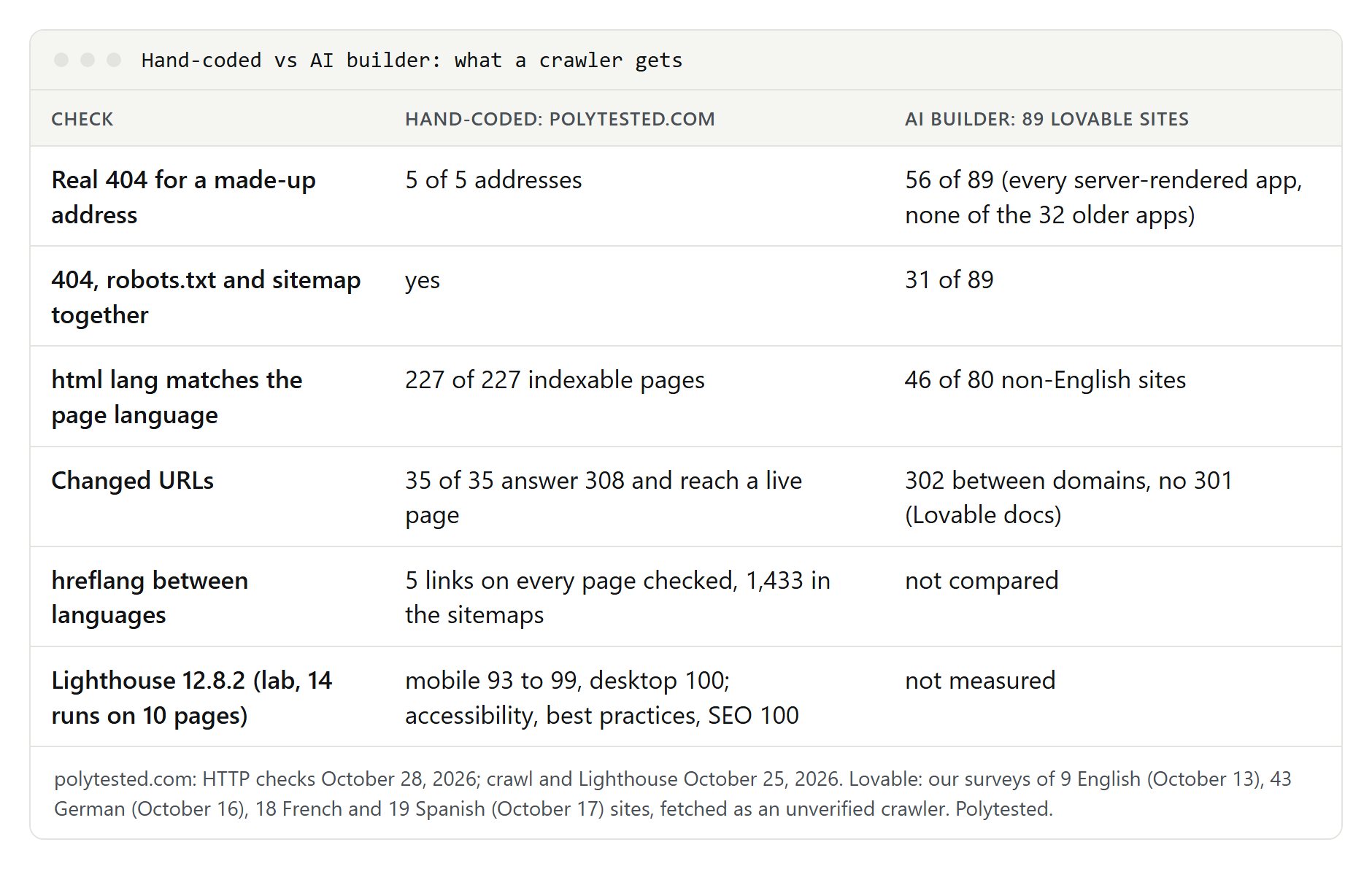
What the requests showed:
- Sitemaps: a sitemap index pointing to one sitemap per language, with 72 English, 79 German, 76 French and 75 Spanish URLs, plus a temporary sitemap of moved addresses. The four language sitemaps carry 1,433 hreflang links in total.
- hreflang in the HTML: on all 7 pages we opened in four languages, 5 alternate links (en, de, fr, es and x-default), a self-referencing canonical and the right
langattribute. - Real 404 errors: all 5 made-up addresses we tried, in four languages and one category path, answered 404.
- Redirects:
www.polytested.comand the/en/prefix answer with 308. All 35 addresses that changed after launch answer 308 and land on a live page in one step. Our website migration checklist tells the story of those 35 URLs. - Our own crawl on October 25: 277 URLs, all answering 200, and no broken internal links. On the 227 indexable pages, no canonical tag pointed to another page, and the
langattribute matched the URL language on every one.
The same crawl also found things to fix: 122 of those 227 pages had titles over 60 characters, counting the site name. Code gives you control, not correctness. Every feature on this list exists because we built it and test it, and a bug in it would affect every page at once.
What 89 sites built with Lovable showed
Between October 13 and 17, 2026, we fetched 89 public Lovable sites as an unverified crawler: 9 English, 43 German, 18 French and 19 Spanish. We requested each home page, a made-up address, robots.txt and sitemap.xml. The full results are in our Lovable SEO guide.
- Real 404 errors: all 56 server-rendered apps answered the made-up address with 404. All 32 older, browser-rendered apps answered 200, which Google warns can lead to soft 404 errors.
- 404, robots.txt and sitemap together: 31 of the 89 sites had all three. None of the 9 English sites did.
- Language attribute: 34 of the 80 non-English sites declared
lang="en".
Lovable has since improved its defaults. Its documentation now says every new project gets a robots.txt, though not always a sitemap. Its SEO and AI search review checks the sitemap, robots.txt, metadata, canonical tags and more, and can fix most findings. The lesson: the defaults decide the outcome, so check them, as you would check code someone else wrote.
Performance: what Lighthouse scores show, and what they don't
On October 25, 2026, we ran Lighthouse 12.8.2 on 10 pages of our site, 14 runs in total. All 10 mobile runs scored between 93 and 99 for performance, and all 4 desktop runs scored 100. Accessibility, best practices and SEO scored 100 in all 14 runs.
Read those numbers with care:
- They are lab results. Lighthouse loads the page once on a simulated slow phone connection. Google's Core Web Vitals use real visits. Google's guidance for Largest Contentful Paint is 2.5 seconds or less for at least 75 percent of page loads. Our mobile lab runs measured between 2.0 and 2.9 seconds, and 4 of the 10 were above 2.5 seconds, so even a high score left room for work.
- The SEO score is basic. Lighthouse's own report says its SEO checks cover basic advice and that many factors it doesn't score can affect rankings.
- We didn't measure the builders. Their speed depends on template, images and apps, so a vendor's demo site tells you little about yours.
To compare platforms fairly, run Lighthouse in mobile and desktop mode on several live sites built with each one, on inner pages as well as the home page. Rendering matters too. Google calls server-side rendering or pre-rendering still a great idea, because it makes pages faster and not all bots can run JavaScript. Check any platform by viewing a page's source: if your text is in the HTML, crawlers get it without running scripts.
Accessibility
A perfect Lighthouse accessibility score is not proof of an accessible site. Lighthouse says it plainly in every report: automatic detection finds only a subset of issues, and manual testing is also encouraged. Lovable describes its own review the same way: it flags a missing viewport tag, a missing lang attribute, missing alt text and controls without an accessible name, but it is not a full accessibility audit.
Whatever you build with, most accessibility work is yours:
- Alt text that says what an image shows, and an empty alt for pure decoration.
- One H1 and headings in order, so screen reader users can jump through the page.
- Link and button text that makes sense out of context.
- Contrast and touch targets. Our own design rules ask for a text contrast of at least 4.5:1 and touch targets of at least 44 pixels.
- Keyboard use: every menu, tab and dialog must work without a mouse.
Builders help with tested templates, but a template can't write your alt text. Code helps when you build the rules into components, so that a page can't be published without them. Accessibility laws differ by country, and this guide is not legal advice.
Security updates and maintenance
On a builder, the vendor patches the platform. Wix, for example, says it provides security monitoring around the clock, HTTPS and DDoS protection. On Lovable's hosting, Lovable runs the servers. If you download the code and host it yourself, the updates become yours.
With code, maintenance is a permanent task, not a launch step. Two recent examples from the framework family our site uses:
- March 2025, CVE-2025-29927: a flaw let attackers bypass Next.js middleware, code that some apps use to check whether a visitor is logged in. Fixed versions came out on March 17 and 18, 2025. Self-hosted apps were affected; apps on Vercel were not, because Vercel routes requests through a separate system.
- December 3, 2025, CVE-2025-55182: the React team disclosed an unauthenticated remote code execution flaw in React Server Components, rated 10.0, the highest CVSS score. Fixed React versions were 19.0.1, 19.1.2 and 19.2.1, and Next.js published patched versions in every release line. Follow-up advisories came out until January 2026.
Our site lists 27 direct dependencies, 12 for the site and 15 for development tools. Together they resolve to 919 packages in our lockfile. Each of those can need an update. If nobody will watch security notices and update the code within days, a builder is the safer choice.
Export and lock-in
Lock-in is the cost you pay when you leave. Check it before you start:
| Platform | What you can export | What stays behind |
|---|---|---|
| Wix | your domain, which you can connect from or transfer to another provider | the site itself, which must run on Wix's servers |
| Squarespace | an .xml file for WordPress with layout pages, one blog page and gallery pages | other page types, product, video and audio blocks, custom CSS, drafts and style settings; no export from a trial site |
| Webflow | HTML, CSS, JavaScript and assets on paid Workspace plans; CMS items as CSV | CMS, ecommerce and user account features, localized pages, forms and site search |
| WordPress.com | an XML file of posts, pages and comments; your media library | your theme, design changes and plugins; images copy over from the old site, so keep it online until they have |
| Lovable | the whole codebase as a .zip on paid plans; Git sync on all plans | Lovable's hosting features, such as its pre-rendering for older apps |
| Hand-coded | everything in your repository | features that only your host offers, if you used them |
Two habits keep your options open with any platform. Register your domain with a registrar you control, so moving never means losing your address. Keep your own copy of your content: texts, images and a list of every URL, so you can redirect them after a move. On our site, we avoid features that only our hosting provider offers, so the code could run elsewhere.
Which one to choose: a decision checklist
Choose a website builder if:
- your site is a set of pages, a blog or a small shop with standard features;
- nobody on your team will maintain code;
- one or two languages are enough, or you accept the builder's multilingual add-on and its limits;
- you can accept the platform's robots.txt, redirect and export rules in the tables above.
Choose an AI builder if:
- you need app features, such as accounts, a database or a booking flow, without hiring a developer;
- you will check what crawlers get: page source, a real 404, robots.txt, sitemap, canonical tags and the
langattribute; - you want code you can download and hand to a developer later.
Choose code if:
- you need full control over URLs, status codes, redirects or language versions;
- your site has rules that software must enforce, such as approval steps or data that drives every page;
- you have, or will pay, someone to update dependencies and react to security notices.
Before you commit, test the platform with one real page:
- Publish a test page and view its source. Is your text in the HTML?
- Open a made-up address and check that the status code is 404.
- Open /robots.txt and /sitemap.xml.
- Change a URL and check that the old one answers with a 301 or 308.
- Add a second language and look for hreflang links in the source.
- Run Lighthouse on mobile, on that page and on an inner page.
- Try the export and look at what you get.