Keyword search volume is the average number of times a keyword is searched per month, usually over the past 12 months and for one country. Google's Keyword Planner shows Google's own figure, rounded and grouped with close variants; Semrush, Ahrefs and other tools estimate theirs from Planner, clickstream and other data, so their numbers differ. You can check volume for free per country in Keyword Planner, and Search Console shows real impressions for searches you already appear for. We compared both for our own new site: they don't match, and we show why.
What the number counts
Every tool calls it search volume, but each one defines it a little differently:
| Source | Period | Place | Built from |
|---|---|---|---|
| Google Keyword Planner | The last 12 months by default, or a month range you choose | The locations you set | Google's own search data, rounded, for the keyword and its close variants |
| Semrush | Searches of the past 12 months divided by 12, updated monthly | One country database; a city or region for one keyword at a time | Third-party data and historical clickstream data, fed into a machine learning model |
| Ahrefs | Average of the last 12 months | One country | Keyword Planner, Google Trends and other third-party data, plus clickstream data |
| Google Trends | The time range you choose | Country, region or city | A sample of Google searches, scaled from 0 to 100, with no absolute numbers |
Four things follow from this:
- It counts searches, not people. Keyword Planner counts how many times people searched, not how many people did. Google Trends is different: it removes repeated searches by the same person over a short period.
- It's an average. A keyword that is searched mostly in December gets the same monthly figure all year.
- It belongs to a place. A US volume says nothing about the UK, Canada or Australia. By default, Keyword Planner counts searches for a term regardless of language, in the location you chose.
- Phones are included. Semrush's volumes combine mobile and desktop searches, and Keyword Planner can split its figure by device.
If search volume is new to you, our guide to SEO keywords explains how it fits next to intent and difficulty.
Google's own number: Keyword Planner
Keyword Planner sits in Google Ads, in the Tools menu. Choose Get search volume and forecasts to paste a list of keywords, or Discover new keywords for ideas. The column you want is Avg. monthly searches. Google's help pages describe it like this:
- Keyword plus close variants. Google counts the keyword and its close variants together, for the month range, location and Search Network setting you selected.
- Exact match only. The historical figures are the same whether you add the keyword as broad, phrase or exact match.
- Rounded. Google says its search volume statistics are rounded, so volumes for several locations may not add up as you'd expect.
- No data for very rare keywords. Keywords with very low volumes, or in sensitive categories, aren't shown; you get an error message instead.
- Monthly refresh. According to the Google Ads API documentation, historical metrics are refreshed monthly.
Keyword Planner is free, but you must finish your Google Ads account setup with billing information before you can use it. Some users then see bands such as 1K–10K instead of a figure. The Google Ads help pages we read on 25 October 2026 don't mention these ranges at all. In a 2022 thread in Google's own Ads community, a user reported bands like 1k-10k, and a volunteer Product Expert answered that you need to spend and have an active campaign to see full data, adding that Google doesn't say how much. So if you see a range, read it as exactly that, and don't guess a number inside it.
How Semrush and Ahrefs estimate volume
Third-party tools have no direct access to Google's search logs. They estimate.
- Semrush takes data sets from third-party providers, overlays them with historical clickstream data, trains a model on a computing cluster and applies it to billions of keywords. The volume is the past 12 months of searches divided by 12, updated monthly, with monthly history back to January 2012. The main database is national; its global volume is the sum of all its regional databases.
- Ahrefs combines Keyword Planner, Google Trends and other third-party data. It says Planner groups keywords with similar meanings and rounds volumes into buckets, and it uses other data, including historical clickstream data, to split those groups into separate figures per keyword. Ahrefs also says its keyword volumes lose precision on long-tail queries, where clickstream sampling introduces more error.
Both vendors call their figures estimates. Ahrefs compared estimates with Search Console impressions in its own study and reports that its volumes were roughly accurate for 60 percent of the keywords studied, Keyword Planner's for 45 percent. That's the vendor's own research, not an independent test.
Why tools show different numbers
Put the same keyword into three tools and you'll often get three numbers. The reasons are in the methods above:
- Grouping. Planner merges close variants such as singular and plural; Ahrefs splits them. One tool's single number can be another tool's two.
- Rounding. Planner rounds, and the values in our own Semrush plan come in fixed steps, as our guide to low-volume keywords shows. Small differences between tools often mean nothing.
- Different inputs. Clickstream data is a sample of users, so each vendor's model sees a different slice of the web.
- Different update dates. Each tool refreshes on its own schedule, so a figure you read in October may average a different 12 months than another tool's.
- Different places. National, local and global volumes are different numbers. Semrush's global figure adds up its country databases; Keyword Planner follows whatever locations you set.
- Different thresholds. What one tool shows as 0 or N/A, another may leave out. The low-volume guide explains what a 0 means in each tool.
The practical rule: compare keywords within one tool, one country and one date, and write all three down next to the number.
Seasonality: the average hides the peak
A 12-month average flattens every season. A made-up example: a keyword with 100 searches in each of 11 months and 1,300 in December has an average of 200. A tool shows 200 all year, while real demand is 100 in June and 1,300 in December. The same arithmetic works against new topics: a term that only appeared two months ago is averaged over months in which nobody searched for it.
Three free ways to see the monthly pattern:
- Keyword Planner: change the date range above the chart to see search volume trends for specific months. Google's own example is a flower delivery business whose keywords peak in February, the month of Valentine's Day.
- Google Trends: shows interest over time for a country, region or city on a scale from 0 to 100. It normalizes searches by place and time and shows terms with little volume as 0, so it works for larger searches only.
- Semrush: its keyword reports show monthly history, back to January 2012 according to Semrush.
Google also notes that searches fluctuate constantly with seasons and current events. Plan seasonal pages a few weeks before the peak, not when the yearly average finally rises.
Check search volume for free, country by country
Keyword Planner is Google's own free source of volume figures. To check keywords for one market:
- In Google Ads, open Keyword Planner from the Tools menu.
- Choose Discover new keywords, enter your keywords and select Get results.
- In the targeting settings above the results, set the location to one country. You can also pick regions or cities, choose a language, and select Google only or Google and search partners.
- Read Avg. monthly searches, then change the date range above the chart to see single months.
- Repeat for each country you write for, and don't add volumes from several locations together: they are rounded.
The United States isn't the whole English-speaking market. Check the UK, Canada and Australia separately, because the same topic can be phrased differently there; our guide to international keyword research shows how. Other free sources, such as Bing Webmaster Tools and free accounts of keyword tools, are listed in our guide to finding keywords.
Search Console: real impressions for searches you already appear for
Search Console doesn't show search volume, but it shows something no keyword tool has: real Google searches in which your site appeared.
- Open the Performance report for Search results.
- Click + Add filter, choose Country and pick the market.
- Open the Queries tab and switch on Impressions and Average position.
Google counts an impression when a link to your site appears on the page of results a searcher loaded, even if they never scroll down to it. That's the catch: if your page isn't on a page of results someone loads, the search doesn't count for you at all. Ahrefs treats impressions as the real search volume once a page consistently ranks at the top for a keyword. Before that, they are only a floor. Search Console also leaves rare, anonymized queries out of its table, and the table shows at most 1,000 rows; the low-volume keywords guide linked above explains both limits.
Our test: Semrush volumes vs our own impressions
Polytested is a new site: Google first showed it on 12 October 2026, and our pages were still being indexed during the period below. We took the 865 keywords in our Semrush plan (US, Germany, France and Spain databases, captured 12 and 13 October 2026) and looked for the same searches in our Search Console data for 12 to 25 October 2026, with 25 October still incomplete. We compared each language's pages with that country's Semrush database: English pages with the US, German pages with Germany, and so on. This is the matching rule:
Normalize: lower case, no accents, punctuation -> space.
Exact:     the search is the planned keyword.
Near:      the same words in another order, or singular
           vs plural ("keyword 101" = "keywords 101").
           Word order counts around "to":
           "srt to text" is not "text to srt".
Anything else (extra words, synonyms, typos): no match.
The result, across all four languages:
- 74 planned keywords appeared in Search Console, exactly or nearly: 27 English, 15 German, 23 French and 9 Spanish.
- 707 impressions and 0 clicks. The median average position was about 67, far beyond the first page of results.
- 1.7 percent of the volume. We scaled each monthly volume down to the 13 full days (volume × 13 ÷ 30.4). The median keyword got impressions equal to 1.7 percent of that; only 13 of the 74 got more than 10 percent.
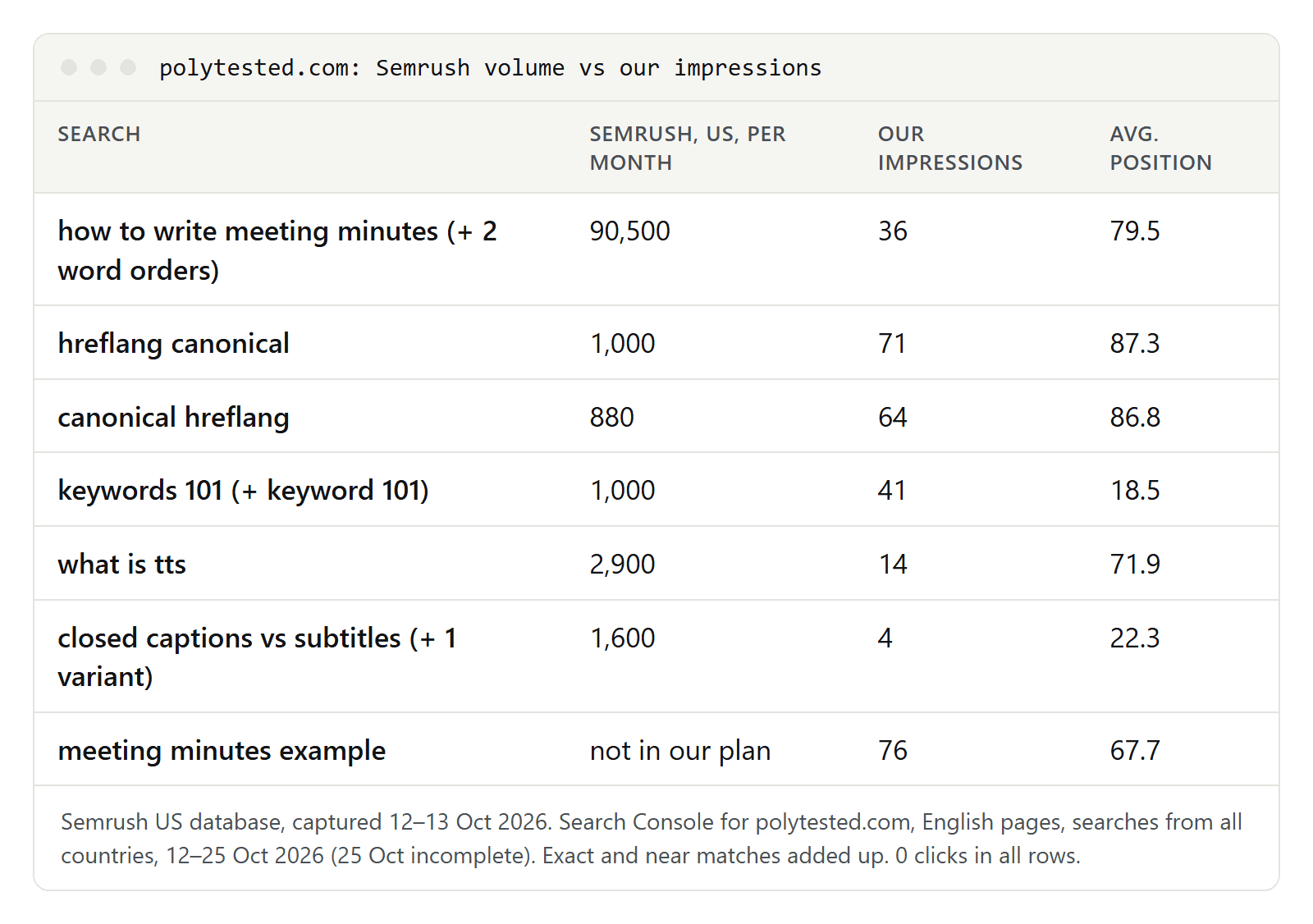
The extremes show the problem. "how to write meeting minutes" has 90,500 searches a month in Semrush's US database; our page got 36 impressions at an average position of 79.5. "keywords 101", where we came closest to the first page (average position 18.5), got 41 impressions against roughly 428 searches in 13 days, about a tenth.
Why impressions and volume can't match yet
- Position. An impression only counts when our link is on a page of results someone actually loaded, and an average position around 67 is far beyond the first page. Even our best positions weren't enough: our German page on turning off YouTube's AI dubbing reached average position 9 for two searches and still got only 2 and 1 impressions, against 170 and 390 searches a month in Germany. An average position can hide days further down, and our data has no daily positions per search.
- A short, early period. 13 days against a 12-month average, on a site Google was still indexing: 176 of the 227 URLs in our sitemaps were indexed on 18 October, 194 on 25 October.
- One country vs every country. Semrush counts one country; our query rows count searches from everywhere, and only 37 percent of our site's impressions came from the US. This can push the other way too: our Spanish page on hreflang got 26 impressions for "hreflang x-default" at an average position of about 70, which is 43 percent of Spain's 13-day volume. Our data doesn't split searches by country, so we can't prove the reason.
- Hidden rows. 1,810 of our 6,614 impressions in the period, 27 percent, had no query row at all.
- Variants split the demand. Only 10.5 percent of the impressions on our English pages came from searches in our plan, exactly or nearly. "meeting minutes example", which isn't in our plan, got 76 impressions, more than twice the 36 of the page's main keyword.
Searches like "meeting minutes example" have no number in our plan. That doesn't mean Semrush shows 0 for them: we simply never looked them up, because our research used volume floors. Search Console found them for us, which is its real value for a new site.
How to use search volume
- Compare, don't count. Use volume to rank keywords within one tool, one country and one date, not as a traffic forecast.
- Read numbers as bands. Volumes are rounded or modeled; a keyword at 880 and one at 1,000 are about equal.
- Check the months. Look at the monthly pattern before you plan a seasonal page.
- Check each country. Look up every market you write for separately.
- Use Search Console as a floor. Impressions show demand you already reach. Pages at positions 11 to 20 are the closest to the first page; our guide to striking-distance keywords explains how to move them up, and checking your keyword rankings regularly shows when a page gets there.
- Compare again later. Once a page holds a top position for a few months, put its impressions next to the tool's volume. Before that, a gap like ours says more about the page than about the keyword.
