To translate a whole document with Google Translate, open translate.google.com on a computer, click Documents, choose the two languages, click Browse your computer and pick a .docx, .pdf, .pptx or .xlsx file of up to 10 MB (a PDF can have up to 300 pages). Then click Translate and Download translation. It's free, but it doesn't work on phones, and text inside images or scanned pages stays untranslated. Below: the steps, the limits, four alternatives for the files Google Translate can't handle well, prompts for AI assistants and fixes for the usual problems.
The short answer: which tool for which document
| Your document | Use | Why |
|---|---|---|
| A Word, PowerPoint, Excel or PDF file on a computer | Google Translate, Documents tab | Free, no setup, the four most common formats |
| A file you want to edit afterward | Google Docs, Tools > Translate document | An editable copy is saved in your Drive |
| A Word document, and you have Microsoft 365 | Word, Review > Translate > Translate Document | Microsoft says Office text translation isn't stored |
| A Word, PowerPoint or PDF file on your phone | The DeepL app with a free account | DeepL's apps translate whole files; Google Translate's apps don't |
| A scanned PDF or a photo of a page | Google Drive's text conversion, or an AI assistant | Google Translate leaves scanned pages untranslated |
| A document you mainly need to understand | ChatGPT or Gemini with a clear prompt | Ask for a summary, a glossary or one section at a time |
| An official document for an agency | A professional translator | Agencies such as USCIS require a certified translation |
How we chose these tools. We picked routes that are free or already on most computers and that take a whole file, not just pasted text, and read each vendor's help, pricing and privacy pages on November 2, 2026. No prices or scores: plans change, and the right tool depends on your document.
How to translate a document with Google Translate, step by step
The document feature runs in a web browser on a computer; there's nothing to install.
- On your computer, go to translate.google.com.
- At the top, click Documents.
- Choose the language to translate from, or click Detect language, and the language to translate to.
- Click Browse your computer and select your file.
- Click Translate and wait until the document has finished translating.
- Click Download translation.
Your original isn't changed; you download a separate translated copy.
Two tips. The format list includes .docx but not the older .doc, so save an old Word file as .docx first. And if the document mixes languages, for example an English cover page on a German contract, set the source language yourself instead of Detect language.
Google Translate's document limits, and why there's no Documents tab on your phone
| Question | Answer from Google's help |
|---|---|
| Which file types? | .docx, .pdf, .pptx and .xlsx |
| How large? | Up to 10 MB per file |
| How many PDF pages? | 300 pages or less |
| On a phone? | Not available on smaller screens or mobile |
| On an iPad? | Yes, in a browser: it works on medium to large screens, like iPads or larger |
| Scanned pages and pictures? | They appear in the translated file, but their text isn't translated |
| Pasted text instead of a file? | Up to 5,000 characters at a time |
| More or larger files? | Google points to its Cloud Translation API, a service for developers |
On an Android phone or an iPhone, Google's help suggests copying the text into the Translate app, which works for a letter, not a long report. For a whole file on a phone, use the DeepL app (below) or wait until you're at a computer.
Google Docs: Tools > Translate document
Google Docs has its own translation command, and the result stays editable in your Drive.
- On your computer, open the document in Google Docs.
- Click Tools > Translate document.
- Enter a name for the translated copy and select a language.
- Click Translate. The copy opens in a new window and is saved in Google Drive.
Starting from a Word file: upload it to Drive and open it. If Translate document is missing from the Tools menu, the file is probably open in Microsoft Office editing. In Drive, double-click the file, click Open in Google Docs (or Open with), then click File > Save as Google Docs. To convert all future uploads, turn on "Convert uploaded files to Google Docs editor format" in Drive's Settings.
Google lists the side effects: embedded charts and videos become images, SmartArt becomes a Google Drawing, and macros don't carry over. A Google Docs document can hold up to 1.02 million characters, a converted one up to 50 MB, and Docs also converts .doc, .rtf and .odt files.
For spreadsheets, Google Sheets has a formula: =GOOGLETRANSLATE(A2,"auto","en") translates cell A2 into English and detects the source language. Fill it down a column to get a translated column next to the original.
Microsoft Word: Review > Translate > Translate Document
If you already work in Word with Microsoft 365, nothing has to go through a website.
- Open the document in Word.
- Select Review > Translate > Translate Document.
- Select the language you want.
- Select Translate. A translated copy opens in a separate window; your original stays as it is.
To translate one paragraph, highlight it and use Review > Translate > Translate Selection; Insert replaces the highlighted text with the translation.
What you need: Microsoft 365 or Office 2021, an internet connection and Office connected experiences turned on, says Microsoft; on a Mac, an Office 365 subscription, Office 2024 for Mac or Office 2021 for Mac. Microsoft's help lists the same steps for Word for the web.
PowerPoint and Excel: Microsoft's help describes translating selected text there, not whole files. For a full deck or workbook, Google Translate's Documents tab is quicker.
Where Bing, Microsoft Translator and Edge fit
We didn't find a file upload for the free Translator for Bing website or the Translator apps on Microsoft's pages. For whole files outside Office, Microsoft documents Azure Document translation, an API for developers. Microsoft also says its Translator apps, Translator for Bing and Edge record text translations to improve the service, unlike Office.
DeepL: free document translation with a monthly limit
DeepL translates whole files on its website, in its Windows and Mac apps and in its iOS and Android apps, with a free DeepL account. According to its pricing page and help center:
- Free version: one file translation per user per month, up to 5 MB.
- Formats: Word (.docx and .doc), PowerPoint (.pptx) and PDF, up to 100,000 characters per file. Excel needs a paid plan.
- Editing: without a subscription, the translated file isn't editable.
- Several target languages: each one counts as a file translation.
- What's kept: body text, titles, captions and footnotes are translated, and the file keeps its formatting, images and fonts.
On the website:
- Sign in and open Translate files.
- Select a file, or drag and drop it into the window.
- Select a target language; optionally, a glossary or a formal or informal tone.
- Click Translate into [language], then Download.
In the mobile apps, tap the File button beneath the source text field (Document in older versions), choose the file and tap Translate file. With one free file a month, save it for the document where layout matters most.
ChatGPT, Gemini and other AI assistants
OpenAI's help describes working with a file's contents, not returning a formatted copy, so expect the translation as text in the chat and paste it into your own document. In return, you can say who will read it, which terms to keep and what to flag, and ChatGPT can read scanned pages that Google Translate skips.
ChatGPT: in the prompt area, open the attachment menu and choose Add photos & files. OpenAI lists DOCX, PDF and TXT, XLSX, XLS, CSV and TSV, and PPTX. Export a .gdoc file as PDF or DOCX first. Documents can be up to 512 MB and 2 million tokens per file, and free users can upload three files per day. ChatGPT reads both text and images in PDFs. If a long translation fills the chat, OpenAI suggests starting a new chat and pasting the passage you want to continue with.
Gemini: sign in, click Add files, then upload a file or add one from Google Drive. Google allows up to 10 files in one prompt and up to 100 MB per file (videos aside), with rolling limits, and warns that answers on very large files can miss details.
Other assistants work similarly; check their help pages for limits.
Copy-ready prompts for translating a document with an AI assistant
A good translation prompt covers seven things; language and readers matter most.
| Part | What it tells the assistant | Example |
|---|---|---|
| Target language | Language and variety | "into American English" |
| Readers | Who will read it | "for a US landlord" |
| What to keep | Structure, numbers, names | "keep all headings, lists and tables" |
| Terms | Words with a fixed translation | "Kaution = security deposit" |
| What not to do | Typical drift | "don't summarize, don't add comments" |
| Doubts | What to flag | "mark unclear passages with [CHECK]" |
| Output | Shape of the answer | "same headings, one section at a time" |
Attach the file, paste a prompt and replace everything in square brackets.
Faithful translation of an attached file
The basic prompt; it stops the assistant from shortening or rewording.
Translate the attached document from [source language] into [American English / target language].
Readers: [who will read it].
Translate everything, including headings, table cells, captions and footnotes.
Keep the structure: same headings, numbered lists, bullet lists and tables.
Don't summarize, don't add explanations, don't comment on the content.
Keep names, product names, numbers, dates and amounts exactly as in the original.
If a passage is unclear or unreadable, translate what you can and mark it with [CHECK].
Long document, one section at a time
For reports and manuals: working in parts keeps the translation complete and lets you check as you go.
Translate the attached document into [target language] section by section.
Start with [the first section / pages 1 to 5]. Stop after that part and wait until I write "continue".
Use this glossary without exception: [source term] = [target term]; [source term] = [target term].
Translate other repeated terms the same way throughout. After each part, list the new terms you translated.
Don't skip tables, footnotes or text in images.
Scanned PDF or photo of a page
The assistant reads first and translates second, so you can see what it read.
The attached file is a scan of a printed page in [source language].
Step 1: Write out the text exactly as it appears, line by line. Mark words you can't read as [illegible].
Step 2: Translate that text into [target language], keeping the same paragraphs.
Don't guess missing words, numbers or names. List anything you weren't sure about at the end.
Slide deck that still fits the slides
Translations often run longer than the original. This keeps slide text short.
Translate the text of each slide in the attached presentation into [target language] for [audience].
Go slide by slide, with the slide number as a heading.
If a translated title would be much longer than the original, give a shorter version that keeps the meaning.
Translate the speaker notes too, under "Notes".
Understand a letter before you answer it
For an official letter, a lease or a school notice. It doesn't replace advice from a professional.
The attached letter is in [source language]. I need to understand it, not publish it.
1. Summarize in plain English, in five sentences or fewer, what it says and what it asks me to do.
2. List every date, deadline, amount and reference number, exactly as written.
3. Translate the passages with requests or deadlines word for word.
Don't give legal advice; mark anything I should check with a professional.
Check a translation against the original
The assistant lists problems instead of rewriting, and you decide.
I've attached the original in [source language] and its translation into [target language].
Don't rewrite the translation. Compare them section by section and make a table with four columns:
section, original passage, problem (missing, added, wrong meaning, number, date, name, tone), suggested fix.
Skip sections that are fine. End with a count of the problems by type.
More prompts for everyday work are in our collection of prompts for ChatGPT.
Comparison: free ways to translate a whole document
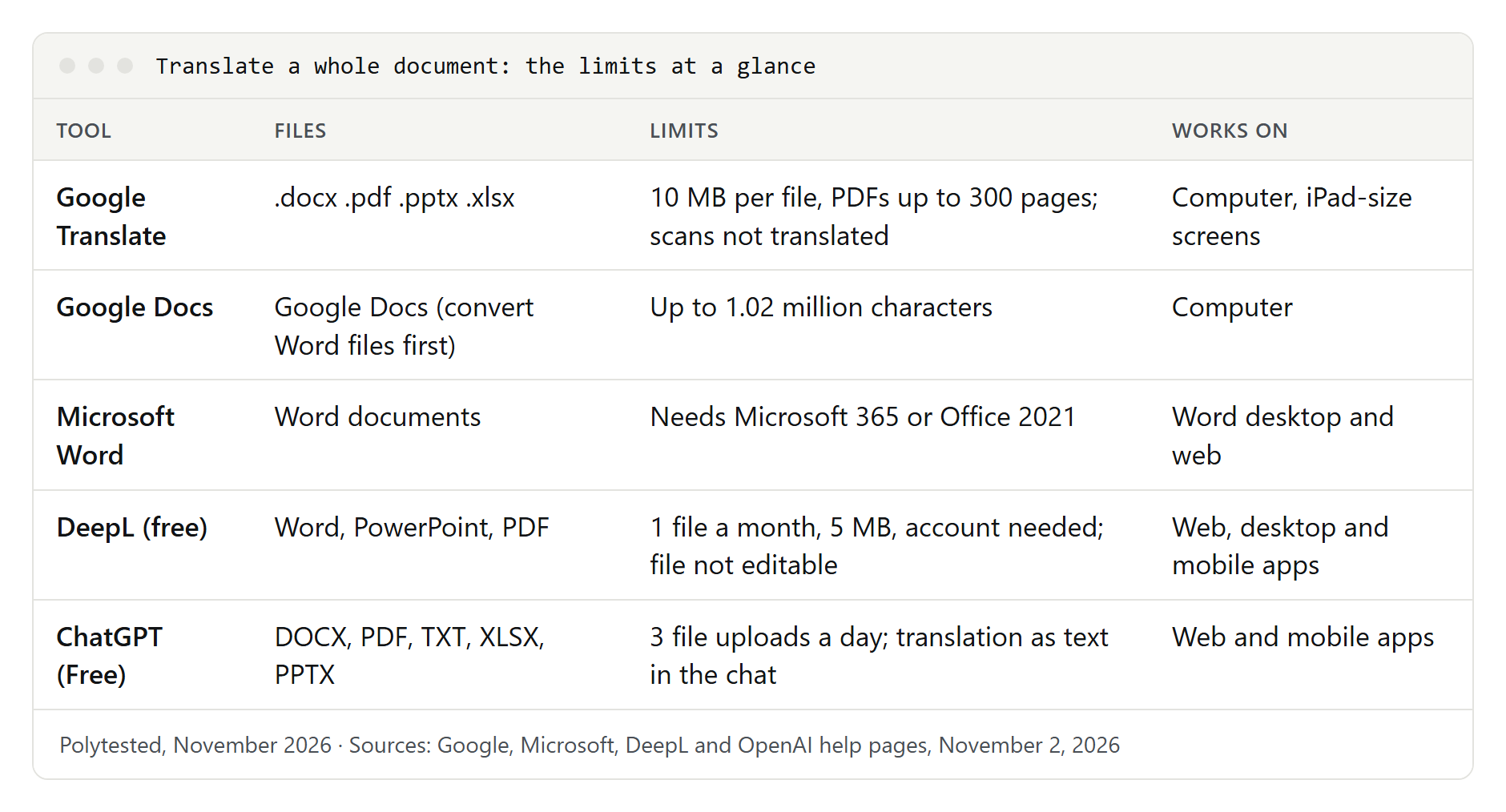
| Tool | Formats | Limits | On a phone | Result | Your file |
|---|---|---|---|---|---|
| Google Translate | .docx, .pdf, .pptx, .xlsx | 10 MB; PDFs up to 300 pages | No; iPad or larger in a browser | Translated copy; scans and text in images untranslated | Signed in, text translations go to your history |
| Google Docs | Docs files; convert .docx, .doc, .rtf, .odt first | Up to 1.02 million characters | — | Editable copy in Drive | Stays in your Drive |
| Microsoft Word | Word documents | Microsoft 365 or Office 2021 | — | Copy in a separate window | Not stored or used for training, per Microsoft |
| DeepL | Word, PowerPoint, PDF; Excel on paid plans | 1 file a month, 5 MB, 100,000 characters, account | Yes, iOS and Android apps | Keeps formatting, images, fonts; free files not editable | Free: may be used for training; no personal data |
| ChatGPT | DOCX, PDF, TXT, XLSX, PPTX and more | Free: three uploads a day | Yes, mobile apps | Text in the chat | Model training on by default; can be turned off |
| Gemini | Most file types | 10 files per prompt, 100 MB each, sign-in | — | Text in the chat | Some chats read by human reviewers |
Scanned PDFs, images and layout: what survives translation
If you can't select a word in your PDF viewer, the PDF is a scan, and Google Translate returns those pages untranslated. Three ways around it:
Convert the scan to text with Google Drive. Upload the PDF, right-click it and choose Open with > Google Docs. Google's tips: 2 MB or smaller, text at least 10 pixels high, pages right side up, common fonts, sharp images. Bold, italics and line breaks usually carry over; lists, tables, columns and footnotes usually don't. Then use Tools > Translate document.
Translate one page as an image in Google Translate's Images tab on a computer, then copy the text or download the translated image. Google notes that small, unclear or stylized text lowers accuracy.
Use an AI assistant, which reads images in PDFs, with the "Scanned page" prompt above.
For layout, a few rules help with every tool:
- Translate the original, not its PDF. DeepL advises this when a PDF translation disappoints, since PDF conversion relies on character recognition and may have a higher error rate.
- Clean up the file. DeepL says a Word file with too many open suggestions can fail, so accept or reject tracked changes, and remove password protection.
- Expect longer text. Check slide titles, text boxes and table columns for cut-off words.
- Mind the pictures. DeepL doesn't translate text inside images in Word or Excel files; it suggests converting to PDF, and 300 DPI for scans.
Privacy: what not to upload
An uploaded document is processed on the vendor's servers. What each vendor says:
- Google Translate: signed in, your text translations are saved to the cloud (History > Clear history deletes them). The help pages we read don't say how long uploaded documents are kept.
- Microsoft Word: Microsoft says text translation in Office isn't written to persistent storage or used for training.
- DeepL Free: content is processed for a limited time to train DeepL's models, and the free version may not be used for texts containing personal data of any kind; that needs a Pro plan. Documents are processed on DeepL's infrastructure in the European Economic Area.
- ChatGPT: on Free, Plus and Pro, "Improve the model for everyone" is on by default; turn it off in Settings > Data controls. Temporary chats aren't used for training and may be kept up to 30 days for safety.
- Gemini: human reviewers read some chats, kept up to three years, and Google asks you not to enter confidential information.
How to check a translated document
A translation can look perfect and still change a date or drop a "not." Check it against the original, section by section, then read it on its own.
- Nothing missing: same pages, sections, rows and footnotes.
- Numbers and dates: every amount, date and reference number matches. In the US, 03/04 means March 4; in much of Europe, April 3.
- Names: people, companies and products are unchanged.
- Leftovers: no untranslated text in headers, footers, charts or scanned pages.
- Terms: the same word is translated the same way throughout.
- Meaning: negations, conditions ("only if," "unless") and deadlines survived.
- Layout: no text cut off in slides, cells or text boxes.
- A native check: for anything you'll send, sign or publish, ask a native speaker to read it.
Listening helps too: see our guide to having text read aloud.
When a free translation isn't enough
A free tool is fine for understanding a document or for everyday mail. Use a professional translator when a mistake would be expensive: a contract, a safety manual, a medical record, anything published in your company's name.
Official documents have their own rules: US federal regulations require that a foreign-language document submitted to USCIS comes with a full English translation that the translator certifies as complete and accurate, plus a certification that they are competent to translate. Universities, courts and other agencies can have similar rules, so check the receiving office's instructions. This is general information, not legal advice.
Translating a whole website is a different job; see our guide to website translation and SEO.
Troubleshooting: common problems and fixes
The file is too large. Google Translate takes up to 10 MB, DeepL's free account 5 MB. Split a long PDF or remove large images, or convert a Word file to Google Docs (up to 50 MB).
The PDF won't upload or translate. Check that it has 300 pages or less and no password. If it's a scan, use Google Drive's text conversion or an assistant. DeepL doesn't support PDFs exported from CAD files, such as floor plans.
The layout is broken. Translate the original Word or PowerPoint file instead of the PDF, try DeepL for layout-heavy files, and shorten long titles by hand.
The wrong language was detected. Set the source language yourself instead of Detect language, especially when the first page differs from the rest.
Translate is missing in Google Docs or Word. In Docs, the file is in Office editing mode: use File > Save as Google Docs. In Word, you need Microsoft 365 or Office 2021, internet and Office connected experiences.
ChatGPT says I've reached the upload limit. Free accounts can upload three files per day. Paste the text into the chat instead, in parts.
It's subtitles or a web page, not a document. Subtitle files have their own workflow, described in our guide to translating subtitles. For a page in your browser, see how to translate a website in Chrome, Safari, Firefox and Edge.