The best prompts for ChatGPT aren't magic phrases. They say what you want done, give the context a new colleague would need, and describe the answer you expect: length, format, tone. Every prompt below follows that pattern, grouped by situation, from emails and resumes to spreadsheets and language practice. Copy one, replace the parts in square brackets, and send it. After the collection: follow-ups that fix a weak answer, ways to save the prompts you reuse, and what to keep out of a chat.
How to write a prompt that works
OpenAI's help pages boil good prompting down to a few habits: be clear and specific, give enough context, name the tone you want, split big jobs into smaller requests and refine the answer with follow-ups. Its prompting guide for the API adds tips that work just as well in the chat window: put the instruction first, separate pasted text with ### or """, show the format you want with an example, and say what to do instead of only what to avoid.
Put together, that gives six parts. You rarely need all of them; task, context and format do most of the work.
| Part | What it tells ChatGPT | Example |
|---|---|---|
| Role | Who to act as | "Act as a patient math tutor." |
| Task | The one thing you want done | "Explain compound interest." |
| Context | Who it's for, background, goal | "For a high school student who knows percentages." |
| Format | Length, structure, tone | "Three short paragraphs and one worked example." |
| Constraints | Limits, phrased as what to do | "Use only the figures I give you." |
| Examples | A sample of the style you want | "Here's an answer I liked: ..." |
The template below puts all six in order. Delete the lines you don't need; keep the last one, which makes ChatGPT ask before it guesses.
Act as [role].
Task: [what you want done].
Context: [who it's for, background, your goal].
Format: [length, structure, tone].
Constraints: [what to include, what to stick to].
Example of the style I want: [short sample].
If anything important is missing, ask me up to three questions first.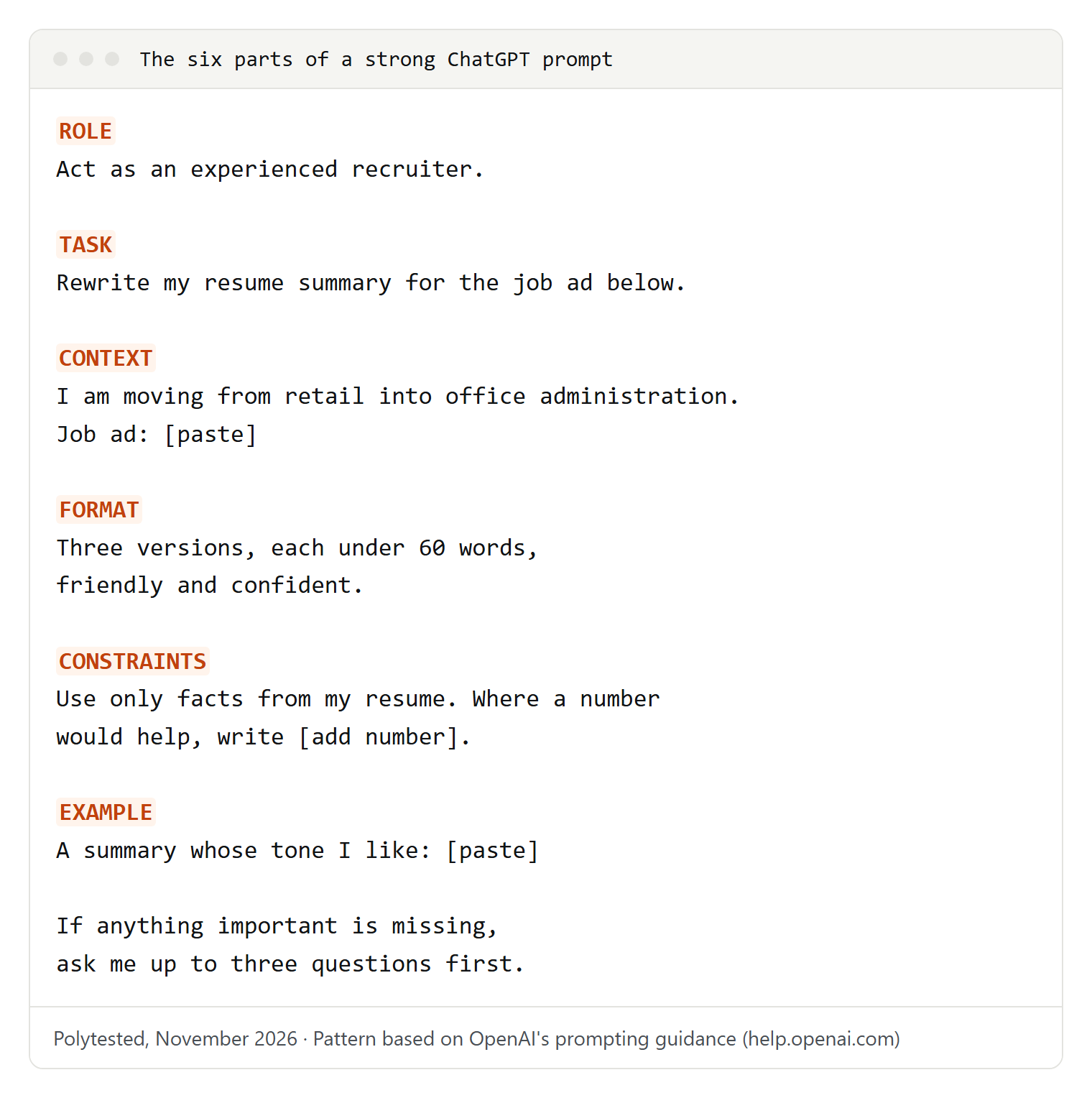
This collection is about text. Prompts for pictures have their own guide: ChatGPT image prompts.
Emails and messages
Paste the message you're answering whenever you can; it's the context ChatGPT needs most.
For a polite no that keeps the relationship intact. Change the reason and the alternative, or delete the alternative.
Here is an email I received: """[paste email]"""
Write a reply that politely declines [request]. Give one short reason and offer [alternative]. Warm but clear, under 120 words.
For when you know what to say but not in which order. Add a deadline if you have one.
Turn these notes into an email to [recipient and role]: [paste notes].
Start with the main point in one sentence, then details, then exactly what I need from them and by when. Add a specific subject line.
For a reminder that doesn't sound annoyed, in two tones to choose from.
I emailed [person] on [date] about [topic] and got no answer. Write a short follow-up that restates the question in one line and can be answered with yes or no. Give two versions: neutral and more direct.Summaries of long texts and meetings
A summary is only useful when it's aimed at a reader and a decision, so name both.
This one asks for quotes around numbers and dates, which makes them easy to check against the original.
Summarize the text below for [reader] who has to decide [decision].
Give the main point in two sentences, the facts that matter, open questions and anything the text leaves out. Quote the original wording for every number and date.
Text: """[paste]"""
Paste notes or a transcript. The "not stated" rule tells ChatGPT not to fill gaps with invented owners or deadlines.
Here are notes from a meeting about [topic]: """[paste]"""
Write minutes with attendees, decisions, an action-item table (task, owner, deadline) and open questions. Add nothing that isn't in the notes; write "not stated" where something is missing.
If you only have a recording, turn it into text first; our guide to transcribing an audio recording covers free ways. For what good minutes contain, see how to write meeting minutes.
Writing and editing
The risk with editing prompts is losing your own voice, so tell ChatGPT what to keep, not just what to fix.
For an edit that fixes errors without turning your text into someone else's. The change list shows what was touched.
Edit the text below for clarity and grammar. Keep my wording, tone and sentence length where they work; change only what is unclear or wrong. Then list your changes.
Text: """[paste]"""
For planning a post, report or talk before you write. Fill in the reader's main question; it decides the order.
I'm writing a [blog post / report / talk] about [topic] for [audience]. Their main question is [question].
Suggest an outline with headings, one line per section, in the order that answers their question fastest. Flag anything I need to research.
Studying and learning
According to OpenAI's help center, ChatGPT's study mode is available on every plan on the web, iOS and Android. On the web you turn it on by typing @study in the message box, or by selecting + and searching for "study"; it isn't offered in temporary chats or projects. The prompts below work with or without it.
For a new topic. Say what you already know, so the explanation starts at the right point.
Explain [topic]. I'm [level, e.g. first-year nursing student] and already know [what you know].
Start with two sentences, then an analogy, then the full explanation. Stop after each layer and ask if I want more.
For exam practice with feedback. Paste your notes to keep the questions on your syllabus.
Quiz me on [topic or pasted notes]. One question at a time; wait for my answer. Tell me if I'm right, explain mistakes, and adjust the difficulty. After ten questions, list what to review.For turning a deadline into a schedule. Be honest about your available time.
My exam on [subject] is on [date]. Topics: [list]. I can study [hours] on [days]. Weakest topics: [list].
Make a day-by-day plan with review sessions and practice tests, and keep the last day light.
For graded work, follow your school's rules on AI; OpenAI's usage policies also rule out academic dishonesty.
Resume, cover letter, interviews and job search
Before you paste a resume, replace your name, phone number, email and address with placeholders like [Name]. ChatGPT doesn't need them to improve the text.
Resume prompts
For matching your resume to one job ad. The last sentence tells ChatGPT not to add experience you don't have.
Job ad: """[paste]"""
My resume: """[paste, contact details removed]"""
Which requirements does my resume already show, which are missing, and which bullet points should I rewrite? Use only experience that's in my resume.
For bullet points that read like tasks. The [add number] marker shows where a real figure from you would help.
Rewrite these bullet points so each shows a result and starts with a strong verb: [paste bullets].
Use only facts I've given. Where a number would help, write [add number] instead of inventing one.
Cover letter
For a first draft you then make your own. Read it aloud and replace any sentence you wouldn't say.
Write a cover letter for [job title] at [company] from the ad and resume below. Open with why this role, not "I am writing to apply". Link my two most relevant experiences to requirements in the ad. Under 300 words, [formal / friendly].
Ad: """[paste]"""  Resume: """[paste]"""
Interview practice
For rehearsing out loud or in writing. Name the company type so the questions fit.
Act as the hiring manager for [job title] at [type of company]. Ask one question at a time, mixing behavioral and role-specific ones. After each answer, say what worked, what was vague, and how to structure it better. Stop after eight questions and summarize.Job search
For reading between the lines of a posting before you apply.
Job ad: """[paste]"""
Separate must-haves from nice-to-haves, describe what the daily work probably involves, and list five questions I should ask in the interview.
Planning: trips, meals and budgets
Put your constraints up front: dates, pace, diet, who's coming. Check opening hours and bookings on official sites, because ChatGPT's information can be out of date.
For a trip plan that fits how you travel. The rainy-day line saves replanning on the spot.
Plan [number] days in [city] for [who's traveling]. We like [interests], dislike [dislikes], pace: [relaxed / full], transport: [how].
Give a day-by-day plan grouped by neighborhood, with a rainy-day alternative each day. Mark what usually needs booking ahead.
For a week of dinners and one shopping trip. If you follow a diet for medical reasons, check the plan with your doctor or dietitian.
Plan dinners for [number] people for [number] days. Diet: [e.g. vegetarian, no nuts]. Weeknight cooking time: [time]. Reuse ingredients to cut waste.
Then give one shopping list grouped by store section.
For the structure of a budget. Keep the actual figures in your own spreadsheet.
Help me set up a monthly budget. My situation: [e.g. freelancer, irregular income, renting].
Suggest categories and subcategories, which are usually fixed and which vary, and questions to answer before I set amounts. Don't suggest amounts.
Small business and freelancing
Remove client names and anything you've agreed to keep confidential before you paste.
For a short offer a client can say yes to. Spell out what isn't included; it avoids misunderstandings later.
Write a short offer for a client who needs [service]. Their goal: [goal]. Included: [scope]. Not included: [exclusions]. Timeline: [timeline]. Next step: [e.g. a short call].
Order: their goal, what I'll deliver, what I need from them, next step. Plain, no jargon.
For a calm answer to a complaint. Decide what you can offer before you paste.
A customer wrote: """[paste]"""
What happened: [facts]. What I can offer: [refund / redo / discount / nothing].
Acknowledge the problem in their words, explain without excuses, state the offer clearly. Under 150 words.
For a week of posts from one piece of news. Paste one of your past posts so the tone matches.
Business update: [news]. Write five short posts for [platform], each from a different angle: the news, a customer benefit, behind the scenes, a question to followers, a reminder. Match this tone: [paste a past post].For a website FAQ built from real questions. The [check] marks show where you need to add facts.
Customer questions, names removed: """[paste]"""
Group similar questions, write one FAQ question per group in the customers' words, and draft short answers. Mark facts I must add with [check].
Customers' own wording is also a good start for keyword ideas; our guide on finding keywords, ChatGPT included builds on that.
Brainstorming and decisions
Ask for quantity first, then judgment, and set the criteria yourself.
For ideas you can actually use. Constraints keep the list from going generic.
Give me 20 ideas for [goal, e.g. bakery names]. Constraints: [list]. Group them into themes and pick the three strongest, with one sentence on why.For a choice between a few options. The last line keeps the decision with you.
I'm choosing between [option A], [option B] and [option C]. What matters to me, in order: [criteria].
Make a comparison table, point out what I may be overlooking, and ask two questions that could change the answer. Don't decide for me.
Spreadsheets, formulas and code basics
You don't need to know formulas or programming, but you do need to describe your data exactly: columns, what's in them, what you want to see.
Spreadsheet prompts
For a formula you can paste straight into a cell. Name your program, because Excel and Google Sheets differ.
I use [Excel / Google Sheets]. Column A: [dates], B: [customer names], C: [order totals], headers in row 1.
Write a formula that [e.g. totals column C per customer for March]. Explain each part in one line and say if it needs a recent version.
You can also upload the file. OpenAI recommends descriptive column headers in the first row and one row per record, and suggests reviewing the code and assumptions behind an analysis before relying on it. Free accounts are limited to three file uploads per day, according to OpenAI.
For a messy list of contacts, products or orders. Asking for the plan first means nothing changes without your OK.
I'm uploading a spreadsheet of [contacts / products / orders]. Find duplicates, inconsistent spellings and empty cells, and tell me what you'd change before changing anything. Then give me the cleaned file and a list of changes.Code basics for non-programmers
For code someone sent you or that you found online. Don't run code you don't understand.
I'm not a programmer. Explain what this code does, line by line, in plain English. Is it safe to run, and what does it need to work? Code: [paste]For a small helper script. Running it on a copy of your files first protects the originals.
I want a script that [task, e.g. renames photos in a folder by date]. I use [Windows / Mac] and have never run code. Tell me which tool to use, give the full script, and walk me through running it on a copy of my files.Thinking about a whole website instead? Our comparison of website builders, coding and AI builders helps you choose.
Language learning and translation
OpenAI's capabilities overview lists translation among the tasks ChatGPT can help with, and its voice mode works in the mobile app and on supported desktop and web platforms, which helps with speaking practice. Name the reader, not just the language.
For a translation that sounds local. The back-translation list shows where meaning may have shifted, so a native speaker knows where to look.
Translate this text into [language] for [reader, e.g. customers in Mexico], tone: [formal / friendly]. Where a phrase doesn't work word for word, adapt it, then list those spots with a literal back-translation.
Text: """[paste]"""
For speaking or chat practice at your level. Change the situation each time.
Be my conversation partner in [language] at level [A2 / B1 / ...]. Situation: [e.g. checking into a hotel]. Use short sentences. After each of my replies, continue, then add one correction in English below a line.Follow-up prompts that make an answer better
The first answer is a draft. OpenAI's help pages recommend treating prompting as a conversation and refining your request step by step; the refresh control also offers Try again. These follow-ups address the usual problems:
| Problem | Follow-up to type |
|---|---|
| Too long | "Cut this to half the length; keep the key facts." |
| Too generic | "Make it specific to my situation: [details]. Remove anything that would fit anyone." |
| Wrong tone | "Rewrite in a [warmer / more formal / more direct] tone; keep the content." |
| Wrong format | "Turn this into a table with columns [A, B, C]." |
| Something missing | "What did you leave out that someone in my position should know?" |
| Not your style | "Here's an example of my writing: [paste]. Match its sentence length and word choice." |
| Ignores an instruction | "Re-read my first message. Which instructions did you miss? Fix them." |
| Long chat drifts | Start a new chat and paste the original prompt plus the latest draft. |
The last row has a reason: OpenAI explains that messages and replies share a limited space per chat, and that a summary carried into a new chat can lose an earlier instruction.
Save the prompts you use again
Once a prompt works, keep it. ChatGPT has three built-in places for this, according to OpenAI's help center as of November 2, 2026.
Custom instructions apply to every chat. On the web and desktop they're under Settings, Personalization; in the iOS and Android apps under Settings, Customize ChatGPT. Free and Go users can save up to 1,500 characters; Plus, Pro, Business, Enterprise and Education users up to 5,000. Use them for what's always true:
I'm a freelance [job] in [country]. Write in American English, short paragraphs, no jargon. When a task is unclear, ask before answering. When a fact matters, say how sure you are and how I can check it.Project instructions apply only inside one project and override your custom instructions there. Select New project in the sidebar, then add instructions under the ••• menu, Project settings. A job-search project, for example, can hold your anonymized resume and the rule never to invent experience. A good answer can be kept with Add to project sources.
Memory keeps details you ask ChatGPT to remember, such as "Remember that I write for a small bakery's customers." You manage it under Settings, Personalization, Memory, and you can ask ChatGPT what it remembers about you.
Custom GPTs are winding down: OpenAI says new GPT creation isn't available on personal Free, Go, Plus and Pro accounts, and that custom GPTs are scheduled to retire on December 11, 2026, with their instructions moving into plugins as "skills". For most people, custom instructions, projects and a plain note with your favorite prompts are enough.
What not to paste, and what to double-check
Keep private things out
Don't paste passwords, ID or Social Security numbers, card or bank details, health records, or other people's private information. Replace names with placeholders, and follow your employer's rules for work documents and client data. OpenAI's data controls explain the settings that matter:
- Improve the model for everyone (Settings, Data controls) is on by default for personal Free, Plus and Pro accounts. Turning it off keeps your chats out of training; your history stays.
- Temporary chat (select Temporary in a new chat) stays out of your history, creates no memories and isn't used for training while it stays temporary. OpenAI may keep a copy for up to 30 days for safety.
- Thumbs up or down: if you rate a response, the whole conversation may be used for training, even after you've opted out.
- Business, Enterprise and Edu workspaces aren't used for training by default.
OpenAI's usage policies apply to everything you ask, including rules against impersonation, fraud and spam.
Check facts before you use them
OpenAI's help page on accuracy says ChatGPT can state wrong facts and dates with confidence and can invent quotes, studies and references. It recommends treating answers as a first draft and verifying quotes, data and references. Web search adds citations, but OpenAI notes these can be incomplete, outdated or wrong too, so open the source and check that it says what the answer claims.
To make that check part of your routine, end important chats with this:
List every factual claim in your last answer: names, numbers, dates, quotes and sources. For each, say how confident you are and where I can verify it. Mark anything you can't support.For medical, legal, tax and financial questions, use ChatGPT to prepare your questions, then ask a qualified professional. And read anything ChatGPT writes for you once more before it goes out under your name.