To translate subtitles, change only the text lines and keep every counter, timecode and arrow exactly as it is. A free web translator can do this if you paste the file in. In our test, Google Translate and DeepL kept our six-cue SRT file intact in German, French and Spanish, while Microsoft Bing Translator broke something in all three. Even an intact translation needs editing, though: every one of the nine translations came out too long for the original timing.
What has to survive translation
An SRT file is a list of numbered cues. Each cue has a counter, a timecode line with a --> arrow and a comma before the milliseconds, one or two text lines, and a blank line before the next cue. Our guide to the SRT file shows the format in full.
When you translate, only the text lines should change. Two kinds of markup inside the text should survive as well:
- Italics such as
<i>…</i>, used for voices off screen or song lyrics. - Position tags such as
{\an8}, which move a line to the top of the screen, for example when on-screen text would otherwise be covered.
If you will upload to YouTube, keep the file simple anyway: YouTube says that for SRT, "only basic versions of these files are supported", that "no style info (markup) is recognized", and that "the file must be in plain UTF-8."
We pasted one SRT file into three free translators
On 13 October 2026 we pasted the same six-cue SRT file into the text boxes of Google Translate, DeepL and Microsoft Bing Translator, signed out, in Chrome, and translated it into German, French and Spanish. The file has a sentence split across two cues, two two-line cues, an italic line, a {\an8} tag and a last line that addresses the viewer: "Can you hear the difference?" We then compared each translation with the original, character by character.
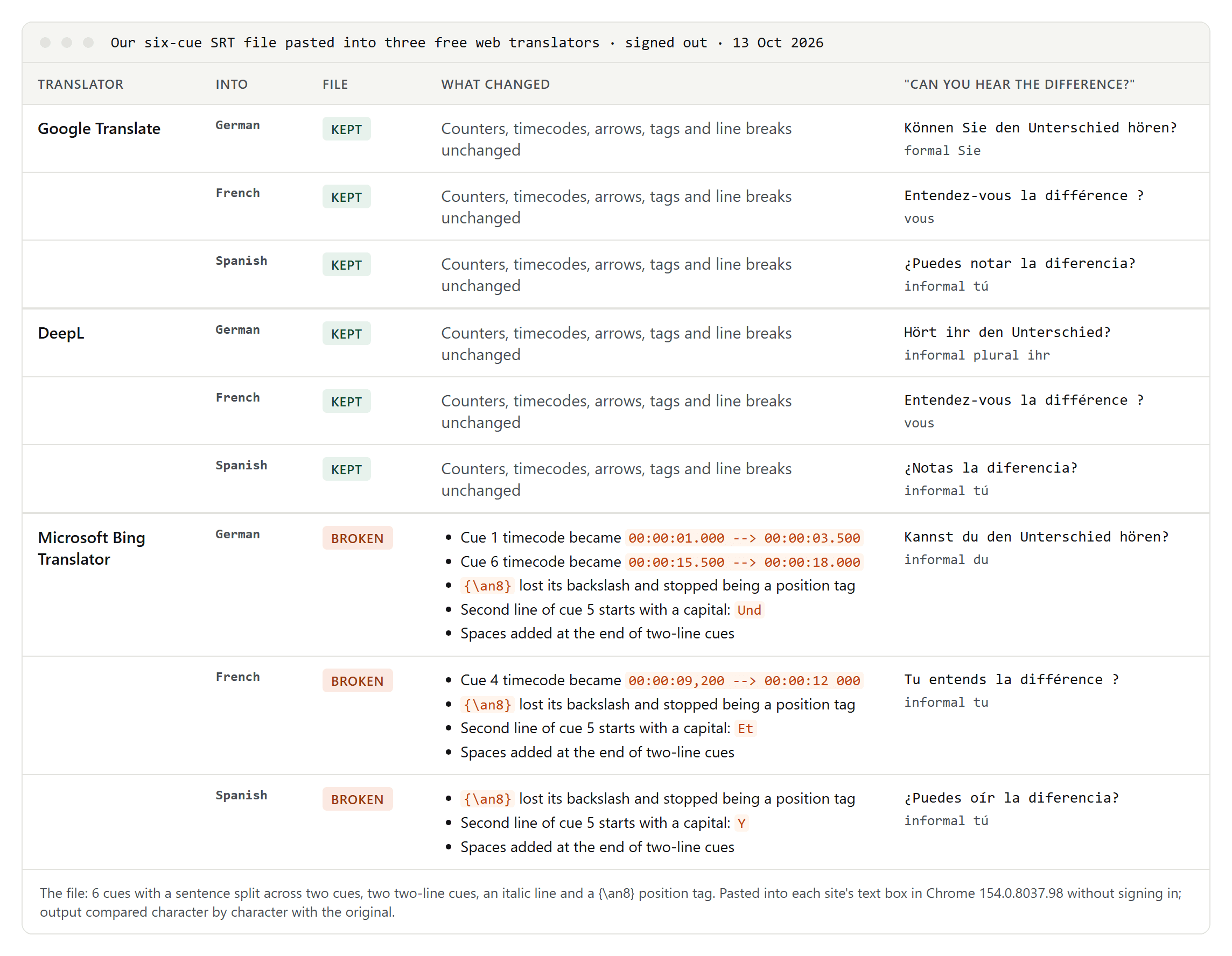
- Google Translate kept the file intact in all three languages: counters, timecodes, arrows, tags and line breaks unchanged.
- DeepL kept it intact too.
- Microsoft Bing Translator broke it in every language. In German, two timecodes came back with full stops instead of commas (
00:00:01.000); in French, one comma became a space. The{\an8}tag lost its backslash in all three languages, so it stopped being a position tag. Bing also started the second line of a two-line cue with a capital letter ("Und", "Et", "Y"), as if it were a new sentence, and added spaces at the ends of lines. - Each tool picked its own "you". For "Can you hear the difference?", Google chose the formal Sie in German, DeepL the informal plural ihr and Bing the informal du. In French, Google and DeepL chose vous and Bing tu; in Spanish, all three chose the informal tú. DeepL's formal and informal switch is for paying subscribers: its web translator showed the formality option with a Pro badge.
- The same tool isn't always consistent. In two runs on the same day, DeepL translated the last line into German as "Könnt ihr den Unterschied hören?" and then as "Hört ihr den Unterschied?".
Longer files: limits and silent cuts
Real subtitle files are longer. We built a 100-cue file of 7,375 characters, five minutes of video, from the same cues and pasted it once into each tool, into German.
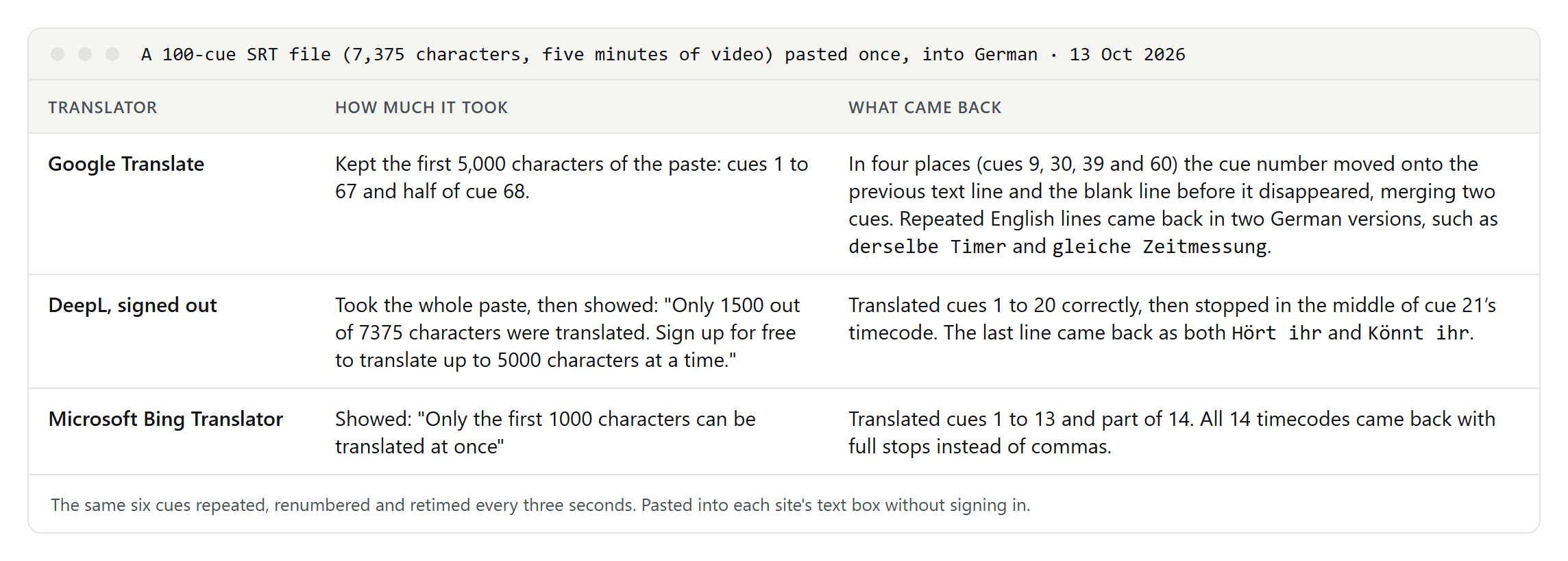
- Google Translate kept the first 5,000 characters of the paste. That is its documented limit: "You can translate up to 5,000 characters at a time when you copy and paste your text." Within those, it merged two cues in four places: a cue's number slid onto the end of the previous text line and the blank line disappeared. A short file came through clean; a long one didn't.
- DeepL, signed out, translated only the first 1,500 characters and said so: "Only 1500 out of 7375 characters were translated. Sign up for free to translate up to 5000 characters at a time." It stopped in the middle of cue 21's timecode.
- Microsoft Bing Translator showed "Only the first 1000 characters can be translated at once" and replaced the comma with a full stop in all 14 timecodes it returned.
If you paste, split the file yourself, at blank lines between cues, into parts below the tool's limit, and check every part.
Which translators take subtitle files directly
- Google Translate's document translation accepts "documents up to 10 MB in any of these formats: .docx, .pdf, .pptx, .xlsx", so not SRT files, and it isn't available on phones.
- DeepL translates SRT files in its web translator, desktop apps and API. Its help center lists SRT upload as not available on the free account or on Pro Individual; Pro Team allows files of 150 KB and Pro Business 200 KB. On the API side, DeepL says that "free usage of this feature is available via the DeepL API."
- Subtitle Edit, a free subtitle editor, has an auto-translate function that translates the text of each cue inside the editor, so the timecodes stay where they are. Its 5.2.0 release of 10 September 2026 notes that "Google Translate retries via a fallback endpoint when the free service is blocked", that it can "re-break translated rows that break the line profile", and that it added engines for models running on your own computer.
- YouTube can translate captions for viewers as they watch; our guide to translating a YouTube video covers that. As a creator, you upload a separate file for each language, and YouTube Studio asks whether it comes "with timing" or "without timing".
Translation is also editing
A subtitle has to be read in the time it is on screen. Netflix's style guides allow 42 characters per line in English, German, French and Spanish, and set the reading speed for adult programs at up to 20 characters per second in English but up to 17 in German, French and Spanish.
Machine translation doesn't know any of this. In our six-cue test, keeping the original timing:
- The text got longer: 24 to 29 percent in German, 19 to 30 percent in French and 13 to 17 percent in Spanish, depending on the tool.
- Lines got too long: every one of the nine translations had at least one line over 42 characters, up to 58 in French.
- Cues got too fast: three or four of the six cues went over 17 characters per second in each translation. In English, only one cue went over the English limit of 20.
So after translating, condense: drop filler words, use shorter synonyms, split long sentences across cues, and re-break lines. Where the timing allows, extend a cue into the gap before the next one.
Language rules to check by hand
- French punctuation: Netflix's French guide says "there should be a space before interrogation and exclamation marks", and colons take a space before and after. All three tools added these spaces in our test.
- Two speakers in one cue: Netflix's English and German guides use "a hyphen without a space" for each speaker; its French and Spanish guides use "a hyphen followed by a space". If your source follows the English style, change it in French and Spanish.
- Formal or informal: decide who you are talking to, choose du or Sie, tu or vous, tú or usted, and keep it the same in every file of a series.
A workflow that keeps the file valid
- Check the original. It should be UTF-8, with a blank line after every cue.
- Split long files at blank lines into parts below the tool's limit.
- Translate by pasting each part, or with a tool that reads SRT files, such as Subtitle Edit.
- Compare the structure: the same number of cues, identical timecodes and arrows, and the tags still in place.
- Edit for reading: line length, reading speed, formality and punctuation.
- Watch it with the video, ideally with a native speaker.
- Upload each language as its own track.
If you only need the text, for example to translate a transcript, convert the file first with our guide to SRT to TXT. You'll need the timing again to turn it back into subtitles.
