A good Instagram bio answers three questions in a few seconds: who you are, what you offer and what to do next. You can get there with a free Instagram bio generator, with any AI assistant and the master prompt below, or by filling in one of our 44 example bios. Below: the rules Instagram sets (150 characters, up to five links, pronouns, category labels, contact buttons), a five-part bio formula, prompts for every situation, copy-ready bios for 11 niches, and fixes for line breaks and links that don't work.
Instagram's bio rules in one place
Instagram's Help Center sets a few hard limits. Everything else is up to you.
| Field | What it is | Rule | Where to edit |
|---|---|---|---|
| Name | The bold name at the top of your profile | Matched in Instagram search; Instagram suggests a name related to your content | Edit profile, or Accounts Center, Profiles |
| Username | Your @handle and profile address | Changes of large accounts may be reviewed; followers may be notified | Edit profile, or Accounts Center, Profiles |
| Bio | The text under your name | Up to 150 characters; anyone can see it | Edit profile |
| Links | Websites shown under the bio | Up to 5 links, visible to anyone on or off Instagram; added in the phone app only | Edit profile, Links |
| Pronouns | Shown on your profile | Up to 4 pronouns; can be shown to followers only | Edit profile, Pronouns |
| Category label | A label such as a business type | Professional accounts only; matches your linked Facebook Page; can be hidden | Edit profile, Public business information |
| Contact button | Directions, phone, email | Professional accounts only; anyone who taps Contact sees it | Edit profile, Public business information |
| Action button | A booking, ordering or lead form button | Business accounts, limited partners, rolling out gradually; one at a time | Edit profile, Action buttons |
The name and the links don't use up your 150 bio characters, so put your keyword in the name and your web address in Links. Your email, phone number and gender from personal information settings are never shown on your profile.
How to edit your bio on your phone and on the web
The steps from Instagram's Help Center, as of November 2026:
In the Instagram app (iPhone or Android)
- Tap your profile picture in the bottom right to open your profile.
- Tap Edit profile.
- Tap the bio field, type or paste your text, and tap Done.
- To add a website, tap Links, then Add external link. To change the order, tap Options, then Reorder links, and drag the links.
On a computer (instagram.com)
- Click your profile picture on the left.
- Click Edit profile.
- Change your bio and click Submit.
Instagram says adding websites isn't available on computers, so add and reorder links in the phone app. A link to your Facebook profile also comes from Links, needs both accounts in the same Accounts Center, and always shows first.
What free Instagram bio generators do
A bio generator is a form in front of an AI model. You describe yourself, pick a tone, and get a few short bios that fit the 150-character limit. This is what four free generators offer according to their own pages, opened on November 6, 2026:
| Tool | Inputs | Output | Account |
|---|---|---|---|
| Ahrefs Instagram bio generator | Description of the profile, language, tone | A chosen number of variants; hashtag and emoji switches | No sign-up mentioned |
| ContentStudio bio generator | Description of you or your brand, tone | Up to five bios per run | No sign-up, per the page |
| Kontentino bio generator | Description, optional tone, language | Short bios, "generate more" button | No login, per the page |
| Otto bio generator | Name, what you do, audience, offerings, account type, niche, tone | Several bios; call to action and emoji switches | Not stated |
What you get is a good starting template, not a finished bio. A form only knows the few words you typed, so results tend to sound alike: a role, an emoji, "DM for collabs". Generators can't know your proof (years, clients, awards), the words your customers search for, or the one action you want visitors to take.
A free AI assistant such as ChatGPT can take all of that in a full prompt. Use a generator for quick ideas and the prompts below for a bio that sounds like you. For prompts beyond Instagram, see our ChatGPT prompts for work and everyday life.
The bio formula: five parts
Most strong bios follow the same order. You rarely need all five on separate lines, but check that each one is somewhere in your profile.
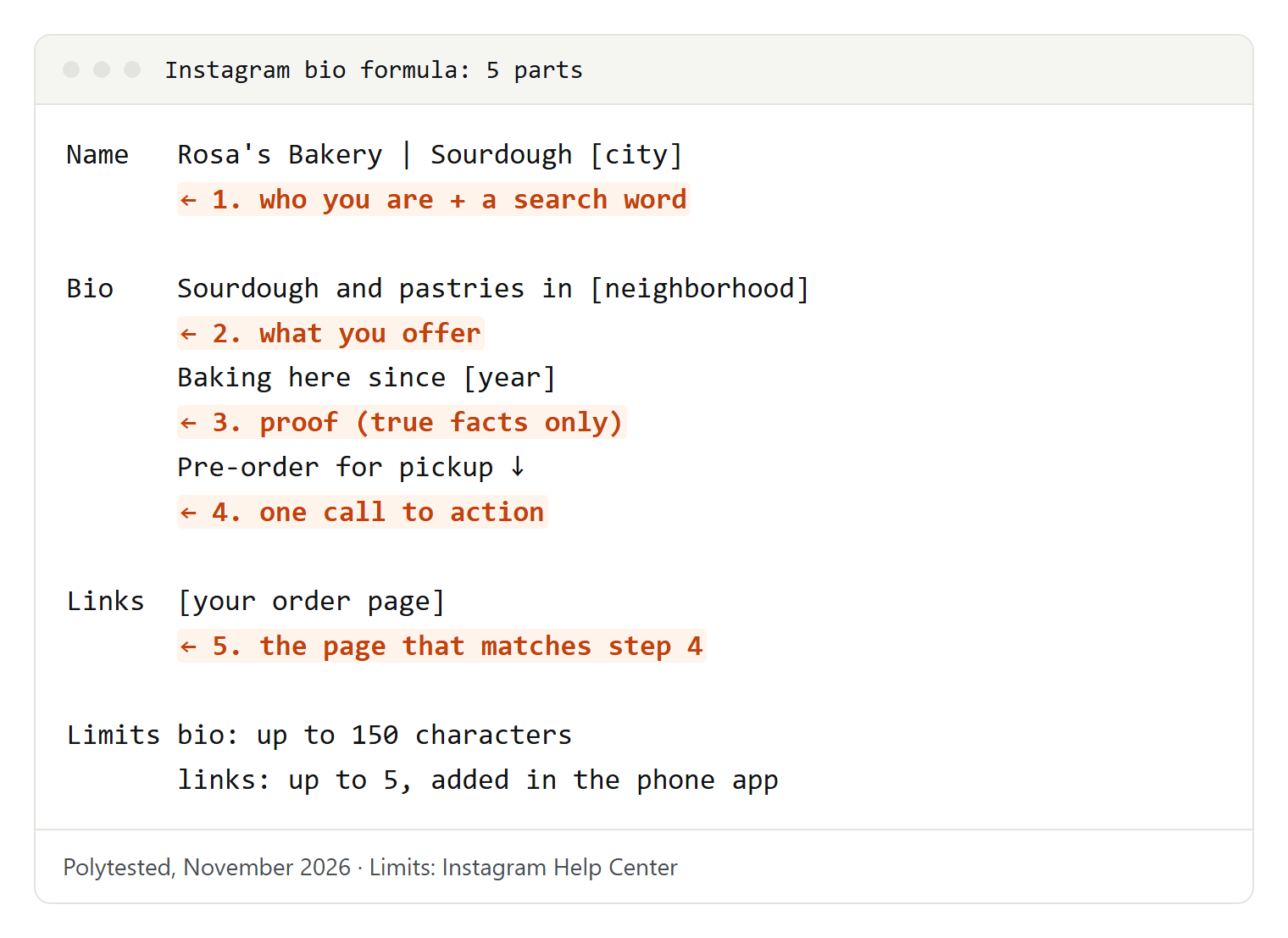
- Who you are: your role or business type, in the words people search for. This often belongs in the name field.
- What you offer: the result for the visitor, not a list of services. "Easy weeknight dinners" says more than "food content".
- Proof: one fact that builds trust: years in business, a certification, a press mention, a neighborhood, a client type. Only use facts that are true and that you can show.
- Call to action: one thing to do now: book, shop, visit, read, send a message.
- Link: the page that matches your call to action, added under Links.
A test for any bio: read it as a stranger who found you in search. If they can't say what you do and what to tap next, rewrite the first line.
The master prompt for any AI assistant
Paste this into ChatGPT, Gemini, Copilot or any other assistant and fill in the brackets. The more facts you give, the less generic the result.
Write 8 Instagram bios for my profile.
Who I am: [your role or business type, one sentence].
What I offer: [the result people get from you].
Who it's for: [your followers or customers].
Proof: [one true fact: years, certification, award, client type, place].
Call to action: [book / shop / visit / message / read].
Search words to use: [2-3 words people would type in Instagram search].
Tone: [warm and plain / playful / calm and expert / bold].
Rules: max 150 characters each, count them and show the count.
Use line breaks, at most 4 lines. Emojis: [none / 1-2 / a few].
Also suggest 3 versions of my name field with a keyword, e.g. "[Name] | [role]".
Use only the facts I give you. Don't invent numbers or awards.
Pick the two best results and ask for a mix: "Combine bio 2 and bio 5, keep the proof from bio 5." AI assistants often miscount characters, so check the length in the Instagram app before you save.
Prompts for each situation
These are shorter variations of the master prompt. Each one changes one thing.
Rewrite the bio you already have
Use this when your bio is long, vague or out of date.
Here is my current Instagram bio: [paste bio].
Rewrite it in 4 versions under 150 characters.
Keep these facts: [facts]. Remove anything that doesn't help a new visitor.
Make the first line say clearly what I do.
End with one call to action: [action].
A bio that helps people find a local business
Instagram matches searches against names, usernames and bios, and suggests mentioning your location for people nearby.
Write 6 Instagram bios for [business type] in [your neighborhood / city].
Mention the place naturally, once.
Include these search words: [words customers use].
Add opening hours or booking info only if I give them: [details].
Also write 3 short name fields, format "[Business] | [what] [place]".
Max 150 characters per bio.
A one-line bio
Some accounts work best with a single sharp line.
Write 10 one-line Instagram bios for [who you are].
Each under 80 characters, no emojis, no hashtags.
Each line must say what I do or what followers get.
Styles: 3 plain, 3 playful, 2 confident, 2 minimal.
A bio from your website's About page
Your About page often has the facts already; the assistant shortens them.
Here is my About page: [paste text].
Pull out: what I do, for whom, one proof point, one call to action.
Write 5 Instagram bios under 150 characters from only those facts.
Then list which facts you used in each bio.
Bio for a launch, season or event
A bio can change for a few weeks and go back afterwards.
My usual bio: [paste bio].
For the next [period], I want to promote [launch / event / sale] on [date].
Write 4 temporary versions that keep who I am and add the event and one call to action.
Then remind me what to change back afterwards.
Get feedback instead of a new bio
Review my Instagram bio as a first-time visitor who found me in search.
Bio: [paste bio]. Name field: [name]. Link goes to: [page].
Answer: what do I do, who is it for, what should a visitor do next?
Then list up to 3 changes, most important first. Don't rewrite it yet.
44 example bios by niche
Copy one, replace everything in square brackets and cut what you don't need. Check the character count after you edit.
Creators
Easy dinners for busy weeknights 🍝
Recipes with [5] ingredients or fewer
New video every [day]
Full recipes ↓I explain [tech topic] in plain English
Tutorials, honest how-tos, no hype
Questions welcome in DMs
Free guide ↓Money basics for [your audience]
Budgets, saving, first steps
Not financial advice, just what I've learned
Newsletter ↓[Number] books a year, reviewed in 60 words
Mostly [genres]
Tell me what to read next ✉️Small businesses
Handmade [product] from [town]
Small batches, made to order
Ships to [countries]
Shop the latest drop ↓Gentle skincare for [skin type]
Made in [place] since [year]
Ingredient lists on every page
Find your routine ↓Fresh flowers for every day in [city] 💐
Same-day delivery in [area]
Weddings and events: tap ContactTreats and toys for [pets] who deserve the best
Shop in [neighborhood] or online
New arrivals every [weekday] ↓Restaurants and cafes
Coffee, pastries and quiet tables in [neighborhood] ☕
Open [days], [hours]
Pastries baked here every morning
Find us ↓[Cuisine] kitchen in [city]
Seasonal menu, local produce
Walk-ins welcome, book for groups
Reserve a table ↓Sourdough and pastries in [neighborhood] 🥐
Pre-order for pickup
Sold out? Come earlier tomorrow
Order here ↓[Cuisine] on wheels in [city] 🚚
Where we park this week: Stories
Catering for events ↓Photographers
Natural wedding photos in [region]
Calm, unposed, real moments
Booking [year] dates
Check availability ↓Portraits and headshots in [city] 📸
For founders, actors and teams
Studio or on location
Book a session ↓Family photos that feel like you
Sessions at home or outdoors in [area]
Gift cards available
Book ↓Product photos for small brands
Clean backgrounds, lifestyle sets
Portfolio and rates ↓Fitness coaches
Strength training for [audience]
Certified [certification]
Online coaching + in person in [city]
Free intro call ↓Yoga for stiff backs and busy minds 🧘
Classes in [studio / neighborhood] and online
Beginners welcome
Class schedule ↓Run your first [distance] without burnout
Plans for beginners
Coach since [year]
Start here ↓Safe, gentle training before and after baby
[Certification]
Online programs, small groups in [city]
Learn more ↓Real estate
Your [city] real estate agent
Helping first-time buyers since [year]
Neighborhood guides in Highlights
Book a call ↓Homes in [area], [type] specialist
Listings, open houses, market updates
Private viewings: tap ContactApartments for rent in [city] 🏠
New listings every week
Tell us what you need ↓Home staging in [region]
Help your home look its best for buyers
Before and after in Highlights
Free consultation ↓Freelancers
Brand identities for small businesses
Logos, colors, packaging
Based in [city], working worldwide
Portfolio ↓Website copy that sounds like you
For [industry] businesses
Taking [month] projects
Let's talk ↓I build fast websites for [type of clients]
[Main technologies]
Open for new projects
Work samples ↓Video editing for creators and brands 🎬
Reels, YouTube, ads
Turnaround and process on my site ↓Students
[Subject] student at [university]
Coffee, notes and late-night study sessions
[City] → [City]Study tips from a [subject] student 📚
Notes, planners, exam weeks
Free templates ↓[Degree] student, graduating [year]
Interested in [field]
Projects and CV ↓Official account of [club name] at [school]
Meetings [day], [place]
Join us ↓Artists
Illustrations of [subject] ✏️
Prints and commissions open
Shop ↓Oil paintings of [subject]
Studio in [city]
Next show: [event, date]
Available works ↓[Genre] from [city] 🎸
New single "[title]" out now
Shows and tickets ↓Fine line tattoos at [studio], [city]
Books open for [month]
Read the FAQ before you message
Booking form ↓Travel
Slow travel through [region]
Itineraries, budgets, local food
Now: [place] 📍
Guides ↓Traveling the world with [number] kids
Family-friendly tips, honest notes
Where we are now: StoriesLife in a [year] van 🚐
Routes, builds and campsites in [region]
Van tour in HighlightsHidden spots in [city], from a local
Weekend ideas every [day]
Free map ↓Local services
Hair salon in [neighborhood] ✂️
Color, cuts, curly hair
Book online ↓Licensed plumber in [area]
Repairs, installs, emergencies
Call or message: tap ContactHome and office cleaning in [city]
Eco-friendly products
Get a free quote ↓Math and science tutoring, [grades]
In person in [area] or online
Free first lesson ↓The arrow points to your link, so make sure the first link matches the call to action.
Use the name field for search
Instagram explains that search results are matched by text: what you type is compared with usernames, bios, captions, hashtags and places. Its own advice is to use a handle and profile name related to your content and to put words about who you are in your bio.
That makes the name field the most valuable spot on your profile: it shows in bold and doesn't use any of your 150 bio characters.
- Pattern: "[Your name] | [what you do]" or "[Business] | [what] in [place]". For example: "Lina Park | Yoga Teacher" or "Rosa's Bakery | Sourdough NYC".
- Use the words your customers type. "Wedding photographer" works better than "visual storyteller" because people search for the first.
- Repeat the place. Instagram says sharing your location in your bio makes it easier for people in your area to find you. For a local business, put the city in the name and the neighborhood in the bio. More on this in our guide to local SEO.
- Keep the username easy to type. If people know you by a name, Instagram suggests using it in your username or profile name.
Emojis, line breaks and spacing
Emojis work like a small icon list: a pin for a place, a phone for contact, an arrow toward your link. Use one or two to guide the eye, not one per word. Screen readers read emojis aloud by name, so a bio made of emojis is hard to follow for people who listen to their screen.
Line breaks: type your bio in the app and press Return (iPhone) or Enter (Android) where you want a new line. If the app removes a break, write the bio in your notes app and paste it in (see Troubleshooting).
Special fonts: "fancy text" generators replace letters with Unicode symbols that look bold or italic. Screen readers often can't read them, and search may not match them. Keep your name and keywords in plain letters.
Mentions: an @username in your bio usually links to that profile, handy for a second account or a team member.
Professional accounts: category, contact and action buttons
Business and creator accounts get extra profile lines that do some of the bio's work, all set under Edit profile.
- Category label: shown below your profile picture. It matches the category of your linked Facebook Page. Change it under Public business information, and under Profile display choose whether to show it.
- Contact button: shown near the top of your profile, with directions, a phone number or an email address. Anyone who taps Contact can see what you add, so use a business number and address.
- Action button: a button such as booking or ordering, connected to a partner service or a lead form. Instagram says it is being introduced gradually, works with a limited number of partners for which you need an account, and only one can be shown at a time.
If your category label already says "Bakery" and the Contact button has your address, your bio doesn't need to repeat them. Use the space for what you offer and your proof.
Pronouns are their own field for every account: Instagram lets you add up to four under Edit profile, Pronouns, and show them to followers only. If your pronouns aren't offered, Instagram suggests adding them to your bio.
Bios for more than one language
Instagram translates bios automatically, based on the language they're written in and the viewer's language settings; viewers tap See Translation.
If you serve two markets, a common layout is one line per language, each with the same call to action:
[Business] in [city]
EN: [what you offer in English]
ES: [what you offer in Spanish]
Book ↓
Ask the AI to write each line for its market, not as a word-for-word translation, and have a native speaker read it. The same goes for your captions, covered in our Instagram caption generator guide.
Mistakes to avoid
- A vague first line. "Living my best life" tells a visitor nothing. Lead with what you do.
- Several calls to action. "Shop, book, subscribe, DM" competes with itself. Pick one per season.
- A link that doesn't match. If the bio says "Book a call", the first link should open the booking page, not your home page.
- Invented proof. Don't let an AI add "award-winning" or follower counts you didn't give it. Use only facts you can back up.
- Copying a generator's first result. It may match thousands of other bios word for word. Add one detail only you have.
- Keywords stuffed in. "Photographer photography photo shoot" reads like spam. One search phrase in the name, one in the bio is enough.
- Private details. Your bio is public: no home address or personal phone.
Troubleshooting
The link in my bio isn't clickable. A web address typed into the bio text usually stays plain text. Add it under Edit profile, Links, Add external link in the phone app; that's where Instagram shows tappable websites.
My line breaks disappeared. Write the bio in a notes app with each line separate, copy it and paste it into the bio field. Remove spaces at the end of lines and check that you saved with Done.
My bio is cut off or won't save. It is probably over 150 characters. Emojis and line breaks take space too. Move your role into the name field and your web address into Links.
I don't see a category label or Contact button. Both are for professional accounts. Switch in your account settings, then set them under Public business information. If they're set but hidden, check Profile display.
The action button I want isn't listed. Instagram is introducing action buttons gradually, with a limited list of partners, and you need an account with that partner first.
The AI keeps writing bios that are too long or too generic. Ask for a character count per bio, give it one true proof point, and paste two bios you like as style examples. To borrow phrases from your own Reels, get their text with our Instagram transcript guide.