The best free Instagram caption generator is often the AI assistant you already use. Free tools from Hootsuite, Iconosquare, Ahrefs and Canva give you a form with a tone menu and a "generate" button; ChatGPT, Gemini or any other assistant does the same job and takes far more context. Below: what each free generator offers, the rules Instagram sets for captions, a caption formula, and 28 copy-ready prompts grouped by account type and goal, plus fill-in templates, a tone guide and an editing checklist.
Free Instagram caption generators: what you get
Most caption generators work the same way: describe the post, pick a tone and length, switch hashtags and emojis on or off. This is what each vendor's own page says, as of November 6, 2026:
| Tool | Free access | Inputs | Languages listed | Good to know |
|---|---|---|---|---|
| Hootsuite AI caption generator | Free tool | Network, tone, language, description, keywords | English, Spanish, Italian, French, German | Covers Instagram and other networks; can rephrase a caption and suggest hashtags |
| Iconosquare caption generator | Free | Description, keywords, eight tones, four lengths | English, Spanish, French, German | Hashtag and emoji switches; output capped at 800 characters |
| Ahrefs Instagram caption generator | Free | Photo upload or description, tone | English shown | Three variants per run; hashtag and emoji switches |
| Canva (AI post generator, Magic Write) | Inside the Canva editor | Goal, tone, audience, description | Magic Write: 103 languages | The post generator is the OpenRep app in Canva's Apps panel |
| Copy.ai caption generator | Free tier with a monthly word allowance | Description, keywords, style | Not stated for this tool | Leads into the Copy.ai app |
| Later Caption Writer | Paid plans; free-plan users can start a 14-day trial | Prompt, brand, audience, tone | Not listed | One credit per caption, inside Later's scheduler |
| Meta AI in Instagram Stories | Free in the app, Stories only | Short text prompt, tone buttons | Not listed | Phone and tablet apps, not on computers |
Several run on OpenAI models by their own account: Hootsuite names GPT-3.5, Iconosquare GPT-4 Turbo, and Canva says it partnered with OpenAI for Magic Write.
Instagram has its own option for Stories: in the phone app, Meta AI writes a caption from a short prompt, in a tone you pick. Instagram warns that results may be inaccurate and asks you to keep personal details such as your address out of the prompt.
Why a prompt often beats a form
A form gives the AI three or four facts. A prompt can add who follows you, what the photo shows, what people should do next and a caption that sounds like you. OpenAI says the ChatGPT Free tier includes unlimited everyday text chats, subject to abuse safeguards; photo uploads have separate limits. The same prompts work in Gemini, Copilot or any other assistant. For prompts beyond Instagram, see our ChatGPT prompts for work and everyday life.
A dedicated tool is quicker for a one-off caption; for regular posting, a saved master prompt gives you more control.
Instagram's caption rules in one place
These come from Instagram's Help Center and Meta's own documentation, checked on November 6, 2026:
| Rule | What Instagram or Meta says |
|---|---|
| Caption length | Maximum 2,200 characters (Meta's developer documentation for publishing posts) |
| Hashtags | Up to 5 per post; with more, the post or comment won't go through (Help Center) |
| Hashtag characters | Numbers work; spaces and special characters such as the dollar or percent sign don't |
| Mentions | 20 @ tags per caption in Meta's developer documentation |
| Search | For a post to be found in Search, put keywords and hashtags in the caption, not the comments |
| Hashtag relevance | Relevant hashtags can help reach interested people; irrelevant ones can hurt distribution |
| Translation | Captions are translated automatically for viewers in other languages, with a See Translation link |
Older guides, and Meta's API documentation, still mention 30 hashtags; Instagram's Help Center now says up to 5, so write for five. Instagram's search guide adds that the text people type is the strongest signal, matched against usernames, bios, captions, hashtags and places: "vegan bakery in Riverton" in plain words helps people find you.
The caption formula and the master prompt
Most good captions have five parts; the first and third do most of the work.
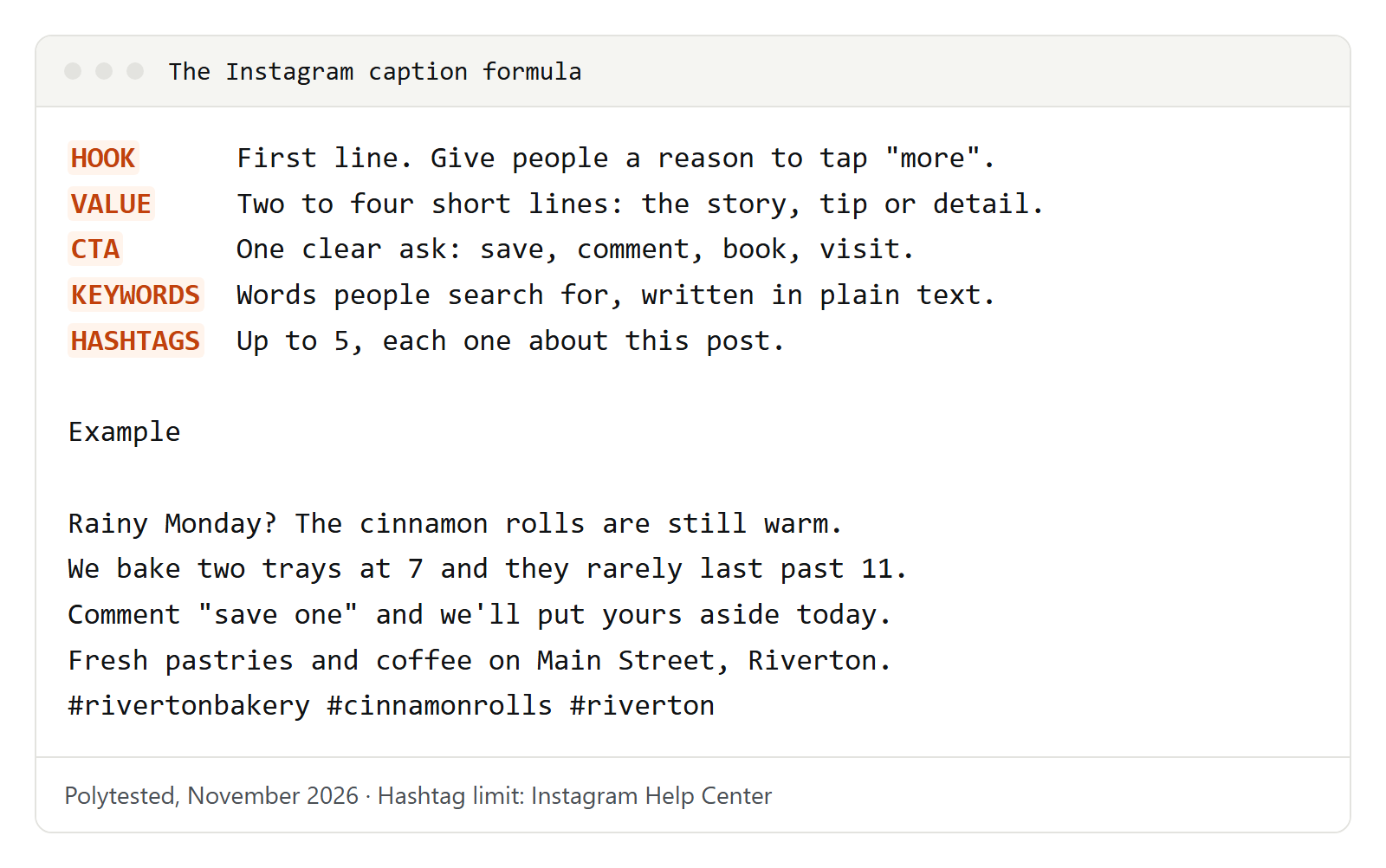
- Hook: the first line, seen before "more". A question, a surprise or the reader's problem.
- Value: two to four short lines with the story, tip or detail.
- Call to action: one clear ask. Two asks compete with each other.
- Keywords: the words someone would type into Instagram Search.
- Hashtags: up to five, each one about this post.
The master caption prompt
Save this one. The prompts in the next sections are shorter variations of it.
Write 5 Instagram captions for this post.
Account: [what your account is about, in one sentence].
Followers: [who they are, what they care about].
Post: [what the photo or video shows].
Goal: [comments / saves / link clicks / bookings / sales].
Tone: [e.g. warm and plain, funny, calm and expert].
Structure: a hook in the first line, 2-4 short lines of value, one call to action, then up to 5 relevant hashtags on a new line.
Include these search words naturally: [2-3 keywords].
Avoid: [words, emojis or claims you never use].
Use only the facts I give you.
Here is a caption of mine to match in voice: [paste caption].
To teach the assistant your voice once, paste a few past captions and keep the answer as a style note.
Here are 5 captions I posted: [paste captions].
Describe my writing voice in 6 short rules: sentence length, words I use, emojis, humor, how I address followers, how I end posts.
Then write those rules as a short "voice guide" I can paste at the start of future prompts.
Small businesses and product launches
For a regular post about what you sell or do.
Write 3 Instagram captions for my [type of business] in [your city].
The photo shows [product or scene].
Followers are mostly locals who [what they like].
Tone: friendly and plain, like talking to a regular customer.
End with one call to action: [visit / order / book].
Add the words "[product] in [your city]" naturally. Up to 4 hashtags.
Behind the scenes: a short story, not an advert.
Write an Instagram caption about this behind-the-scenes moment at [business name]: [what is happening, who is in the photo].
Tell it as a short story in 3-4 lines, then one question that invites comments.
No sales language. Up to 3 hashtags.
For a sale or a limited offer. Give the real dates and conditions; the assistant must not add any.
Write 3 Instagram captions for this offer: [what is included, start and end date, conditions].
Use only these facts. Put the end date in the first two lines.
One urgent version, one calm, one playful. One call to action each. Up to 4 hashtags.
For a launch, use the teaser a few days before and the second prompt on the day.
Write 3 teaser captions for a product we launch on [date]: [product, what problem it solves].
Don't reveal [what stays secret]. Build curiosity in the first line.
Call to action: turn on post notifications or save the post.
Up to 3 hashtags, one with our brand name.Write an Instagram caption for launch day of [product].
Key facts (use only these): [features, where to buy].
Hook: the problem it solves, in under 10 words.
Then 3 short lines on what's new, one call to action ([link in bio / shop tag]), up to 5 hashtags.
Give me a shorter version for a Story too.Restaurants, cafes and real estate
For a dish or special, add the taste words you'd say at the table.
Write 3 short Instagram captions for [dish] at [restaurant name], [your city].
What makes it special: [ingredients, where they come from, how it's made].
Available: [days / times / until sold out].
Make the first line about taste or smell. End with "reserve" or "order" as the call to action.
Up to 4 hashtags, including our neighborhood.
Listing captions need facts from the agent; never let the assistant guess sizes or features.
Write an Instagram caption for a new listing.
Use only these facts: [type of home, bedrooms, bathrooms, standout features, neighborhood].
Hook: the one feature buyers will remember.
Then 3 lines on everyday life there (schools, parks, commute) based only on what I listed.
Call to action: DM to book a viewing. Up to 5 hashtags with the city and neighborhood.Plan a 6-slide Instagram carousel: "Living in [neighborhood]".
For each slide give a headline of up to 6 words and one sentence.
Use only these places and facts: [list].
Then write the caption: a hook, 2 lines of context, "Save this for your move" as the call to action, up to 4 hashtags.Personal brands, travel and fitness
Story-led captions suit coaches, freelancers and creators. Give the assistant the real story; it only shapes it.
Turn this experience into an Instagram caption: [what happened, what you learned].
Structure: a first line that states the lesson as a surprise, 4-5 short lines telling the story, one takeaway, then a question.
Keep my words where possible. No clichés like "game-changer". Up to 3 hashtags.Write an "about me" Instagram caption for a [job / niche] account with new followers.
Facts: [who you are, what you help with, 3 personal details you're happy to share].
Format: one hook line, 3 numbered facts, one line about what to expect here, call to action to follow.For a trip photo, the details you add (a smell, a sound, a mistake) make it yours.
Write 3 Instagram captions for a photo of [place] in [country].
Details from my trip: [what I did, one surprising thing, one practical tip].
One version poetic, one funny, one practical with the tip first.
Each under 300 characters. Up to 4 hashtags with the place name.
For trainers, studios and gyms. Ask for safe, general wording.
Write an Instagram caption for a [class or workout] video at [studio name].
Who it's for: [level, goal]. What it includes: [moves, equipment].
Tone: encouraging, no body-shaming, no promises of results.
Call to action: book a class or save the workout. Up to 4 hashtags.Write an Instagram caption with one practical habit tip about [topic, e.g. warming up].
Hook: a common mistake. Then the tip in 3 short steps.
End with "General information, not personal advice." Up to 3 hashtags.Events, giveaways and carousels
Write an Instagram caption announcing [event name] on [date] at [place].
Facts: [what happens, who it's for, how to get tickets or sign up].
Hook: why someone shouldn't miss it, in under 12 words.
Put date, time and place on separate lines. Call to action: [link in bio / RSVP]. Up to 4 hashtags.Write an Instagram caption recapping [event name].
Highlights: [3 moments]. People to thank: [@handles].
Warm and grateful. End with the date of the next event or a question about next time.
Up to 3 hashtags.Giveaways
Instagram's promotion guidelines say whoever runs a giveaway is responsible for running it lawfully, including official rules and eligibility such as age and residency. Each promotion must include a complete release of Instagram by every entrant and a statement that it isn't sponsored, endorsed, administered by or associated with Instagram. Don't ask people to tag themselves in photos they're not in. This isn't legal advice; check the rules where you and your entrants live.
Write an Instagram giveaway caption for [prize] from [account name].
How to enter: [steps, e.g. follow us and comment with your favorite flavor].
Rules to state clearly: open to [age and countries], ends [date and time zone], winner picked [how], announced [where].
Add: "Each entrant releases Instagram from any liability. This giveaway is not sponsored, endorsed, administered by or associated with Instagram."
Hook in the first line, steps as a numbered list, link to the full rules: [where].
Carousels
A carousel caption tells people why to swipe and what they get at the end.
I'm making an Instagram carousel about [topic] for [audience].
1. Suggest 8 slide headlines, each up to 7 words, ending with a summary slide.
2. Write the caption: a hook that promises what the last slide gives, 2 lines of context, "Save this for later", up to 4 hashtags.
3. Write alt text for the first slide.
Reels hooks and Reel captions
The first second of a Reel and the first line of its caption do the same job.
Give me 10 opening lines for an Instagram Reel about [topic] for [audience].
Each under 10 words, spoken in the first seconds.
Mix: 3 questions, 3 surprising statements, 2 "stop doing X" lines, 2 "here's how" lines.
No promise the video doesn't keep.Here is the script of my Reel: [paste script or transcript].
Write a caption that doesn't repeat the video word for word: a hook, one extra tip that isn't in the video, a call to action, up to 4 hashtags.
Also give me 3 short text overlays for the opening.If you only have the video, get its text first with our guide to Instagram transcripts. For a voiceover, see our free AI voice generator guide.
Captions in Spanish, German and French
Instagram translates captions automatically for viewers whose settings are in another language. When you do target Spanish, German or French speakers, ask for a caption written for that market, not a word-for-word translation, and have a native speaker check it.
Write an Instagram caption in Spanish for followers in [Spain / Mexico / Latin America].
Post: [what it shows]. Goal: [goal].
Use "tú" and natural local expressions, no literal translation from English.
Use opening ¿ and ¡ correctly. Up to 4 hashtags in Spanish.Write an Instagram caption in German for followers in Germany, Austria and Switzerland.
Post: [what it shows]. Goal: [goal].
Use the informal "du", plain sentences, German quotation marks „…“.
Avoid English marketing words unless Germans really use them. Up to 4 German hashtags.Write an Instagram caption in French for followers in France.
Post: [what it shows]. Goal: [goal].
Use "vous" [or "tu" for a very casual brand], with a space before : ; ? !
No anglicisms where a common French word exists. Up to 4 French hashtags.Here is my English Instagram caption: [paste].
Rewrite it for followers in [country] in [language]. Keep the meaning and the call to action, but adapt idioms, jokes, dates, units and holidays.
List every change so I can check it.Fill-in caption templates
Copy a line and fill the brackets.
It's here: [product]. [One line on the problem it solves.] Find it [where].

Save the date: [event], [date], [place]. [Why to come.] Tickets: link in bio.

New this [month]: [what's new]. [One detail people will love.] Which one are you trying first?[Option A] or [option B]? Tell us in the comments.
The mistake we hear about most with [topic]: [mistake]. Do this instead: [fix]. Save this for later.
[Number] things nobody tells you about [topic]. Swipe to number [x].[Time] ago I [situation]. Today [what changed]. What I learned: [lesson].
A small win today: [win]. What's yours this week?
Thank you, [people]. [One specific thing they did.] We couldn't have [result] without you.Hashtags, alt text, AI labels and paid partnerships
Hashtags
Use up to five, all about the post: topic, place, brand, community. This prompt picks them from your own list.
Post: [what it shows, who it's for, where].
From these hashtags, pick the 5 most relevant and explain each in a few words: [list].
Tell me to drop any that is unrelated to the post.
Also suggest 3 plain-text keywords for the caption itself.
Alt text
Instagram writes automatic alt text with object recognition; you can replace it with a better description, which screen readers read aloud. Before sharing, write it under Accessibility (in the app, inside the advanced settings); for an existing post, use Options, then Edit.
Write alt text for this Instagram photo (uploaded).
Describe what matters for someone who can't see it: who or what, the setting, colors, any text in the image.
One or two plain sentences, no "image of", no hashtags, no emojis.
Use your own photos or photos you have permission to use, take extra care with photos of children, and remember that the assistant's usage policies apply (for ChatGPT, OpenAI's usage policies). For prompts that create images, see our ChatGPT image prompts.
AI-generated content labels
Labels apply to the media, not the caption. Meta adds an "AI info" label when it detects industry-standard signals that an image, video or audio was made with AI, or when you disclose it. Meta requires its disclosure tool for organic posts with photorealistic video or realistic-sounding audio that was digitally created or altered, and says it may apply penalties otherwise. Content only edited with AI tools gets the label in the post's menu instead of on the post.
Branded content
If a brand paid you, gave or lent you a product, or you earn from an affiliate link in the post, Instagram counts it as branded content and requires the paid partnership label. The brand must approve your tag before its name appears. Posts about your own products don't need it.
Tone guide
"Engaging" means little to an AI; "short sentences, one joke, no emojis" is clear.
| Account type | Tone words to use | Words to forbid |
|---|---|---|
| Local shop or cafe | warm, plain, neighborly, one emoji at most | "elevate", "curated", "game-changer" |
| B2B or consultant | clear, confident, specific, no slang | "synergy", vague promises |
| Creator or personal brand | first person, honest, conversational | generic motivational quotes |
| Fitness | encouraging, safe, inclusive | body-shaming, guaranteed results |
| Real estate | factual, local, welcoming | anything you can't back with facts |
| Kids and family brands | gentle, playful, simple words | pressure tactics, scary claims |
Editing checklist and mistakes to avoid
Before you post an AI-written caption:
- Facts: every price, date, size and opening time comes from you.
- First line: it works on its own and makes people read on.
- One call to action.
- Your voice: read it aloud; if you'd never say it, change it.
- Keywords in plain text, hashtags five at most.
- Tags and labels: people tagged only if they're in the photo, paid partnership label when a brand is involved, AI disclosure where Meta requires it.
- Alt text for photos that carry information.
- Language: a native speaker has checked captions in languages you don't speak well.
Common mistakes:
- The same opening every time. Ask for "five different first lines, no questions".
- Emoji overload. Add "maximum one emoji, no exclamation marks".
- Made-up details. Keep "use only the facts I give you" in every prompt.
- Copying other accounts. Instagram asks creators to post original content and says it's less likely to recommend reposts and content with noticeable watermarks.
- A block of 30 hashtags. The Help Center now lists 5 per post.
When the AI caption doesn't work
| Problem | Follow-up prompt |
|---|---|
| Sounds like an ad | "Rewrite it as if I'm telling a friend. Remove all marketing words." |
| Too long | "Cut it to 3 lines. Keep the hook and the call to action." |
| Generic | "Use these details: [3 specifics]. Remove anything that could fit any business." |
| Wrong tone | "Here is a caption I like: [paste]. Match its rhythm and word choice." |
| Invents facts | "Mark every fact you added that I didn't give you, then remove them." |
| Weak first line | "Give me 8 first lines: questions, numbers, surprises and mistakes." |
| Refuses a request | Check it against the assistant's usage policies; deceptive or impersonating content isn't allowed. |
To tighten a caption you already have:
Here is my Instagram caption: [paste].
Improve it without changing the facts: a stronger first line, fewer filler words, one call to action, under [number] characters.
Show the new version, then list what you changed in 3 bullets.