To turn your own photo into a Christmas photo, open ChatGPT, attach the picture with the + button and describe the change in one message: first what must stay the same (faces, expressions, who is in the picture), then the scene, the light and the format you need. Free accounts can do this too, within daily limits. Below: 24 copy-ready prompts grouped by situation, the right aspect ratios for cards and stories, fixes for common problems and a word on privacy.
How to turn your photo into a Christmas photo in ChatGPT
The steps, based on OpenAI's help center:
- Pick a sharp photo. ChatGPT accepts PNG, JPEG and non-animated GIF files up to 20 MB each. Large, sharp, evenly lit faces give it more to work with.
- Attach it. In a chat, tap + and choose Add photos & files, or drag the file into the message box.
- Describe the edit. What to keep first, then what to change.
- Wait. OpenAI says an image can take a few minutes; you can keep chatting meanwhile.
- Refine. Ask for one change per message in the same chat. Or select the image to open the editor, use Select to mark an area such as the background, and describe the change there. OpenAI notes that selections aren't always precise.
- Save. Every image also lands under Images in the sidebar. Open it and choose Save to download it.
If you only want one prompt, start here:
Edit my uploaded photo. Keep everyone exactly as they are: same faces, expressions, hairstyles, skin tones, body shapes and the same number of people. Change only the background to a warm living room decorated for Christmas, with a lit tree and soft string lights. Natural photo look with real skin texture. Portrait format, 4:5. No text.Changing only the background leaves the least room for faces to change. Swap in any setting from the sections below.
What you can do on the free plan
ChatGPT Images, the image feature, is available on every plan. OpenAI began rolling out ChatGPT Images 2.5 to all plans on September 8, 2026, and says it keeps the people in reference photos more recognizable and follows edits more reliably over several turns.
| Feature | Free | Paid plans |
|---|---|---|
| Create and edit images | Yes, with its own usage limit | Yes, Plus has higher limits |
| Upload photos | Yes, 3 file uploads per day | Up to 80 files every 3 hours |
| Images with thinking | No | Plus, Pro and Business |
ChatGPT tells you when you reach a limit, and OpenAI says it may lower upload limits at peak hours. With three uploads a day, upload your best photo once and make all your versions in that same chat.
The anatomy of a good Christmas photo prompt
OpenAI's prompting guide for its image models gives the key rule for edits: say what should change and list what must stay the same. A strong Christmas photo prompt has up to nine parts:
- Keep: faces, expressions, hair, skin tones, body shapes, the number of people.
- Who and pose: who stands where, who looks at the camera, what hands are doing.
- Setting: the place, with two or three concrete details.
- Clothes and props: colors, materials, a mug, a gift box.
- Light: tree lights, firelight, window light, golden hour.
- Style: "real photograph" or a look such as black and white. OpenAI calls camera terms cues, not guarantees.
- Format: the aspect ratio and what it's for.
- Text: the exact words in quotation marks, or "no text".
- Avoid: logos, extra people, anything you don't want.
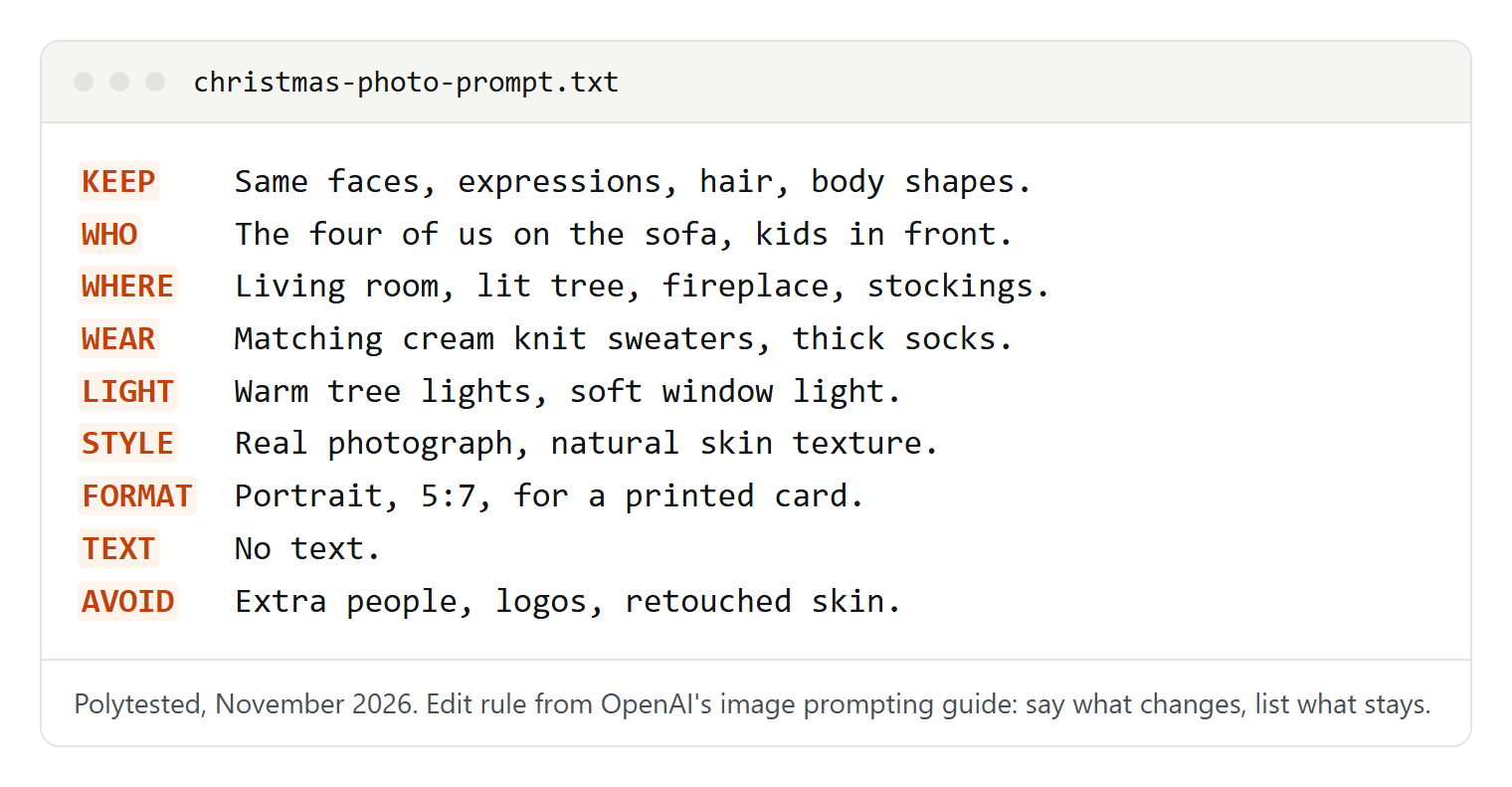
Keep, setting and format matter most; add the rest when you need them.
Solo and couple portraits
For portraits that aren't about Christmas, see our ChatGPT self-portrait prompts.
Holiday profile picture
Edit my uploaded photo into a holiday profile picture. Keep my face, expression, hairstyle and glasses exactly as they are. Head and shoulders, centered, with a softly blurred Christmas tree and warm lights behind me. I'm wearing a [color] knit sweater. Real photograph, natural skin texture. Square, 1:1.The centered face survives the round crop most apps use. Delete "and glasses" if you don't wear any.
Quiet evening by the window
Use my uploaded photo. Keep my face, hair and body shape unchanged. Place me in an armchair by a frosted window on a snowy evening, holding a mug of hot chocolate, a plaid blanket over my knees. Candid, as if a friend took the picture. Warm lamp light, soft film grain. Portrait, 4:5."Candid" asks for a relaxed, unposed look. Replace the cocoa with a book or [your favorite holiday drink].
Couple under string lights
Edit our uploaded photo. Keep both of us exactly as we are: faces, expressions, hair, height difference and pose. Move us to a small balcony at night under warm string lights, sharing a wool blanket, light snow falling. Real photograph, gentle bokeh. Portrait, 4:5. No text.Keeping the pose and height difference stops ChatGPT from rearranging you. Change "balcony" to "front porch" or "[your street]".
Baking cookies together
Use our uploaded photo. Keep our faces, hair and expressions unchanged. Put us in a cozy kitchen baking Christmas cookies: flour on the counter, a tray of star-shaped cookies, matching aprons in [color]. We're laughing, turned toward each other. Bright morning window light. Candid photo. Landscape, 3:2.This one changes your pose, which gives ChatGPT more freedom, so check both faces closely before you share it.
Family photos, with care for children
In group photos, ChatGPT can add, drop or merge people. Say how many people there are and that nobody should be added or removed.
Family on the sofa by the tree
Edit my uploaded family photo. There are [number] adults and [number] children; keep exactly these people, no one added or removed. Keep every face, expression, hairstyle and body shape as in the photo. Seat us on a sofa in front of a lit Christmas tree, children in front. Soft warm light, real photograph. Portrait, 5:7, for a card.5:7 has the shape of a 5 x 7 inch card, so the print shop doesn't need to crop it.
Three generations at the table
Use my uploaded photo. Keep all [number] people with their faces, ages and expressions exactly as they are. Place us around a festive dinner table with candles, evergreen branches and red napkins, everyone looking toward the camera. Warm evening light. Landscape, 3:2. No text."Ages" in the keep list asks ChatGPT not to make grandparents look younger or children older.
Fix a cluttered snapshot
Edit my uploaded photo. Change only the background: replace the [messy room / parking lot] with a simple wall covered in pine branches and warm fairy lights. Keep every person, face, outfit and pose exactly as in the photo, and keep the light on our faces the same. Same framing as the original.The people stay as photographed, which makes this the safest family edit.
With children's photos, use pictures of your own children or ones their parents have agreed to, and leave their faces and bodies as they are: no requests to look older, slimmer or different. If your teenager uses ChatGPT with an account linked to yours, OpenAI's parental controls may let you decide whether they can create or edit images.
Pet prompts
Pets are recognized by their markings, so name them in the keep line.
Edit my uploaded photo of my [dog/cat]. Keep the face, fur color, markings and eye color exactly the same. Add a small red Santa hat and a plaid scarf, and place my pet on a rug in front of a glowing fireplace with stockings. Camera at the pet's eye level, sharp focus on the eyes. Real photograph. Square, 1:1.Swap the hat for reindeer antlers, or the fireplace for [a snowy garden].
Use my uploaded photo of my [pet]. Keep the face, fur and markings unchanged. Show my pet peeking out of an open gift box full of tissue paper, surrounded by wrapped presents under a Christmas tree. Playful, warm light. Real photograph. Portrait, 4:5.A good fit for small pets; for a big dog, try "lying next to a pile of presents" instead.
I've uploaded two photos. Image 1 is our family photo, image 2 is our [dog]. Place the [dog] from image 2 into image 1, sitting in front of us at a realistic size. Keep everyone in image 1 exactly as they are, and keep the [dog]'s face, fur and markings from image 2. Match the light and shadows. Change nothing else.Numbering the photos and giving each a role is what OpenAI's guide recommends when you combine images. On the free plan, this uses two of your three daily uploads.
Cozy indoor and snowy outdoor scenes
For Christmas pictures without people, such as decorations or backgrounds, see our ChatGPT image prompts.
Decorating the tree
Edit my uploaded photo. Keep each person's face, expression, hair and body shape unchanged. Show us hanging ornaments on a tall Christmas tree, one person holding a star for the top. Glass baubles and paper decorations, warm light from the tree and a floor lamp. Candid, real photograph. Portrait, 4:5.Name your own decorations, such as [the paper chains the kids made], to make it feel like your home.
By the fireplace
Use my uploaded photo. Keep everyone's face, expression and hair exactly the same. Place us on a rug in front of a stone fireplace with a crackling fire, stockings on the mantel and candles. Everyone in thick socks and knit sweaters in [colors]. Firelight on our faces, a dark, cozy room. Real photograph. Landscape, 3:2.Firelight is orange. If faces turn too orange, add "neutral skin tones".
Snowy forest walk
Edit my uploaded photo. Keep all faces, expressions, hair and the number of people unchanged. Place us on a snowy forest path at golden hour, in winter coats, hats and scarves in [colors], snow on the pine branches, our breath visible in the cold air. Real photograph. Portrait, 4:5.For a city version, replace the forest path with [a snowy street in your town].
At the Christmas market
Use my uploaded photo. Keep everyone's face, expression and hair exactly as they are. Put us at a Christmas market in the evening, in winter coats, holding mugs of hot drinks, with wooden stalls, warm string lights and a softly blurred crowd behind us. Real photograph, gentle bokeh. Portrait, 4:5. No readable signs."No readable signs" keeps ChatGPT from inventing stall names that may come out misspelled.
Vintage film, matching pajamas and ugly sweaters
Old color snapshot
Edit my uploaded photo to look like a family snapshot from the 1970s. Keep every face, expression and the number of people unchanged. Warm, faded colors, soft grain, a little flash glare, a wood-paneled living room with a tinsel tree. Dress us in sweaters typical of the time. Square print with a white border. No text.Change the decade to the fifties or the nineties, and the room and clothes should follow.
Black-and-white classic
Use my uploaded photo. Keep everyone's face, expression and hair exactly the same. Turn it into a classic black-and-white Christmas portrait: a plain studio backdrop, a small decorated tree, soft side light from a window, fine grain and rich blacks. Like a print from an old family album. Portrait, 4:5.Black and white hides mismatched outfit colors, which makes it forgiving for large groups.
Matching pajamas
Edit my uploaded photo. Keep every face, expression, hairstyle, body shape and the number of people exactly as in the photo. Dress everyone in matching red-and-green plaid pajamas [and the dog in a matching bandana]. Seat us on a rug by the tree with mugs of cocoa. Bright Christmas-morning light. Real photograph. Portrait, 4:5.A new outfit can also change body shapes, so "body shape" stays in the keep line.
Ugly sweater party
Use my uploaded photo. Keep our faces, expressions and hair unchanged. Dress each of us in a different, wonderfully tacky Christmas sweater: one with knitted reindeer, one with pom-poms, one with [your hobby] in a knitted pattern. We're posing proudly at a party with tinsel and paper crowns. Bright flash, a bit cheesy. Square, 1:1.Give each sweater a motif that fits its wearer.
Holiday card prompts with a greeting
OpenAI's guide says to put the exact words in quotation marks, say where they go and ask for no other text. Check every letter before you print.
Create a holiday card from my uploaded photo. Keep everyone exactly as they are. Layout: the photo fills the top two thirds; below it, on a cream background, the text "[Merry Christmas]" in an elegant serif font and, smaller, "[Love, the Garcias]". A thin gold line between photo and text. Include only this text. Portrait, 5:7.Replace both lines in brackets; keep the quotation marks.
Use my uploaded photo as the center of a holiday card. Keep the photo itself unchanged. Around it, add a hand-painted watercolor border of pine branches, holly and red berries on textured white paper. Below the photo, write exactly "[Happy holidays from our home to yours]" in a handwritten-style script. No other text. Landscape, 7:5.The border leaves your photo untouched, so faces can't drift.
I've uploaded two photos. Make a holiday card with photo 1 large on the left and photo 2 smaller on the right, both unchanged, on a deep green background with tiny white snowflakes. At the bottom, write exactly "[Season's Greetings]" and below it "[year]". No other text. Landscape, 7:5.Use it for a "then and now" pair or the year's two best moments.
If a name keeps coming out wrong, spell it letter by letter in the prompt, as OpenAI suggests for unusual words, or ask for "clean empty space at the bottom, no text" and add the greeting in your print shop's card designer. For help writing the greeting, see our ChatGPT prompts; for a cartoon version of the family, our ChatGPT caricature prompt.
Formats for social media, phones and print
ChatGPT can make images in any aspect ratio: pick one with the aspect ratio picker or write it in your prompt. Asking for the right shape from the start is better than cropping later, which can cut off heads or text.
| Where it goes | Ask for | Why |
|---|---|---|
| Instagram feed post | 4:5 or 3:4 portrait, or 1:1 | Instagram keeps photos between 1.91:1 and 3:4 without cropping |
| Stories and Reels | 9:16 | Meta recommends 9:16 to fill a vertical phone screen |
| Profile picture | 1:1, face centered | Most apps crop it to a circle |
| 5 x 7 inch card | 5:7 portrait or 7:5 landscape | Same shape as the card |
| 4 x 6 inch print | 2:3 portrait or 3:2 landscape | Same shape as the print |
| Phone lock screen | 9:16 | The clock covers the top, so keep faces in the middle |
To turn a finished picture into a second format, ask for a new version:
Make a vertical 9:16 version of this image for a story. Keep every person, face and expression exactly as they are and at the same size. Extend the scene above and below with more of the same setting. Keep the top and bottom calm, without faces or important details. No text.The Aspect ratio button in the editor does the same: it regenerates the image in the new shape, so look at the faces again afterwards.
For printing, use the file you saved from ChatGPT, not a screenshot, and take your print service's low-resolution warning seriously. Keep faces and text away from the edges, because cards are trimmed when they're cut. Order one test print first: screens are brighter than paper, so a dark fireplace photo can print darker than it looks.
How to keep faces looking like you
OpenAI says ChatGPT Images 2.5 is better at preserving the people in reference photos, but its own prompting guide warns that repeated edits can still change details you wanted to keep. What helps:
- A good source photo: faces large, sharp, facing the camera, in even light.
- A detailed keep line: face, eye shape, smile, skin texture, hairstyle, age, body shape.
- Small changes: a new background leaves less room for drift than a new pose.
- One change per message, repeating the keep line each time.
- Select only the background in the editor and leave faces unselected.
- Back to the original when a face drifts, instead of correcting the drifted version.
The faces changed in the last version. Go back to my original uploaded photo and apply the same Christmas changes again, but change only the background and clothing. Keep each face, eye shape, nose, smile, skin texture, hairstyle and age exactly as in the original. Do not retouch or smooth the skin.If a face must be exactly as photographed, OpenAI's guide says prompting alone can't guarantee it. Use the generated picture as a background or frame and place your original photo on top in a card designer.
Fixing common problems
| Problem | What to try |
|---|---|
| A face looks like someone else | Go back to the original photo, change only the background and list each feature to keep |
| A person is added, missing or merged | State the number of adults and children and "no one added or removed" |
| Misspelled or extra text | Put the exact words in quotation marks, add "include only this text", spell names letter by letter |
| Odd hands or fingers | Give hands a job (holding a mug, in pockets), or select the hands and ask to fix only them |
| Skin too smooth, like plastic | Add "natural skin texture, visible pores, no retouching" |
| Too much decoration | Name two or three decorations and add "simple, uncluttered" |
| The request is refused | Remove names of celebrities, brands and characters; describe the look in your own words |
| A limit message appears | Wait until the time shown, then continue in the chat that already has your photo |
On refusals: OpenAI's system card for ChatGPT Images 2.5 says the service checks the prompt, the uploaded images and the finished image against its policies, and blocks requests or results that break them.
Privacy, permission and children's photos
Before you upload, from OpenAI's own pages:
- Permission: OpenAI's terms of use say you need the rights and permissions for what you upload, and its usage policies don't allow using someone's likeness, including a photorealistic image, without consent in ways that could confuse people about what's real. Use your own photos or ask everyone in the picture first.
- Model training: on personal Free, Plus and Pro accounts, chats can be used to improve OpenAI's models by default. To stop that, go to Settings > Data controls and turn off Improve the model for everyone.
- Deleting: to remove an image from Images, delete the chat it was made in. A photo also saved in your Library stays there until you delete it separately.
- Labels: every ChatGPT image carries Content Credentials (metadata naming the OpenAI tool) and an invisible SynthID watermark. A screenshot can remove the metadata; the watermark may survive. OpenAI's terms also say you shouldn't present output as human-made when it wasn't.
Whether you may sell or commercially use an edited picture is a legal question; OpenAI's terms of use set out who owns the output.
For children's photos, the parent decides. Before you share a card publicly, check the background for a house number, a school logo or a street sign. A private family chat or a printed card keeps the picture among the people it was made for.