The viral ChatGPT caricature prompt is a single sentence, and it works best when ChatGPT already knows you. Attach a clear head-and-shoulders photo, paste the prompt and send it. If ChatGPT knows little about you, or remembers the wrong things, add three details yourself: your job, three objects from your workday and one hobby. Below you'll find the original prompt, a stronger version, 20 more prompts for jobs, couples, pets, hobbies, styles and fixes, and the memory and privacy settings worth checking before you post the result.
The viral prompt and a stronger version
This is the prompt that spread in February 2026, as quoted in news coverage:
Create a caricature of me and my job based on everything you know about me.It leaves every decision to ChatGPT, which is part of the fun and why results vary so much. The version below says what to keep, what to push and how to frame the picture.
Create a caricature of me and my job. Use the attached photo for my face and what you know about me for the scene. Big head, small body, bright hand-drawn marker style. Exaggerate my smile and hair a little, but keep my face shape, eyes, skin tone and glasses true to the photo. Show me at work as a [your job], surrounded by [three objects from your workday]. Plain light background, square format.Open a new chat on the web or in the iOS or Android app, attach your photo, paste the prompt, fill in the brackets and send. OpenAI says generation can take a few minutes. Then ask for one change at a time.
According to OpenAI's help page "Images in ChatGPT", ChatGPT Images is available on all plans, including Free; on Free, creating images and uploading files have their own usage limits. For a realistic portrait instead of a cartoon, see our ChatGPT self-portrait prompts.
What the "me and my job" caricature trend is
In early February 2026, people started asking ChatGPT for a caricature of themselves at work, built from what it knew about them, and posting the results. TechRadar covered the trend on February 6, 2026; Creative Bloq followed on February 9, noting that the images had filled social feeds that week.
The look borrows from boardwalk caricature artists: an oversized head on a small body, a few features pushed further than real life, and props that tell a story about your work.
What made it spread was "based on everything you know about me": for regular users, the picture can include details from past chats. When OpenAI launched native image generation in ChatGPT on March 25, 2025, it said the model can use chat context and uploaded images. That "how does it know about my cat?" moment is what people shared, and why the trend raised privacy questions (see the last section).
How ChatGPT uses what it remembers about you
According to OpenAI's help page "Memory in ChatGPT" (updated November 1, 2026), when Memory is on, ChatGPT can draw on past chats, saved memories, custom instructions, files saved in Library or Space and content from connected apps such as Gmail, depending on your plan and region. Memory doesn't keep every detail; ChatGPT decides what is relevant. If you mostly use it for work emails, expect an office.
Check what ChatGPT knows before you generate
Review your memory in Settings > Personalization > Memory (controls such as Reference chat history and the memory summary vary by account), or simply ask ChatGPT what it remembers. For a caricature, ask for a preview list first:
Before you draw anything, list the details you would use for a caricature of me and my job, grouped under: job, workplace objects, hobbies, pets, personality. Mark anything you're unsure about. Don't create the image yet.Then reply in the same chat with your corrections ("remove the gym, I quit in spring; add my bike") and ask it to draw the caricature from the corrected list and your photo.
Correct or remove a wrong detail
In the memory summary you can type a correction, delete an item, or choose "Don't mention this again", which reduces future references but doesn't delete the original chat. OpenAI also notes that deleting a chat doesn't necessarily delete a saved memory created from it.
No memory? Describe yourself and add a photo
Memory off, a new account, or you'd rather ChatGPT didn't dig through your history? Give it the material yourself:
Create a caricature of the person in the attached photo. About me: I work as a [job] at a [type of workplace]. On a normal day I use [three tools or objects]. Outside work I love [one or two hobbies]. Friends describe me as [two traits]. Big head, small body, warm hand-drawn colors. Keep my face, hairstyle and skin tone recognizable. Show me in a typical work moment.For a clean slate, open a new chat, select Temporary and choose Unpersonalized before your first message. OpenAI says such a chat doesn't use memory or custom instructions.
A good reference photo matters more than any wording:
- Use your own photo, or one you have permission to use.
- Face clearly visible, head and shoulders in the frame, even daylight, no beauty filter.
- One person per photo. For a group, attach one photo per person and say which is which.
No photo? Describe your hair, glasses and usual clothes; you'll get a character with your traits rather than a likeness.
Anatomy of a good caricature prompt
Every prompt here follows one pattern, in line with OpenAI's image-prompting guide: describe subject, composition and style, and say what should change and what must stay the same.
| Part | What to write | Example |
|---|---|---|
| Subject | Who, and which photo | "the person in the attached photo" |
| Keep unchanged | The features that make you you | "keep my face shape, eyes, skin tone and glasses" |
| Exaggerate | One to three features you like | "a bigger smile and taller curly hair" |
| Setting and props | A scene from your job or hobby, three to five objects | "a classroom with a whiteboard and a pile of papers" |
| Style | The drawing medium | "hand-drawn marker with soft watercolor fills" |
| Light and mood | How it should feel | "bright daylight, cheerful" |
| Format | Shape and framing | "square, head and shoulders centered" |
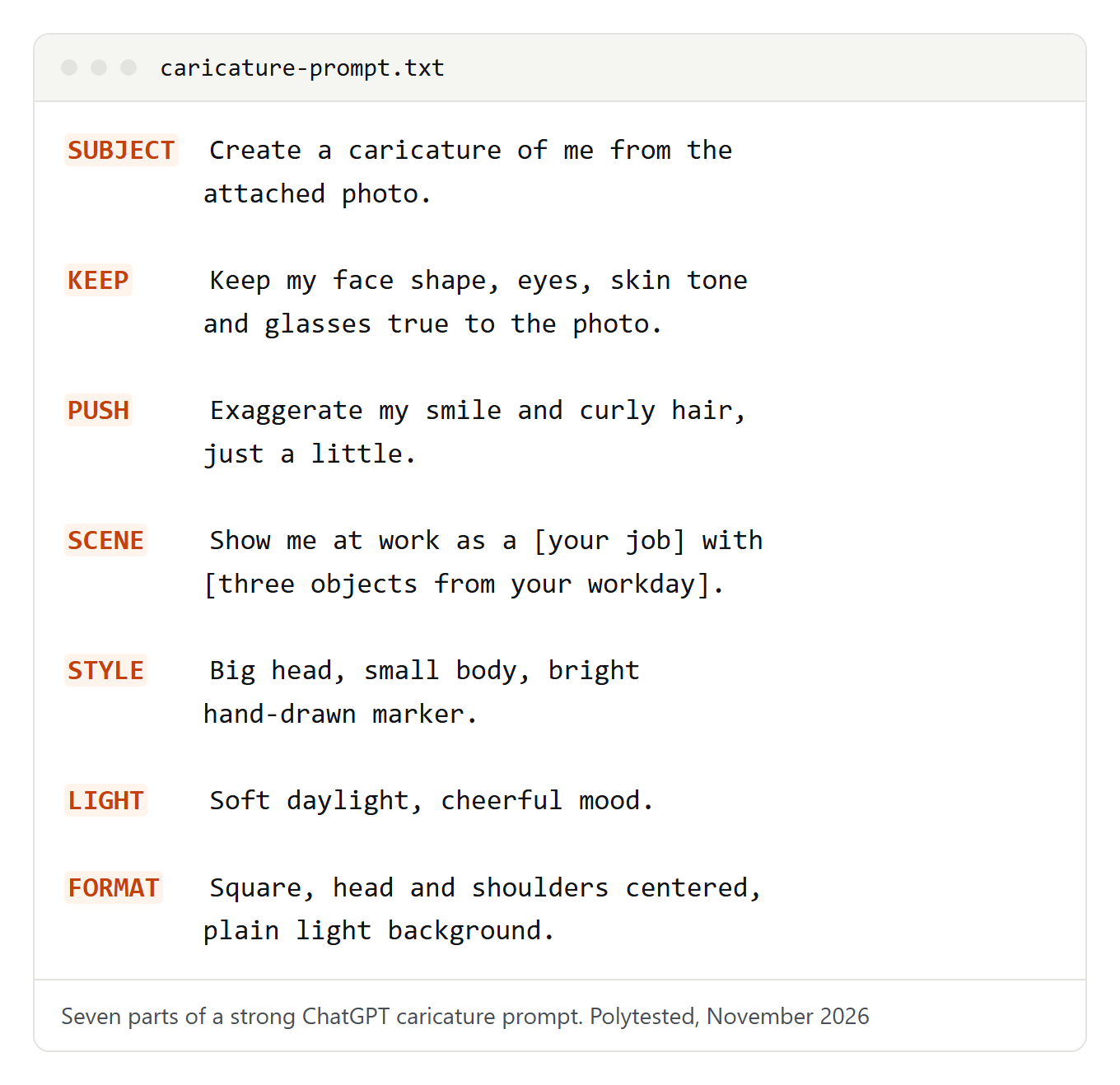
The "keep unchanged" line is the one people most often leave out. For rules that apply to any image, see our ChatGPT image prompts.
Caricature prompts by job
These prompts assume you've attached a photo of yourself. Swap in the props you really use.
Nurse
A warm end-of-shift scene. Replace the thermos with whatever keeps you going on nights.
Create a friendly caricature of me from the attached photo as a nurse at the end of a long shift: scrubs, a stethoscope around my neck, a clipboard and a giant thermos. Big head, small body, kind smile slightly exaggerated. Keep my face recognizable. Soft blue hospital corridor, cheerful cartoon style.Teacher
Fill in your subject so the board shows the right content.
Create a caricature of me from the attached photo as a [subject] teacher at a whiteboard full of [diagrams / vocabulary / maps], holding a marker like a conductor's baton, with a paper airplane flying past my ear. Big head, small body, raised eyebrows. Keep my face, hair and glasses accurate. Warm, colorful classroom.Software developer
A victory moment instead of the tired-coder joke. Change the screen text to your team's catchphrase.
Create a caricature of me from the attached photo as a software developer celebrating a fixed bug: one arm raised, a laptop covered in stickers and a terminal window that says "All tests passed". Big head, small body, triumphant grin. Keep my face and hair true to the photo. Clean, bright digital cartoon style.Chef
Name your signature dish so it ends up on the pass.
Create a caricature of me from the attached photo as a chef tasting sauce from a wooden spoon with one eyebrow raised, in a busy kitchen: order tickets on a rail, steam rising from the pots and [my signature dish] waiting on the pass. Big head, small body. Keep my face recognizable. Warm kitchen light, lively ink-and-watercolor style.Freelancer
Pick the place you really work from. The folders stand in for clients without showing real company names.
Create a caricature of me from the attached photo as a freelancer working from [a café table / my kitchen / a co-working space]: a laptop, a wall calendar full of colored deadlines and me juggling three glowing project folders. Big head, small body, calm smile. Keep my face accurate. Sunny, relaxed illustration style.For any other job, keep the structure and change three things: the clothes, the main tool and the place.
Couples, families, teams and pets
Everyone in the picture should be happy to be in it. Ask before you upload someone else's photo, and take extra care with children: keep the joke on the scene, never on their looks. OpenAI's usage policies apply to every image and explicitly prohibit shaming or stigmatizing the body type or appearance of minors.
Couple
OpenAI's prompting guide recommends naming each reference image by number and role, which helps keep two faces apart.
Create a caricature of the two people in the attached photos: photo 1 is me, photo 2 is my partner. Show us [cooking together / on a road trip / building flat-pack furniture], big heads, small bodies, both laughing. Keep both faces, hairstyles and skin tones recognizable and don't mix up our features. Cozy illustration style, landscape format.Family
Exaggerate smiles and hair only. That keeps it kind for every age.
Create a gentle family caricature of the [number] people in the attached photo, standing [on our front steps / around the kitchen table]. Exaggerate only smiles and hairstyles, nothing about bodies. Keep every face recognizable and each person in the same position as in the photo. Include [our pet / a favorite board game]. Warm storybook colors.Team or office
One shared style makes a group picture look planned. Leave space for signatures and it's a farewell card.
Create one group caricature of our team as [number] cartoon characters at a long desk, each with their own prop: [person 1: prop], [person 2: prop], [person 3: prop]. Big heads, small bodies, one art style for everyone. Above them, a banner that reads "[team name]". Bright office colors, landscape format.Pet owner
The joke works best when the pet is clearly the boss.
Create a caricature of me and my [dog / cat] from the two attached photos: photo 1 is me, photo 2 is my pet. Show my pet clearly in charge: [walking me on the leash / sitting in my desk chair while I sit on the floor]. Big heads, small bodies. Keep my face and my pet's coat pattern and eye color accurate. Cozy home colors, loose ink style.Hobby caricatures
The same recipe works for weekends. Swap the garden for your hobby and its most typical object.
Create a caricature of me from the attached photo kneeling in my vegetable patch and proudly holding up a comically huge [tomato / zucchini / pumpkin], with a watering can and muddy gloves. Big head, small body, delighted expression. Keep my face recognizable. Early-summer light, fresh watercolor style.Style variants: from pencil sketch to 3D figure
Each style works with any job or hobby above.
Pencil sketch
Quieter and more grown-up, good for a printed gift.
Create a pencil caricature of me from the attached photo: graphite on textured paper, visible hatching, light shading on the face and loose outlines everywhere else. Exaggerate only my [smile / eyebrows]. Draw small sketches of [prop 1], [prop 2] and [prop 3] floating around me. Black and white, portrait format.Tiny 3D figure on your desk
You become toy-sized, and your work things tower over you.
Create a tiny 3D cartoon figure of me from the attached photo standing on my own desk, with my coffee mug, keyboard and [main work object] looking enormous next to me. Big head, short body, smooth matte finish. Keep my hairstyle, skin tone and glasses accurate. Soft studio light, shallow depth of field.Desk scene full of job props
A busy picture full of clues about your work.
Create a caricature of me from the attached photo sitting at my desk, seen from the front. Every object tells something about my job: [object 1], [object 2], [object 3] and a calendar with [my busiest day] circled. Oversized head, small body. Detailed, cozy illustration with lots of small things to discover.Comic strip
Four panels tell a whole workday. Quoting the speech bubbles keeps the text under control.
Create a four-panel comic strip about a typical day in my job, with me from the attached photo as the main character, drawn as a caricature with a big head. Panel 1: [morning]. Panel 2: [a problem]. Panel 3: [how I fix it]. Panel 4: [end of the day]. Keep my face the same in every panel. One speech bubble in panel 4 that reads "[short line]". No other text. Clean newspaper-comic style.Retro magazine cover
Invent the magazine name so the cover doesn't copy a real publication.
Create a retro magazine cover from the [1970s / 1980s] with a caricature of me from the attached photo as the cover star, posing with [my main work tool]. Magazine name: "[invented name]". One cover line: "[Your job title] of the Year". Faded colors, halftone print texture. Use only the text in quotes. Portrait format.Planning holiday cards instead? Our ChatGPT Christmas photo prompts are written for that.
How to keep the exaggeration flattering
A good caricature exaggerates what people like about you:
- Pick one to three features. A wide smile, curly hair, big glasses or a beard work well. More than three and it stops looking like you.
- Exaggerate expression and props, not bodies. A bigger grin or a gigantic coffee mug is funny. Weight, skin, age or anything a person is self-conscious about isn't.
- Name the identity features. Put skin tone, eye color and face shape in the "keep" part.
- Choose tone words on purpose. "Affectionate" and "flattering" pull one way, "roast" and "satirical" the other.
Add one of these lines to any prompt in this guide:
Keep it affectionate: exaggerate only my smile and my [hair / glasses], keep my body proportions natural and make me look confident and happy. Nothing about weight, skin or age.Make it a gentle roast of my work habits, not my looks: exaggerate my [forty open browser tabs / color-coded calendar / desk snack collection], while my face stays flattering.Adding text, name tags and the right format
ChatGPT Images can add text, and OpenAI's prompting guide explains how: put the exact words in quotes, say where they go and how they look, spell unusual words letter by letter, ask for no other text, then check the spelling. Keep it short.
Add a name tag on my shirt that reads exactly "[Your name]" and, below the picture, a caption in bold rounded letters that reads exactly "[Your job title]". My name is spelled [letter by letter]. No other text anywhere in the image.If one letter is wrong, mark the name tag with the selection tool and write "change only the text on the name tag". OpenAI warns that edits can spread beyond the selection, so check the face afterwards.
OpenAI says ChatGPT can create any aspect ratio: use the aspect ratio picker or write the ratio in your prompt. In the editor, Aspect ratio regenerates an image in a new shape.
| Where it goes | What to ask for | Why |
|---|---|---|
| Profile picture | Square, head and shoulders centered, plain background, space around the head | Profile pictures are often cropped to a circle and shown small |
| Instagram feed post | Portrait 3:4 or square | Instagram keeps photos between 1.91:1 and 3:4 and crops other shapes (Instagram Help Center) |
| Story or phone wallpaper | Tall portrait, the figure in the middle | Keeps the figure clear if the app adds buttons or captions at the edges |
| Banner or slide | Wide landscape, figure on one side | Leaves room for your own text |
Fixing common problems
| Problem | What to do |
|---|---|
| It doesn't look like you | Use a sharper front-facing photo without filters, exaggerate fewer features, add "keep my face shape, eyes, skin tone and hairline exactly as in the photo" |
| The face drifts after edits | OpenAI notes that repeated edits can change details you wanted to keep. Restate them, or start a new chat with the original photo |
| Wrong, generic or odd details | Run the preview prompt and correct the list, or name your job, three props and one hobby |
| Misspelled text | Shorten it, quote it, spell it letter by letter, or fix that area with the selection tool |
| Strange hands | Say what the hands do ("both hands around the mug") or keep them out of the frame |
| Skin too smooth or plastic | Ask for visible pencil or brush texture, paper grain and "no airbrushed look" |
| The joke feels mean | Add the flattering line above and drop "roast" |
| You've reached a limit | On Free, image creation has its own usage limit; ChatGPT tells you when you reach it |
About refusals: when OpenAI launched image generation in ChatGPT, it said it applies stricter limits when images of real people are involved. A prompt can be refused if it seems to target someone else or a public figure, or contains sexual or violent content. Make it clearly about you and your job, and don't try to trick the safeguards: OpenAI's usage policies prohibit circumventing them. For everyday prompting habits, see our ChatGPT prompts.
Privacy: what to check before you share
The trend is fun because ChatGPT knows things about you. That's also the reason to pause before posting.
What memory can reveal. Anything you've discussed with ChatGPT can turn into a prop or a caption: your employer, your city, a health topic, a family situation. The preview prompt shows you the raw material first.
Temporary chats. OpenAI says temporary chats stay out of your history, don't create or update memories and aren't used to train models while temporary; a copy may be kept for up to 30 days for safety.
Turning memory off. In Settings > Personalization > Memory you can turn off Memory or Reference chat history. OpenAI says that after you turn off Reference chat history, information remembered from past chats is scheduled for deletion within 30 days; the chats themselves stay until you delete them. Separately, Settings > Data controls > Improve the model for everyone decides whether your chats can help train models; it's on by default for personal Free, Plus and Pro accounts.
Before you post. Check the background and the props ChatGPT added: badges, screens, documents, client names, school logos, your street. Your employer may have rules about sharing workplace details.
Other people's faces. Use only photos of people who agreed. OpenAI's usage policies prohibit using someone's likeness, including their photorealistic image, without consent in ways that could confuse authenticity.
Labels and deleting. OpenAI says ChatGPT images carry Content Credentials (C2PA metadata) and an invisible SynthID watermark, but a screenshot can strip the metadata, so say the picture was made with AI when you post it. Images are saved under Images; to delete one, delete the conversation it was created in.
Copyright and commercial use are legal questions we can't answer here; check OpenAI's terms and usage policies.