To convert an ASS subtitle file to SRT, open it in a free editor such as Subtitle Edit and save it in SubRip (.srt) format, use Aegisub's Export Subtitles command, or run ffmpeg -i episode.ass episode.srt. The dialogue text and timing survive, and so do italics and bold. Fonts, colors, exact positions, fades, karaoke timing and drawings don't, because SRT has no place for them. We converted a sample file of our own and read how three free tools treat each feature, so you know what to check afterward.
What an ASS file is
ASS stands for Advanced SubStation Alpha. Its predecessor, SubStation Alpha (SSA), was written by a programmer known as Kotus in 1996 for the anime fansubbing community, and ASS (version 4.00+) followed in 2002 with layers, transparency and rotation, according to Subtitle Edit's format reference. There has been no new specification since; today the renderer libass and editors such as Aegisub define what works.
That origin still shows. The typical ASS file someone wants to turn into SRT is a fan subtitle for an anime episode, often stored inside an MKV video. The Matroska format can hold ASS tracks together with the fonts they need as attachments.
An ASS file is plain text with three main sections:
- [Script Info]: the title, the script type (
v4.00+for ASS,v4.00for the older SSA) and the script resolution (PlayResX,PlayResY) that every position refers to. - [V4+ Styles]: named looks with font, size, colors, bold, italic, outline, shadow, alignment and margins. Colors are written as
&HAABBGGRR, blue before green before red, with 00 for opaque. - [Events]:
DialogueandCommentlines with layer, start, end, style, speaker name, margins, effect and text. Times look like0:00:01.20: hours, minutes, seconds and hundredths of a second.
Inside the text, override tags in curly braces change a line or part of it. Aegisub's tag reference lists them all; these are the ones that matter for conversion:
| Tag | What it does |
|---|---|
{\i1} … {\i0} | italics on and off; \b, \u and \s work the same for bold, underline, strikeout |
{\an8} | alignment as on a numeric keypad: 8 is top center, 2 is bottom center |
{\pos(960,100)} | exact position in script pixels |
{\fad(300,300)} | fade in and fade out, in milliseconds |
{\k40} | karaoke: the next syllable lasts 40 hundredths of a second |
{\p1} … {\p0} | drawing mode: the text becomes vector shapes such as m 0 0 l 840 0 |
\N | line break |
Text in braces without a backslash is ignored by renderers, so fansubbers use it for notes.
Our sample file
We wrote a short scene with the features you meet in real fansub files: two styles (Default for dialogue, Sign for text on screen), an italic override, a sign at the top center with {\an8} and {\pos}, a dark box drawn behind the sign, a karaoke line and a translator's comment.
[Script Info]
; Sample file written by Polytested for this guide
Title: Night train (sample)
ScriptType: v4.00+
WrapStyle: 0
PlayResX: 1920
PlayResY: 1080
ScaledBorderAndShadow: yes

[V4+ Styles]
Format: Name, Fontname, Fontsize, PrimaryColour, SecondaryColour, OutlineColour, BackColour, Bold, Italic, Underline, StrikeOut, ScaleX, ScaleY, Spacing, Angle, BorderStyle, Outline, Shadow, Alignment, MarginL, MarginR, MarginV, Encoding
Style: Default,Arial,64,&H00FFFFFF,&H000000FF,&H00000000,&H80000000,0,0,0,0,100,100,0,0,1,3,1,2,60,60,50,1
Style: Sign,Georgia,56,&H0000D7FF,&H000000FF,&H00202020,&H00000000,-1,0,0,0,100,100,0,0,1,2,0,8,40,40,40,1

[Events]
Format: Layer, Start, End, Style, Name, MarginL, MarginR, MarginV, Effect, Text
Comment: 0,0:00:00.00,0:00:00.00,Default,,0,0,0,,TL note: the sign is on the station wall, keep it short
Dialogue: 0,0:00:01.20,0:00:03.80,Default,Mia,0,0,0,,Is this the last train tonight?
Dialogue: 0,0:00:04.00,0:00:07.10,Default,Ren,0,0,0,,{\i1}If we miss it,{\i0} we're walking\Nall the way home.
Dialogue: 0,0:00:04.50,0:00:09.00,Sign,,0,0,0,,{\pos(540,80)\c&H202020&\p1}m 0 0 l 840 0 840 90 0 90{\p0}
Dialogue: 1,0:00:04.50,0:00:09.00,Sign,,0,0,0,,{\an8\pos(960,100)\fad(300,300)}TRACK 3 – LAST TRAIN
Dialogue: 0,0:00:09.40,0:00:13.00,Default,Song,0,0,0,,{\k40}Run {\k35}to {\k30}the {\k80}light, {\k45}run {\k90}home
The Sign style is bold, gold and aligned top center; the sign line repeats \an8 and adds a position and a fade. Layer 1 draws the sign above the box on layer 0.
What an SRT file can hold
An SRT file is a list of numbered subtitles, each with a start time, an end time to the millisecond and its text. Our guide to SRT files explains the format in detail. Compared with ASS, it can carry very little:
- Basic formatting:
<i>,<b>,<u>and<font color>. The Library of Congress notes that how these show depends on the player. YouTube recognizes no markup in SRT files at all and wants plain UTF-8. - Position, unofficially: some players read an ASS-style
{\an8}at the start of an SRT line. VLC's subtitle decoder, for example, moves such a line to the top and hides other tags in braces. It isn't part of any SRT standard, so test your player. - Nothing else: no styles, layers, speaker names, fades, karaoke timing or drawings.
If you need positions on the web, WebVTT supports them through cue settings; see what a VTT file is.
What our conversion kept and lost
We converted the sample with a short converter we wrote for this test: it keeps everything SRT can hold, including the sign's top position as {\an8}, and lists what it drops. This is the result:
1
00:00:01,200 --> 00:00:03,800
Is this the last train tonight?

2
00:00:04,000 --> 00:00:07,100
<i>If we miss it,</i> we're walking
all the way home.

3
00:00:04,500 --> 00:00:09,000
{\an8}<b>TRACK 3 – LAST TRAIN</b>

4
00:00:09,400 --> 00:00:13,000
Run to the light, run home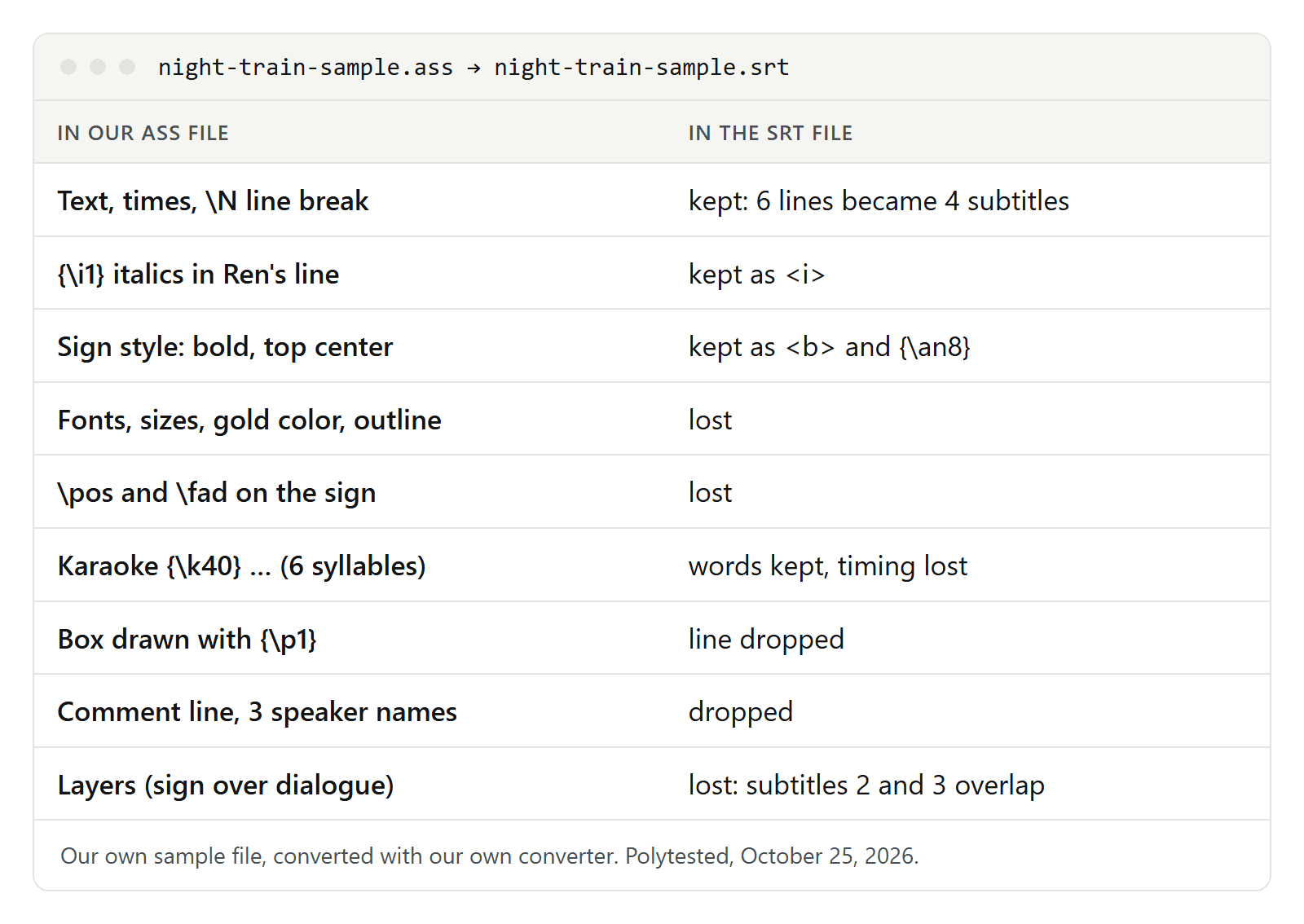
- Six lines became four subtitles. The Comment line and the drawn box, which has no text, were dropped.
- Kept: the words, all times (converted from hundredths to milliseconds, so
0:00:01.20became00:00:01,200), the line break, the italics, the sign's bold from its style and its top position as{\an8}. - Lost: two fonts with their sizes, the gold color, outlines and shadows, both
\pospositions, the fade, the box's dark color, six karaoke timings, three speaker names (Mia, Ren, Song) and layer 1. - Subtitles 2 and 3 overlap from second 4.5 to second 7.1, because the sign appears while Ren is still speaking. In ASS, layer and position keep them apart. In SRT, only
{\an8}does; a player that ignores it puts both at the bottom.
The karaoke line shows a limit no converter can work around: SRT has one start and one end per subtitle, so per-syllable timing has nowhere to go. Our LRC to SRT guide deals with the same problem for song lyrics.
FFmpeg, Subtitle Edit and Aegisub follow different rules
Help pages and converter sites rarely say more than that styles get lost. To see what actually happens, we read the conversion code of three free tools in their main branches on October 25, 2026. We did not install or run them, so treat this as their rules on paper.
| In the ASS file | FFmpeg | Subtitle Edit | Aegisub |
|---|---|---|---|
{\i1}, {\b1} in the line | <i>, <b> | <i>, <b> | <i>, <b> |
| Italics, bold, font, color or alignment from the style | turned into tags | not applied | not applied |
| Font, size, color tags in the line | <font> tags | <font> tags, only in lines without positions or effects | removed |
{\an8} in the line | kept | kept if its tag block starts with it | removed |
\pos, \move, \fad | removed | removed | removed |
Karaoke {\k} | words kept, timing removed | words kept, timing removed | words kept, timing removed |
Drawing {\p1} | shape commands end up as text | removed | removed |
| Comment lines | left out | left out | left out |
| Overlapping lines | separate subtitles | separate subtitles | cut into pieces, with both texts in one subtitle while they overlap |
What this means in practice:
- FFmpeg keeps the most formatting. It writes the style's font, size and color as a
<font>tag whenever they differ from its defaults (Arial, size 16, white), so every line in our Default style (Arial, size 64) would get<font size="64">. It has no rule for drawing mode: our box would become a subtitle that readsm 0 0 l 840 0 840 90 0 90. Delete such lines. - Subtitle Edit keeps
{\an8}, removes drawings and comments, and leaves overlapping lines as they are. Lines that are top-aligned only through their style end up at the bottom. - Aegisub keeps only bold, italics, underline and strikeout. Its docs warn that exporting to any format other than ASS "will almost always" strip formatting tags. In return, it never leaves two subtitles on screen at once.
Convert with Subtitle Edit or Aegisub
Subtitle Edit is free and open source:
- Open the .ass file.
- Check signs and songs in the list: look for
{\an8}at the start, lines of numbers and letters, and lines that overlap. - Choose SubRip (.srt) as the format and save.
For many files, its command-line version seconv converts a whole folder: seconv "*.ass" subrip. Add --encoding:utf-8-no-bom if you want UTF-8 without a byte order mark, because seconv writes UTF-8 with one by default. --remove-formatting strips every tag, and seconv also reads the subtitle tracks of MKV files.
Aegisub is a free editor whose own format is ASS. Open the file and use Export Subtitles, which saves a copy in a different format; choose SRT as the file type. The export dialog also lets you pick the text encoding of the new file.
Convert with FFmpeg
FFmpeg is a free command-line tool and picks the SubRip format from the file extension:
ffmpeg -i episode.ass episode.srtIf the subtitles are inside an MKV file, choose the track with -map: 0:s:0 is the first subtitle track, 0:s:1 the second.
ffmpeg -i episode.mkv -map 0:s:0 episode.srtAn .srt output only takes text subtitles, according to FFmpeg's documentation. Picture-based tracks from Blu-rays or DVDs need text recognition (OCR) first, which Subtitle Edit can do.
After converting, search the file for drawing commands and decide whether you want the <font> tags.
Online converters
Many websites convert ASS to SRT. We haven't tested them; here is what their pages said on October 25, 2026:
- SubtitleKit says the conversion runs in your browser without uploading the file. It is the only one of these pages that lists what is lost, including italics and bold set in a style.
- GoTranscript converts for free without an account, but its page doesn't say what is kept or where your file is processed.
- Ebby says some effects or styling may be lost, without saying which.
For unreleased or private material, an offline tool is the safer choice.
Encoding: when accents break
Most current ASS files are UTF-8; Subtitle Edit's reference recommends it and calls UTF-16 less common. Older files can use a legacy Windows code page. Aegisub tries to guess the character set of files that aren't Unicode and offers Open subtitles with charset for when it guesses wrong. ASS tracks inside MKV files are a smaller risk: the Matroska specification stores their text as UTF-8.
- Ignore the style's Encoding field. It limits which fonts can be used, and Aegisub's docs say it has nothing to do with the encoding of the text.
- FFmpeg refuses text that isn't valid UTF-8 and suggests the
-sub_charencoption in its error message. Name the encoding before the input:ffmpeg -sub_charenc CP1252 -i episode.ass episode.srt. - Save the SRT as UTF-8. YouTube requires plain UTF-8. The SRT file guide linked above shows what a wrong encoding does to accented letters.
When to keep the ASS file instead
In many fansub files the signs, songs and typesetting are half the work. If the look matters, don't convert:
- Play the ASS file as it is in a player with libass, such as mpv.
- Burn it into the video. FFmpeg's subtitles filter draws an ASS track with libass, for example
ffmpeg -i episode.mkv -vf subtitles=episode.mkv episode-hardsub.mp4. Burned-in text can't be turned off; subtitles vs closed captions explains when that is a problem. - For a web player, use WebVTT, which keeps positions.
Convert when the destination demands SRT: YouTube doesn't list ASS among its subtitle formats, and many video editors and platforms take SRT. If you are translating the file, convert first and then follow our guide to translating subtitles. If you only need the words, convert the SRT to text.
Checklist after converting
- Compare the number of subtitles with the
Dialoguelines. Missing ones should be drawings or empty lines, nothing else. - Search for
m 0 0and lines that are only numbers and letters: leftovers of drawings. - Search for
{\`. Keep `{\an8}only if your player reads it. - Play the moments where signs and dialogue overlap.
- Check that every
<i>and<b>is closed. - Save as UTF-8 and check accented letters.
- Preview the file on the platform you publish to.
