A .vtt file is a WebVTT (Web Video Text Tracks) file: plain text that tells a video player which caption or subtitle to show and when. It starts with the line WEBVTT, followed by cues such as 00:00:03.400 --> 00:00:06.800 and the text for that moment. Web browsers, YouTube, Vimeo, Zoom and Microsoft Teams use it, and any text editor opens it. Below: our own sample file explained line by line, how VTT differs from SRT, how to convert it, and what made captions vanish when we loaded broken files in Chrome.
What is a VTT file?
VTT stands for Web Video Text Tracks, usually written WebVTT. The format is defined by the W3C, the body that publishes web standards. As of October 2026, its specification is still a Candidate Recommendation Draft (the current version is dated May 20, 2026), not a final Recommendation. Browsers support it anyway: the HTML <track> element, which loads WebVTT files into a video player, has worked in all major browsers since July 2015, according to MDN.
A few basics:
- It is plain text. The file extension is .vtt, the media type is
text/vtt, and the text must be encoded as UTF-8. - It grew out of SRT. WebVTT started in 2010 as WebSRT, based on the SubRip (SRT) format, and was first specified inside the HTML standard before it got its own document.
- One format, several jobs. The same file type carries closed captions for viewers who can't hear the audio, translated subtitles, chapter titles and even metadata for scripts. What it is used for is decided by the web page or platform, not by the file. The difference between the first two is explained in subtitles vs. closed captions.
What's inside a VTT file: our sample, line by line
We wrote a short sample file with every common building block. The text is English, with a curly apostrophe, curly quotes and an em dash, which matter later.
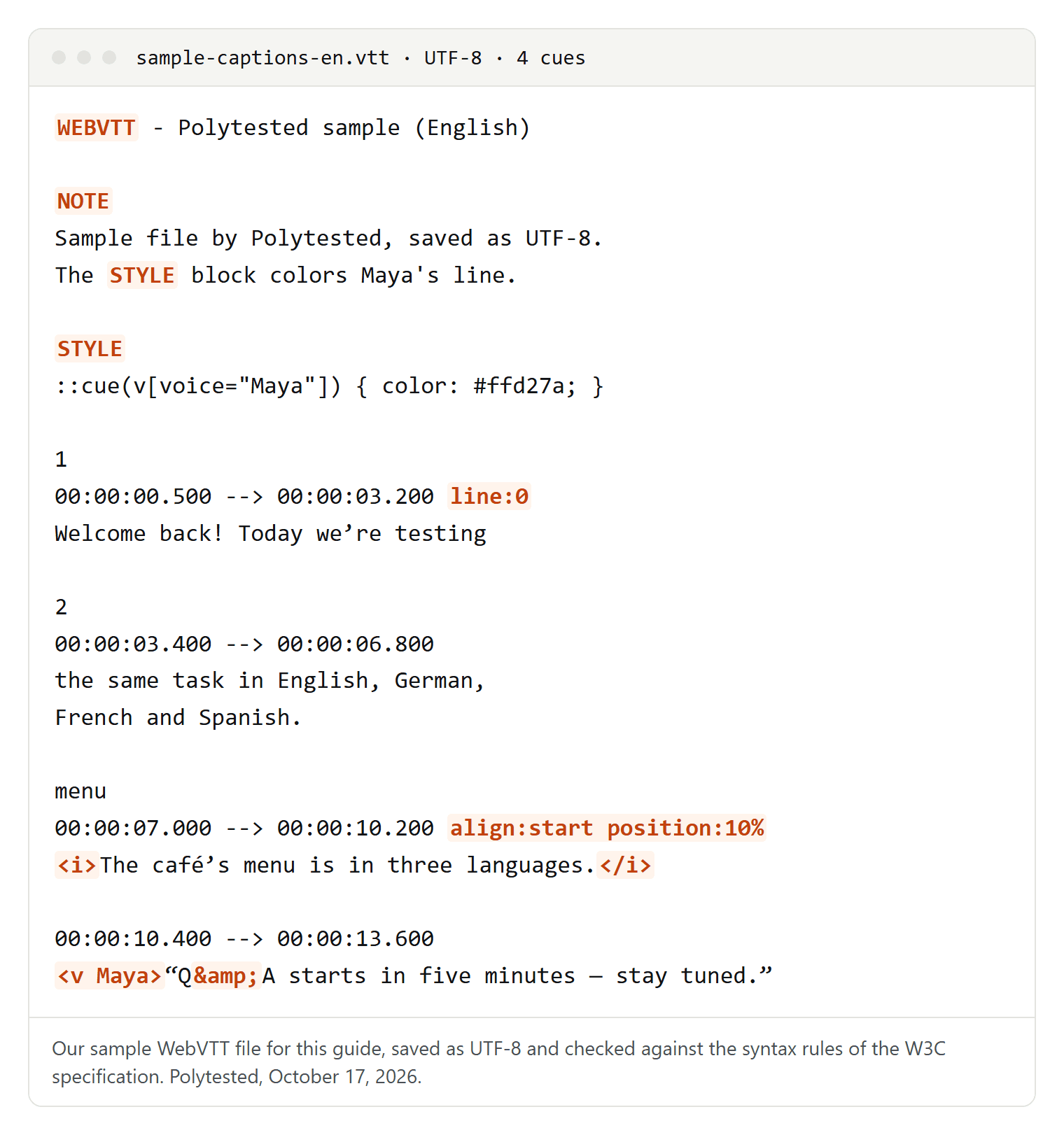
- Header: the first line must be
WEBVTT. After a space or a tab you may add a title, as inWEBVTT - Polytested sample (English). An invisible byte order mark (BOM) before it is allowed. Line breaks may be Windows style (CRLF) or Unix style (LF). - Comment: a block that starts with
NOTEis never displayed. It ends at the first blank line. - Style block:
STYLEholds CSS for the captions. It must come before the first cue and may not contain blank lines. Ours colors everything Maya says. - Cue identifier: an optional line before the timing, a number or a word such as
menu. The spec says each identifier must be unique within the file. - Timing: hours, minutes, seconds, a full stop and exactly three digits of milliseconds. Hours may be left out (
00:03.400) unless they are above zero, and they may have more than two digits. The arrow is two hyphens and a greater-than sign, with a space on each side. Cues are listed in order of their start time, and each cue must end after it starts. - Cue settings: after the timing.
line:0moves the cue to the top of the picture,align:startaligns it left, andposition:10%shifts it to the right. The spec defines six:vertical,line,position,size,alignandregion. - Text and tags:
<i>,<b>and<u>for italic, bold and underline,<v Maya>for the speaker,<lang es>for a passage in another language,<c.name>for a CSS class. A blank line ends the cue, so a cue's text can't contain one. - Escapes: write
&as&and<as<; MDN also recommends>for>. Our last cue writes "Q&A" asQ&A.
A minimal file with one cue needs only four lines:
WEBVTT

00:00.000 --> 00:02.500
Captions start here.
Styling has limits. On the ::cue selector, only a short list of CSS properties applies, among them color, background, font, text-shadow, outline and opacity. Position is not CSS: it comes from the cue settings.
VTT vs. SRT: what's different
Here is cue 2 of our sample in both formats:
2
00:00:03,400 --> 00:00:06,800
the same task in English, German,
French and Spanish.WEBVTT
2
00:00:03.400 --> 00:00:06.800
the same task in English, German,
French and Spanish.| Feature | SRT | WebVTT |
|---|---|---|
| First line | the first cue number | WEBVTT |
| Before milliseconds | comma | full stop |
| Hours | always written | optional |
| Cue numbers | required | optional, any unique word |
| Encoding | not defined; YouTube and Vimeo want UTF-8 | UTF-8, always |
| Position and style | simple tags, depending on the player | cue settings, STYLE blocks, classes |
| Comments | none | NOTE blocks |
HTML <track> in browsers | rejected by Chrome in our test | yes |
| accepted | not accepted | |
| YouTube | accepted, markup ignored | accepted, with positioning |
Use SRT where a platform demands it and for old players. Use VTT for a video on your own website, for Vimeo, and whenever position, colors or speaker tags matter. SRT is covered in depth in what an SRT file is.
How browsers show a VTT file
A browser only uses a VTT file through a web page: the <track> element inside a <video> points to it.
<video controls src="demo.mp4">
  <track kind="captions" src="sample-captions-en.vtt" srclang="en" label="English (CC)" default>
  <track kind="subtitles" src="sample-captions-es.vtt" srclang="es" label="Español">
</video>- kind:
subtitles(the default if left out),captions,descriptions,chaptersormetadata. An invalid value turns the track into metadata, which is meant for scripts and not shown to viewers. - srclang: the language of the track. It is required for subtitles.
- label: the name viewers see in the captions menu.
- default: switches the track on unless the viewer's settings prefer another; only one track per video may have it.
What we saw in our own tests:
- Chrome follows the file. On October 14, 2026, Chrome 155 played our German test file as written: one cue at the top, one in two lines at the bottom, one left-aligned in italics, and the speaker's line in the color from the STYLE block. The speaker's name from
<v …>was not displayed; it only labels the text for styling. - Color classes need a STYLE block. The spec names default color classes such as
<c.red>and<c.yellow>. On their own, they stayed white in Chrome 155 on October 14, 2026. On October 15, Chrome 155 and Edge 155 colored yellow and cyan text only once a STYLE block defined those colors. - The menu shows only the label. In the built-in players of Chrome 155 and Edge 155 (German interface, October 15, 2026), the captions menu listed each track by its
label. A track without a label appeared as its language code. Whether a track is captions or subtitles showed only as a small icon, and only when two tracks had the same name or a track had none. Chrome cut off names as short as ten characters; the seven-character "DE (UT)" fit. Put the distinguishing part first and keep labels short. - Word timing isn't highlighted. WebVTT can time single words inside a cue, karaoke style. In our test on October 15, 2026, Chrome 155 and Edge 155 read those timestamps but didn't color sung and upcoming words differently.
- Other domains need CORS. A VTT file on another domain than the page loaded only when the
<video>element had thecrossoriginattribute and the server allowed the request.
What makes captions disappear: our Chrome test
We loaded the same three-cue test file (German text) as a track in Chrome 155, each time with one change, and recorded what Chrome reported.
| Variant | Result |
|---|---|
| Valid: UTF-8, header, full stops | 3 of 3 cues |
| UTF-8 with a byte order mark (BOM) | 3 of 3 cues |
| Header with a title after a space | 3 of 3 cues |
No hours, as in 00:01.000 | 3 of 3 cues |
| Saved as Windows-1252 | 3 of 3 cues, but � instead of ä, ö, ü, ß and € |
Windows-1252, server declares charset=windows-1252 | same � |
No WEBVTT line | error, no cues |
Lowercase webvtt | error, no cues |
WEBVTT followed directly by a hyphen | error, no cues |
| Commas in all timestamps | loads without error, but 0 cues |
| A comma in one timestamp | 2 of 3, no error message |
| Two digits of milliseconds | 2 of 3, no error message |
En dash in the arrow: –> | 2 of 3, no error message |
| An SRT file used as the track | error, no cues |
- Commas fail silently. A file with SRT-style commas loaded "successfully" and showed nothing. One comma removed only that cue.
- The header is strict. It must be exactly
WEBVTT, uppercase, followed by a space, a tab or a line break. - Typing matters. Some websites turn the arrow's two hyphens into a dash, so a copied example can lose its cues. Type the arrow yourself.
- Renaming is not converting. An SRT file with a .vtt extension was rejected.
- A bare
<cuts the text. In the same series, Chrome kept only "Wenn 3" of the line "Wenn 3 < 5 gilt, passt es" ("if 3 < 5 holds, it fits"). A bare&happened to come through, but escape both anyway.
Encoding: a VTT file is always UTF-8
For SRT files, the encoding is not defined, so players guess. WebVTT leaves no room for guessing: the spec says the file must be UTF-8, and every parser must decode it as UTF-8. In our Chrome test, a file saved as Windows-1252 (often called "ANSI" on Windows) showed the replacement character � for every umlaut, even when the server explicitly said the file was Windows-1252.
English files are not safe either. Here are two cues of our sample, saved as Windows-1252 and then decoded as UTF-8, the way the spec requires:
Welcome back! Today we�re testing
<v Maya>�Q&A starts in five minutes � stay tuned.�The curly apostrophe, both curly quotes and the em dash broke, and text copied from other documents often contains them. Save every VTT file as UTF-8; a BOM is optional and did no harm in our test. Notepad on Windows saves UTF-8 by default, and TextEdit on a Mac needs Format, Make Plain Text first; the details are in our guide to SRT files.
How to open a VTT file
- To read or edit it: any plain text editor, such as Notepad on Windows or TextEdit on a Mac in plain text mode. Avoid word processors for editing; they add formatting.
- To watch it with the video: VLC has read WebVTT since version 2.2 and rewrote its support in version 3.0, including CSS styles. Give the .vtt file the same name as the video and put it in the same folder, and VLC loads it automatically; otherwise use Subtitle, Add Subtitle File.
- To edit it with a preview: Subtitle Edit is free and open source, and since version 5 it runs on Windows, macOS and Linux. It shows the subtitles over the video and saves them in other formats.
- In a browser: through a web page with a
<track>element, as shown above. - A Zoom transcript: Zoom's help says you can open its VTT file with a text editor or a word processor.
How to convert VTT to SRT
The easiest way is Subtitle Edit: open the .vtt file, then choose File, Save as and save it in SubRip (.srt) format. SRT has no place for STYLE blocks, comments or cue settings, so those are dropped.
Without a program, use find and replace with regular expressions, in VS Code (Ctrl+H, then the .* button) or Notepad++ (Search, Replace, Search Mode "Regular expression", with ". matches newline" unticked). We tested these expressions with JavaScript's regular expressions, the engine VS Code's Find uses, on files with Windows and Unix line breaks. Work in this order:
- Delete the
WEBVTTline and every NOTE and STYLE block. - Add missing hours: find
(?<![\d:])(\d\d:\d\d\.\d\d\d), replace with00:$1. - Change the full stop to a comma inside timestamps only: find
(\d\d:\d\d:\d\d)\.(\d\d\d), replace with$1,$2. - Remove cue settings: find
^(\d\d:\d\d:\d\d,\d\d\d --> \d\d:\d\d:\d\d,\d\d\d)[ \t].*$, replace with$1. - Remove identifier lines: find
^.+\r?\n(?=\d\d:\d\d:\d\d,\d\d\d --> ), replace with nothing. Then number the cues 1, 2, 3; for long files, let Subtitle Edit do it. - Turn speaker tags into names: find
<v(?:\.[^ \t>]+)*[ \t]+([^>]+)>, replace with$1: `. Then delete all other tags except i, b and u: find `<(?!\/?[ibu]>)[^>]+>, replace with nothing. - Replace
<with<,>with>, and last&with&. - Save as UTF-8 with the .srt extension.
Step 3 is where shortcuts go wrong. Replacing every full stop in the file breaks the text, not just the timestamps. Our short meeting transcript, after a blind "replace all":
00:00:01,000 --> 00:00:04,200
<v Maya Johnson>Morning! Did Mr, Lee approve the $1,234,50 invoice?</v>
The timestamps are now right for SRT, but "Mr." and the dollar amount are damaged, and "e.g." and "U.S." in the next cue became "e,g," and "U,S,". With the steps above, the same transcript becomes a clean SRT file:
1
00:00:01,000 --> 00:00:04,200
Maya Johnson: Morning! Did Mr. Lee approve the $1,234.50 invoice?

2
00:00:04,600 --> 00:00:07,900
Dan Ortiz: Yes, e.g. for the U.S. team & the new hires.
How to convert VTT to text (Zoom and Teams transcripts)
Meeting tools are where most people meet VTT files. Microsoft Teams lets meeting organizers and co-organizers download a transcript as a .docx or .vtt file by default: in Chat, open the past meeting, select Recap, then Transcript, then the arrow next to Download, and pick the file type. If you only need the text, take the .docx. Zoom saves the transcript of a cloud recording as a VTT file; that needs a Pro, Business, Education or Enterprise account. In Teams files, the speaker sits in a voice tag such as <v User Name>, according to Microsoft's developer documentation.
To turn a VTT file into plain text:
- Subtitle Edit: File, Export, Plain text. Line numbers and timecodes are off by default.
- Find and replace: delete the header, NOTE and STYLE blocks; delete every timing line with the identifier above it (
^(?:.+\r?\n)?(?:\d+:)?\d\d:\d\d\.\d\d\d[ \t]+-->.*\r?\n); turn voice tags into names as in step 6 above, then delete all tags (<[^>]+>); decode<,>and&; join the lines of each cue ((\S)\r?\n(?=\S)with$1 `); and remove blank lines ((\r?\n)(?:\r?\n)+with `$1).
Our meeting transcript, converted that way:
Maya Johnson: Morning! Did Mr. Lee approve the $1,234.50 invoice?
Dan Ortiz: Yes, e.g. for the U.S. team & the new hires.
For SRT input, the same idea is shown step by step in how to convert SRT to TXT. Turning a transcript into a record of decisions is a separate job, covered in how to write meeting minutes. Meeting transcripts contain names and often confidential details, so convert them on your own computer rather than uploading them to a free online converter.
Where you can use VTT files
| Platform | VTT? | What to know |
|---|---|---|
| YouTube | yes | Positioning works; styling is limited to bold, italic and underline. For beginners, YouTube recommends SRT or SBV. |
| Vimeo | yes, recommended | Must be UTF-8 and begin with WEBVTT. |
| no | SRT only, uploaded from a desktop browser. | |
| Microsoft Stream (SharePoint, OneDrive) | yes | First line WEBVTT; notes, comments and styles are removed on upload; files up to 4 MB. |
| PowerPoint | yes | WebVTT since Office 2016; on a Mac since version 16.63. SRT in UTF-8 only since version 2411. |
| Microsoft Teams | download | Transcripts as .docx or .vtt. |
| Zoom | download | Cloud recording transcripts are saved as VTT. |
| H5P | yes | Captions must be .vtt. |
| Apple Podcasts | yes | Transcripts as WebVTT or SRT. |
In Microsoft Stream, upload a file under Video settings, Transcripts and captions, Upload. In PowerPoint, select the video, then on the Playback tab choose Insert Captions, Insert Captions. Descript exports subtitles as SRT or VTT. For your own YouTube videos, see how to download YouTube subtitles.
Checklist before you upload
- UTF-8, with or without a BOM.
- First line exactly
WEBVTT, nothing else on it except an optional title after a space. - Timestamps with a full stop and three digits of milliseconds, in order of start time.
- Arrows typed as two hyphens and a greater-than sign.
- STYLE blocks before the first cue, without blank lines.
&and<instead of bare & and < in the text.- Short track labels, with the distinguishing part first.
- A test in the target player: in our tests, a broken file often failed without any error message.
