TTS stands for text-to-speech: software that turns written text into spoken audio, also called speech synthesis. It is what reads a web page aloud, gives a voice to a navigation app or a screen reader, and voices many videos. Your computer and phone almost certainly have it built in already. Below: how it works, where you meet it, which voices we found on our own Windows computer and in Chrome, and what goes wrong when a voice has to speak German, French or Spanish.
What TTS means
In almost every context TTS means text-to-speech. On chat platforms it is a feature with the same name: on Discord, a /tts command in front of a message asks the app to read it aloud, and TikTok has a text-to-speech feature that turns typed text into a voice. Streamers on Twitch use third-party alert tools that read viewers' messages aloud. In medicine and a few other fields the same three letters stand for unrelated terms, so check the context if you met them outside tech.
How text-to-speech works
The W3C's Speech Synthesis Markup Language specification describes the steps a speech engine goes through:
- Structure analysis: finding paragraphs and sentences.
- Text normalization: turning written forms such as numbers, dates and currency into words a voice can say.
- Text to phonemes: working out how each word is pronounced.
- Prosody: deciding pitch, timing, pauses, speed and emphasis.
- Waveform: producing the audio.
Older systems either stitched together short fragments recorded from one speaker or generated speech from a statistical model; DeepMind described the first as hard to change without recording a whole new database and the second as less natural. In 2016 DeepMind's WaveNet showed that a neural network could generate the audio waveform directly. Modern neural voices build on that idea: one network predicts how the speech should sound, and a second one, the vocoder, turns that into audio.
Where you already use it
- Accessibility: screen readers such as Windows Narrator, VoiceOver and TalkBack read the screen aloud for people who can't read the text.
- Reading aloud: browsers, e-book apps and phones can read articles and documents.
- Voice-overs and dubbing: many videos, tutorials and ads are voiced by TTS instead of a speaker, and AI dubbing uses it to voice translations (see what is dubbing).
- Assistants and phone menus: every spoken answer from a voice assistant is synthesized speech.
The voices already on our computer
We checked which voices a standard setup offers, on a Windows 11 computer with Chrome, on 13 October 2026, and rechecked Chrome's list on 15 October.
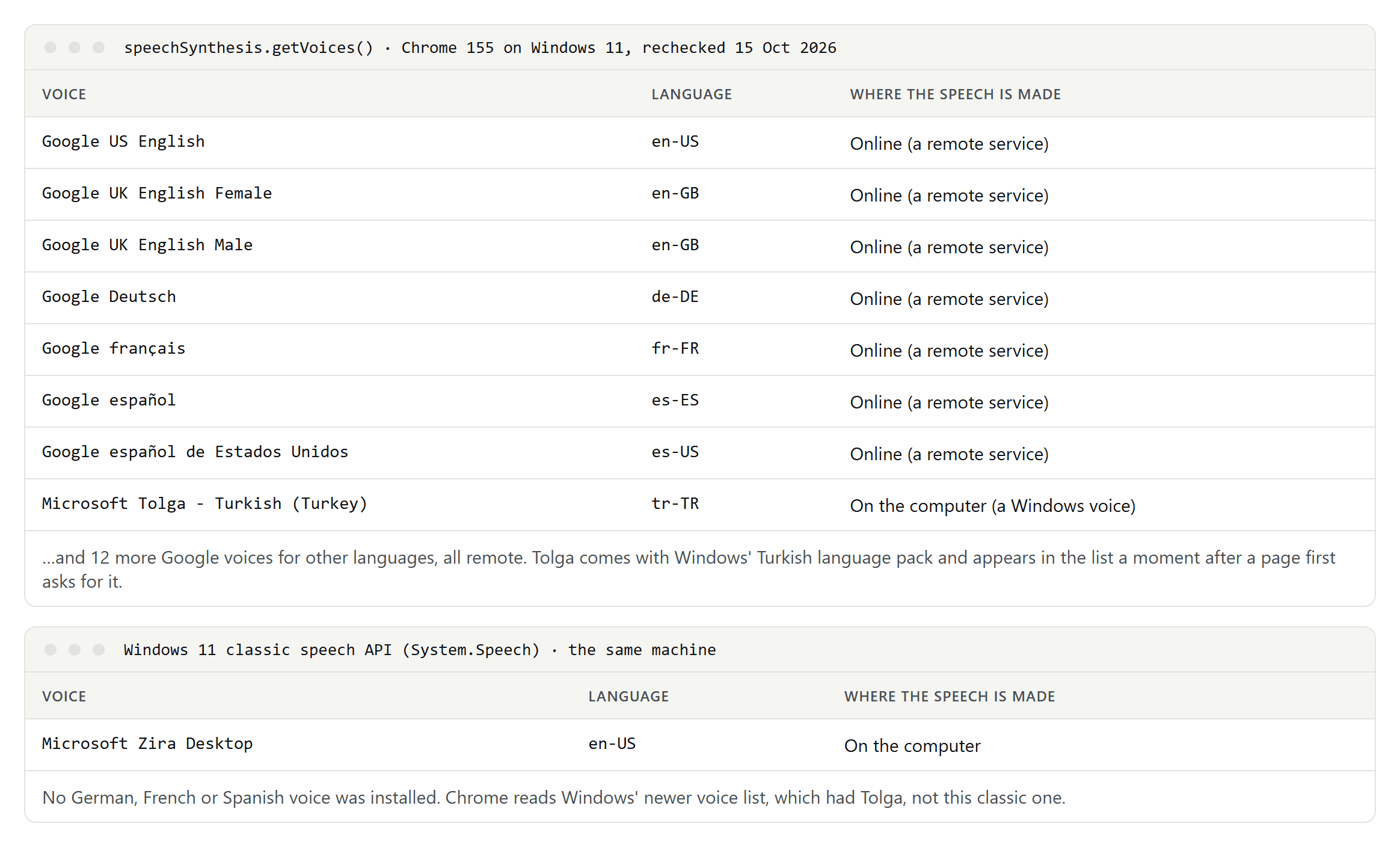
- Chrome offered 19 Google voices through the browser's speech interface: US and UK English, German, French, Spanish and Spanish for the United States among them, plus 12 more voices for other languages. It also listed one Windows voice, Microsoft Tolga (Turkish), which came with the Turkish language pack on our machine. Our first check read the list only once and missed Tolga: Chrome adds the computer's own voices a moment after a page first asks for the list.
- All of Chrome's Google voices were remote. The browser marks each voice as local or remote, and MDN explains that a remote voice is supplied by a remote speech service rather than the computer itself. In practice the text you have read aloud is sent to that service.
- Windows had one voice installed for its classic speech interface, Microsoft Zira (US English), and one for its newer speech platform, Microsoft Tolga (Turkish). There was no German, French or Spanish voice. Chrome reads the newer list, so Tolga appeared in Chrome and Zira didn't.
Windows can add more. Microsoft lists standard voices per language, such as Stefan, Hedda and Katja for German, Paul, Julie and Hortense for French, and Pablo, Helena and Laura for Spanish, plus newer natural voices for Narrator. In Windows 11, open Narrator's settings with Windows key + Ctrl + N, choose Add legacy voices, then Add voices under Manage voices, and pick the language.
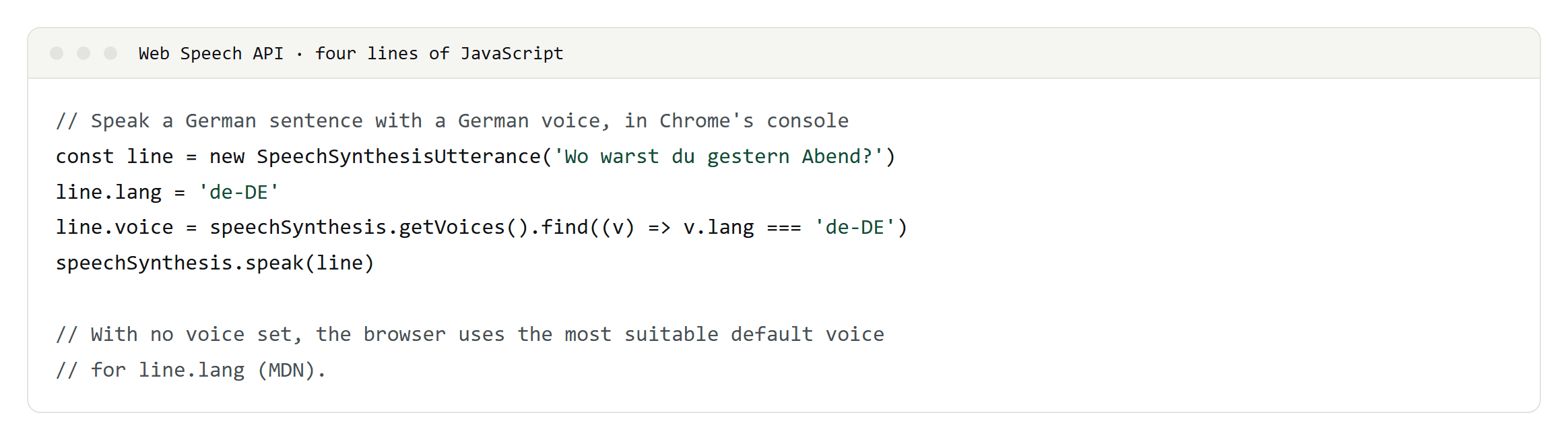
If you build for the web, four lines of JavaScript are enough to try a voice in Chrome's console:
Built-in voices on phones and Macs
- Android: Settings, Accessibility, Text-to-speech output. Choose the engine and install voice data for more languages.
- iPhone and iPad: Settings, Accessibility, Spoken Content, where you can choose and download voices.
- Mac: System Settings, Accessibility, Read & Speak. Apple notes that voices aren't available in every language.
Built-in TTS has a long history on phones: Android added a text-to-speech engine in version 1.6 in 2009, with English, French, German, Italian and Spanish from the start.
What goes wrong in German, French and Spanish
- A voice reads every word with its own language's rules. An English voice reading a German name will pronounce it like English. Pick a voice for the text's language, and mark foreign phrases.
- Mark the language. In SSML, the lang element tells an engine that a phrase is in another language, but engines support it to different degrees, so test it with the voice you use. On a web page, the HTML lang attribute tells screen readers which pronunciation rules to load, and WCAG asks for it.
- Numbers and dates. "10/12/2026" is a different day in the US and in Europe. Normalization decides how it is read, so write dates unambiguously or say how they should be read.
- Regional variants. Spain and Mexico have different voices in Windows, and words differ between them. Choose the market's voice.
SSML: telling a voice what you mean
SSML, the Speech Synthesis Markup Language, is a W3C standard (version 1.1 since 2010) for marking up text before it is spoken: pauses, emphasis, speed, pitch, how a number or date should be read, a phonetic pronunciation, or a switch to another language. Cloud TTS services such as Google's, Amazon's and Microsoft's support it, each with its own subset.
AI voices such as ElevenLabs are on our test list for all four of our languages; the results will go on their own test pages.
