Intelligent automation is automation with AI added for the steps that need judgment, such as reading an email, pulling the fields out of an invoice or deciding which category a request belongs to. The rest of the workflow still follows fixed rules. Enterprise vendors describe it as AI combined with process management and software robots; for a small team, it usually means an AI step inside a Zapier, Make or n8n workflow. We counted how common that has become: of the 13,300 templates in n8n's public library, 7,113 include at least one AI step, and so do 80 of the 100 most viewed.
Intelligent automation in plain English
Vendors define it in slightly different ways:
- IBM: intelligent automation, "sometimes called cognitive automation", is the use of artificial intelligence, business process management and robotic process automation "to streamline and scale decision-making across organizations."
- Salesforce: "Intelligent automation pairs artificial intelligence with workflow automation." It contrasts this with basic automation, which "follows predefined rules."
The common idea is a division of labor. Rules handle what is predictable: when an email arrives, save the attachment, add a row, send a message. AI handles what rules can't: understanding a free-text email, reading an invoice that comes in a different layout every time, or sorting requests by topic.
A typical small-team example:
- A new email arrives in the invoices inbox.
- AI step: read the email and the attached invoice, and return the supplier, invoice number, amount and due date as separate fields.
- Rule: if the amount is above a limit you set, send it to someone for approval.
- Rule: add a row to the bookkeeping spreadsheet.
Only step 2 is "intelligent". Without it, someone types the fields in by hand.
Intelligent automation vs RPA, workflow automation, hyperautomation and AI agents
- Workflow automation connects apps through their integrations and runs fixed steps when a trigger fires. Zapier, Make and n8n started here.
- Robotic process automation (RPA) uses "software robots (or bots) to complete back-office tasks", in IBM's words. IBM adds that the bots can "work on the presentation layer of existing applications", logging in and moving data the way a person would, so they also work with systems that have no API.
- Intelligent automation adds AI to either of them, for unstructured input and judgment calls.
- Hyperautomation is a strategy rather than a technology. IBM calls it "the concept of automating everything in an organization that can be automated", using several automation tools together.
- AI agents are the most autonomous form. Anthropic draws the line clearly: workflows are "systems where LLMs and tools are orchestrated through predefined code paths", while agents are "systems where LLMs dynamically direct their own processes and tool usage." In n8n's AI Agent node, you connect a model and at least one tool, and "the agent decides which tools to call to complete a task."
For a small team, the practical question is usually whether a fixed workflow with one AI step is enough, or whether you need an agent that chooses its own steps.
What 13,300 n8n templates show
n8n publishes a library of workflow templates that anyone can browse and import. On 13 October 2026 we downloaded the records of all 13,300 templates through the public template service that n8n's own editor uses, and counted the templates that contain an AI node.
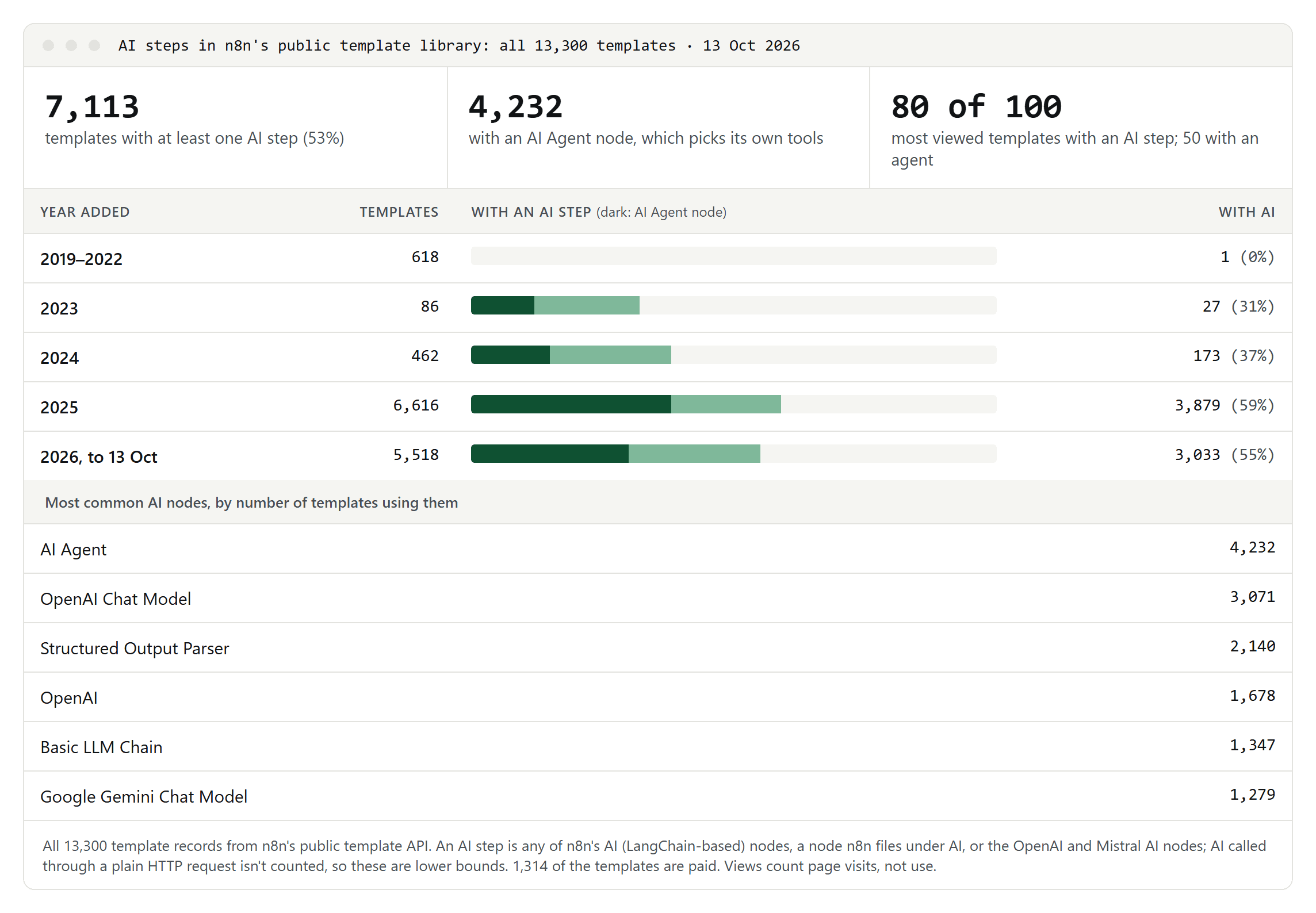
- More than half include AI. 7,113 of the 13,300 templates have at least one AI step.
- The most popular ones even more so. 80 of the 100 most viewed templates include an AI step, and 50 of them use an agent.
- It happened fast. Of the 618 templates added before 2023, one has an AI step. Of the 6,616 added in 2025, 3,879 do.
- Agents and fixed steps both matter. 4,232 templates use the AI Agent node; 2,881 use AI as a step in an otherwise fixed workflow.
- The common pattern is AI in, fields out. After the AI Agent and the OpenAI chat model, the most used AI node is the Structured Output Parser, which n8n describes as a way "to return fields based on a JSON Schema": named fields the next steps can use.
What the data doesn't show: templates are examples, not running workflows, and views count page visits, not use. AI called through a plain HTTP request isn't counted, so our numbers are a lower bound. 1,314 of the templates are paid.
What it looks like in n8n, Make and Zapier
- n8n has a family of AI nodes: chat model connections, a basic LLM chain for single prompts, output parsers, memory, and the AI Agent node. You can require "human approval before an AI Agent executes a specific tool": approve, and the tool runs with the input the AI chose; deny, and the action is canceled. n8n counts executions, and an execution is "a single run of your entire workflow", however many steps it has. The Community edition, which you host yourself, is "the free edition"; n8n's cloud plans start with a trial.
- Make bills in credits, which "replaced operations as the term for Make's billing unit." AI modules that use Make's AI Provider consume credits based on tokens and operations. The new Make AI Agent, released on 2 February 2026, is available on all plans through Make's AI Provider and is in open beta, so its pricing may change. Former Integromat users can find Make's vocabulary in what happened to Integromat.
- Zapier's Free plan includes 100 tasks a month and two-step Zaps only; multi-step Zaps start with the Professional plan. Which plans include the AI step is stated differently in Zapier's help center, which since 1 October 2026 lists AI by Zapier on Free as well, and on its pricing page (both checked 16 October 2026), so check before you rely on it.
Five places a small team can start
These are common patterns, not measurements:
- Inbox triage: the AI step labels incoming email by topic or urgency; rules route it to the right person or folder.
- Invoices and receipts: the AI step extracts the fields; a rule adds them to a spreadsheet; a person checks anything above a limit.
- Support replies: the AI step drafts an answer from your help pages; a person approves it before it is sent.
- Meeting notes: a transcript goes in; a summary, decisions and action items come out, in the format of meeting minutes.
- Short translations: product descriptions or replies are translated by the AI step and checked by a native speaker before they go live.
What it costs
- Count runs, not steps. n8n bills per execution, however many steps a run has. Make bills credits per module run, and its AI usage adds token-based credits. Zapier counts tasks.
- Estimate before you build. Multiply the runs you expect per month by what each run consumes in your tool, and test with a small volume first.
- Watch the AI usage separately. AI steps add model costs, either through the automation tool's own AI credits or through your own account with the AI provider.
Risks: wrong answers, runaway agents and personal data
- AI steps can be wrong. OpenAI's own help pages say a language model "can produce incorrect or misleading outputs. Sometimes, it might sound confident—even when it's wrong." Put a check after any AI step whose output matters: a rule that validates the fields, or a person.
- Agents cost more and can compound errors. Anthropic: "The autonomous nature of agents means higher costs, and the potential for compounding errors." It recommends "finding the simplest solution possible, and only increasing complexity when needed."
- Personal data: if an AI service processes customer or employee data for you, the GDPR requires processors "providing sufficient guarantees" and a contract that governs the processing. Send only the data the task needs. And people have "the right not to be subject to a decision based solely on automated processing" that has legal or similarly significant effects on them.
- Hiring is a special case. The EU AI Act lists AI systems used "to analyse and filter job applications, and to evaluate candidates" as high-risk. Don't let an automation reject applicants on its own.
None of this is legal advice; for anything involving personal data, check with someone who knows your situation.
How to start
- Pick one process with messy input that someone handles by hand every week.
- Build it without AI first. Get the trigger, the fixed steps and the output working.
- Add one AI step where reading or judgment is needed, and ask for structured output: named fields, not prose.
- Add a check before anything is sent, paid or deleted.
- Measure for a few weeks: how often the AI step was wrong and how much time it saved. Only then consider an agent.
