For one Spanish version of a page, use hreflang="es". If you have separate pages for different countries, label each with a country code, such as es-ES for Spain and es-MX for Mexico, and keep one page as the plain es catch-all for Spanish speakers everywhere else. Don't rely on es-419, the code for Latin American Spanish: it is a valid language tag, but Google's hreflang documentation says it isn't supported. We checked which Spanish codes 36 big multilingual sites declare on their home pages. Half declared Spanish versions, in five different ways, and two of the codes we found don't exist.
The short answer
- One Spanish version for everyone:
es. - Spain and Latin America on separate pages:
es-ESfor Spain andesfor the Latin American page, which then also serves every other Spanish speaker. - A page per country:
es-ES,es-MX,es-ARand so on, plus one page markedesas the catch-all. - Spanish for the United States:
es-US, ores-PRfor Puerto Rico. - Never:
es-419,es-LA(that's Laos),es-SP(no such code) ores_ESwith an underscore. - Always: every version lists itself and all the others, and
x-defaultnames the page for everyone else.
How Google reads a Spanish hreflang value
- Language first, region second. The language is an ISO 639-1 code,
esfor Spanish. The region is optional and must be an ISO 3166-1 alpha-2 country code, such asES,MXorUS. A hyphen joins them. - Case doesn't matter.
es-mxandes-MXare the same to Google; uppercase regions are only the ISO convention. - A region alone isn't valid.
mxon its own says nothing about the language. - Codes that aren't officially assigned don't work. Google asks for "officially assigned" region codes and ignores reserved ones such as
EU,UNandUK. - Hreflang doesn't set the page's language. Google detects the language from the visible text, not from hreflang or the
langattribute. Hreflang only tells it which version to show to which reader.
What 36 multilingual sites use for Spanish
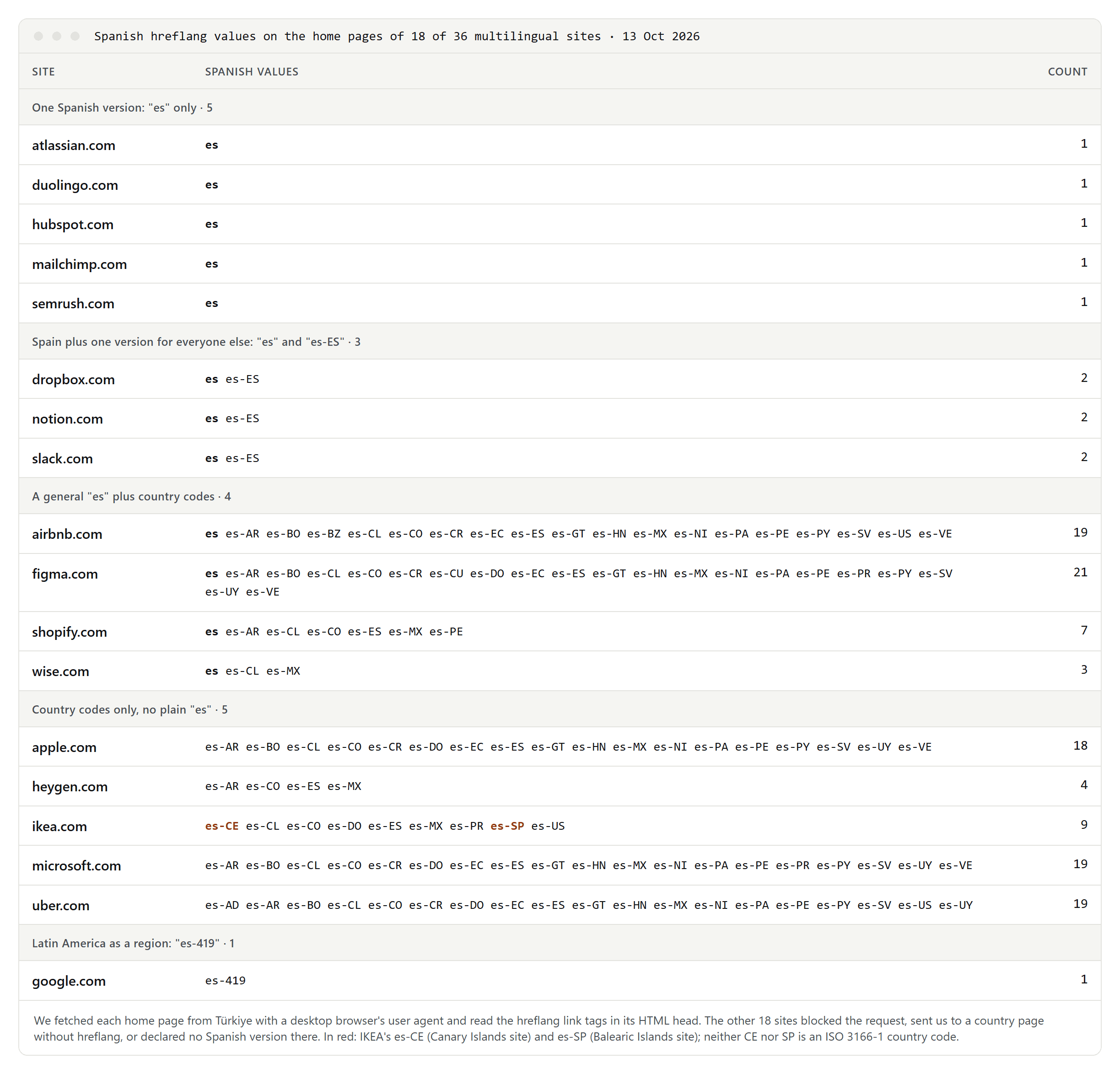
On 13 October 2026 we fetched the home pages of 36 well-known multilingual sites and read their hreflang tags. Eighteen declared Spanish versions, in five different ways:
- Just
es: Atlassian, Duolingo, HubSpot, Mailchimp and Semrush. One Spanish version, labeled for all Spanish speakers. We do the same. espluses-ES: Dropbox, Notion and Slack have a page for Spain and a second Spanish page markedesfor everyone else.esplus country codes: Airbnb, Figma, Shopify and Wise. Figma's approach is the neat one for Latin America: it labels 19 Latin American countries and territories and plaines, and all of them point to the same Latin American page.- Country codes only: Apple, Microsoft, Uber, HeyGen and IKEA. Without a plain
es, a Spanish speaker in a country that isn't on the list has no Spanish match. Apple, for example, lists 18 Spanish-speaking countries but not the United States. Google recommends a catch-all for exactly this case. es-419: the About Google page. The page in Google's own documentation that sayses-419isn't supported carries anes-419link too.
Two values on IKEA's home page don't exist: es-CE points to its Canary Islands site and es-SP to its Balearic Islands site. Neither CE nor SP is an ISO 3166-1 country code, so the annotations don't follow Google's rules. Both regions are part of Spain, which is ES.
es-419: a valid tag that Google doesn't support
es-419 is real. It combines Spanish with the United Nations region 419, Latin America and the Caribbean, and it has been in the official registry of language tags since 2005. HTML accepts it.
Google's hreflang documentation still rules it out: only ISO 639-1 languages and ISO 3166-1 alpha-2 regions are supported, and "such as es-419" is the example it gives. Region 419 is a UN number, not an ISO country code. Google doesn't document what it does with the value instead, so don't build on it.
To reach Latin America as a whole, either list the countries, as Figma and Airbnb do, or mark your Latin American page as plain es next to an es-ES page for Spain.
Four setups that work
Each version needs the same set of links, including one pointing to itself. These are the links for each setup:
- One Spanish version, as on our site:
hreflang="en"for English,hreflang="es"for Spanish, andhreflang="x-default"pointing to English. - Spain and Latin America:
es-ESfor the Spain page andesfor the Latin American page, plus your other languages andx-default. - A page per country:
es-ES,es-MX,es-AR,es-COand so on, one per country page, and the sameescatch-all as in setup 2. Google allows the catch-all to be one of the country pages. - The United States:
es-USfor a page written for Spanish speakers in the US, alongside the others. A plainespage reaches them too if you have no US page.
The link itself looks like this: <link rel="alternate" hreflang="es-MX" href="https://example.com/es-mx/">. HTML link tags, HTTP headers and sitemaps work equally well for Google, so pick one place. Our guide to hreflang and canonical tags shows the full setup, including the canonical tag every version needs.
Spanish codes that break or mislead
es-LA: LA is the code for Laos, so this means Spanish for readers in Laos.es-SP: there is no country code SP. Spain isES.es_ES: hreflang uses a hyphen. The underscore form comes from software locale names.es-EUandes-UK: reserved codes. Google says it ignores them; the UK isGBanyway.es-LATAM,es-XL,es-419-MX: not valid region codes.es-ICandes-EAfor the Canary Islands and Ceuta and Melilla: these are reserved codes, not country codes. Usees-ES.
When separate country pages are worth it
Spanish is the native language of about 519 million people, according to the Instituto Cervantes' 2025 yearbook, and in the United States 44.9 million people speak it at home, according to the Census Bureau's American Community Survey for 2024. One Spanish version can't fit all of them perfectly, but separate pages only help when the content really differs:
- Prices and currency: euros in Spain, pesos in Mexico, Argentina and Colombia, US dollars in Ecuador and Puerto Rico.
- Words and address: a computer is an "ordenador" in Spain and a "computadora" in most of Latin America; a mobile phone is a "móvil" in Spain and a "celular" in most of the Americas. Most of Spain says "vosotros" for "you all", while the Americas say "ustedes".
- Number formats: browsers format the same number differently. With the
esandes-ESlocales, 1234.5 becomes "1234,5"; withes-MX,es-USandes-419, it becomes "1,234.5"; withes-ARandes-CO, "1.234,5". We checked this in Node.js, which formats numbers from the same Unicode CLDR locale data that browsers build on (version 46 here). - Law and shipping: returns, taxes, delivery and data protection notices differ by country.
If the pages would be the same text with a different label, keep one. Google may treat near-identical pages in the same language as duplicates and index only one of them, and Bing calls them duplicate content too.
Our setup
Our Spanish pages are marked plain es, with x-default pointing to English. They are written for Spain first: we use "tú", and prices are in euros with Spanish VAT. Because es also reaches Latin American readers, we avoid "vosotros" in the text. If we add pages for Latin American countries, they will get their own country codes and the Spain pages will become es-ES.
To choose keywords for the Spanish version, see our guide to international keyword research.
Bing and the lang attribute
- Bing recommends hreflang for language and regional targeting, in a December 2025 post on its webmaster blog.
- The
langattribute on<html>doesn't tell Google which version to show, but set it anyway (<html lang="es">) for browsers and screen readers. - The Content-Language meta tag is outdated: the HTML standard no longer allows it, and the W3C advises using
langinstead.
How to check your setup
Search Console's International Targeting report, which once flagged hreflang errors, was retired in 2022. Check by hand:
- open the page source and confirm every version lists itself and all the others;
- confirm each version's canonical tag names the page itself;
- use the URL Inspection tool in Search Console to see which URL Google treats as canonical.
