n8n is a workflow automation platform made by n8n GmbH in Berlin. You connect apps such as Gmail, Google Sheets, Slack or an AI model into workflows that run on their own: in a visual editor you chain building blocks called nodes, and add your own JavaScript or Python where the ready-made nodes stop. You can run n8n free on your own server or pay for n8n Cloud. It is not open source, but "fair-code". Below: how it works, an invoice example with US formats that we tested, and what 13,300 public templates reveal.
n8n at a glance
- What it is: workflow automation with a visual editor, code steps and AI agents. On its press page, n8n now calls itself an AI orchestration platform.
- Who makes it: n8n GmbH, headquartered in Berlin, founded in 2019 by Jan Oberhauser, who is still CEO. n8n says it has raised $240 million; SAP invested in May 2026 at a valuation of $5.2 billion.
- The name: short for "nodemation", with eight letters between the two n's. It is pronounced "n eight n" and always written in lowercase. In the GitHub README, Oberhauser explains that "node-" stands for the node view and Node.js, "-mation" for automation, and that the full word was too long to type on the command line.
- License: the Sustainable Use License, free for your own business, personal projects and learning, with clear limits.
- How you run it: the self-hosted Community Edition is free; n8n Cloud is a subscription running on Microsoft Azure in the European Union.
- Interface: English only.
How n8n works: workflows, nodes and triggers
The key terms, as n8n's glossary defines them:
- Workflow: a collection of nodes that automate a process. It starts when a trigger condition occurs, when you run it by hand or when another workflow calls it.
- Node: one building block. Some start workflows; others fetch, send or transform data.
- Trigger node: the starting point, such as a schedule, a new email or a webhook. Every workflow in production needs one.
- Credentials: stored logins for apps, such as a password, an API key or OAuth.
- Execution: one run of a workflow.
- Template: a ready-made workflow from the library that you import and adapt.
For services without their own node there is the HTTP Request node, which can call any web API.
Since n8n 2.0, the editor works with drafts. n8n saves your edits automatically, but only the published version runs in production. The Publish and Unpublish buttons replaced the old Activate/Deactivate toggle that many older tutorials still show.
An example: vendor invoices from your inbox
A typical small-business workflow shows how the pieces fit together:
- Trigger: an email with a PDF attachment arrives (Gmail Trigger or Email Trigger (IMAP)).
- Read: the Extract from File node pulls the text out of the PDF, and an AI node such as Information Extractor picks out invoice number, amount and due date.
- Check: a Code node turns "$1,234.56" and "10/25/2026" into a number and a date and checks that every field is filled.
- Store: the data goes into Google Sheets or into QuickBooks Online, which has its own node.
- Notify: a Slack message tells whoever pays the bills.
The library has similar workflows. On October 13, 2026, 38 templates used the QuickBooks Online node, among them "Process emailed PDF invoices into QuickBooks bills with OpenAI". A template is a starting point: credentials, field names and error handling always need adapting.
Step 3 is where formats cause trouble. This is the code for it, in the Code node's default mode:
// Code node, mode "Run Once for All Items"
const items = $input.all();
for (const item of items) {
  const f = item.json;
  // "$1,234.56" -> 1234.56: drop "$", commas and spaces
  f.amount = Number(String(f.amount).replace(/[$,\s]/g, ''));
  // "10/25/2026" (MM/DD/YYYY) -> "2026-10-25"
  const [month, day, year] = String(f.dueDate).split('/');
  f.dueDate = `${year}-${month.padStart(2, '0')}-${day.padStart(2, '0')}`;
  f.complete = Boolean(f.invoiceNumber) && Number.isFinite(f.amount);
}
return items;
We ran this code outside n8n, in plain JavaScript on Node.js (which the Code node uses for JavaScript), with values written the way they appear on US invoices, and compared it with JavaScript's built-in shortcuts:
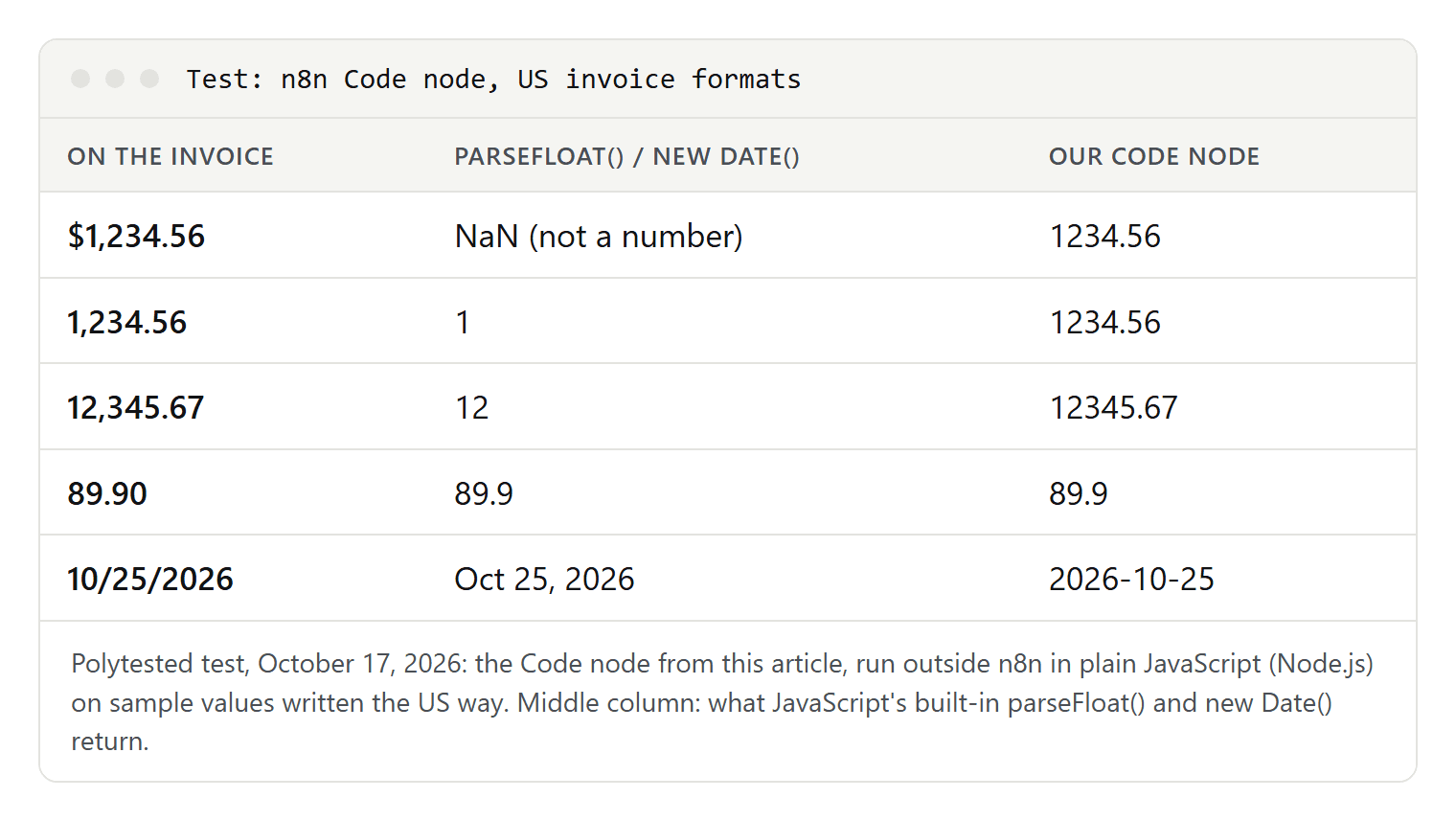
parseFloat() stops at the first character it doesn't understand. The dollar sign gives "not a number", which at least fails loudly, but "1,234.56" quietly becomes 1. A wrong number that looks like a number is worse than an error.
Dates are a trap of their own. new Date() reads "10/25/2026" correctly because it expects the US order, but a European vendor's "05/10/2026", meaning October 5, became May 10 in our test, and our code would make the same mistake. If you get invoices from abroad, record each vendor's date format, or have the AI step return dates as YYYY-MM-DD.
What 13,300 public templates show
To see how people actually use n8n, we downloaded every record from n8n's public template search on October 13, 2026: 13,300 templates, 1,314 of them paid. (The library's own counter showed 13,490 on October 17.) The records list the nodes of each template, though not its trigger nodes.
| Node | Templates | Share |
|---|---|---|
| Code | 7,821 | 58.8 percent |
| HTTP Request | 6,851 | 51.5 percent |
| Google Sheets | 4,713 | 35.4 percent |
| AI Agent | 4,232 | 31.8 percent |
| OpenAI Chat Model | 3,071 | 23.1 percent |
| Gmail | 2,977 | 22.4 percent |
| Slack | 2,197 | 16.5 percent |
Three things stand out:
- Code and HTTP Request lead. More than half of all templates contain some JavaScript or Python, and half call an API directly. Only 3,301, a quarter, use neither. n8n is a low-code tool more than a no-code one.
- AI is the norm. 7,113 templates (53.5 percent) contain at least one AI step. Local models through Ollama, where data can stay on your own network, appear in only 115.
- The library keeps growing. 895 templates were added in September 2026, more than in any other month this year; the peak was July 2025 with 1,046.
n8n and AI: the AI Agent node and MCP
AI nodes based on the LangChain framework became generally available in n8n 1.19.0 on November 29, 2023. The AI Agent node connects a chat model to one or more tools, such as other apps or workflows, and the agent decides which tool to call.
Version 1.88.0, on April 10, 2025, added nodes for the Model Context Protocol (MCP), a standard that lets AI applications use tools. n8n can also act as an MCP server: clients such as Claude Desktop connect to your instance, search your workflows, run the ones you expose and, according to the documentation, create and edit workflows.
Where the data in an AI step goes depends on the model you choose, not on n8n. Our guide to intelligent automation covers what to watch for when a workflow hands decisions to AI.
Is n8n open source? The license in plain English
No, not as the Open Source Initiative defines it. The source code is public, but it is licensed under the Sustainable Use License, which n8n wrote in 2022. n8n's license page explains that open source licenses can't limit use, "so we do not call ourselves open source". It calls its model "fair-code" instead. Until March 17, 2022, n8n used Apache 2.0 with the Commons Clause.
n8n's license FAQ lists what the free license allows:
| Allowed | Not allowed |
|---|---|
| Running your own business on it | Hosting n8n as a service where clients build workflows |
| Personal projects, learning and research | Letting outside users build workflows in your product, through your UI, the API, MCP or an AI agent |
| Building automations for clients on your instance, if they can't create or edit them | Forking n8n into your own automation product |
| Charging for building and maintaining workflows, training and consulting | White-labeling n8n |
| Using n8n behind the scenes in your product, even with users connecting their own accounts | Using enterprise features without an enterprise license |
The test is who controls the workflow logic. If you build the automations and your clients only use them, that's allowed, even for a fee. As soon as customers can create or change workflows in your product, you need a commercial agreement with n8n. The Community license covers self-hosted n8n only; n8n Cloud has its own terms. This is not legal advice; for unclear cases, n8n points to license@n8n.io.
Is n8n free? Community Edition, Cloud and executions
Self-hosted, yes. Without a license key, n8n runs as the Community Edition, which according to n8n has almost the complete feature set. Missing are mostly team features: projects and sharing of workflows and credentials, single sign-on (SAML, LDAP), Git version control and environments, external secrets and log streaming.
Registering your email unlocks the free Registered Community Edition with folders and a few debugging extras. Business and Enterprise features need a paid key. n8n Cloud is a paid subscription with a 14-day trial that includes Pro features and 1,000 executions. We don't quote prices; n8n's pricing page is the reference.
Paid plans are priced by executions, meaning whole workflow runs, regardless of their number of steps. How n8n counts them:
- Only production runs count toward the quota: those started by a trigger, a schedule or polling. Your manual test runs don't.
- A Schedule Trigger counts every time it fires, whatever the result.
- A polling trigger, such as Google Drive's, counts only when it finds new data.
- A webhook counts every incoming request, even an empty one.
Cloud or self-hosted: what each option asks of you
n8n itself recommends self-hosting for expert users only. Mistakes can lead to data loss, security issues and downtime; if you aren't experienced with servers, n8n points you to Cloud, where it handles hosting, updates and scaling.
If you host n8n yourself, the documentation says:
- Use Docker. n8n recommends Docker Compose for production. Installing with npm is deprecated from n8n 3.0, which the documentation says is "releasing soon" and which will run self-hosted only with Docker. On October 17, 2026, the current stable release on npm was 2.43.7.
- Update often. n8n releases a new minor version most weeks and advises updating at least once a month.
- Back up the key. On first launch, n8n creates a random encryption key in the ~/.n8n folder and encrypts all stored credentials with it. Back up the database and that key together.
- Audit your instance. A built-in security audit finds common problems.
- Be careful with community nodes. Unverified community nodes have full access to the machine n8n runs on. From version 3.0 they are off by default.
Where your data lives
n8n Cloud runs on Microsoft Azure, with hardware and data currently in the European Union; n8n's sub-processor list names "EU (e.g., Germany, Sweden)". n8n says it is preparing more locations, but its security page named no US region on October 17, 2026. If your company needs data kept in the US, self-hosting on your own servers is the way to get it today.
Also from n8n's own pages:
- GDPR: for Cloud, n8n is controller and processor and includes a data processing agreement with Standard Contractual Clauses in its terms; for self-hosted n8n it is neither. This matters if you handle data of customers in the EU.
- Telemetry: n8n collects usage and diagnostic data by default, but not the data in your workflows or your credentials. Self-hosted, an administrator can turn it off with environment variables; on Cloud it can't be turned off.
- AI services: for its own AI features, n8n lists sub-processors such as OpenAI and Anthropic, with processing in the US.
Data that your workflows send to other services, an AI model for example, falls under those providers' terms. This is not legal advice.
How secure is n8n? The security advisories of 2025 and 2026
For a tool that holds the keys to your email, accounting and customer data, security is the key question. On October 17, 2026, n8n's GitHub repository listed 225 published security advisories, 14 from 2025 and 211 from 2026. n8n rated 22 of them critical, the latest on May 13, 2026.
- "Ni8mare": the most serious flaw, CVE-2026-21858, got the maximum score of 10. Through certain workflows with forms, attackers without a login could read files on the server. It affected versions 1.65.0 up to, but not including, 1.121.0.
- Exploited in the wild: since March 11, 2026, the US Cybersecurity and Infrastructure Security Agency (CISA) has listed CVE-2025-68613, a code injection flaw in expressions, as a known exploited vulnerability.
- Most need a login: in 20 of the 22 critical advisories, the attack requires a signed-in user, usually one allowed to edit workflows. Ni8mare was the big exception.
If you host n8n yourself: run a current 2.x version and update at least monthly, give few people the right to edit workflows, make forms and webhooks public only when needed, run the security audit, and replace all stored credentials after an incident. On Cloud, n8n applies security updates for you.
n8n vs. Zapier vs. Make: the differences in logic
Leaving prices aside, the three differ in how they work (Zapier and Make facts as of October 14, 2026):
- Billing unit: n8n counts executions, whole workflow runs. Zapier counts tasks, each successful action. Make bills in credits; for apps without AI, one operation equals one credit. So a long workflow is still a single execution in n8n.
- Self-hosting: only n8n offers it.
- Data location: n8n Cloud stores data in the EU. Zapier hosts data on AWS servers in the United States and offers no EU-only storage. Make lets you pick a data zone in the US or the EU, though for AI features that doesn't guarantee every request stays there.
- Code: all three run JavaScript or Python; in Make, through the Make Code app on paid plans.
The more control you need over data, code and hosting, the better n8n fits; the less technical your team, the more the other two make sense. If you know Make by its old name, see what happened to Integromat.
Getting started, and who n8n is for
The quickest way to a first workflow:
- Try it without installing: start an n8n Cloud trial.
- Or run it locally: the documented one-line setup,
curl -fsSL https://get.n8n.io | sh, needs Docker on Linux or macOS, or WSL on Windows. - Build: start with a trigger, add a node such as Google Sheets and set up its credentials. Test with a manual run (Execute Workflow).
- Publish: once it works, publish the workflow; from then on, its trigger starts it.
- Plan for failure: n8n can start a separate error workflow that alerts you by email or chat. Without one, you may notice a broken workflow days later.
n8n fits if you automate processes with many steps, your own APIs or some code; you want control over your data; or you want AI agents that work with your own systems.
Look elsewhere if nobody on your team has time for server updates and security (then use Cloud or a simpler tool), if you only want to connect two apps in a few clicks, or if you need workflow data stored in the US without running your own servers.
