TikTok has no transcript feature. It can show captions on top of a video, either generated automatically or written by the creator, and it can translate them into some languages. What it doesn't offer is a transcript view, a way to copy all the text, or an export. When we opened a public video on TikTok's website on 13 October 2026, the player's menu had a Captions entry and nothing else for text; on the website you can copy only the caption line that is on screen. So there are three clean ways to get the words of a TikTok: read the captions, transcribe your own original file, or ask the creator. This guide covers all three, translated captions, and what the "TikTok transcript generator" sites actually do.
The short answer
- Someone else's video: turn on captions and read along, or ask the creator for the script.
- Your own video: transcribe the original recording on your phone or computer. That gives you a clean file you can edit, translate and turn into subtitles.
- Transcript generator sites fetch the video or its caption track automatically. TikTok's terms ban automated extraction without TikTok's written approval, so we don't recommend them for other people's videos.
What we saw on TikTok's website
We opened a public video from TikTok's own newsroom account on 13 October 2026, signed out, with the site in English:
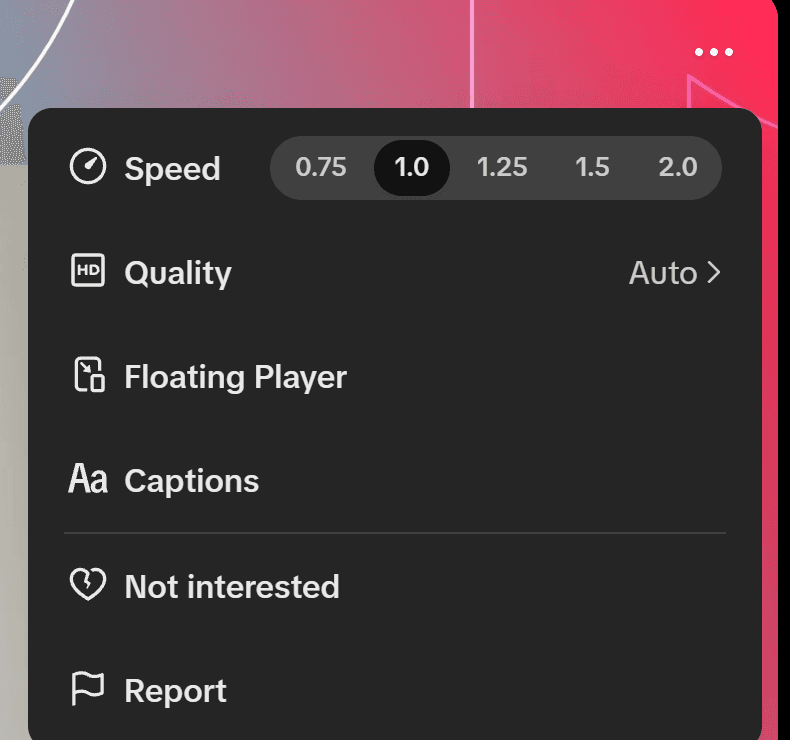
The menu behind the three dots listed Speed, Quality, Floating Player, Captions, Not interested and Report. Clicking Captions opened a small Captions dialog with two switches, Captions (auto-generated) and Always translate posts, plus Do not translate and Translate into. Captions were switched off. Nothing offered a transcript, an export or a download.
When we checked again on 16 October 2026, the caption line on screen was ordinary page text: with the video paused, we could select it with the mouse and copy it with Ctrl+C. That gives you one line at a time, not a transcript.
How to turn on captions in the TikTok app
- On a video that has captions, tap Share.
- Tap Captions. You may have to scroll the row to find it.
- Switch Show captions on or off.
TikTok's accessibility page also describes a long press: press and hold the video, then tap Captions. RNID, the UK charity for deaf people, reports that this menu is now called Captions and translations, and that the switch reads Show captions (unavailable) when a video has no captions.
Translated captions
Since July 2022, TikTok can translate captions, video descriptions and text stickers. At launch it named nine languages: English, Portuguese, German, Indonesian, Italian, Korean, Mandarin, Spanish and Turkish, on select videos. French wasn't on that list. TikTok doesn't publish a current list, but on 15 October 2026 the Translate into list in the Captions dialog on TikTok's website offered 52 languages, French among them.
A translated caption is machine translation of machine transcription, so mistakes can stack up: a misheard word gets translated as a different word. If you quote a translated caption, check it against the audio.
Getting the text of your own TikTok videos
The cleanest source is the file you recorded, before it is compressed and music or effects are added:
- Transcribe the original file with a transcription tool. Our guide to transcribing an interview compares the methods, and time-coded transcripts explains when you need timestamps.
- Correct the names, product terms and numbers by hand.
- Reuse the text for your captions, your video description or a blog post.
- For subtitles in other languages, export the transcript as an SRT file and translate that.
If you write or edit captions in TikTok's editor, keep a copy of your text before you post. We found no way to export captions from TikTok afterwards.
When a video has no captions
Automatic captions exist only for some videos and some languages. If the switch says unavailable, there is no caption track to read. For your own video, transcribe your file. For someone else's, ask the creator for the script.
Can you download a TikTok to transcribe it?
Only when the creator allows it. Save video appears in the Share panel only if the creator has turned on video downloads. Private accounts and users under 16 can't turn them on.
A saved copy doesn't give you the right to republish what's said in it. In the US, fair use is decided case by case on four factors, and no number of words is automatically safe. This isn't legal advice. If you want to quote a creator at length, ask them.
What "TikTok transcript generators" do
These sites and extensions ask for a video link and return text. They work in one of two ways:
- They copy TikTok's caption track, if the video has one. You get exactly what TikTok shows, mistakes included.
- They download the video and transcribe the audio with their own speech recognition.
Either way, an automated system extracts content from TikTok. TikTok's US terms ban using bots or other automated systems to "scrape, crawl, export or otherwise extract" content without its written approval, and the EEA and UK terms have a similar ban. The US terms also ban using another user's content commercially without that user's permission.
TikTok has its own data access, the Research API, which can return a video's speech as text. Only approved non-commercial researchers, such as universities and not-for-profit research bodies, can get access, so it isn't an option for creators, marketers or businesses.
Our advice: for your own videos, work from your own files. For other people's videos, read the captions or ask the creator.
