Lovable sites can be indexed and can rank like other web apps, but what a crawler receives depends on when the app was created. Apps created since 13 May 2026 render every page on the server. Older apps are built in the visitor's browser, and Lovable sends a pre-rendered copy only to crawlers it has verified, such as Google, Bing and the big AI assistants. On 13 October 2026 we fetched nine public Lovable sites. The server-rendered ones sent real content and real 404 errors, but none of the nine had everything a launch needs. This guide covers how to tell which kind of app you have, what we found, and what to check before you launch.
The short answer
- Apps created from 13 May 2026 (22 June 2026 on Enterprise workspaces) run on TanStack Start with server-side rendering. Every visitor and every crawler gets a finished page.
- Older apps run on React and Vite and are built in the browser. Lovable serves pre-rendered pages to verified crawlers: Google, Bing, social-preview bots, and AI engines such as ChatGPT, Perplexity, Claude and Gemini. Since October 2026 Lovable also lists "verified SEO tools", without naming them. Everyone else, including unverified bots and link checkers, gets the regular single-page app, which is often an almost empty HTML page.
- Either way, the basics are your job: a title and description for each page, a correct canonical tag, a sitemap, a robots.txt, real 404 errors and crawlable links. Lovable's SEO and AI search review checks most of these for free. Applying its fixes uses credits.
Which kind of Lovable app do you have?
Open a published page and view its source (Ctrl+U in Chrome on Windows, Option+Command+U on a Mac):
- Your page's text is in the source: the page is rendered on the server.
- You see an almost empty
<div id="root"></div>: the page is built in the browser, on the older stack.
Then open an address that doesn't exist on your site, such as /this-page-does-not-exist, and check its status code in the Network tab of your browser's developer tools. In our check, all five server-rendered sites answered 404. All four browser-rendered ones answered 200.
What we found on nine live Lovable sites
We picked nine public apps on lovable.app addresses, most of them listed on a showcase of Lovable-built sites. For each one we requested the home page, a made-up address, robots.txt and sitemap.xml. We sent Googlebot's user agent from our own connection. Lovable doesn't treat that as a verified crawler, so we saw what SEO scanners and smaller bots see, not what Google sees.
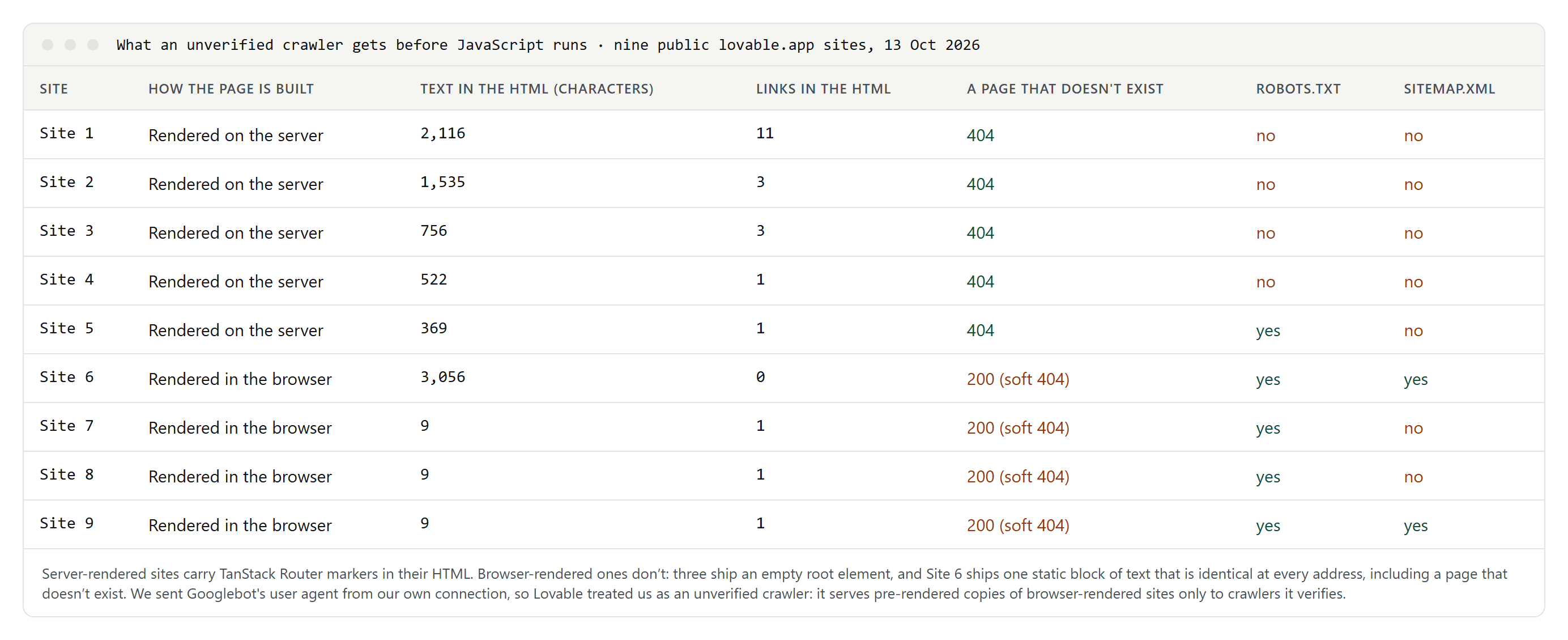
- The five server-rendered sites sent their text in the HTML, from 369 to 2,116 characters, and answered the made-up address with a real 404. Only one of them had a robots.txt, and none had a sitemap.xml.
- Three browser-rendered sites sent an empty root element, with almost no text and a single link.
- One browser-rendered site had static text in its HTML, but the same block at every address. The home page, an inner page and a page that doesn't exist all came back with the same title and the same H1, and with a canonical tag pointing to the home page. The HTML had no links at all.
- All four browser-rendered sites answered the made-up address with 200 instead of 404. Google warns that this leads to soft 404 errors in single-page apps.
- None of the nine had a real 404, a robots.txt and a sitemap.xml together.
When we tested, Lovable's documentation said sitemaps and robots.txt were not always generated up front, which matched what we saw. Its rewritten page now says Lovable creates a robots.txt with every new project, but not always a sitemap (checked 16 October 2026).
For an older app, Google gets the pre-rendered copy, which we couldn't request. To see it, run a live test with the URL Inspection tool in Google Search Console and look at the HTML and the screenshot Google got.
What Google needs from a JavaScript site
Google can run JavaScript, but its own guidance still favors HTML that arrives ready:
- Render on the server. Google calls server-side rendering or pre-rendering "still a great idea": it makes pages faster, and not all bots can run JavaScript.
- Don't rely on a copy made only for crawlers. Google calls this setup, a rendered copy for crawlers and a JavaScript app for people, dynamic rendering. It describes dynamic rendering as a workaround and not a recommended solution. Lovable's pre-rendering for older apps works the same way.
- Use real links. Google can generally crawl a link only if it is an
<a>element with anhrefattribute. Buttons that navigate with a script don't count. - Return real 404 errors. In a single-page app, send missing pages to an address that answers 404, or add a noindex robots tag to the error page.
- Don't start with noindex. If the original HTML says noindex, Google may skip rendering, so removing the tag with JavaScript may not work.
Before you launch: a checklist
- A title and description for every page. Duplicate titles across routes are one of the problems Lovable's review flags.
- Canonical tags that point to the page itself on your final domain. "Canonical URLs point to the homepage" is another of the review's messages, and the site in our check that sent one block of text to every address did exactly that. Our guide to canonical tags explains the rules.
- A sitemap.xml with full addresses on your final domain, submitted in Google Search Console.
- A robots.txt that allows crawling and names the sitemap.
- Real 404 errors for addresses that don't exist.
- Navigation built from
<a href>links, not buttons. - Alt text on images that carry meaning.
- Lovable's SEO and AI search review (under More → Analytics → SEO & AI since October 2026), then a URL Inspection test on a few pages. The review is free on all plans. Its Try to fix button uses regular message credits, and it can also connect Search Console and submit your sitemap from the project chat.
Custom domains: a 302, and a lovable.app address that stays
Custom domains need a paid plan. You choose one primary domain, and every other connected domain redirects to it with a 302, which is a temporary redirect. Lovable hosting doesn't support 301 permanent redirects between a project's domains, so that you can change the primary domain later. Google, for its part, doesn't use a temporary redirect as a signal that the target should be canonical. The project's own xxx.lovable.app address can't be removed either.
So don't rely on redirects to tell Google which address is yours:
- point every page's canonical tag to your custom domain;
- list only custom-domain addresses in your sitemap;
- verify the custom domain in Search Console and submit the sitemap there.
Should you upgrade an older app to TanStack Start?
If traffic from search or AI search matters to you, we think yes. After the upgrade, Google, Bing, AI crawlers, link-preview bots and SEO scanners all get the same finished page, which is the setup Google recommends. Lovable says the following about the upgrade:
- It runs in your existing project and uses credits. Most upgrades cost 10 to 35 credits, depending on the project's size.
- Your published site doesn't change until you publish again, and you can revert the upgrade from the version history.
- Some code libraries only work in the browser and can break server rendering, so test every page before you publish.
If you stay on React and Vite, Lovable keeps serving pre-rendered pages to verified crawlers. Its docs say a site hosted on Lovable doesn't need an outside pre-rendering service. That pre-rendering is part of Lovable's hosting, so if you host an older app somewhere else, check what crawlers get there.
Multilingual Lovable sites
Lovable's documentation has no page on hreflang or multilingual sites. Google's rules apply as they do everywhere:
- one URL per language;
- no automatic redirects based on the browser's language;
- hreflang links between the versions, where each version lists itself and all the others.
Put the hreflang links in the HTML or in the sitemap, and check that they appear in the page source. Our guide to hreflang and canonical tags shows how. To choose keywords for each language, see international keyword research.
